Search...Search plugins and themes...
⌘K
Sign in
  • Get started
  • Download
  • Pricing
  • Enterprise
  • Account
  • Obsidian
  • Overview
  • Sync
  • Publish
  • Canvas
  • Mobile
  • Web Clipper
  • CLI
  • Learn
  • Help
  • Developers
  • Changelog
  • About
  • Roadmap
  • Blog
  • Resources
  • System status
  • License overview
  • Terms of service
  • Privacy policy
  • Security
  • Community
  • Plugins
  • Join the community
  • Discord
  • Forum / 中文论坛
  • Merch store
  • Brand guidelines
Follow us
DiscordTwitterBlueskyThreadsMastodonYouTubeGitHub
© 2026 Obsidian

Grappling Hook

chrisgrieserchrisgrieser9k downloads

Blazingly fast file switching to bookmarked files. For people for whom using the Quick Switcher still takes too much time.

Add to Obsidian
  • Overview
  • Scorecard
  • Updates40

Obsidian Plugin for blazingly fast file switching. For those who find the Quick Switcher still too slow. Endorsed by Nick Milo.

  • Commands
    • Bookmark cycler
    • Alternate note
    • Cycle tab/split
    • Next/previous file in current folder
    • Open first URL in file
  • Installation
  • About the developer

Commands

Bookmark cycler

Goes to your most recently modified bookmarked note. If you are already at a bookmarked note, goes to the next bookmarked note, in order of the last modification date. This allows you to quickly cycle between a core set of files that are important. The command works well for workflows where you work with a dynamic core set of main notes and many auxiliary notes.

When you have text selected, the bookmark cycler switches to its alternative mode, and copies the selected text to the last modified bookmarked note, regardless the note you are.

[!NOTE] Only bookmarked files are considered. Bookmarked blocks or headers are ignored.
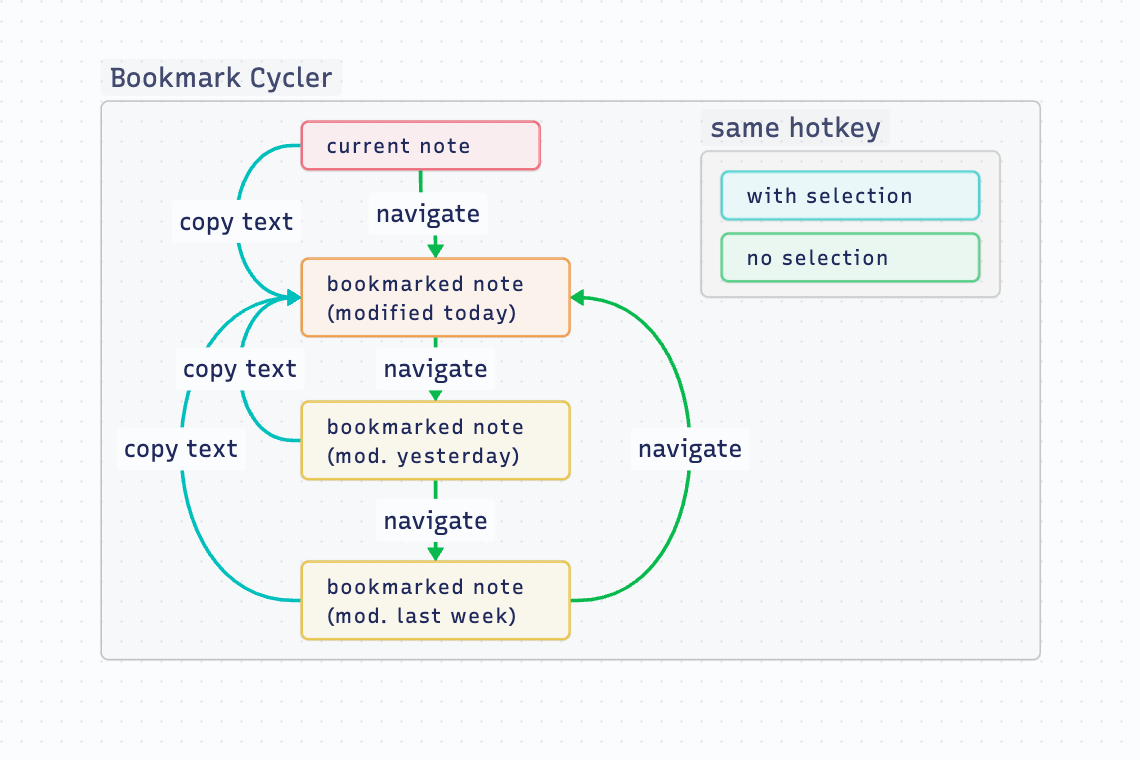
Illustration bookmark cycler This command is inspired by the Harpoon plugin for neovim.

Alternate note

Go to the last file you were at. As opposed to the Navigate Back command, using the Switch to Alternate Note command moves you forward in history when you press it the second time. This allows you to rapidly switch between two files with only one hotkey. This command is equivalent to vim's :buffer #.

The name of the alternate file is also displayed in the status bar. If the alternate file is already open in another tab, it switches to that tab. If not, the alternate file is opened in the current tab.
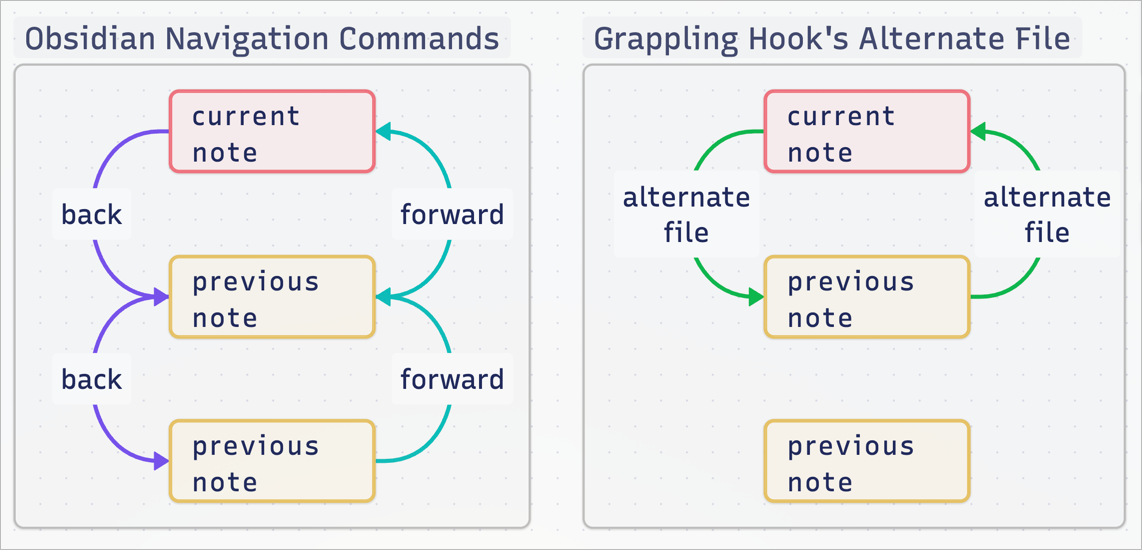
Illustration alt-file

Cycle tab/split

Like the Obsidian built-in command Go to next tab, but includes tabs in other splits, meaning you can cycle through all open tabs with one hotkey. This command similar to vim's :<C-w>w.

Next/previous file in current folder

Cycles through all files in the current folder, in alphabetical order.

Open first URL in file

Opens the first URL (external link) found in the file. This includes the frontmatter. Currently, works only in Source Mode and Live Preview.

Note that this only works with URLs that are actually in the file, meaning URLs displayed via dataview or embedded notes are not supported.

Installation

➡️ Install in Obsidian

About the developer

In my day job, I am a sociologist studying the social mechanisms underlying the digital economy. For my PhD project, I investigate the governance of the app economy and how software ecosystems manage the tension between innovation and compatibility. If you are interested in this subject, feel free to get in touch.

  • Academic Website
  • Mastodon
  • ResearchGate
  • LinkedIn

If you find this project helpful, you can support me via 🩷 GitHub Sponsors.

78%
HealthExcellent
ReviewCaution
About
Switch notes quickly with commands to cycle bookmarked files by last-modified, toggle the alternate note, and cycle across all tabs and splits. Cycle alphabetically through files in the current folder and open the first external URL found in a note. Copy selected text into the last-modified bookmark when using the bookmark cycler.
NavigationFilesCommands
Details
Current version
1.4.0
Last updated
3 months ago
Created
3 years ago
Updates
40 releases
Downloads
9k
Compatible with
Obsidian 1.5.8+
License
MIT
Report bugRequest featureReport plugin
Sponsor
Ko-fi
PayPal
Author
chrisgrieserchrisgrieser
github.com/chrisgrieser/theme-design-utilities
GitHubchrisgrieser
  1. Community
  2. Plugins
  3. Navigation
  4. Grappling Hook

Related plugins

Recent Files

Display a list of recently opened files.

Remember cursor position

Remember cursor and scroll position for each note.

Reveal Active File Button

Add a button to the top of the File Explorer, to reveal the active file.

Home tab

A browser-like search tab for your local files.

Find orphaned files and broken links

Find files that are not linked anywhere and would otherwise be lost in your vault. In other words: files with no backlinks.

Quick Explorer

Perform file explorer operations (and see your current file path) from the title bar, using the mouse or keyboard.

Open Tab Settings

Adds options to customize how tabs are opened, including open in new tab by default, preventing duplicate tabs, and more.

Notebook Navigator

Alternative file browser with folders, tags, properties, shortcuts, previews, keyboard navigation, drag and drop, and pinned notes.

Commander

Customize your workspace by adding commands everywhere, create macros and supercharge your mobile toolbar.

Omnisearch

Intelligent search for your notes, PDFs, and OCR for images.