Go Board Viewer
 j2masamitu1k downloads
Displays Go (Weiqi/Baduk) SGF files and code blocks as interactive Go boards with playback controls for desktop and mobile.
- Overview
- Scorecard
- Updates16
An Obsidian plugin that displays SGF (Smart Game Format) files and code blocks as interactive Go boards with playback controls.
📱 Works on both desktop and mobile devices - This plugin fully supports desktop and iOS and Android mobile devices.
Features
Core Features
- 📱 Mobile & Desktop Support: Full functionality on iOS, Android, Windows, Mac, and Linux
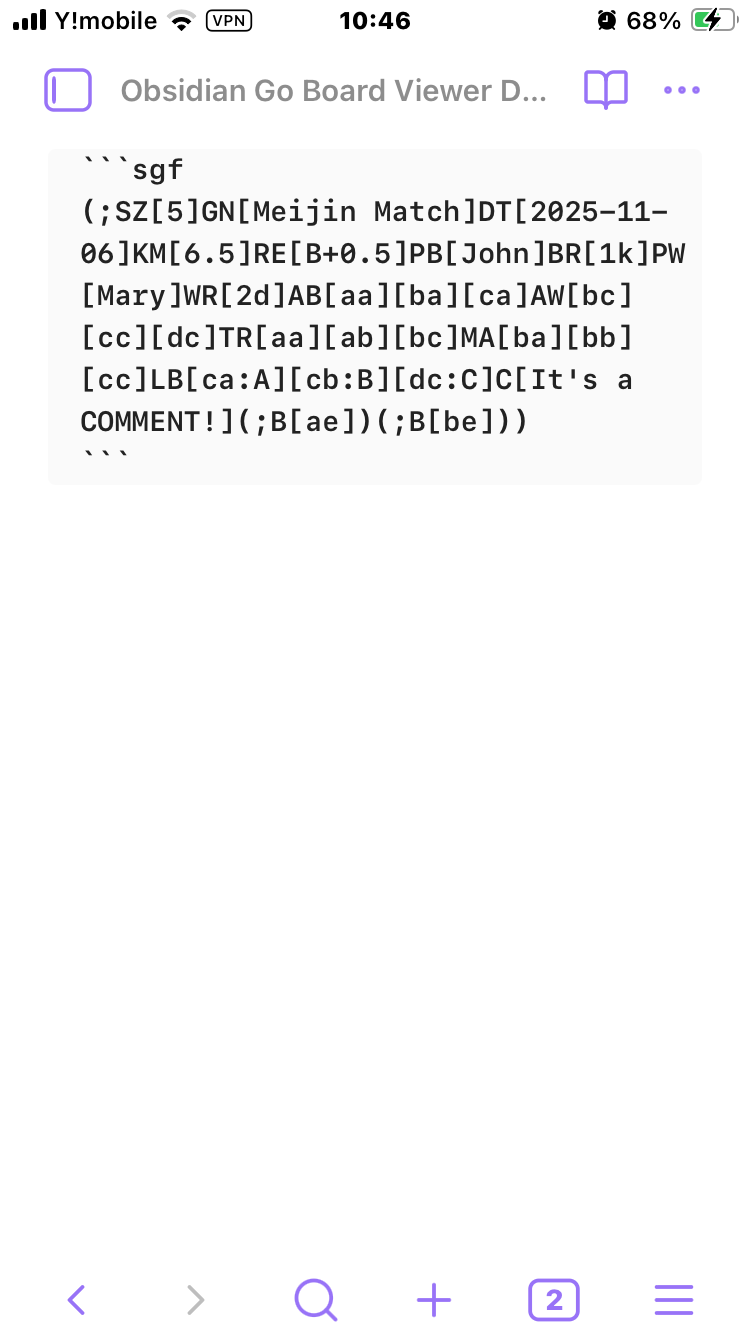
- SGF Code Block Support: Automatically renders SGF text in ````sgf` code blocks as interactive Go boards
- SGF File Embedding: Display
.sgffiles using![[game.sgf]]syntax with optional parametersmoveparameter: Start at a specific move number (e.g.,![[game.sgf|move=10]])
- Direct File Opening: Open
.sgffiles directly in Obsidian - Game Information Display: Shows player names, ranks, event, date, komi, handicap, and result
SGF Editor (New in v2.0.0)
- View/Edit Mode Selection: Choose mode by code block language tag
- ````sgf` - View-only mode (default): Navigate and view games with full playback controls
- ````sgf-edit` - Edit mode: Interactive editing with board manipulation
- Interactive Editing: Click on the board to make changes
- Add stones: Place black or white stones
- Remove stones: Remove existing stones
- Add labels: Add custom text labels to intersections
- Comment Editor: Edit and save comments for the current position
- Game Info Editor: Edit player names, ranks, and game title
- Move Deletion: Delete moves from current position onwards
- SGF Output: View and copy the edited SGF text in real-time
- Auto-play Mode: Automatic move playback with play/pause controls (view mode only)
Playback & Navigation
- Playback Controls: Navigate through game moves with First/Previous/Next/Last buttons
- Move Comments: Display comments associated with each move
- Variation Support: Handle and select between different game variations/branches
SGF Features
- SGF Markers: Full support for SGF markup properties:
- LB (Label): Text labels on intersections
- TR (Triangle): Triangle markers
- SQ (Square): Square markers
- CR (Circle): Circle markers
- MA (Mark): X-mark markers
- Setup Stones: Support for AB (Add Black), AW (Add White), AE (Add Empty)
- Multiple Board Sizes: 19×19, 13×13, 9×9, and custom sizes
Design & Customization
- Responsive Design: Adapts to various screen sizes - perfect for studying Go games on your phone or tablet
- Touch-Friendly: Optimized button sizes and layouts for mobile devices
- Customizable Colors: Full color customization via settings:
- Board background color
- Grid line color (including star points)
- Coordinate label color
- SGF marker color (circles, triangles, squares, labels)
- Variation label color
- Reset to defaults button
Screenshots
Basic Game Display
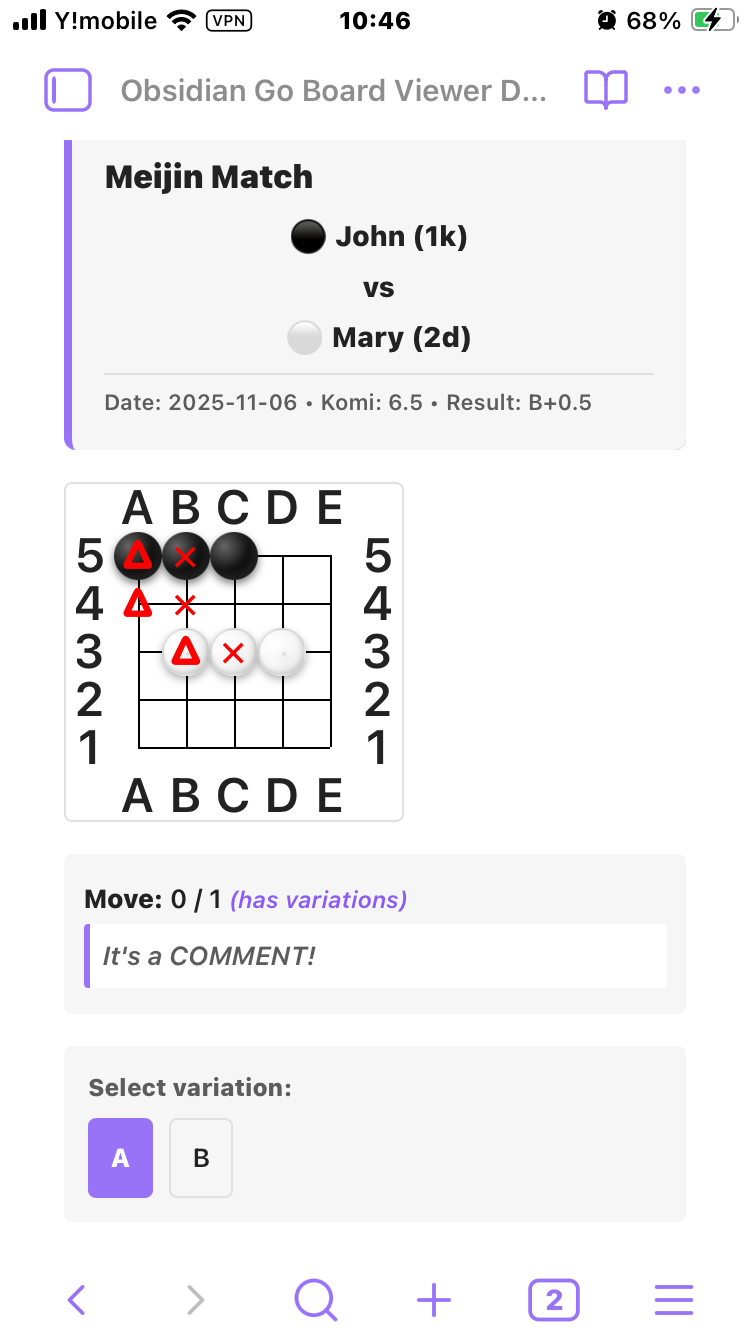
Source Display
Installation
Manual Installation
- Download the latest release from the Releases page
- Extract the files to your Obsidian vault's
.obsidian/plugins/goboard-viewer/directory - Enable the plugin in Obsidian Settings → Community Plugins
Note for Mobile Users with Sync Plugins:
- If you're using a sync plugin like "Remotely Save", you need to temporarily enable "Sync Config Dir" to sync plugins to mobile devices
- Steps:
- Enable "Sync Config Dir" in the sync plugin settings
- Run sync and wait for completion
- Verify the plugin appears on your mobile device
- You can disable "Sync Config Dir" again after installation
- Important: When updating the plugin to a new version, you'll need to enable "Sync Config Dir" again to sync the update
Building from Source
- Clone this repository
- Install dependencies:
npm install - Build the plugin:
npm run build - Copy the following files to
.obsidian/plugins/goboard-viewer/:manifest.jsonmain.jsstyles.css
- Enable the plugin in Obsidian Settings
Development Mode
npm install
npm run dev
Development mode watches for file changes and automatically rebuilds.
Usage
Method 1: SGF Code Block (View Mode)
Add an SGF code block to your markdown note for viewing:
```sgf
(;SZ[19];B[pd]C[Star point]
;W[dp];B[qp];W[dc];B[nq]
;W[qc]C[A direct 3–3 invasion])
```
Method 1b: SGF Code Block (Edit Mode)
Use sgf-edit language tag to enable editing:
```sgf-edit
(;SZ[19];B[pd]C[Star point]
;W[dp];B[qp];W[dc];B[nq]
;W[qc]C[A direct 3–3 invasion])
```
In edit mode, you can:
- Click on intersections to add/remove stones or labels
- Edit comments for the current position
- Edit game information (player names, ranks, etc.)
- Delete moves from the current position
- Copy the edited SGF from the output area
Method 2: Embed SGF File
- Add an
.sgffile to your vault - Embed it in your note:
![[my-game.sgf]]
Using Markers
SGF markers are displayed in red (or blue for variations):
(;SZ[9]AB[aa][ba][ca][da][ea]AW[ac][bc][cc][dc][ec]TR[aa][ab][ac]SQ[ba][bb][bc]MA[ca][cb][cc]CR[da][db][dc]LB[ea:1][eb:2][ec:3])
- TR: Red triangle ▲
- MA: Red X mark ✕
- SQ: Red square □
- CR: Red circle ○
- LB: Red text label
- Variation markers: Blue letters (A, B, C...)
Handling Variations
When a position has multiple variations, the plugin displays:
- Blue letter markers (A, B, C...) on the board showing where each variation begins
- Variation selection buttons below the board
- "(has variations)" indicator next to the move count
Click a variation button to switch between branches.
SGF Examples
Simple Game
(;GM[1]FF[4]SZ[19]KM[6.5]DT[2025-11-08];B[pd]C[star point];W[dp];B[pp];W[dd];B[fq];W[qq]C[direct 3–3 invasion];B[pq];W[qp];B[po];W[rn];B[cf];W[cn];B[fc];W[df];B[dg];W[ef];B[cd];W[cc];B[ce];W[dc];B[hc])
Game with Variations
(;GM[1]FF[4]SZ[19]KM[6.5]DT[2025-11-08];B[pd]C[star point];W[dp];B[pp];W[dd];B[fq](;W[qq]C[direct 3-3 invasion];B[pq];W[qp];B[po];W[rn];B[cf];W[cn];B[fc];W[df];B[dg];W[ef];B[cd];W[cc];B[ce];W[dc];B[hc])(;W[cn]C[knight's move];B[dq];W[cq];B[cr]))
Tsumego Problem with Setup
(;SZ[9]AW[ab][bb][cb][db][da]AB[ec][dc][cc][bc][ac][eb][ea]C[Black to play, White dies.];B[ba]C[3 point nakade])
Technical Details
- @sabaki/shudan: Go board rendering library
- @sabaki/sgf: SGF file parsing
- Preact: Lightweight UI rendering
- Obsidian API: MarkdownPostProcessor and MarkdownCodeBlockProcessor
- Offline: Works without internet connection
Supported SGF Properties
Game Info
- FF (File Format), GM (Game), SZ (Size)
- PB (Player Black), PW (Player White)
- BR (Black Rank), WR (White Rank)
- KM (Komi), HA (Handicap), RU (Rules)
- DT (Date), GN (Game Name), EV (Event), RO (Round), PC (Place)
- RE (Result)
Moves & Setup
- B (Black move), W (White move)
- AB (Add Black), AW (Add White), AE (Add Empty)
- C (Comment)
Markup
- TR (Triangle), SQ (Square), CR (Circle)
- MA (Mark/X), LB (Label)
Variations
- Full support for game tree variations with selection UI
Known Limitations
- Time information (BL, WL) is not displayed
- Some advanced SGF properties may not be fully supported
Contributing
Contributions are welcome! Please feel free to submit issues and pull requests.
- Fork the repository
- Create your feature branch:
git checkout -b feature/my-feature - Commit your changes:
git commit -am 'Add some feature' - Push to the branch:
git push origin feature/my-feature - Submit a pull request
License
MIT License - see LICENSE file for details
Acknowledgments
- Sabaki - Go board rendering library
- SGF File Format - Standard specification
- Obsidian - Knowledge base platform