Gnosis
 Paul24 downloads
Search your vault with gnosis's retrieval pipeline, from a portable index built on your own machine. No server, no API key.
- Overview
- Scorecard
- Updates4
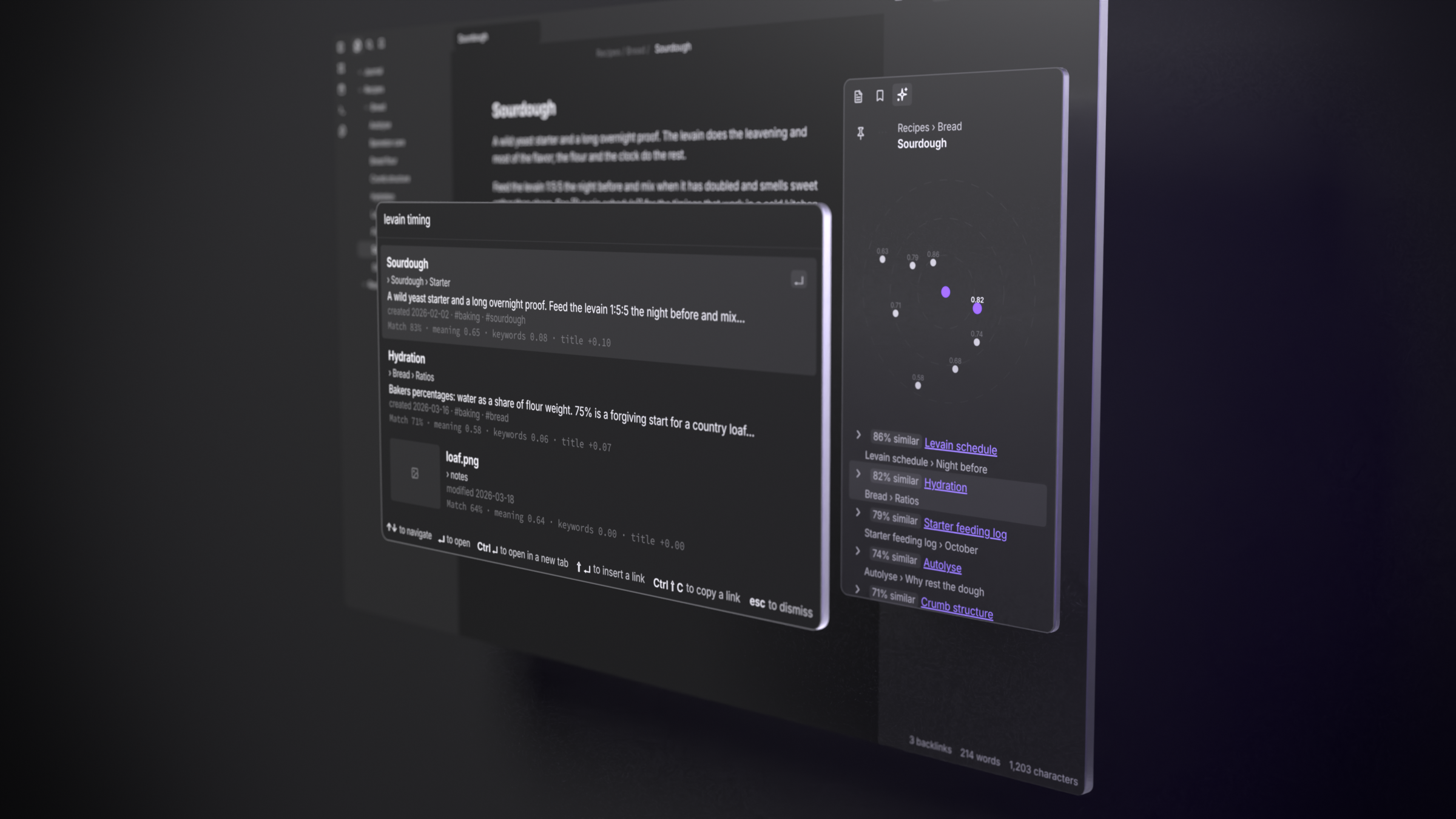
Gnosis for Obsidian searches your vault with the retrieval pipeline of gnosis. It reads a portable index that you build on your own computer. It does not use a server or an API key. Your data stays in the vault.
Desktop only. The models run in a worker with WebAssembly or WebGPU. Their downloads are hundreds of megabytes, which is too much for a phone. Thus, Obsidian does not show this plugin on mobile.
The plugin does not have its own ranking code. The gnosis query pipeline is
compiled to WebAssembly and is in vendor/gnosis-wasm/. Thus, the lexical
channel, the BM25+ parameters, the title bonus, the fusion weight and the vector
comparison for related notes are the same code as in the CLI. They also have the
same measurements. The plugin reads bytes from the vault, sends them to this
code and shows the results.
What it does
Features that need no model and no download:
- Search vault: BM25+ keyword search over the text in the index. On the scifact benchmark, keyword search gets 0.666 nDCG@10 and the hybrid pipeline gets 0.722. Keyword search is less accurate than semantic search, but it finds most results.
- Search scopes: a prefix limits the search to one kind of document. Use
txt:for notes,img:for images andpdf:for PDFs. For example,img: red bicyclesearches only images. The prompt shows the scope. If no document can match the scope, the result list tells you. For example, image search is off, or the index has no images or PDFs. The prefixes also work in hybrid search. In hybrid search, the plugin queries each model only for the kinds of document in the scope. - Related notes: the notes that are most similar to the current note. The quality is full quality, because the index already contains the vectors of the two notes. The list does not include the notes that the current note links to. Thus, the list shows unlinked mentions. A map above the list shows the current note at the center. The distance of a note from the center is its score. Notes that are similar to each other are in the same direction.
- Show index info: shows which tool built the index, when it was built and how much it contains.
Semantic search (Settings → Semantic search):
Search vault becomes a hybrid search. The plugin embeds the query with the model that built your index. Then the gnosis ranking code fuses the result with the keyword channel. While the model loads, search uses only keywords and tells you.
Weak matches: a result is a weak match when its meaning score is below the relevance floor of the model and it has no strong keyword match. Weak matches show after the other results, below a "Weak matches" line, in dimmed text. If all the results are weak, the list starts with "No strong matches".
If a query word is not in the index, the plugin also matches it to the index words that are one or two typing errors away. For example, "hydraton" finds "hydration". These matches get half weight, thus an exact match always ranks first. This also works in keyword search.
Before the plugin turns on semantic search, it asks you. It shows a list of the files that it downloads:
- The model files from Hugging Face, at the revision that the gnosis CLI uses. bge-small-en-v1.5 is 134 MB. multilingual-e5-small is 487 MB.
- The WebAssembly engine of ONNX Runtime, from jsDelivr. The engine for the CPU is 14.3 MB. The engine for a graphics card, through WebGPU, is 26.9 MB. To use only the CPU engine, set Settings → Compute to CPU.
The plugin keeps these files in a cache. It does not download them again in the next session.
The plugin downloads the engine. It does not bundle it. The engine would make
main.js14 to 41 MB larger. Obsidian reads and parses this file each time it starts, for each user. This includes the users who never turn on semantic search. The plugin downloads the engine only after you agree. It uses the URL of the onnxruntime-web release that the plugin was built with. A SHA-256 hash, set at build time, checks the file before the plugin caches it and each time the plugin loads it. The plugin refuses a file that does not match and does not run it. The download contains only the WebAssembly of the engine. The JavaScript of the engine is inmain.js. The plugin does not download code from other locations.Your data stays on your device. The model runs locally in a worker. The plugin does not upload notes or queries.
The plugin reads from the index how to embed a query: the pooling and the query prefix. Thus, for an index built with
query_instruction = false, the plugin sends the query without the instruction, as the CLI does.
Image search (Settings → Search images):
- Images that the CLI indexed show in Search vault together with notes,
each with a thumbnail. Select an image to open it. A text query finds images
through the CLIP text tower (
Qdrant/clip-ViT-B-32-text, 258 MB, the same files that the CLI uses). This is a second model. The plugin asks for it separately. It has an effect only when the open index has an image space. - The image scores agree with the CLI scores to 2e-7, and the rank order is the
same (
test/image-parity.test.ts). - Delete model also removes CLIP and turns off image search. The model card includes CLIP in its count.
- Index images in the plugin. When this setting is on, Build index also
embeds the PNG, JPEG and WebP files in the vault with the CLIP vision tower
(
Qdrant/clip-ViT-B-32-vision, 352 MB). It also gives each document a CLIP-text title proxy.gnosis indexwrites the same data when[embed.image]is on. This one setting controls the two towers, and its prompt names the vision tower. The plugin downloads the vision tower only when a build must embed an image for the first time. An automatic update never downloads it. If an image file does not decode, the build skips it, as the CLI does. Preprocessing follows fastembed, not transformers.js: the image is scaled to 224x224 with a Catmull-Rom filter, and the alpha channel is removed. For a 16:9 photo, transformers.js gets a score of 0.69 against the CLI vectors. This plugin gets more than 0.9999.
PDF indexing (Settings → Index PDFs, off by default):
- When this setting is on, Build index reads the text of each PDF in the
vault and indexes it page by page. Search then finds PDFs as it finds notes.
Use the
pdf:prefix to search only PDFs. - The plugin reads PDFs with the same gnosis code as
gnosis index. It reads them in a separate worker. - A scanned PDF has no text layer, thus it has no text to index. The build skips it. The build also skips a PDF that it cannot read, and a PDF that takes more than 60 seconds to read. The diagnostics report records each skipped file.
- A build reads each PDF fully and embeds all its pages. Thus, a vault with many PDFs takes more time to build.
Building the index here (command: Build index), desktop only:
- The plugin builds the index with the gnosis
Builder, compiled to WebAssembly. Parsing, chunking, content hashes and the shard layout are the same as ingnosis indexandgnosis export. An index built from nothing on the kepano-obsidian vault is byte for byte the same as the CLI export, except for the per-chunk i8 scales. These scales differ only in their last bits (less than 1e-6 relative) between the two runtimes. - Incremental: the build embeds only the notes whose content changed. If no note changed, the build writes nothing. After an edit, the build writes again only the shard that contains the note, and the manifest.
- You can stop and continue a build: the build saves its progress in IndexedDB on this device. It never saves progress in the vault, thus a partial index never syncs. If you use Cancel index build or close Obsidian, the existing index does not change. The next Build index continues from the point where the last build stopped.
- Rebuild from scratch (command: Rebuild index from scratch): the plugin asks you first. Then it embeds all notes again, including the notes that did not change. The plugin cannot update an index in an older artifact format. For such an index, Build index offers the same rebuild. An automatic update does not change it.
- An existing index keeps its model and its settings. For a vault with no index, the plugin uses Model for new indexes (default: bge-small-en-v1.5).
- Two writers: another device or the CLI can write the index in the vault. In that case, the plugin asks before it replaces the index. It also tells you what a rebuild here removes, for example images, PDFs or other folders.
Limits:
- The "notes changed" line on the index card counts only notes, not images. A build finds changes to images.
Getting started
Install the plugin and run Build index. The plugin asks before it downloads the model. Then it builds the index in the background and shows the progress in the status bar.
You can also build the index with the gnosis CLI. On a large vault, the CLI is faster:
cd /path/to/vault
gnosis index .
gnosis export --out .gnosis/artifact
The index is in .gnosis/artifact by default. You can change this location.
The index is a manifest and a set of shards. Shard names do not change, and a
build writes again only the documents that changed. Thus, the index syncs as a
small number of files, not as one large file.
Building
npm install
npm run build     # writes main.js
npm test          # the suites below
script/install.sh /path/to/vault
No Rust toolchain needed: the WebAssembly module and its JS glue are committed
under vendor/gnosis-wasm/, with the gnosis revision they came from recorded
in vendor/gnosis-wasm/GNOSIS_REV.
A gnosis release refreshes them. Its tag publishes the wasm bundle as a release
asset and notifies this repo, and .github/workflows/update-wasm.yml vendors
that asset, checks it against its published SHA-256, runs the tests and opens a
chore: Re-vendor gnosis-wasm for vX.Y.Z pull request. The asset is used as
published, never rebuilt. The same can be done by hand:
script/update-wasm.sh --release v0.1.0   # a gnosis release; no tag means the latest
script/update-wasm.sh ../gnosis          # build from a gnosis checkout, for local work
main.js is about 1.4 MB: the inlined 666 KB gnosis .wasm, and the
embedding worker (transformers.js and ONNX Runtime's JavaScript, 509 KB), which
is inlined as source and started from a blob. Both are inlined because the
community-plugin channel ships only main.js, manifest.json and
styles.css. The only network access is the consented download above: the
plugin fetches no JavaScript at run time.
License
MIT. main.js also bundles transformers.js and its tokenizer and
template packages (Apache-2.0 and MIT), ONNX Runtime Web (MIT), and the gnosis
query client compiled to WebAssembly (MIT) with the Rust crates it links. Their
licenses are in THIRD_PARTY_NOTICES.md, generated
from what the build reads by npm run notices.