GitHub Tasks
 epistemic-technology537 downloads
Sync issues and pull requests from your GitHub account to tasks.
- Overview
- Scorecard
- Updates7
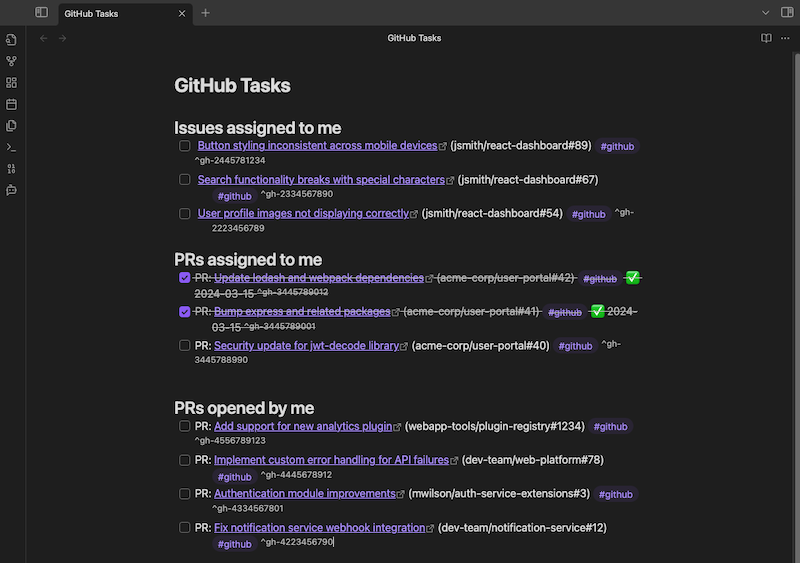
Import GitHub issues and pull requests to Obsidian tasks.
- Import issues assigned to you and PRs assigned to or opened by you.
- Import tasks in Tasks Emoji format or Dataview format (see: Tasks documentation)
- Import labels as tags.
- Closed issues and PRs automatically marked as completed.
- Automatically refresh tasks on specified intervals.
- Behavior and appearance configurable through plugin settings.
Screenshot
Getting Started
To use GitHub tasks, you will need to create a Fine-grained GitHub Personal Access Token.
You should use a token specifically for this plugin.
- Give the token access to whichever repositories you want to import tasks from.
- Under repository permissions, give the token read access to issues, metadata, and pull requests.
Settings
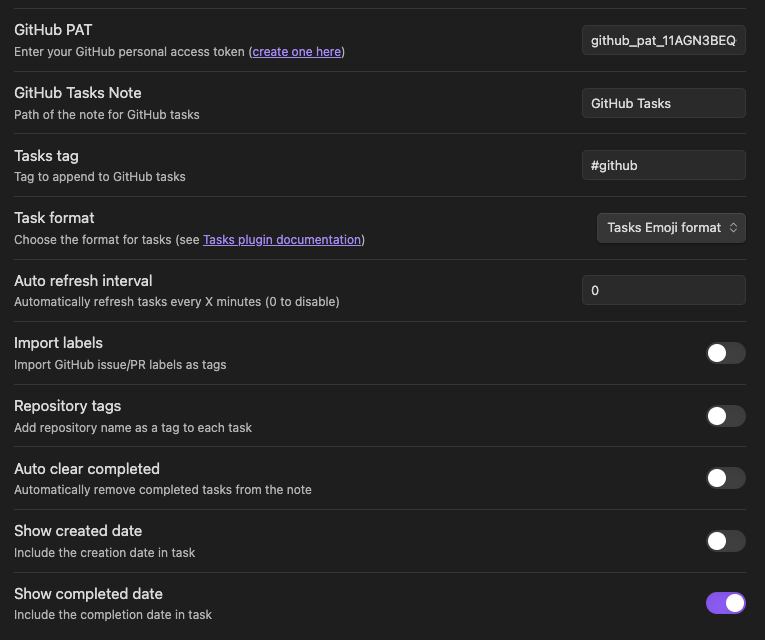
- GitHub PAT: Your personal access token.
- GitHub tasks note: Path to the note where tasks will be imported. For folders, use the format
folder/subfolder/note. You do not need the.mdextension. - Task tag: Tag that will be added to tasks imported from GitHub.
- Task format: Format that will be used to import tasks. Choose between Tasks Emoji format or Dataview format.
- Auto refresh interval: Interval in minutes at which tasks will be automatically refreshed. A setting of 0 disables automatic refreshing.
- Import labels: If enabled, labels from GitHub will be imported as tags in Obsidian.
- Repository tags: If enabled, repository names will be imported as tags in Obsidian.
- Auto clear completed: If enabled, closed issues and PRs will be automatically cleared from the note.
- Show created date: If enabled, the created date of tasks will be shown in the note.
- Show completed date: If enabled, the completed date of tasks will be shown in the note.
Commands
- Refresh GitHub tasks: Refreshes the tasks in the GitHub tasks note.
- Clear completed GitHub tasks: Clears all completed tasks from the GitHub tasks note.
Usage Notes
- The plugin only syncs from GitHub. Marking a task as completed in Obsidian will not update the status on GitHub.
- If you edit a task, such as to add a due date, refreshing will not overwrite your changes. Only the completed status and completed date will be updated.
- Changing format settings will not affect existing tasks. If you wish to change the format of existing tasks, I suggest deleting the note content and re-importing the tasks.
- If you change the GitHub tasks note path, the old note will remain, possibly creating duplicate tasks.
- PRs that are both opened by you and assigned to you will be duplicated in the note.
- The
^gh-#######tag is used to identify tasks imported from GitHub. If removed or edited, the task won't sync correctly from GitHub (it will remain and be duplicated).
Support
GitHub Tasks is produced by Epistemic Technology.
I am an independent software developer. If you find GitHub Tasks to be useful, please consider supporting my work.
Contributing, Feedback, and Help
This is an open source project, using the MIT License. Pull requests for bug fixes or small improvements are welcome. If you want to get involved in a more substantial way, please Contact me.
To report a bug, request a feature, provide feedback, or ask for help, please open an issue.
The GitHub logo used in the settings panel is courtesy of GitHub. It was adapted from the logo used in the Obsidian Excalidraw Plugin.