Search...Search plugins and themes...
⌘K
Sign in
  • Get started
  • Download
  • Pricing
  • Enterprise
  • Account
  • Obsidian
  • Overview
  • Sync
  • Publish
  • Canvas
  • Mobile
  • Web Clipper
  • CLI
  • Learn
  • Help
  • Developers
  • Changelog
  • About
  • Roadmap
  • Blog
  • Resources
  • System status
  • License overview
  • Terms of service
  • Privacy policy
  • Security
  • Community
  • Plugins
  • Themes
  • Discord
  • Forum / 中文论坛
  • Merch store
  • Brand guidelines
Follow us
DiscordTwitterBlueskyThreadsMastodonYouTubeGitHub
© 2026 Obsidian
GitHub

GitHub Embeds

mrgvsvmrgvsv7k downloads

Embed GitHub issues, PRs, and code snippets.

Add to Obsidian
  • Overview
  • Scorecard
  • Updates8

Embed GitHub issues, PRs, and code snippets directly in Obsidian.
Demo GIF

Details

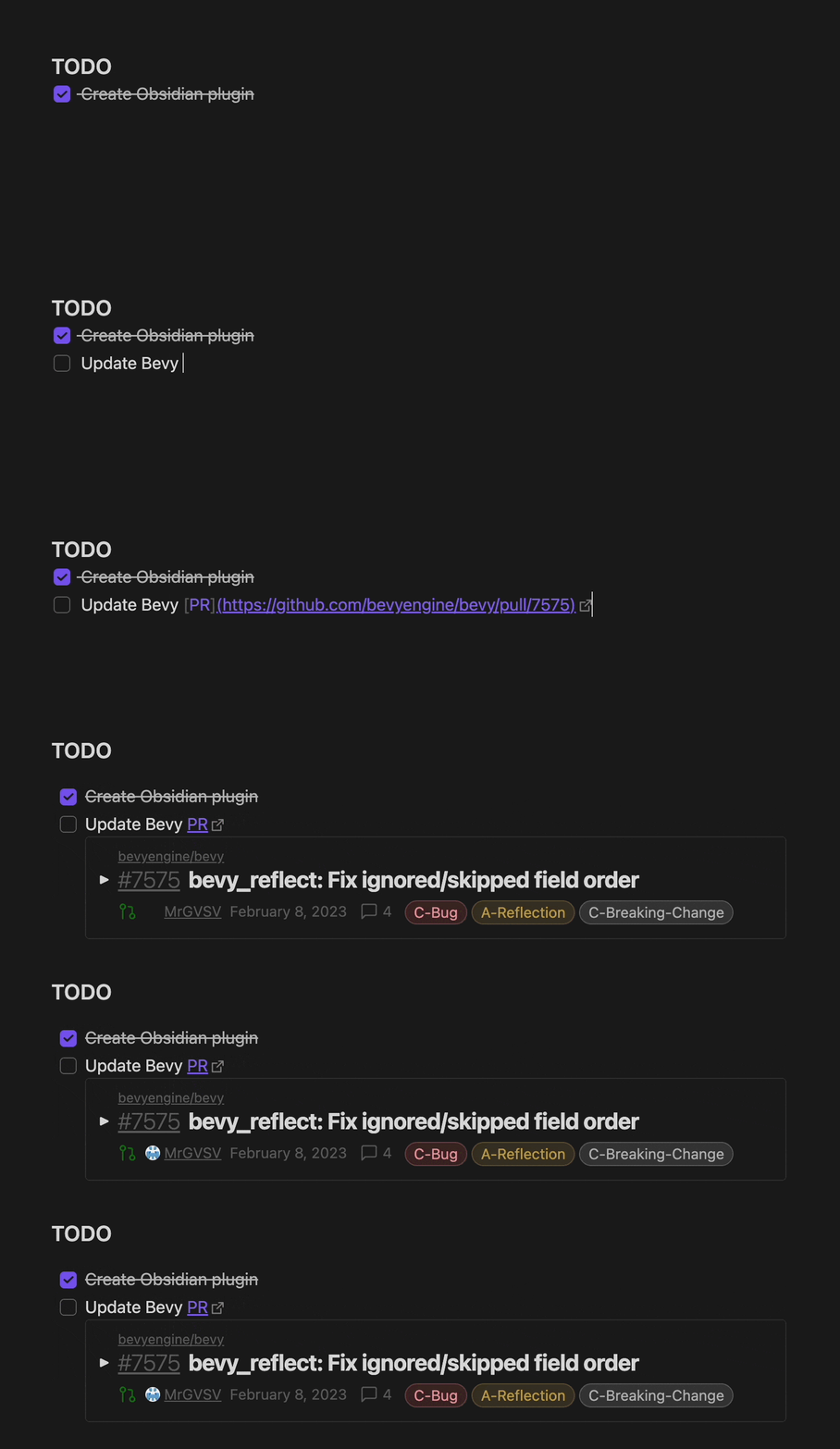
When in reader mode, the Github Embeds plugin will find all GitHub links and attempt to embed a preview below it.

Issues and PRs

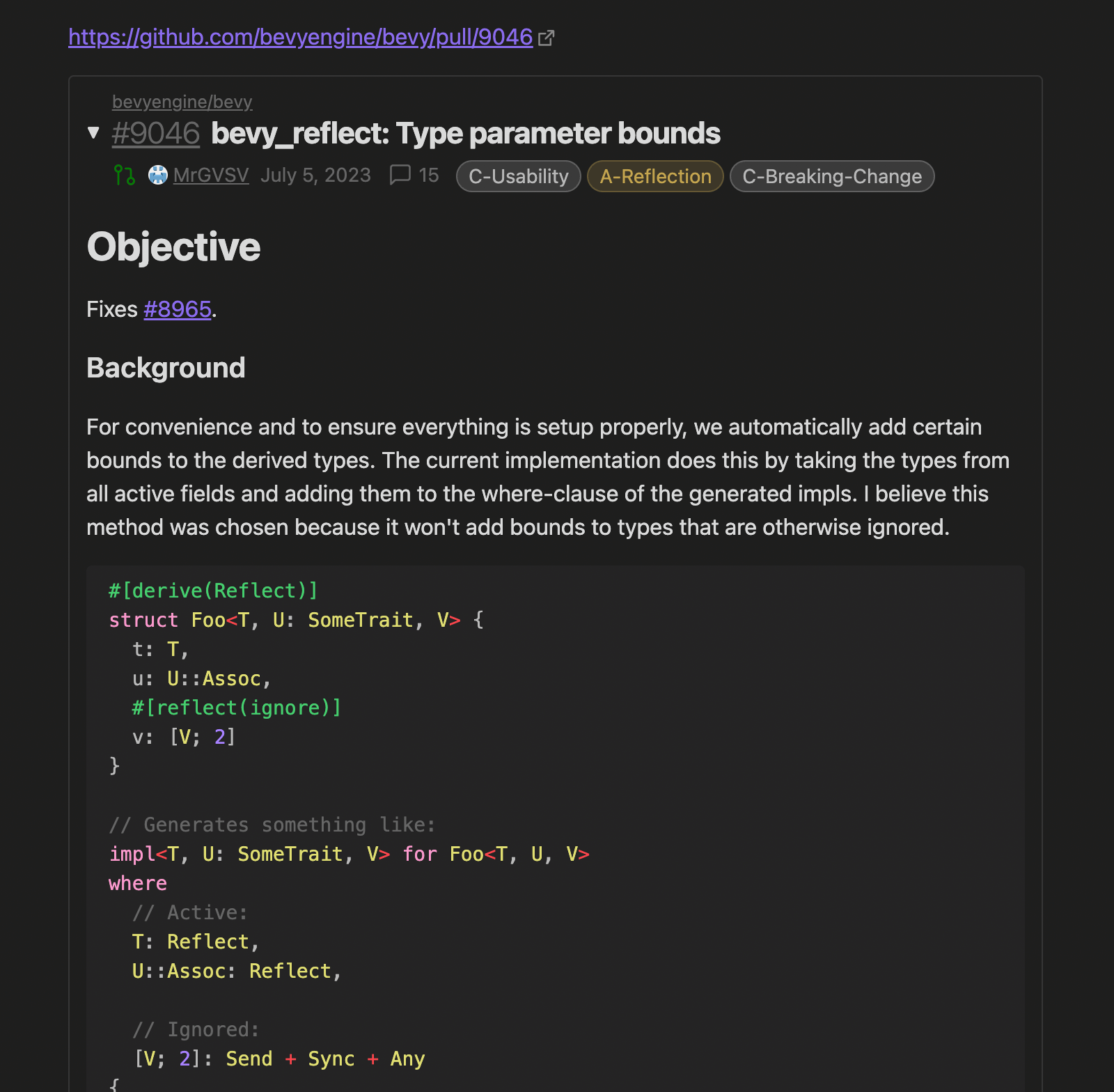
Issues and pull requests will be displayed for any link matching one of the following:

  • https://github.com/<OWNER>/<REPO>/issues/<ISSUE NUMBER>
  • https://github.com/<OWNER>/<REPO>/pull/<PR NUMBER>

File Snippets

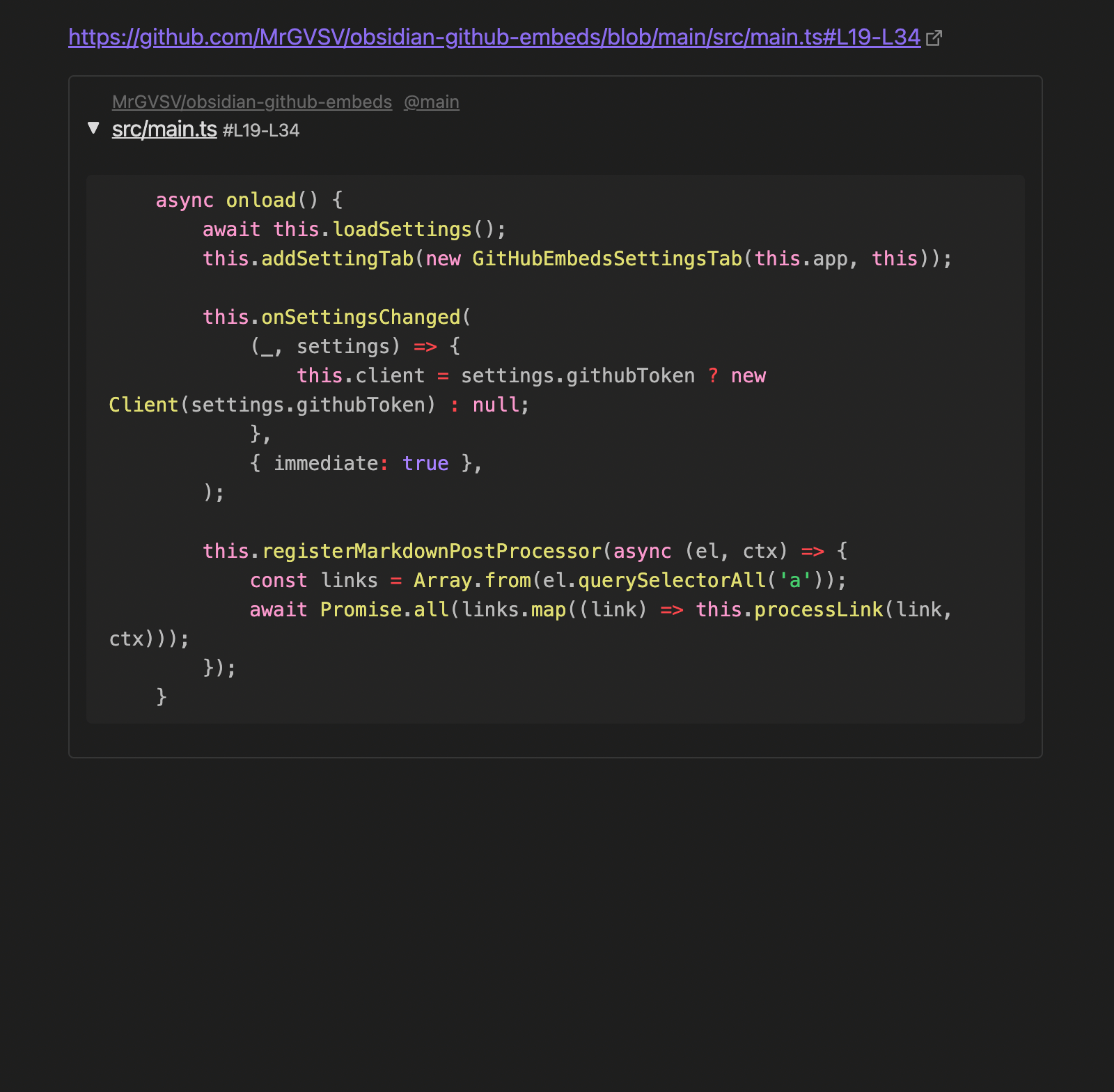
File snippets will be displayed when the link matches a URL like:

  • https://github.com/<OWNER>/<REPO>/blob/<REF>/<PATH TO FILE>

Snippets can also be limited to one or more lines. If we wanted a file to only show line 12, we could append our URL with #L12. To show multiple lines, like 12 through 19, we could change this to read #L12-L19.

Note While we can scope our files to a particular set of lines, the entire file will still need to be requested. This may result in poor performance for really large files.

Authentication

In order to make use of GitHub's API, calls need to be authenticated. Because of that, this plugin requires you to create a personal access token.

By default, the token will be generated with the Repository access set to Public repositories (read-only). To allow this plugin to also work with private repositories, change the access to All repositories and give it at minimum the following repository permissions:

  • Contents (Read-only)
  • Issues (Read-only)
  • Pull requests (Read-only)

With the token created, navigate to this plugin's settings and paste it into the token text field.

Screenshots
Screenshot of pull request embedScreenshot of file embed

Todo

There are some remaining features I'd like to add:

  • Display embeds in editor mode
  • Opt-in/opt-out specific links
  • Better configuration of issue/PR info placement
  • More PR metadata (additions/deletions, check status, etc.)

The following are things that would be great but are likely out-of-scope for this project:

  • Allowing issue/PR to be editable

Support

This plugin is totally free to use! I have a lot of fun making stuff like this, so I never expect any type of financial compensation. But if you enjoy the plugin and are feeling generous, I certainly won't say no to a cup of coffee!

60%
HealthFair
ReviewCaution
About
Embed GitHub issues, pull requests, and file snippets directly in Obsidian when links appear in reader mode. Display issue/PR previews and inline file snippets with line-range support (e.g. #L12-L19). Require a GitHub personal access token for API and private repo access.
IntegrationsCodeLinks
Details
Current version
1.0.7
Last updated
2 years ago
Created
3 years ago
Updates
8 releases
Downloads
7k
Compatible with
Obsidian 0.15.0+
Platforms
Desktop, Mobile
License
MIT
Report bugRequest featureReport plugin
Sponsor
Buy Me a Coffee
GitHub Sponsors
Author
mrgvsvmrgvsv
github.com/MrGVSV
GitHubmrgvsv
  1. Community
  2. Plugins
  3. Integrations
  4. GitHub Embeds

Related plugins

Local REST API & MCP Server

Unlock your automation needs by interacting with your notes over a secure REST API.

Templater

Create and use dynamic templates.

Smart Connections

AI link discovery copilot. See related notes as you write. Lookup using semantic (vector) search across your vault. Zero-setup local model for embeddings, no API keys, private.

Excalidraw

Visual PKM powerhouse. Create and edit Excalidraw drawings.

BRAT

Easily install a beta version of a plugin for testing.

Mermaid Tools

Improved Mermaid.js experience: visual toolbar with common elements and more.

Maps

Adds a map layout to bases so you can display notes as an interactive map view.

Self-hosted LiveSync

Sync vaults securely to self-hosted servers or WEBRTC.

Zotero Integration

Insert and import citations, bibliographies, notes, and PDF annotations from Zotero.

Readwise Official

Sync highlights from Readwise to your vault.