Git Ribbon Sync
 Pietro41 downloads
Sync vault changes: quicky pull, push, and view git history from ribbon icons and commands.
- Overview
- Scorecard
- Updates2
A lightweight, seamless Obsidian plugin that adds dedicated Git action buttons directly to your left sidebar ribbon. Easily pull, commit, push, and inspect your repository's commit history without ever opening a terminal.
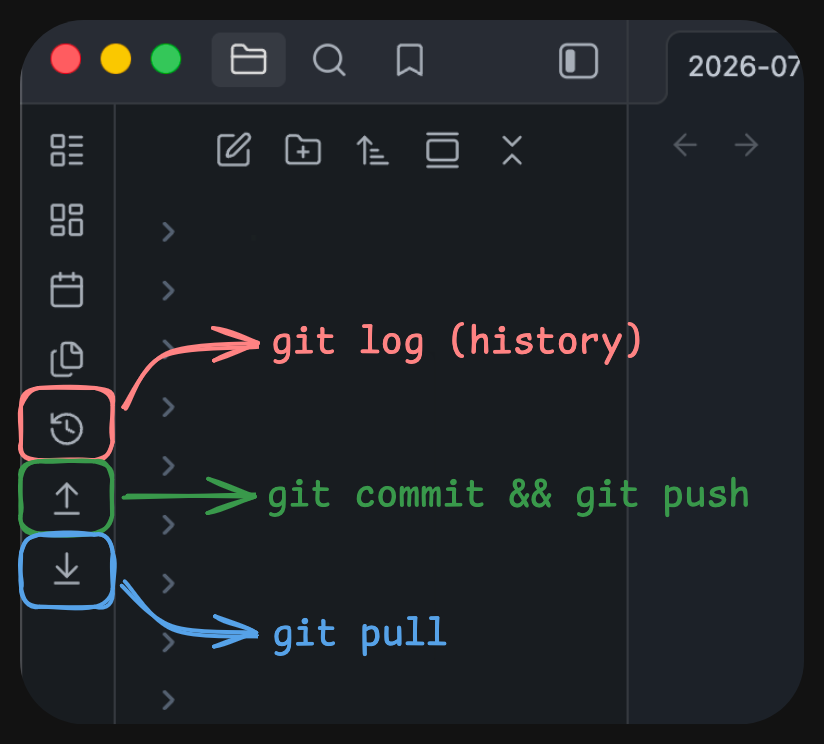
Ribbon Icons & Usage
The plugin adds three buttons to your left ribbon bar:
| Icon | Command | Description |
|---|---|---|
history |
Show Git History | Opens an interactive tab inside Obsidian rendering your repository's commit log in a styled table. |
arrow-down-to-line |
Git Pull | Executes git pull in your vault root and displays a status notification upon completion. |
arrow-up-from-line |
Git Commit & Push | Stages files, commits with a message like Vault sync: mac 2026-07-28 14:30:00, and pushes to your remote repo. |
Settings
Navigate to Settings → Community Plugins → Git Ribbon Sync to configure:
- Device Name: Customize the identifier included in automated commit messages (defaults to your machine's OS or hostname).
- Commit Message Prefix: Modify the leading text for automated sync commits (default:
Vault sync:).
Command Palette & Hotkeys
All three ribbon actions are registered as official Obsidian commands:
- Open the Command Palette.
- Search for:
Git Ribbon Sync: Git PullGit Ribbon Sync: Git Commit & PushGit Ribbon Sync: Show Git Commit History
- Assign custom keyboard shortcuts under Settings → Hotkeys.
Development & Building
To modify or build the plugin locally:
# Install dependencies
npm install

# Run watch mode (auto-compiles on save and copies to your vault)
npm run dev

# Single build for release
npm run build
HealthExcellent
ReviewSatisfactory
About
Add Git action buttons to the left ribbon to pull, commit & push, and view your repository's commit history without opening a terminal. Open an interactive commit-log tab, run git pull with status feedback, and stage/commit/push changes from the ribbon or via registered commands and hotkeys.Details
Current version
0.1.5
Last updated
2 months ago
Created
2 months ago
Updates
2 releases
Downloads
41
Compatible with
Obsidian 1.0.0+
Platforms
Desktop only
License
MIT