Football Playbook
 Adrián Meléndez30 downloads
Manage American football playbooks: teams, formations and plays drawn with Excalidraw.
- Overview
- Scorecard
- Updates4
Design and organize American football playbooks in Obsidian. Plays are drawn with the Excalidraw plugin, with the field and players already in place.
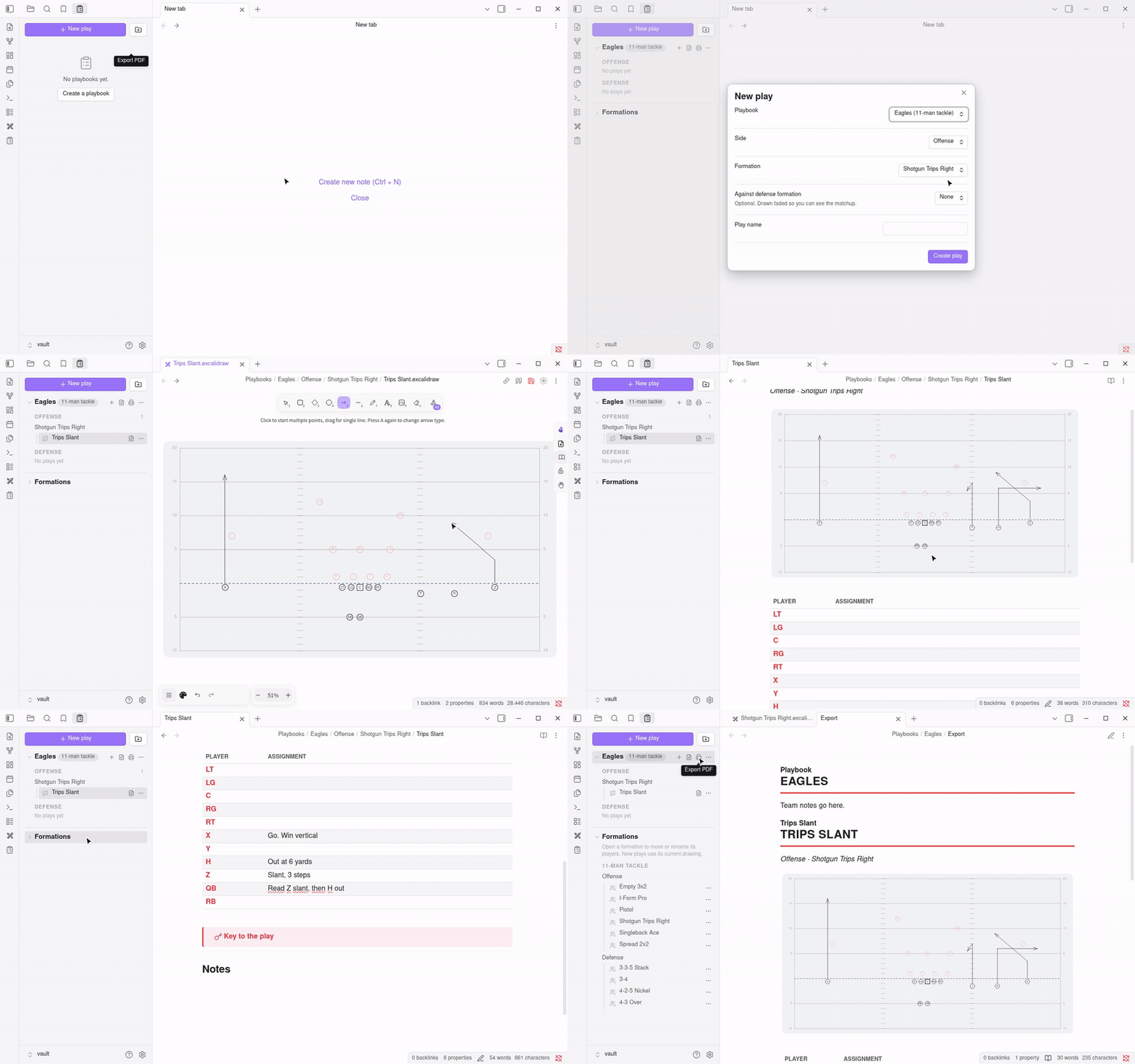
Watch the full-speed video (MP4)
Features
- Playbooks per team: 11-man tackle, 9-man tackle or 5v5 flag; offense only, defense only, or both.
- Defense first: defense plays and formations are drawn from the defense's point of view, with the defense at the bottom and highlighted and the offense faded at the top.
- New play in one click: pick a formation and get a drawing with the field (yard lines, hashes, yard numbers, line of scrimmage) and every player lined up. Optionally show the opponent's formation faded behind.
- Formation library: built-in formations for each format, each one a drawing you can open, edit (move players, change labels), rename, duplicate or delete from the Formations section of the panel. You can also turn any play drawing into a formation with Save current drawing as formation. Deleted a built-in by mistake? Run Restore built-in formations.
- Ball on the hash: put the ball in the middle or on the left or right hash when creating a play. The line, tight ends and backs move with the ball; wider players spread out to fit.
- One-tap routes: select one or more players in a drawing, then pick Go, Slant, Hitch, Out, In, Curl, Comeback, Post, Corner, Drag, Flat or Wheel from Add route. Routes break inside or outside relative to the ball, use standard depths and stay attached to the player when you move them.
- Tags and filter: tag plays when you create them (red zone, 3rd down, pass…) or later with Edit tags, then filter the panel by name, formation or tag.
- Routes and blocks: buttons in the header of every play drawing. Draw route gives an arrow, Draw block a line ending in a perpendicular bar (the usual blocking symbol). Select lines first to switch them between route and block.
- One clean line style: every line in a drawing gets the same color (black for offense, red for defense), thickness and clean, not hand-drawn, look, whenever the drawing opens or with Tidy lines. Straight, curved and dashed lines keep their shape.
- Notes for every play: general notes plus an assignments table with one row per player.
- Mirror: flip a play or formation to the other side in one click. "Trips Right" becomes "Trips Left", and left/right in the play's notes swap too.
- Playbook panel: browse plays by side and formation; rename, duplicate, mirror or delete a play (note and drawing together) from its menu.
- Share with your team: export a whole playbook as one
.playbook.jsonfile and import it on any device. No server or account needed. - Works on mobile: browse, draw, import and share on phones and tablets (PDF export needs a computer).
- PDF export: one button exports the team notes and every play, one per page.
Getting started
- Install Football Playbook and Excalidraw from Settings → Community plugins. The panel shows an install button if Excalidraw is missing.
- Click the clipboard icon in the left ribbon to open the Playbooks panel.
- Click New playbook, then New play.
Sharing a playbook
- In the Playbooks panel, select the share icon next to the playbook (or Share playbook in its ⋯ menu). On a computer you choose where to save
<Team>.playbook.json; on a phone the share sheet opens. - Send the file to your coaches and players: email, chat, shared drive.
- They install Football Playbook and Excalidraw, then select the import icon at the top of the panel and pick the file.
Importing a playbook that already exists asks whether to replace it (the old copy goes to the trash) or keep both. The team's formations are added too, without touching formations the person already has. Files are checked before import, and anything unsafe is skipped.
Where things are stored
Everything is plain files in your vault, so it syncs and backs up like any other note:
Playbooks/<Team>/Playbook.md                                team notes + settings (format, defense)
Playbooks/<Team>/Offense/<Formation>/<Play>.md              play notes and assignments
Playbooks/<Team>/Offense/<Formation>/<Play>.excalidraw.md   play drawing
Playbooks/<Team>/Export.md                                  generated by Export PDF
Playbooks/Formations/<Format>/<Offense|Defense>/<Name>.excalidraw.md   formation library
A formation's players are the shapes the plugin drew. To add a player to a formation, copy and paste an existing one; to rename a player, edit the letter inside it.
Development
npm install
npm run dev      # rebuild on change
npm run lint     # Obsidian's review rules
npm test         # check built-in formations
npm run deploy   # build and copy into a test vault (set VAULT=/path/to/vault)
Releasing
npm version patch(orminor/major) updatespackage.json,manifest.jsonandversions.json, commits and tags.git push --follow-tags. The GitHub workflow builds and creates a draft release withmain.js,manifest.jsonandstyles.css.- Publish the draft release on GitHub.
First release only: sign in at community.obsidian.md, link your GitHub account and add the plugin to the community directory. It reads manifest.json from the default branch and installs files from the matching release. See Submit your plugin.