Folder Terminal
 First Kang134 downloads
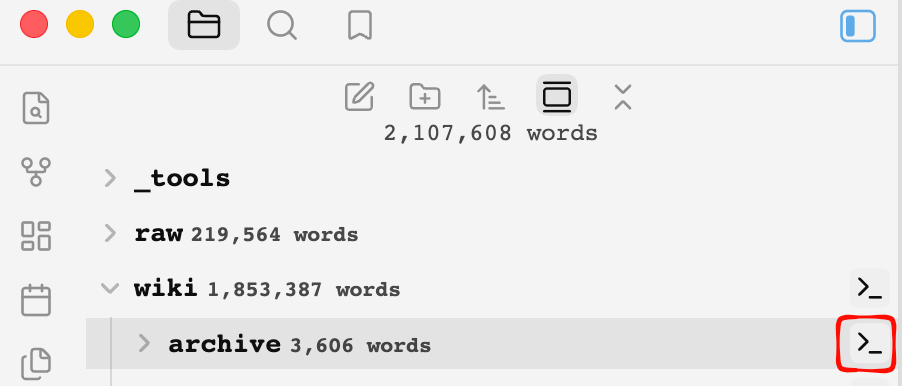
Hover over a folder in the file explorer to reveal a terminal icon; click it to open a real shell (PTY) docked at the bottom, rooted at that folder.
- Overview
- Scorecard
- Updates11
This README is bilingual: English sections first, 中文 sections below. 本说明为双语:英文在前,中文在后。
Folder Terminal is an Obsidian plugin that adds a terminal icon to every folder in the file explorer. Hover over a folder and click the icon to open a real shell (PTY) at the bottom of Obsidian, with the working directory automatically set to that folder.
⚠️ Desktop-only (depends on Node's
child_process); not available on mobile.
Highlights
- Hover-to-reveal terminal icon on folders (auto-hidden while renaming)
- Real PTY via an embedded Python proxy —
vim/ssh/htopwork normally, no native modules required - Multi-tab sessions, drag-to-reorder, double-click rename, per-tab settings (shell / color scheme / font size / color tag)
- Cross-restart recovery, theme-aware GitHub-style colors, clickable URLs
- UI localization: Chinese / English / Follow system
Platform notes: macOS requires python3 (Xcode Command Line Tools); Linux falls back to script when python3 is missing; Windows uses winpty when available, otherwise cmd.exe.
Obsidian 插件:鼠标移到文件浏览器中的文件夹上时,标题右侧出现「终端」图标;点击后在 Obsidian 当前面板下方打开一个真实 Shell(PTY)窗口,工作目录自动切换为该文件夹。
⚠️ 仅支持桌面端(依赖 Node 的
child_process),移动端不可用。
Features / 功能
English
- 🖱️ Hover-to-reveal icon on every folder title (floats at the right edge, no layout shift, auto-hidden while renaming)
- 📂 One-click
cd— opens a terminal already rooted at that folder's absolute path (including the vault root) - 🗂️ Multi-tab sessions — one tab per folder, each an independent shell; switching tabs keeps scrollback, closing a tab ends the session
- 🧲 Drag-to-reorder tabs
- ✏️ Double-click rename a tab (does not rename the actual folder)
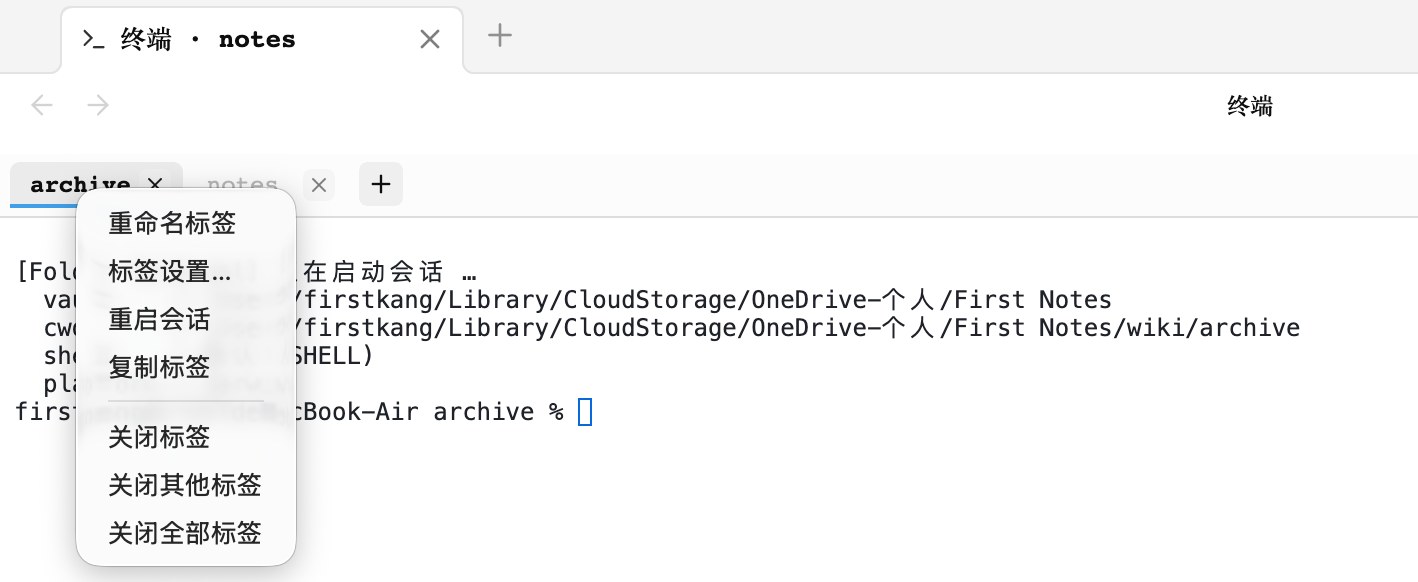
- 🖱️ Right-click menu — rename / tab settings / restart session / close
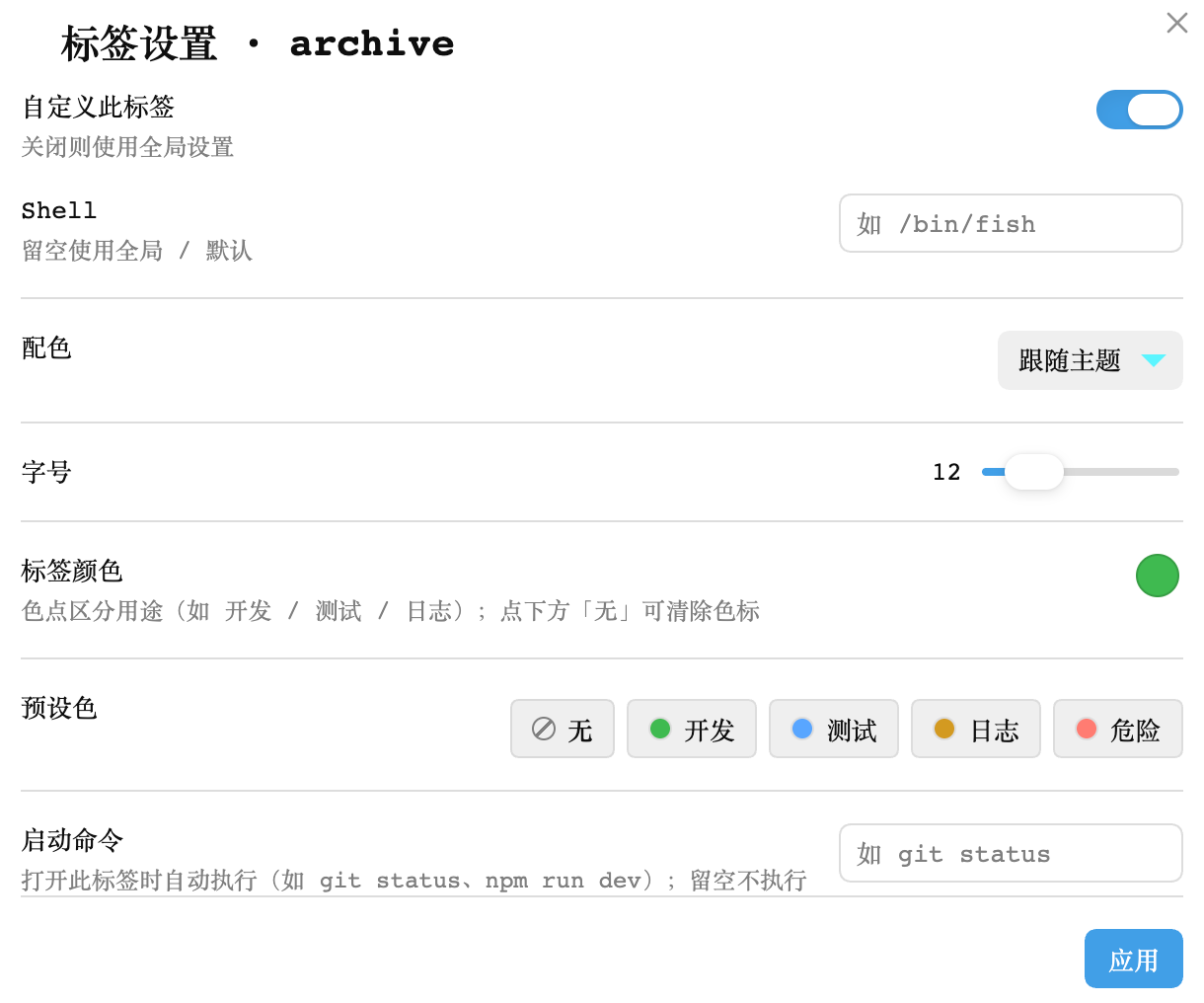
- 🎛️ Per-tab settings — override shell, color scheme, font size, color tag (persisted with the workspace layout)
- 💾 Cross-restart recovery — the tab list is persisted with the workspace layout and restored on next launch
- 🖥️ Real PTY — on macOS / Linux an embedded Python PTY proxy (
pty.fork) creates a true pseudo-terminal, so interactive programs likevim/ssh/htopwork without any native modules - 📐 Live resize —
TIOCSWINSZkeeps the PTY size in sync with the panel, so full-screen TUIs react instantly - ⚙️ Settings — default shell, font size, color scheme (theme / dark / light), panel-reuse toggle
- 🔗 Clickable URLs (xterm web-links)
- 🔍 In-terminal search — press
Ctrl/Cmd+F(or right-click → Search) to find text in the buffer, with match highlighting, prev/next navigation, live match count, and case-sensitive / regex / whole-word toggles - ⌨️ Command history & cursor navigation — on Windows (pipe mode, no readline)
↑/↓recalls previous commands and←/→/Home/Endmove the cursor within the line - 🎨 Theme-aware GitHub-style colors
中文
- 🖱️ 文件夹悬浮图标:鼠标移入文件夹标题显示终端图标(右端悬浮,不占位不误触;重命名时自动隐藏)
- 📂 一键进入目录:点击图标,终端自动
cd到该文件夹的磁盘绝对路径(含库根目录,data-path="") - 🗂️ 多标签会话:每个文件夹一个标签页,各自独立 Shell;切换标签不丢滚动历史,关闭标签才结束会话
- 🧲 标签拖拽排序:直接拖动标签调整顺序
- ✏️ 双击重命名:自定义标签名(不影响实际文件夹名)
- 🖱️ 右键菜单:重命名 / 标签设置 / 重启会话 / 关闭标签
- 🎛️ 每标签独立设置:可单独覆盖 Shell、配色、字号、颜色标记(弹窗配置,随布局持久化)
- 💾 跨重启恢复:标签列表随工作区布局持久化,重启 Obsidian 后自动恢复所有会话
- 🖥️ 真实 PTY:macOS / Linux 通过内嵌的 Python PTY 代理(
pty.fork)创建真实伪终端,vim / ssh / htop 等交互程序可正常工作,无需任何原生模块 - 📐 自适应尺寸:面板大小变化时通过
TIOCSWINSZ实时调整 PTY 尺寸,vim 内全屏程序也能即时感知 - ⚙️ 设置面板:默认 Shell、字号、配色方案(跟随主题/深色/浅色)、面板复用开关
- 🔗 链接可点:URL 自动高亮可点击(xterm web-links)
- 🔍 终端内搜索:按
Ctrl/Cmd+F(或右键 → 搜索)在缓冲区检索,支持高亮全部匹配、上/下一处跳转、实时计数,以及区分大小写 / 正则 / 全字匹配开关 - ⌨️ 命令历史与光标导航:Windows 管道模式下
↑/↓回溯历史命令,←/→/Home/End在行内移动光标 - 🎨 跟随主题:明暗主题下采用 GitHub 风格配色
Screenshots / 截图
Hover icon — 鼠标悬停文件夹时显示终端图标
Multi-tab terminal — 多标签终端与右键菜单
Per-tab settings — 标签设置弹窗
Installation / 安装
English
Option A — Community plugin browser (after this plugin is approved)
- Open Settings → Community plugins
- Turn off Restricted mode if prompted
- Click Browse, search for Folder Terminal, then Install and Enable
Option B — BRAT (for beta / pre-release testing)
- Install the BRAT plugin from the community browser
- Open the command palette and run BRAT: Add a beta plugin for testing
- Paste
https://github.com/FIRSTKANG/folder-terminaland confirm - Enable Folder Terminal in Community plugins
Option C — Manual
- Build:
npm install && npm run build - Copy the plugin folder (containing
main.js,manifest.json,styles.css) into your vault's.obsidian/plugins/folder-terminal/ - Enable Folder Terminal in Settings → Community plugins
中文
方式 A — 社区插件市场(插件过审后可用)
- 打开 设置 → 第三方插件
- 按提示关闭「受限模式」
- 点击 浏览,搜索 Folder Terminal,然后 安装 并 启用
方式 B — BRAT(用于抢先体验 beta / 未上架版本)
- 在社区市场安装 BRAT 插件
- 打开命令面板,运行 BRAT: Add a beta plugin for testing
- 粘贴
https://github.com/FIRSTKANG/folder-terminal并确认 - 在第三方插件中启用 Folder Terminal
方式 C — 手动安装
- 构建:
npm install && npm run build - 把插件目录(含
main.js、manifest.json、styles.css)复制到 vault 的.obsidian/plugins/folder-terminal/ - 在 Obsidian「设置 → 第三方插件」中启用 Folder Terminal
Development / 开发
npm install
npm run dev        # watch 模式(产出 main.js)
npm run build      # 生产构建(tsc 检查 + esbuild 打包)
npm run smoke:pty  # PTY 链路冒烟测试(不依赖 Obsidian,可直接跑)
Commands / 命令
| Command (EN) | 命令(中文) | Description |
|---|---|---|
| Open terminal at vault root | 在库根目录打开终端 | Open/focus the bottom terminal rooted at the vault root |
| Open terminal at active note's folder | 在笔记所在文件夹打开终端 | Open/focus the bottom terminal rooted at the current note's folder |
Settings / 设置
| Setting (EN) | 设置项 | Description |
|---|---|---|
| Default shell | 默认 Shell | Empty = $SHELL (macOS default /bin/zsh); e.g. /bin/bash, /bin/fish |
| Font size | 字号 | Terminal font size (10–22px) |
| Color scheme | 配色方案 | Follow Obsidian theme / force dark / force light |
| Reuse terminal panel | 复用终端面板 | When on, re-clicking an icon focuses the same bottom panel's tab (default on) |
| Interface language | 界面语言 | Chinese / English / Follow system |
Each tab can also override shell / color scheme / font size / color tag individually: right-click a tab → Tab settings… 每个标签页还可以单独覆盖 Shell / 配色 / 字号 / 颜色标记:右键标签 → 「标签设置…」。
Tab operations / 标签操作
| Action (EN) | 操作 | How / 方式 |
|---|---|---|
| Switch | 切换标签 | Single click |
| Reorder | 排序 | Drag onto a target tab (insert before it) |
| Rename | 重命名 | Double-click the tab name, Enter to save / Esc to cancel |
| Restart session | 重启会话 | Right-click → Restart session |
| Tab settings | 标签设置 | Right-click → Tab settings… (per-tab shell / color scheme / font size / color tag) |
| Close | 关闭 | The × on the tab, or right-click → Close |
How it works / 实现原理
English: a MutationObserver keeps injecting a terminal icon into every folder title in the file explorer. Clicking it opens a new panel below the current one via workspace.getLeaf('split', 'horizontal'), where a custom ItemView renders xterm.js. A child_process.spawn('python3', ['-u', '-c', <pty-proxy.py>, $SHELL]) launches an embedded Python PTY proxy; fd3 is used as a resize-control channel, and pty.fork() creates a real pseudo-terminal so interactive programs work. No native modules are bundled — child_process, path, etc. are marked external and provided by the Obsidian desktop runtime.
中文:
文件浏览器 .nav-folder-title(MutationObserver 持续补注入图标)
        │ 点击
        ▼
workspace.getLeaf('split', 'horizontal')  →  当前面板下方新开面板
        ▼
registerView 自定义视图  →  xterm.js 渲染终端
        ▼
child_process.spawn('python3', ['-u', '-c', <pty-proxy.py>, $SHELL])
        │  fd0/1 = 键盘输入 / 终端输出;fd3 = 尺寸控制通道
        ▼
pty.fork()  →  真实 PTY  →  /bin/zsh(或 $SHELL),工作目录 = vault 根 + 文件夹路径
关键点:
- PTY 代理:内嵌一段 Python 脚本(
src/pty-proxy.py,构建时以字符串打包进 main.js),pty.fork()创建真实伪终端后只做字节搬运。这样交互程序(vim/ssh)才能正常工作,且对 stdio 类型无要求。 - 为什么不用
script命令? macOS 上 Node/Electron 的child_process管道实际是 socketpair(libuv 行为),而 BSD 的script会对 stdin 做tcgetattr,遇 socket 返回EOPNOTSUPP直接退出(已实测复现)。Python 代理没有这个检查。 - 不打包原生模块:无需 node-pty / 编译 .node 二进制,esbuild 配置把
child_process、path等 Node 内置模块标为 external,运行时由 Obsidian 桌面端提供。
Known limitations / 已知限制
- Desktop only:
isDesktopOnly: true, not loaded on mobile. - macOS needs
python3: requires Xcode Command Line Tools (prompts on first use, or runxcode-select --install). - Linux without
python3falls back toscript: still interactive, but resize sync degrades tostty(only effective at the shell prompt). - Windows is best-effort: with winpty you get a PTY; otherwise
cmd.exe(no PTY, interactive programs limited). - First open is a 50/50 split: drag the divider to resize; Obsidian remembers the layout afterward.
- Fixed panel height is not yet possible: Obsidian does not expose a Leaf-size API (hard-coding CSS would break drag layout); waiting for an official layout API.
- Shortcut conflicts: when the terminal is focused, some Obsidian global shortcuts (e.g.
Cmd+P) may still be intercepted by Obsidian;Ctrl+C/ arrow keys are handled normally by the PTY. - Obsidian version drift: the file explorer's DOM class names (
.nav-files-container, etc.) may change across versions; if the icon disappears, updatefolderIcons.tsfor the new DOM. - Session end: closing a tab / uninstalling the plugin kills the session; a hard Obsidian quit may leave a few
python3/shell child processes.
中文:
- 仅桌面端:
isDesktopOnly: true,移动端不加载。 - macOS 依赖 python3:需要 Xcode Command Line Tools(首次使用会提示安装,
xcode-select --install)。 - Linux 无 python3 时回退
script:仍可交互,但尺寸同步降级为 stty(仅 shell 提示符下生效)。 - Windows 尽力而为:装了 winpty 则有 PTY;否则
cmd.exe无 PTY,交互程序受限。 - 首次打开是 50/50 分屏:拖动分隔条调整高度后 Obsidian 会记住布局。
- 面板固定高度暂不可行:Obsidian 未公开 Leaf 尺寸控制 API(CSS 硬改会破坏拖拽布局),等待官方布局 API 或后续用内部分裂配置实现。
- 快捷键冲突:终端聚焦时,Obsidian 的全局快捷键(如 Cmd+P)仍可能被 Obsidian 拦截;Ctrl+C / 方向键等由 PTY 正常处理。
- Obsidian 版本变动:文件浏览器的 DOM 类名(
.nav-files-container等)随版本可能调整,若图标消失需按新版 DOM 更新folderIcons.ts。 - 会话结束:标签关闭 / 插件卸载会 kill 对应会话;Obsidian 直接退出时可能残留少量 python3/shell 子进程。
Project structure / 目录结构
src/
  main.ts              插件入口:视图注册、设置、图标挂载、命令  (entry: view registration, settings, icon mount, commands)
  folderIcons.ts       文件浏览器悬浮图标(MutationObserver + DOM 注入)  (file-explorer hover icon)
  terminalView.ts      多标签终端视图(xterm.js,标签/会话/拖拽/重命名管理)  (multi-tab terminal view)
  tabSettingsModal.ts  标签设置弹窗(每标签 Shell / 配色 / 字号 / 颜色标记覆盖)  (per-tab settings modal)
  pty.ts               Shell 会话封装(python3 PTY 代理,Linux 回退 script,Windows winpty/cmd)  (shell session wrapper)
  pty-proxy.py         PTY 代理脚本(构建时打包进 main.js)  (PTY proxy, bundled at build time)
  settings.ts          全局设置面板(shell / 字号 / 配色 / 复用开关 / 界面语言)  (global settings panel)
  i18n.ts              多语言字典与 t() 函数(zh-CN / en / 跟随系统)  (i18n dictionary + t())
scripts/
  pty-smoke.js         PTY 链路冒烟测试(含尺寸控制通道验证)  (PTY smoke test)
Roadmap / 后续路线
- Settings: default shell, font size, color scheme, reuse-panel toggle
- Fallback when
python3is missing (Linuxscript, macOS prompts for CLT) - Multi-tab / per-folder session memory (cross-restart recovery)
- Icon moved out of the title to the folder's right edge (absolute positioning, no layout shift)
- Windows winpty best-effort (auto-fallback to
cmd.exe) - Tab drag-reorder / double-click rename / right-click menu
- Per-tab settings (shell / color scheme / font size / color tag override)
- UI localization: Chinese / English / Follow system
- Fixed terminal panel height (blocked on Obsidian layout API)