
- Overview
- Scorecard
- Updates3
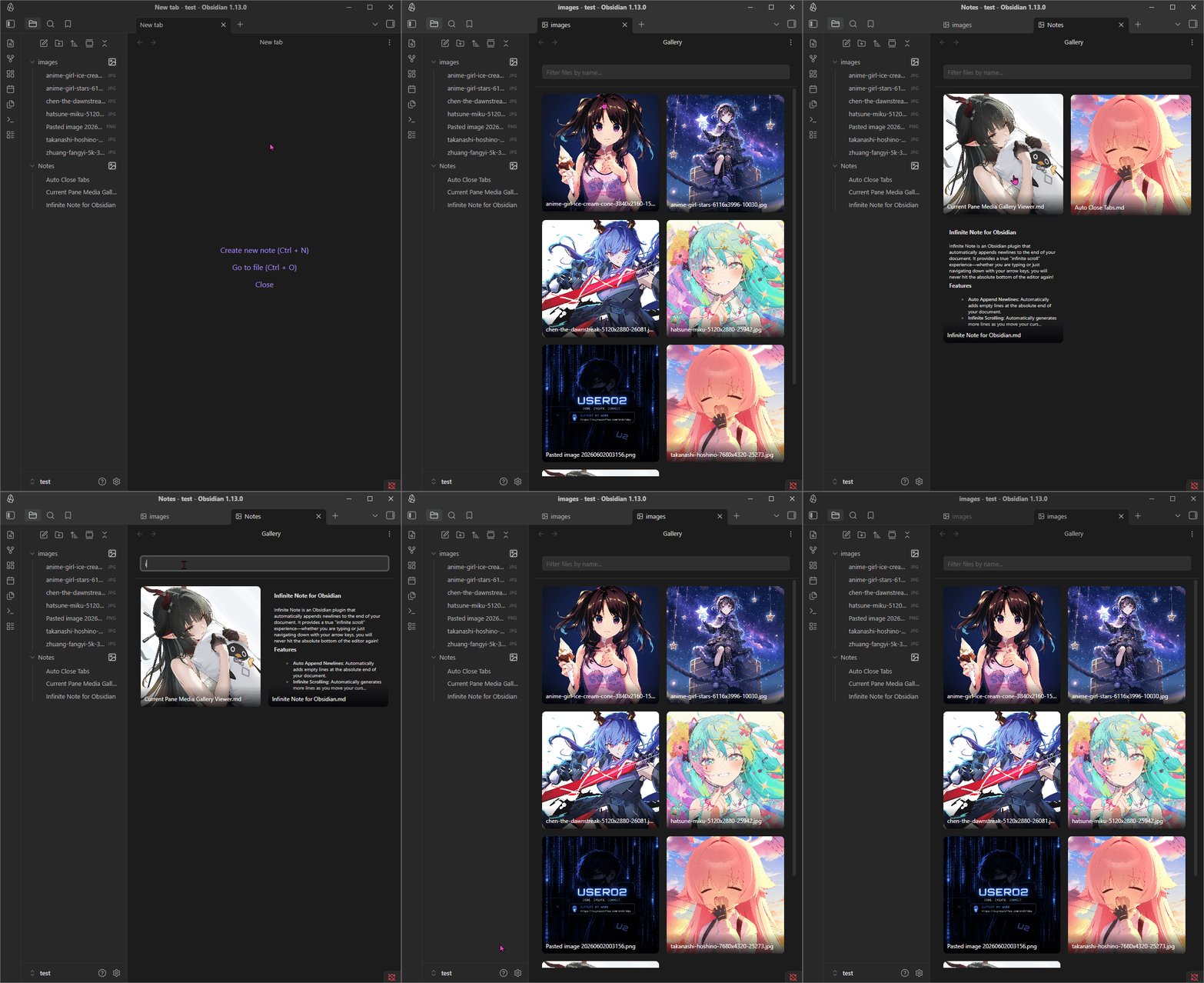
An Obsidian plugin that allows you to view the contents of any folder as a beautiful, responsive media gallery in a new tab. Perfect for users who store images, videos, and visual notes in their vaults.
✨ Features
- File Explorer Integration: Adds a convenient gallery icon next to every folder in your navigation pane.
- Media Support: Displays thumbnails for all images (
.png,.jpg,.gif, etc.) and videos (.mp4,.webmwith hover-to-play preview!). - Optional Click to Zoom Focus: Open a premium fullscreen lightbox overlay to focus on images instead of opening the file immediately.
- Smooth Navigation: Cycle through images with Arrow keys (
Left/Right) or Mouse Wheel. - Interactive Zoom: Zoom in/out with Arrow keys (
Up/Down) and click-and-drag to pan around the image. - Filmstrip Preview: View all folder images in a small thumbnail strip at the bottom. The focused image thumbnail stays highlighted and is automatically kept centered.
- Smooth Navigation: Cycle through images with Arrow keys (
- Smart Note Preview (
.mdfiles): If a folder contains markdown notes, the plugin will automatically find the first image inside the note and use it as a cover thumbnail! If no image is found, it renders a neat text preview of the note. - Breadcrumb Navigation: Tab titles display the full folder path (e.g.,
Parent > Child) so you always know exactly which folder you are browsing. - Live Search Filter: Includes a fixed search bar at the top of the gallery to quickly filter files by name.
- Customizable: Adjust the standard thumbnail size easily from the plugin settings.
- High Compatibility: Includes a "Force Right" option to ensure the gallery icon plays nicely with other plugins that modify the file explorer (like File Explorer Note Count).
🚀 How to Use
- Hover over any folder in the standard Obsidian File Explorer (left pane).
- Click the Gallery Icon that appears on the right side of the folder name.
- A new tab will open displaying all media and notes inside that folder as a visual grid.
- Click on any thumbnail to open the actual file (or preview it in zoom focus mode).
- Use the search bar at the top of the gallery to filter files instantly.
⚙️ Settings
You can customize the plugin behavior in Settings > Community Plugins > Folder as Gallery:
- Thumbnail Size (px): Use the slider to increase or decrease the size of the gallery thumbnails (100px - 500px).
- Force Icon to Far Right: Enable this if the gallery icon overlaps or conflicts with elements from other plugins.
- Click to Zoom Image: Enable this option to zoom and preview images in a fullscreen overlay with keyboard and scroll-wheel navigation, instead of opening them as files.
📦 Manual Installation
- Download the latest release (
main.js,manifest.json,styles.css) from the Releases page. - Create a folder named
obsidian-plugins-folder-as-galleryinside your vault's.obsidian/plugins/directory. - Place the downloaded files into that folder.
- Reload Obsidian and enable the plugin in Settings > Community Plugins.
📝 Release Notes
v1.0.2
- New Feature: Click to Zoom Focus Mode (Optional)
- Zoom and preview images in a fullscreen modal with backdrop blur.
- Cycle through images with Arrow keys (
Left/Right) or Mouse Wheel. - Rate-limit wheel scroll swapping to prevent skipping multiple images.
- Zoom with Arrow keys (
Up/Down) and click-and-drag to pan around the image. - Lightbox Thumbnail Strip: View other images at the bottom, centered on the active image. Click any thumbnail to jump to it.
- New Feature: Open in New Tab
- Added "Open in new tab" at the top of right-click context menus in both grid and lightbox views.
v1.0.1
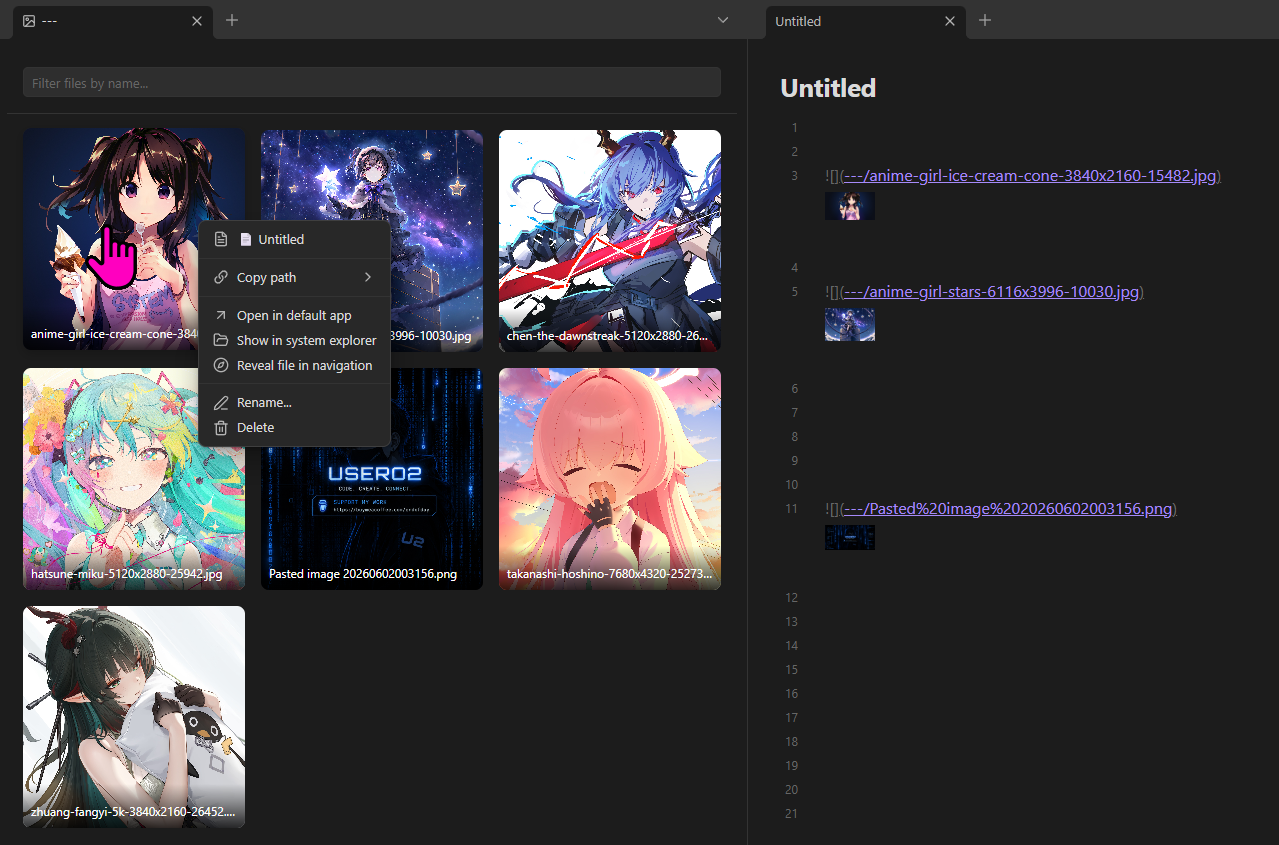
- New Feature: Added a comprehensive Right-Click Context Menu for gallery cards!
- Instantly see a list of
.mdfiles containing the image and click to navigate. - Advanced "Copy path" options: Obsidian URL, Vault Folder path, and System Root path.
- Native system integration: Open in Default App, Show in System Explorer.
- File management directly from the gallery: Reveal in Navigation, Rename, and Delete.
- Instantly see a list of
- Bug Fix: Fixed an issue where toggling the plugin from the Obsidian settings would cause the Settings modal to forcefully close.
❤️ Support & Donate
If this plugin has improved your Obsidian workflow, saved you time, or you just want to support its continued development, please consider donating!
Your support is incredibly appreciated, helps fix bugs, and keeps this project alive and growing. 🙏
https://buymeacoffee.com/endofday
Built with ❤️ for the Obsidian Community
HealthExcellent
ReviewSatisfactory
About
View any folder as a responsive media gallery in a new tab, displaying image thumbnails and hover-to-play video previews. Open galleries from an icon beside folders, preview markdown notes using the first image or a text snippet, and navigate with breadcrumb titles and a live search.Details
Current version
1.0.2
Last updated
2 months ago
Created
4 months ago
Updates
3 releases
Downloads
1k
Compatible with
Obsidian 0.15.0+
Platforms
Desktop, Mobile
License
MIT
Sponsor