Finance Vault
 Matheus103 downloads
Registre receitas, despesas, cartões, gastos fixos, parcelamentos e aportes em arquivos Markdown locais.
- Overview
- Scorecard
- Updates4
See where your money goes. Keep the details in your vault.
Bring your income, everyday spending, credit card installments, and investment contributions into one clear dashboard. See what came in, what went out, and what remains for the month — right inside Obsidian.
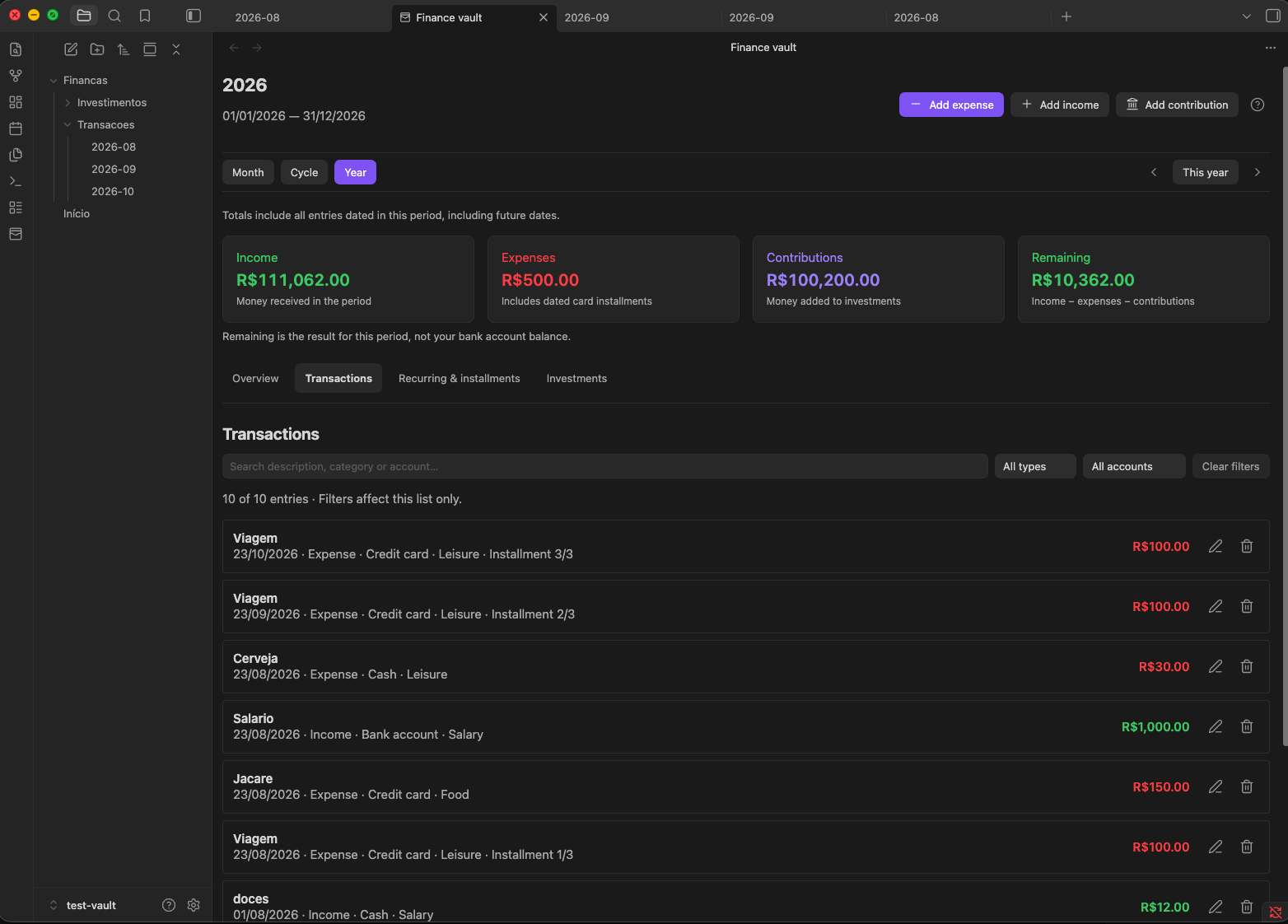
Every entry stays in your vault as readable Markdown. No sign-up, no bank connection, no subscription. Just your records, on your terms.
Install Finance Vault and record your first expense with the built-in accounts and categories. Personalize them whenever you're ready.
Currently supports Brazilian reais (BRL). Entries are recorded manually.
Less guesswork. A clearer picture.
- Understand your spending. See expenses by category and credit card, with charts that make the biggest costs easy to spot.
- Know what remains. View income, expenses, and investment contributions together, with a clear calculation of what's left for the period.
- Keep installments in sight. Enter a purchase total once. Finance Vault splits it across the months and shows upcoming installments.
- Stop retyping recurring entries. Save templates for salary, rent, and subscriptions, then review and record them from a monthly checklist.
- Track the money you invest. See how much you've contributed to each asset or investment type, separately from everyday expenses.
- Keep control of your records. Works offline, with no telemetry or ads. Your Markdown files remain readable even without the plugin.
A financial view that fits your month
Choose Month for the calendar view, Cycle for a period aligned with your payday, or Year to see the bigger picture. A cycle can run from the 10th of one month to the 9th of the next, for example.
Switch between an overview, searchable transactions, recurring items and installments, and investment contributions. Find an entry by description, account, or category, then edit it in place.
In Settings → Finance Vault → Financial cycle, choose when a new rule takes effect and the day of the month each cycle starts. Use Delete rule to remove a scheduled rule before its effective date. Active and past rules are kept to preserve cycle history.
Your records always stay in the file for their actual month. Changing the view never moves your data.
Make your first entry
- Open the dashboard using the wallet icon in Obsidian's sidebar.
- Choose Add expense, Add income, or Add contribution.
- Check the date, enter the details, and save. Your period totals update automatically.
Ready to make it yours? Rename accounts and adjust categories in Settings → Finance Vault. Add recurring templates and customize your cycle when you need them.
Finding your way around
The dashboard opens in Month, with the month name and exact date range at the top. Use the arrows to navigate and This month to return. Cycle follows the configured start day; Year shows a monthly breakdown.
- Overview shows the period totals and spending charts.
- Transactions lists income and expenses. Search by description, account or category as you type, combine type and account filters, and use Clear filters to restore the full list. Filters only affect the list, not the summary totals.
- Recurring & installments contains the monthly checklist and upcoming installments. Create a template here, then use Record entry each month. The checklist names its month; upcoming installments always start from today.
- Investments shows contributions by type or asset and lets you edit individual entries.
Use Add expense, Add income or Add contribution for a new entry. When browsing a different period, the date defaults to its first day; when viewing the current period, it defaults to today. Always check the date before saving. Command-palette shortcuts continue to default to today.
Remaining = income − expenses − contributions. It is the result for the selected period, not a bank balance. Totals include future entries dated inside the period; credit card totals are not a statement or outstanding debt calculation.
The Getting started help button explains the main workflows. Settings now begin with account setup; recurring templates, cycles and storage options follow.
See the changelog for release notes.
Where your data lives
Financas/
├── Transacoes/
│   └── YYYY-MM.md
└── Investimentos/
    └── YYYY-MM.md
Markdown files, one per month. The plugin's tables sit between finance-vault:table:v1 markers — anything you write outside them (notes, links, whatever) is preserved. If a line turns out invalid or has a duplicated ID, the dashboard warns you instead of silently deleting it.
[!IMPORTANT] Back up your vault. Finance Vault keeps your personal records organized, but it's no substitute for bank statements or advice from a professional.
Installation
From the Obsidian community directory
- Settings → Community plugins → Browse.
- Search for Finance Vault.
- Install and enable.
Manual (or before it hits the directory)
- Download
main.js,manifest.json, andstyles.cssfrom the latest release. - Create the folder
<your-vault>/.obsidian/plugins/finance-vault/. - Copy the three files into it.
- Restart Obsidian and enable the plugin.
You can also test it via BRAT using this repository's URL.
What it doesn't do (yet)
Being honest, because money is serious business:
- Only works in Brazilian reais (BRL).
- No bank statement import or reconciliation.
- Doesn't calculate each account's balance.
- No market quotes, average price, or investment returns.
- No budgets, goals, notifications, or detailed credit card statements.
- No built-in sync — use whatever you already use for your vault (Syncthing, Obsidian Sync, git, your pick).
If something on that list is a dealbreaker, open an issue — suggestions are welcome. Just don't include personal financial data in your report.
Development
Requires Node.js 20+ and npm.
git clone https://github.com/matheusz-nied/finance-vault-obsidian.git
cd finance-vault-obsidian
npm install
npm run dev
The test vault lives in test-vault/ — open it in Obsidian with Open folder as vault.
Before any delivery:
npm test
npm run lint
npm run build
License
0BSD. Make good use of it.