Fast Find 10K
 Simon Späti11 downloads
Fast fuzzy search for large vaults: titles first, then headings, then content. Live preview, typo tolerance, finds duplicates, instant on 10k+ notes, uses Smart Connections if present.
- Overview
- Scorecard
- Updates6
A fast note finder for large vaults (10k+ notes). A Rust search engine compiled to WebAssembly runs in a worker and powers instant fuzzy, field-weighted, frecency-ranked search with optional semantic "similar notes".
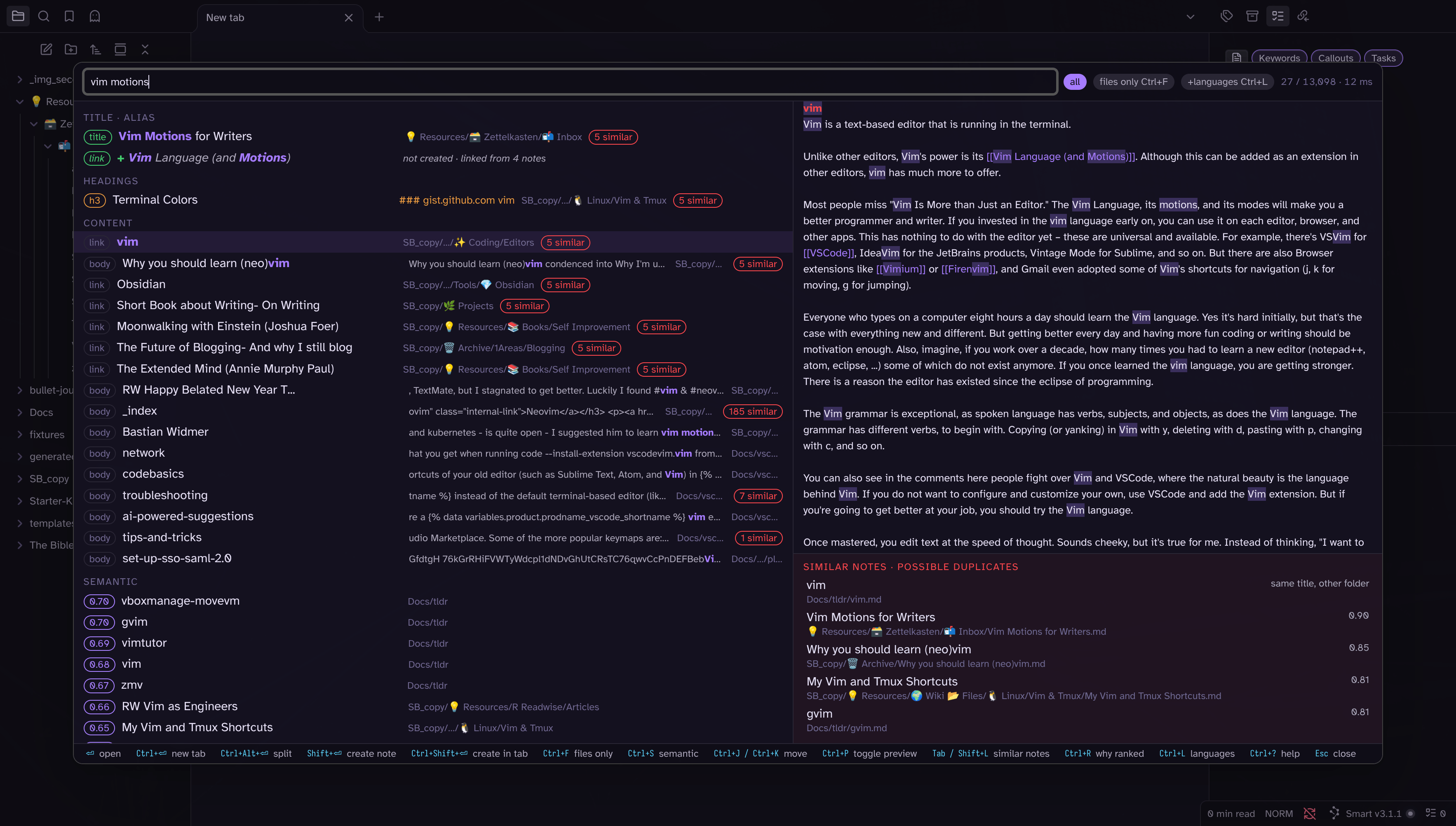
I've built my dream search for Obsidian based on fzf/Telescope from Neovim for preview style and fuzzy search, Omnisearch for smarter search, and Smart Connections for similar notes, all based on Rust WASM to be super fast. This is how it looks:
Video showcase:
https://github.com/user-attachments/assets/2a36f06a-0cf9-4156-a0aa-6bbc0249ea34
Origin Story
I used Omnisearch for 5+ yearso, plus, and I ran into the 10k limitation of Obsidian. luckly Kepano, the CEO Obsidian quickly solved. The problem was that wikilinks starting with [[ didn't show notes that existed in the vault. I knew it, sometimes they showed, sometimes they didn't, see the video here.
But I also noticed, that Omnisearch sometimes I missed notes, or I had to know the title exactly. It was not as much fuzzy finding as i wanted, plus the configration between searching the title of file (I used quick switcher for taht) or h1-h3 headers, or if inside the body, wasn't that clear. Although, to their credit, you can speicify the weight of each in the settings.
But I also started to use Smart Connection panel on the left, that helped me to find similar notes, as to make sure I don't create a note that already exists.
In this new plugin I created with Claude Code, i integrated Quick Seach, OMniseach and Smart Connections into one Plugin. If you have smart connections installed, we use the embeddings created for similary search. Plus the search is more fuzzy too, so if you type toubleshoot, missing the r, it will still find the troubleshoot note.
It will nicely show the different titles, and h1-3 and body, plus you can toggle why they were found.
And bottom right, there's similar notes to show and avoid creating an existing note twice, which is most important to my obsidian workflow, as i don't relay on folders, but all by seach. So if search does not work anymore, I will create 10 of the same notes over and over again, plus i might not find my notes, usually i remember when I create a note and want to find a spefific, but in case I forgot, then this plusign helps me too.
[!NOTE] The name "Fast Find 10K" comes from finding fast notes, which is the key of this plugin and the 10k is a hint to my personal limitation I got from 10k above. It's not meant to stay like this, or not usable below 10k, it will work peferctly fine too for low files, but that's the reason why I created it, and hence the name.
Features
Fast on big vaults. The index is a Rust engine compiled to WebAssembly, running in a Web Worker. On the 9,385-note / 27 MB test vault the finder is searchable about 0.3 s after Obsidian loads (fully indexed after 1.2–1.4 s), and a query takes 4–18 ms inside Obsidian (1–8 ms native). There is no input debounce: every keystroke is a query, and the screen is repainted in under 30 ms. Notes are cached in IndexedDB, so a reload re-indexes only what changed; an edit is picked up within half a second.
Accurate ranking in tiers. A note that matches every word in its title or an alias always ranks above one that matches only in a heading, which ranks above body-only matches. Within a tier, field weights, prefix and typo quality, how many title words the query left unmatched, word proximity, backlinks and your own opening history (frecency) decide the order. See How ranking works.
Fuzzy, but guarded.
troubelshootstill finds "Obsidian Troubleshooting" (one typo for 6–9 letter words, two for 10+, and one typo in titles already at 5 letters:Gitubfinds "GitHub"), while scattered subsequences are rejected, sowritingdoes not match "Airbyte Checkpointing", and a typo never borrows a letter from the next word, soinvoicedoes not match "Brand Voice" (n+voice); a dropped space still works:databasefinds "Data Base Design". Word order never matters:ai writingandwriting aireturn the same list.Why ranked here (Ctrl+R). Every row can show its tier, which field each word hit (exact, prefix or fuzzy, with the quality), and every score component. When a result surprises you, one key shows the reason:
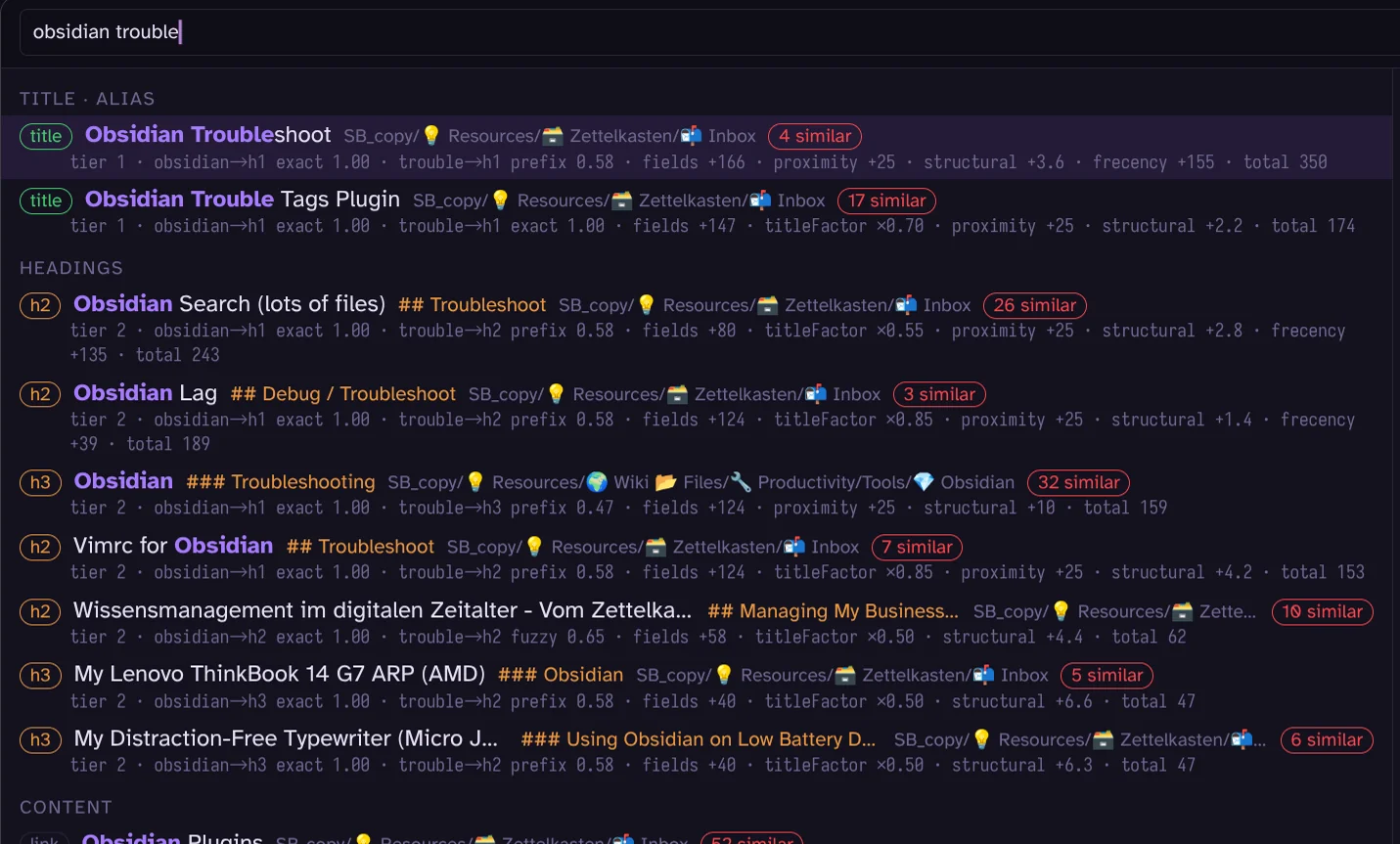
"Obsidian Troubleshoot" wins over "Obsidian Trouble Tags Plugin" although the latter matches
troubleexactly: two of its title words were not in the query (titleFactor ×0.70), and the first note was opened before (frecency +155).Similar notes, to avoid creating a note twice. The panel bottom right lists near-duplicates of the selected result, and every row carries an
N similarpill. Similarity comes from title overlap, plus Smart Connections embeddings when that plugin is installed. Before creating a note with Shift+Enter, the create guard shows the closest existing notes first ("Already have?"). This is the feature that stops a vault with no folders from collecting "AI", "AI and Data Engineering" and "AI for Data Engineers" three times over.Create when nothing exists. Shift+Enter creates a note named after the query (Mod+Shift+Enter in a new tab). Unresolved
[[links]]show as ghost rows ([ghost x2]= linked from two notes) and can be created the same way.Files only (Ctrl+F) switches to titles, aliases and paths, as a Quick Switcher replacement.
Telescope layout with preview. Results left, the note preview right with the matches highlighted (plain text for speed; embedded images are shown as pictures), vim keys to move (Ctrl+J/K) and to scroll the preview (Shift+J/K). Enter opens, Mod+Enter in a new tab, Mod+Alt+Enter in a split, Alt+Shift+Enter opens all shown results (10 or fewer).
Query syntax for narrowing:
"exact phrase",#tag,path:folder,-exclude. Optional words (a an the of to in on iby default) never exclude a note, and abbreviations expand (oss→ "open source"), both editable in the settings.Respects your vault setup. Obsidian's "Excluded files" are never indexed, you can add ignored globs, and folders such as an archive can be downranked instead of hidden.
Semantic results through Smart Connections embeddings, as a separate tier below the text matches: on by default for every query (a query embedding takes a few milliseconds), or on demand with Ctrl+S.
Resume and recall. "Search (resume last)" reopens the finder with the previous query; notes you keep opening from the same query get a sticky bonus.
Local only. No language model, no network. See LLMs or AI.
Install
Until the plugin is in the community list, install a release with BRAT (add ssp-data/obsidian-fast-find-10k as a beta plugin; this also works on mobile), or build it yourself:
make install VAULT=<vault> # builds wasm + plugin and symlinks plugin/dist into the vault
That needs Rust with the wasm32-unknown-unknown target, wasm-bindgen-cli 0.2.128 and Node. Without make:
bash scripts/build-wasm.sh
cd plugin && npm ci && npm run build        # dist/main.js (wasm and worker embedded), manifest.json, styles.css
V=<vault>/.obsidian/plugins/fast-find
mkdir -p $V && ln -sf $PWD/dist/main.js $PWD/dist/manifest.json $PWD/dist/styles.css $V/
Then enable "Fast Find 10K" under Settings → Community plugins. Requires Obsidian 1.5.7 or newer. The plugin's Obsidian id is fast-find (manifest ids allow only lowercase letters and hyphens, so no 10k); that id names the plugin folder and the commands (fast-find:search). Everything else, from the repo to the package, keeps the name Fast Find 10K.
docs/dev-checklist.md has the reload and verification steps.
Usage
Commands (bind them to hotkeys in Settings → Hotkeys):
| Command | What it does |
|---|---|
| Search | opens the finder over titles, aliases, headings, tags, links, paths and content |
| Search file names | opens it in files-only mode (titles, aliases, paths) |
| Search (resume last) | reopens it with the last query |
| Rebuild index | drops the note cache and reads every file again |
Query syntax: plain words are AND-ed and match by prefix and with typo tolerance; "exact phrase", #tag, path:folder, -exclude. A #tag no note carries, or a -word that would leave nothing, is searched as a plain word, so pasting a title such as Newsletter #115 works. No input debounce: every keystroke is a query.
An empty query lists recently opened notes. Rows show which field matched (title, alias, heading, content, link) with highlights, a preview on the right, and an N similar pill when near-duplicates exist: N is the number of rows the similar-notes panel shows for that note (title overlap plus up to five Smart Connections neighbours above the "Minimum similarity shown"); for rows beyond the first ten only the title-overlap part is counted, to keep typing instant.
Keys
Defaults (Mod is Cmd on macOS, Ctrl elsewhere); every binding can be changed in the settings, and Ctrl+? shows the current ones in the modal.
| Key | Action |
|---|---|
| ↓ / Ctrl+J | next result |
| ↑ / Ctrl+K | previous result |
| Shift+J / Shift+K | scroll the preview down / up. Search is case-insensitive, so typing lowercase j/k is the same query; only a note created with Shift+Enter would get a lowercase j/k in its name (rebind to Alt+J / Alt+K if that matters) |
| Tab | focus the similar-notes panel (Tab again or Esc returns) |
| Shift+L / Shift+H | vim-style: move into the similar-notes panel on the right / back to the results on the left (capital L and H cannot be typed into the query while bound; rebind if you need them) |
| Enter | open |
| Mod+Enter | open in a new tab |
| Mod+Alt+Enter | open in a split |
| Alt+Shift+Enter | open all shown results in tabs (10 or fewer) |
| Shift+Enter | create a note named after the query (with the "Already have?" guard) |
| Mod+Shift+Enter | create it in a new tab |
| Ctrl+F | toggle files only |
| Ctrl+S | add semantic results (Smart Connections) |
| Ctrl+P | toggle the preview |
| Ctrl+R | toggle "why ranked here" (tier, per-term field and match, score parts); while the search is open Ctrl+R does not reload Obsidian. A saved binding still on the old default Ctrl+/ moves to Ctrl+R on load (unless Ctrl+R is taken) |
| Ctrl+L | toggle language expansion for this search session (the German word list and the dictionary note join the abbreviations); off at startup unless "German words on at startup" is set. The header pill "+languages" shows the state |
| Ctrl+? (Ctrl+Shift+/) | toggle the key help |
| Esc | close (or leave the similar panel / help) |
Settings
- Indexing: ignored folders/globs (never indexed; Obsidian "Excluded files" are always honoured), downranked folders (still searchable, score × 0.3), rebuild index.
- Ranking: field weights (title 100, alias 90, h1 105, h2 65, h3 55, tag 30, link 20, path 15, body 10; a weight of 0 turns the field off; H1 is usually the note's own title and gets a hair more than the file name, but a note matched only in its H1 still sits in the headings tier below every title match), fuzzy typo tolerance (off / normal / loose), partial-match tier (when few / always / never), optional words that a query never requires (default
a an the of to in on i; they still add to the score where they match), abbreviations and synonyms (one group per line,oss: open source, open-source software; typing a single-word member also finds the other members, see Examples), German words on at startup (language expansion adds about 400 built-in English ↔ German word pairs and the dictionary note to the abbreviations:schoolfinds "Schule Madretsch",Kinderfinds "children"; off by default, Ctrl+L switches it per session), dictionary note (the path of a note in the vault whoseenglish: german, germanlines join the abbreviations, reloaded when you edit it). - Semantic: use Smart Connections embeddings, minimum similarity shown (similar-notes panel, note to note, default 0.70), minimum similarity for semantic results (the semantic tier and the create guard, query to note, default 0.60: a short query embeds further from a note, typical top hits score 0.65–0.8), semantic tier (always, the default: appended after every query, a few milliseconds / only when fewer than five full matches / on demand with Ctrl+S / never).
- Behaviour: create guard, preview open by default (desktop), preview open by default on mobile (off: a "preview" pill toggles it there), key hints in the footer (desktop only / always / never).
- Keys: every modal binding.
- Debug: "why ranked" by default, log engine timings to the console, clear frecency.
Mobile
The plugin runs on phones and tablets (the engine is WebAssembly in a worker, the cache is IndexedDB; the first start reads every note, which takes longer than on a desktop, and the header shows indexing N / total until it is done). The search opens in one column: the input on its own line, the pills (all / files only / +languages / preview) below it as tap targets, the results list scrolling, the preview stacked underneath when the pill turns it on, and no key-hint footer. With the preview on, a tap selects a row and shows it below; a second tap on the selected row opens it (with the preview off, one tap opens). Testing a build without a release: obsidian dev:mobile on in the desktop app emulates the mobile layout; on a real device, sync the vault's .obsidian/plugins/fast-find/ folder (Obsidian Sync with community plugins enabled, or any file sync) after make install, or publish a pre-release and install it through BRAT.
How ranking works
Each query word (and each quoted phrase) must match, except optional words (a an the of to in on i by default), which only add to the score. A note's tier comes from the weakest field its words matched, and a lower tier never ranks above a higher one:
- title · alias: every word in the title or an alias (unresolved link targets, "ghosts", also appear here and can be created with Shift+Enter). A ghost is hidden when a note of that name exists, compared with diacritics and emoji folded:
[[Café]]does not show as a ghost whenCafe.mdexists - headings: every word in a title, alias or H1–H3
- content: every word somewhere, including body, tags, links and path
- partial: some words missing but one in the title or an alias (shown when the other tiers have few hits)
- semantic: Smart Connections neighbours of the query, when enabled
Within a tier, notes where every word matched exactly or by prefix come before notes where a word matched only with a typo (when the query itself has the typo, every hit is fuzzy and the scores decide). Then the score adds the field weights × match quality (exact 1.0, prefix by length ratio, fuzzy below that), shrinks it for title words the query left unmatched, and adds proximity (words close together or in one section), backlinks, a bonus when the title is exactly the query's words, frecency (opens over the last 30 days, decaying) and a sticky bonus for a note opened three times from the same query. Downranked folders and very short notes are multiplied down. Ctrl+R shows every part for each row.
Smart Connections
When Smart Connections (4.7.2) is installed and has embedded the vault, Fast Find 10K reads its note vectors (read-only, through one bridge module) and uses them for the semantic tier, the similar-notes panel and the create guard. Without it everything else works and the similar panel uses title similarity only, and hides itself when it has nothing to show.
How the index and the embeddings stay current
Two separate things, both automatic:
- The note index is built from the markdown text. On start it comes from the plugin's cache and only changed files are re-read (about 1.3 s for 10k notes); afterwards every create, edit, rename or delete in the vault updates it within half a second. "Rebuild index" in the settings drops the cache and reads every file again; you only need it after changing the ignore globs or if something looks off.
- The embeddings are never computed by this plugin. Each time you open the search, the bridge fingerprints Smart Connections' item list (path, content hash and embedding reference per note), at most once per 30 seconds, and reloads all vectors into the engine when that fingerprint changed. So while Smart Connections is still embedding new notes, every search opened after a pause sees what it has finished so far; nothing to run afterwards. With "Log engine timings" on, the console shows a
vectors: N notesline at each reload.
Examples
All results below come from the CLI on the 9,385-note test vault (ff10k query <vault> "<q>"), which is a copy of my own vault; Obsidian shows the same list.
Word order does not matter. ai writing and writing ai give the same list:
1  AI Writing
1  How to detect AI Writing
1  Use Cases of AI Writing (ChatGPT, Lex, etc.)
1  Writing with AI- SSP Data
Typos. obsidian troubelshoot (letters swapped) still puts "Obsidian Troubleshoot" first; the rest are notes with a troubleshooting heading:
1  Obsidian Troubleshoot
2  Obsidian                          ### Troubleshooting
2  Vimrc for Obsidian                ## Troubleshoot
2  Obsidian Lag                      ## Debug / Troubleshoot
Fully covered titles win. obsidian trouble ranks "Obsidian Troubleshoot" above "Obsidian Trouble Tags Plugin", because the second title has two words the query did not mention. Ctrl+R shows it: trouble→title prefix 0.58 · titleFactor ×1.00 versus trouble→title exact 1.00 · titleFactor ×0.70. Type trouble tags and the plugin note comes first.
Phrase, tag, path and exclude. "data engineering" duckdb needs the two words next to each other and duckdb anywhere:
1  Reducing complex Data Engineering Architecture with SQLite and DuckDB
1  What has WebAssembly (WASM) to do with DuckDB and data engineering   [ghost x1]
2  Data Engineering Whitepapers       ## DuckDB
The second row is a ghost: a [[link]] to a note that does not exist yet. Shift+Enter creates it. path:inbox dagster -airflow limits the path to inbox, requires dagster and drops every note that mentions Airflow.
Optional words. should i change finds "Should I Change My Writing because of AI" first, and a note titled "Change Should Happen" also qualifies for the title tier although it has no i, because i is on the optional list. Where an optional word does hit, it still adds to the score.
Abbreviations. With the setting line oss: open source, open-source software, the query oss matches notes that say OSS, "open source" or "open-source software" in the title, headings or body:
without the group                        with the group
1  Open Source (alias OSS)               1  Open Source
1  dbt (alias)                           1  Supporting Open Source
1  OSS git Analytics and insights        1  Why Open-Source
1  Podcast Bedag - OSS Data Engineering  1  dbt (alias)
                                         1  open-source lock-in
                                         1  The Death of Open Source
German words. With language expansion on (Ctrl+L in the search, or the "German words on at startup" setting), school also finds "Empfangsstruktur (Schule Madretsch)" and "Schulen im Kanton" (prefix: schule → Schulen, umlauts folded), and schule finds the English "School Notes". Notes found through a word from the list or from an abbreviation group show their highlights in a second colour with a "via word list" pill, so you can tell them from direct matches. The list is about 400 everyday pairs (crates/ff10k-core/dict/de.txt); add your own in the abbreviations box, or keep them in a note (Dictionary.md with lines such as invoice: rechnung, faktura) and name it in the "Dictionary note" setting. Everything stays exact or prefix: no translation model, and nothing changes while the toggle is off.
Spanish, French, any other language. The built-in list is German only, but the mechanism is not: put the pairs in the dictionary note (school: escuela, colegio, one line per word) or in the abbreviations box, and Ctrl+L switches them with the German list. A built-in list for another language is a text file in the same format: add crates/ff10k-core/dict/es.txt, one match arm for "es" in dictionary() in crates/ff10k-core/src/rank.rs, and a toggle next to "German words" in the settings tab; pull requests welcome. Keep false friends and words that are also English words out of such a list (the German file's header says which were dropped and why).
Why not a full dictionary: I tried the free Ding German–English dictionary (414k entries, GPL). Every automatic reduction expands a word to all its senses: note becomes Banknote and Hauch, change becomes Kleingeld and Münzen, house becomes Geschlecht, and the strict rules that remove those also remove Kind and Daten. A query expansion needs the one everyday translation, which a general dictionary does not mark, so the built-in list is hand-picked and the dictionary note is yours.
The same for de: data engineering: alone, de is an exact two-letter word and finds "TJ DeVries" and "Elias DeFaria"; with the group it finds the "Data Engineering" hub notes first. Typing a single-word member finds the others in both directions (k8s: kubernetes makes kubernetes find the "K8s Cheatsheet" note too); a several-word member is only found, so open source does not search for oss.
Files only. Ctrl+F with obsidian lag lists "Obsidian Lag" and then partial title matches ("Obsidian", "Using Obsidian with AI"); headings and body are not searched.
Similar notes. Selecting "How to detect AI Writing" shows, from the Smart Connections embeddings:
0.850  AI Writing
0.838  What I Learned Writing with AI
0.836  Originality.ai (detecting AI generated articles)
0.830  Tools to Check Plagiarism and AI-Generated
Without Smart Connections the panel uses title overlap only: "👉🏻 Data Engineering" lists "AI in Data Engineering", "Airflow for Data Engineering", "Data Engineering Glossary" and so on.
Compared with Omnisearch
Same vault, same queries, Omnisearch 1.31.0 with its default fuzziness. First three results each:
| Query | Fast Find 10K | Omnisearch |
|---|---|---|
obsidian trouble |
Obsidian Troubleshoot · Obsidian Trouble Tags Plugin · Obsidian (### Troubleshooting) | Obsidian Trouble Tags Plugin · Obsidian Troubleshoot · Vimrc for Obsidian |
obsidian troubelshoot |
Obsidian Troubleshoot · Obsidian (### Troubleshooting) · Vimrc for Obsidian | no results |
oss |
Open Source (alias OSS) · dbt (alias) · OSS git Analytics and insights | OSS git Analytics and insights · Open Source · Podcast Bedag - OSS Data Engineering |
Recall over the vault's own titles (every note queried by its full title, its first two words, and its title with one letter deleted; the note must be the first hit), a 939-note sample (every 10th note) for both tools. No language expansion or abbreviations were active in any run:
| Query | Fast Find 10K (after the recall fixes) | Omnisearch |
|---|---|---|
| full title | 99.2 % first, 99.9 % in top 5 | 97.8 % first, 100 % in top 5 |
| first two words | 61.3 % first, 83.0 % in top 5 | 71.5 % first, 87.4 % in top 5 |
| one letter deleted | 98.6 % first, 100 % in top 5 | 78.2 % first, 83.8 % in top 5 |
The "first two words" row is expected, not a gap: a query such as RW Data matches about a hundred notes titled "RW Data …" equally (every word matched, same number of unmatched title words), so which equal note comes first is a tie-break. Fast Find 10K breaks ties by backlinks, then by modification date; Omnisearch's BM25 prefers the shorter document, which happens to agree with the test more often. The note you want is in the top 10 in 88 % of these ambiguous queries, and typing one more word resolves it. Run ff10k recall <vault> to get the numbers for your own vault.
LLMs or AI
Everything here shown is based locally, no AI model used, no local and also no frontier or online model. Smart Connection creates local embeddings in .smart-env (small local embedding model), and these we use for showing similar notes. Everything else is just local index based on your notes.
Everything runs locally and there is no language model involved. Search is a plain index over your notes: tokens, fields, positions, frecency. No model runs when you type. The one exception is similar notes: if you have Smart Connections installed, FF10K reuses the embeddings it already stored in .smart-env. Those come from a small local embedding model (a few hundred MB, not an LLM), and FF10K does not compute them, but instead read and compresses them from Smart Connctions. If Smart Connections isn't installed, nothing changes except the similar-notes panel falls back to title overlap only.
Performance
On a 9,385-note / 27 MB vault: warm start about 1.2–1.4 s to fully indexed (searchable after the first 500 notes), engine time per query 4–18 ms in Obsidian, 1–8 ms native. Numbers and method in docs/perf.md.
Development
make build(wasm + plugin),make test(Rust, golden, typo recall, plugin),make install VAULT=…,make recall VAULT=…,make release VERSION=x.y.z(bumps the version files, builds, commits, tags and creates the GitHub release withgh)- Build:
cargo build --release(CLI binary:target/release/ff10k) - Test:
cargo test --workspace; plugin:cd plugin && npm test - Golden:
cargo test -p ff10k-core --features golden --test golden, orff10k golden <vault> <golden.toml>(exit 1 on failures) - Typo recall:
cargo test -p ff10k-core --features golden --test typo_recall -- --nocapture(one typo in a title word must keep the note in tier 1) - Recall on your own vault:
ff10k recall <vault> [--every 10] [--all-misses]queries every note by its full title, its first two words and its title with one letter deleted, and prints how often the note is the first hit, in the top 5 and in the top 10, with every miss (--sample-out file.jsonwrites the queries for running the same set through another search plugin) - Benches:
cargo bench -p ff10k-core(criterion),ff10k bench <vault>(p50/p95 in microseconds, 200 runs per query),ff10k profile <vault>(ingest time per phase, engine heap)
CLI (ff10k)
ff10k index   <vault>                                   # docs, bytes, index time, RSS
ff10k query   <vault> "<q>" [--files] [--debug] [--limit N] [--smart-env] [--synonym "oss: open source"]...
ff10k similar <vault> <vault-relative-path> [--smart-env]
ff10k golden  <vault> <golden.toml>
ff10k bench   <vault>
ff10k profile <vault>                                   # read / extract / tokenize / insert / keys split, heap
ff10k recall  <vault> [--every K] [--sample-out f.json] [--all-misses]   # title / two-word / one-typo recall @1 @5 @10
The vault walk skips dot-folders and non-.md files and honours Obsidian "Excluded files"
(userIgnoreFilters in .obsidian/app.json: /regex/ entries or path prefixes).
--smart-env loads Smart Connections embeddings from <vault>/.smart-env.
Credits
Ideas and behaviour borrowed from fff, fzf, Telescope, Omnisearch and Smart Connections. Fuzzy matching by neo_frizbee.
See also my other plugins I made, Obsidian Trouble Tags.