
- Overview
- Scorecard
- Updates4
Entity linker is an Obsidian plugin links research terms to corresponding standard entities(wikidata, wikipedia, openalex)
Usage
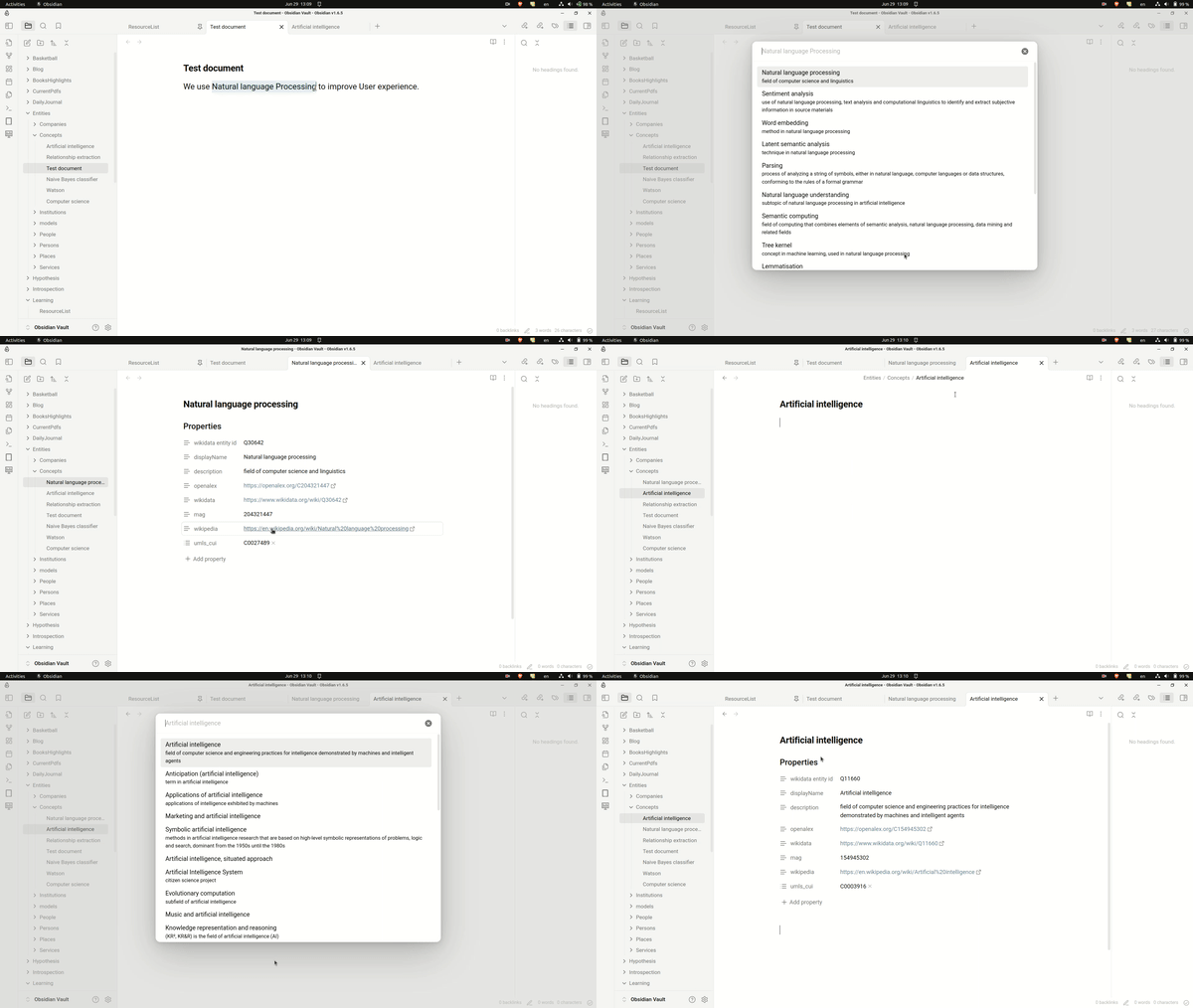
This plugin has two commands:
Link selection to entity, which suggests entities using the selected text as search term. On choosing a suggestion it resolves the entity note (creating it if it does not exist yet) and replaces the selection with a link to it. If the canonical name differs from the text you selected, the link is aliased ([[Post-training quantization|PTQ]]) so your prose reads as written.Link active note to entity, which suggests entities using the active note's title as search term, and writes the resolved properties into the frontmatter of the note you are in. It never creates a separate note.
Before creating anything, the plugin looks for an existing note of that name anywhere in the vault, so a note you already filed by hand is reused rather than duplicated under a different folder or casing.
Settings
| Setting | Effect |
|---|---|
| Polite email | Sent to the OpenAlex API for faster, more consistent responses. |
| Entity folder | Where notes for named entities (the Wikipedia/Wikidata results) are created. |
| Concept folder | Where notes for OpenAlex concept results are created. Leave empty to keep everything in the entity folder. |
| Overwrite existing properties | If checked, existing properties are overwritten instead of preserved. |
| Insert link at selection | Replace the selected text with a link to the note instead of opening it in a new tab. |
| Record aliases | Add the searched term and canonical name to the note's aliases so both resolve to it. |
Properties that resolve to nothing are skipped rather than written as blanks, so a note never accumulates empty
wikidata: / mag: / umls_cui: keys.
Demo
Entity linking via selection as well as active note
How it works
The plugin queries the OpenAlex concepts API for the search term. OpenAlex concepts are scholarly topics, so those hits are filed to the concept folder. When OpenAlex returns nothing, the plugin falls back to resolving the term against Wikipedia/Wikidata, and those hits — typically people, organisations and other named things — are filed to the entity folder.
Installation
From github
- Go to the Releases page.
- From the latest release, download
main.js,manifest.jsonandstyles.cssfrom the Assets section. The auto-generated "Source code" archives will not work:main.jsis a build artifact and is not committed. - Create the folder
/your-vault/.obsidian/plugins/entity-linker/if it does not already exist. - Move the three downloaded files into that folder.
- Enable the plugin in Obsidian:
- Open Obsidian, go to Settings > Community Plugins.
- Make sure Restricted mode is off.
- Search installed plugins for entity-linker.
- Click Enable.
From within Obsidian
You can install this plugin within Obsidian by doing the following:
- Open Settings > Community plugins.
- Make sure Restricted mode is off.
- Click Browse.
- Search for Entity Linker.
- Click Install.
- Once installed, click Enable.
For development
Compilation
- Clone this repo inside path/to/your/dev/vault/.obsidian/plugins.
- npm i or yarn to install dependencies
- npm run build to compile, or npm run dev to start compilation in watch mode.
Roadmap
- First release
- Add fuzzy logic
- Add direct search
FAQs
- Why is email(optional) asked in settings?
We use OpenAlex API for fetching metadata. Their API is rate limited. If you add your email in the request, your requests goes into polite pool which has much faster and more consistent response times.
Recommendations
- Obsidian Wikidata Importer pulls data from the Wikidata database into your Obsidian notes
- Obsidian Wikipedia gets the first section of Wikipedia and pastes it into your active note.
Acknowledgement
- Many thanks to Shaun Martin for File Suggestion Component which this plugin relies on.
- Thanks to OpenAlex team for providing free for use API over scholarly works.
- Thanks to Obsidian team for upholding malleability in the product that allows people to add and share new features. without hassle.