English Write Checker
 julioagh171 downloads
Real-time English writing suggestions powered by a local LLM (Ollama) to reach C1-C2 level.
- Overview
- Scorecard
- Updates6
An Obsidian plugin that analyzes your English writing in real time using a local LLM via Ollama. It highlights grammar errors and style suggestions directly in the editor, with inline replacements you can accept with a single click.
Features
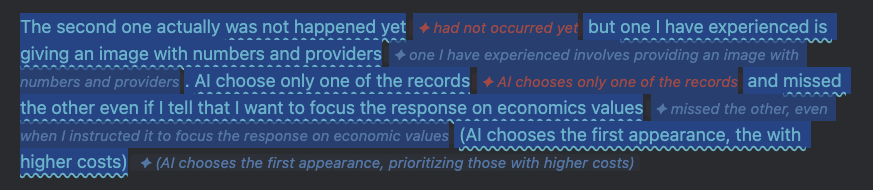
- Red underline — grammar mistakes (wrong tense, missing article, subject-verb disagreement, etc.)
- Blue underline — style improvements to reach C1-C2 level vocabulary and register
- Inline suggestion chips shown next to each flagged phrase
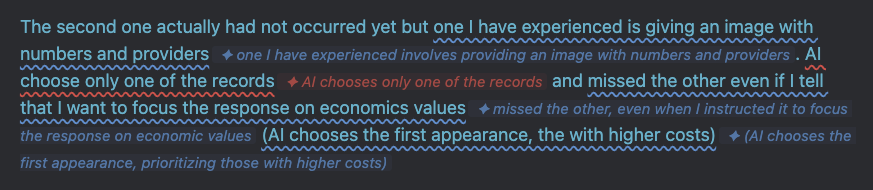
- Click any suggestion to instantly accept it
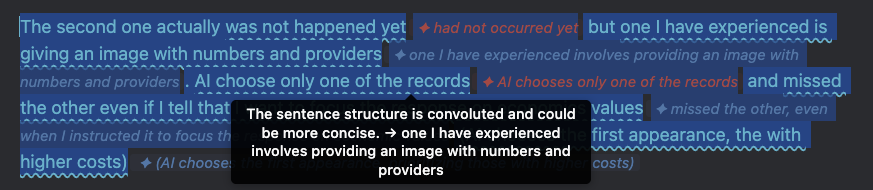
- Tooltip with explanation on hover
- Fully local — no data leaves your machine
Screenshots
Suggestions displayed inline
Hover to see the explanation
Click to accept a suggestion
Requirements
- Obsidian 0.15.0 or higher
- Ollama running locally
- Model pulled:
gemma3:4b(orgemma3:12bfor better quality)
Installation
- Clone or download this repository
- Copy the folder into your vault's plugin directory:
The folder must contain only:<your-vault>/.obsidian/plugins/english-write-checker/main.js,manifest.json,styles.css - Open Obsidian → Settings → Community plugins → enable English Write Checker
- Make sure Ollama is running:
ollama serve
ollama pull gemma3:4b
Usage
- Open a note and write or paste English text
- Select the paragraph you want to analyze
- Open the Command Palette (
Cmd+P) → English Write Checker: Analyze selected text - Click any suggestion chip to accept it, or hover to read the explanation
- To clear all suggestions: English Write Checker: Clear all suggestions
Tip: assign a hotkey to "Analyze selected text" in Settings → Hotkeys for faster access.
Settings
| Setting | Default | Description |
|---|---|---|
| Ollama endpoint | http://localhost:11434 |
URL where Ollama is running |
| Model | gemma3:4b |
Change to gemma3:12b for higher quality |
| Target level | C1 |
B2, C1, or C2 proficiency target |
License
MIT © Julio Gonzales
Based on write-good-obsidian by Mark Hesketh (MIT).
HealthExcellent
ReviewSatisfactory
About
Analyze English writing in real time using a local LLM via Ollama and receive grammar and style suggestions inline. Highlight grammar errors with red underlines and style upgrades with blue, show clickable suggestion chips with hover explanations, accept fixes with one click, and keep all processing local.Details
Current version
0.1.5
Last updated
4 months ago
Created
5 months ago
Updates
6 releases
Downloads
171
Compatible with
Obsidian 0.15.0+
Platforms
Desktop only
License
MIT