
- Overview
- Scorecard
- Updates13
This plugin lets you plan small emails inside your Obsidian notes.
Install ..
.. automatically in Obsidian
- Go to Community Plugins in your Obsidian Settings and disable Safe Mode
- Click on Browse and search for "Email Block"
- Click install
- Toggle the plugin on in the Community Plugins tab
.. manually from this repo
- Download the latest release
*.zipfile. - Unpack the zip in the
.obsidan/pluginsfolder of your obsidian vault
How to use
Add the "email" code block into your note:
... with plain text as body content:
```email
to: [email protected]
subject: My Subject
body: "Hey info,

  here is some content"
```
... with a referenced note as body content:
```email
to: [email protected]
subject: My Subject
body: [[MyMail4711]]
variables:
  myvar: TestVar
```
You can use the variables parameter to replace placeholders in your body text with the variable values.
To include a variable in the body text just add a placeholder {{myvar}}.
Variables from fontmatter data can be used as well.
... with a body text after the yaml:
```email
to: [email protected]
subject: Hello World
---
Hi there,
this is my new body
Best!
JB
```
... you can use properties, like variables, on the subject or within the body:
```email
to: [email protected]
subject: reminder for {{name}}
---
Dear {{name}},
this is not a personal email.
Regards,
FI
```
Parameter
You can customize the view with the following parameters:
| Parameter | Description | Values | Required |
|---|---|---|---|
| to | The main receiver of the mail. Multiple receiver seperated by ",". | String / List of Strings | |
| cc | The cc receiver of the mail. Multiple receiver seperated by ",". | String / List of Strings | |
| bcc | The bcc receiver of the mail. Multiple receiver seperated by ",". | String value / List of Strings | |
| subject | The subject of the email. Plain text or combined text with variables | String value | x |
| body (1) | The body of the email. Plain text or a link to a [[NoteFile]] (2). | String value | x |
| showmailto | Show the "mailto" link after the mail body. | true/false (Default: true) | |
| variables | A map of placeholder variables. | YAML Object | |
| from | A from field (only for documentation). | String value | |
| date | The date/time the mail was sent (only for documentation). | String value |
- The body can be appended after the yaml with a "---" separation
- No formatting is supported (only new lines) (reason).
Example
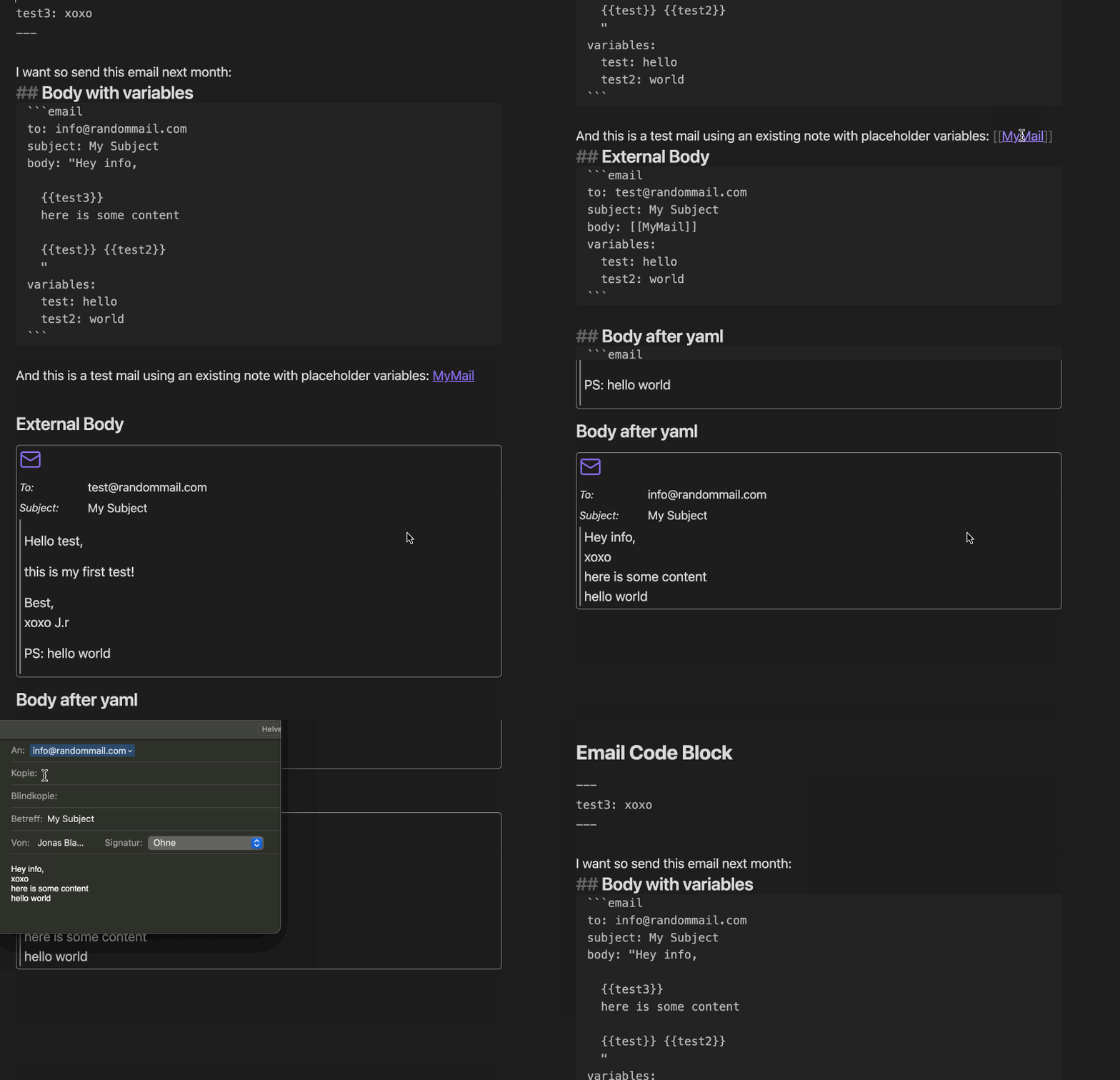
How to dev
- Clone this repo into the plugin folder of a (non-productive) vault (
.obsidian/plugins/) npm inpm run dev- Toggle the plugin on in the Community Plugins tab
Contributors
Thank you for your contributions!
Donate
HealthGood
ReviewSatisfactory
About
Compose and plan small emails directly inside your notes using an email code block, with body content as plain text, a referenced note, or inline after YAML. Use variables and frontmatter placeholders like {{name}} to inject content, specify recipients (to/cc/bcc), and show a mailto link.Details
Current version
1.1.1
Last updated
10 months ago
Created
4 years ago
Updates
13 releases
Downloads
7k
Compatible with
Obsidian 0.15.0+
Platforms
Desktop, Mobile
License
MIT
Sponsor