Eisenhower Matrix
 oamadorr760 downloads
Organize your tasks using the Eisenhower Matrix — prioritize by urgency and importance across 4 quadrants.
- Overview
- Scorecard
- Updates1
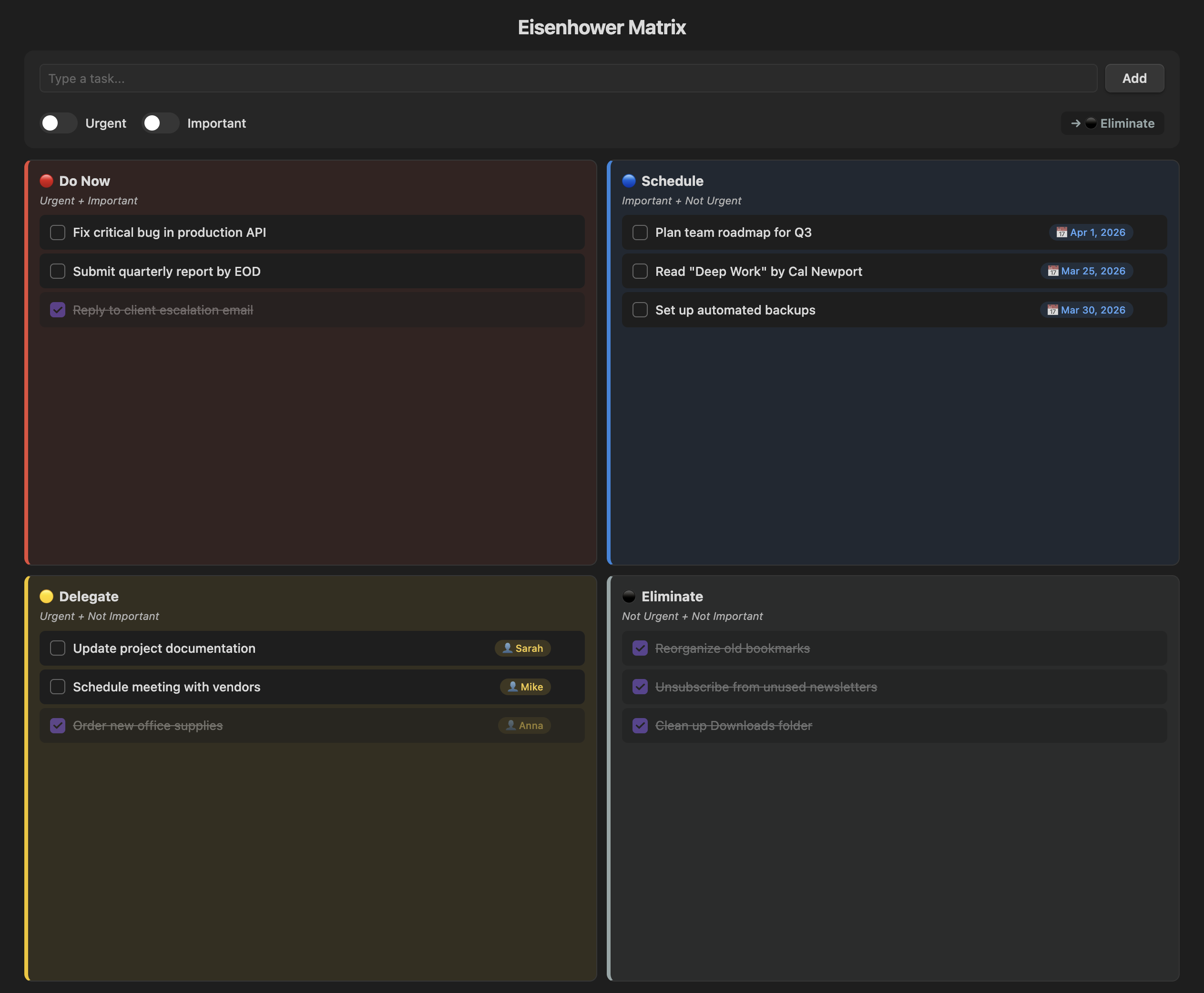
Eisenhower Matrix — Obsidian Plugin
Organize your tasks by urgency and importance using the Eisenhower Matrix — directly inside Obsidian.
Overview
The Eisenhower Matrix (also known as the Urgent-Important Matrix) helps you decide and prioritize tasks by sorting them into four quadrants based on urgency and importance.
| Quadrant | Urgent | Important | Action |
|---|---|---|---|
| 🔴 Do Now | ✅ | ✅ | Execute immediately |
| 🔵 Schedule | ❌ | ✅ | Plan a date |
| 🟡 Delegate | ✅ | ❌ | Assign to someone |
| ⚫ Eliminate | ❌ | ❌ | Drop or defer |
Features
Core
- Toggle-based input — flip the Urgent and Important switches and the task is automatically routed to the correct quadrant
- Smart contextual fields — Schedule tasks prompt for a due date 📅, Delegate tasks prompt for an assignee 👤
- Markdown persistence — all tasks are saved as a readable
Eisenhower Matrix.mdfile in your vault, fully compatible with search, backlinks, and Dataview - Inline editing — click any task text to edit it in place; Enter to save, Escape to cancel
Organization
- Drag & drop — move tasks between quadrants by dragging them
- Reorder within quadrant — drag tasks inside the same quadrant to change priority order
- Hide/show completed — toggle to hide finished tasks and focus on what's pending
- Task counter — each quadrant shows
(pending/total)at a glance - Delete confirmation — clicking ✕ opens a confirmation menu to prevent accidental deletion
Scheduling & Delegation
- Quick date buttons — pick "Tomorrow", "+7 days", or "+30 days" instead of manually selecting a date
- Assignee autocomplete — previously used names appear as clickable chips for quick selection
- Overdue alerts — past-due Schedule tasks are highlighted in red with a ⚠️ badge
- Move with context — moving a task to Schedule or Delegate opens a modal to set the date or assignee
Settings
- Custom data file — choose which markdown file stores your tasks
- Auto-complete Eliminate — tasks added to Eliminate are automatically marked as done
- Responsive layout — works on desktop, tablet, and mobile screens
How to Use
- Click the grid icon in the ribbon (or use the command palette:
Open Eisenhower Matrix) - Type your task in the input field
- Toggle Urgent and/or Important to select the target quadrant
- Click Add or press Enter
- Check off completed tasks ✓, click text to edit, or drag to reorganize
Installation
From Community Plugins (pending approval)
- Open Settings → Community plugins → Browse
- Search for "Eisenhower Matrix"
- Click Install, then Enable
Manual Installation
- Download
main.js,manifest.json, andstyles.cssfrom the latest release - Create a folder
.obsidian/plugins/eisenhower-matrix/in your vault - Copy the 3 files into that folder
- Enable the plugin in Settings → Community plugins
License
MIT — free for personal and commercial use.
Made with ❤️ by Amador Rosa
HealthExcellent
ReviewSatisfactory
About
Organize tasks by urgency and importance with an interactive Eisenhower Matrix inside Obsidian. Toggle urgency and importance to auto-route tasks into quadrants, edit inline, drag-and-drop to reorder or move tasks, schedule dates or assign tasks to people, and persist everything to a readable Markdown file with overdue alerts and quadrant counters.Details
Current version
1.0.0
Last updated
6 months ago
Created
6 months ago
Updates
1 release
Downloads
760
Compatible with
Obsidian 0.15.0+
Platforms
Desktop, Mobile
License
MIT