Search...Search plugins and themes...
⌘K
Sign in
  • Get started
  • Download
  • Pricing
  • Enterprise
  • Account
  • Obsidian
  • Overview
  • Sync
  • Publish
  • Canvas
  • Mobile
  • Web Clipper
  • CLI
  • Learn
  • Help
  • Developers
  • Changelog
  • About
  • Roadmap
  • Blog
  • Resources
  • System status
  • License overview
  • Terms of service
  • Privacy policy
  • Security
  • Community
  • Plugins
  • Themes
  • Discord
  • Forum / 中文论坛
  • Merch store
  • Brand guidelines
Follow us
DiscordTwitterBlueskyThreadsMastodonYouTubeGitHub
© 2026 Obsidian

Easy Keep View

tazihadtazihad2k downloads

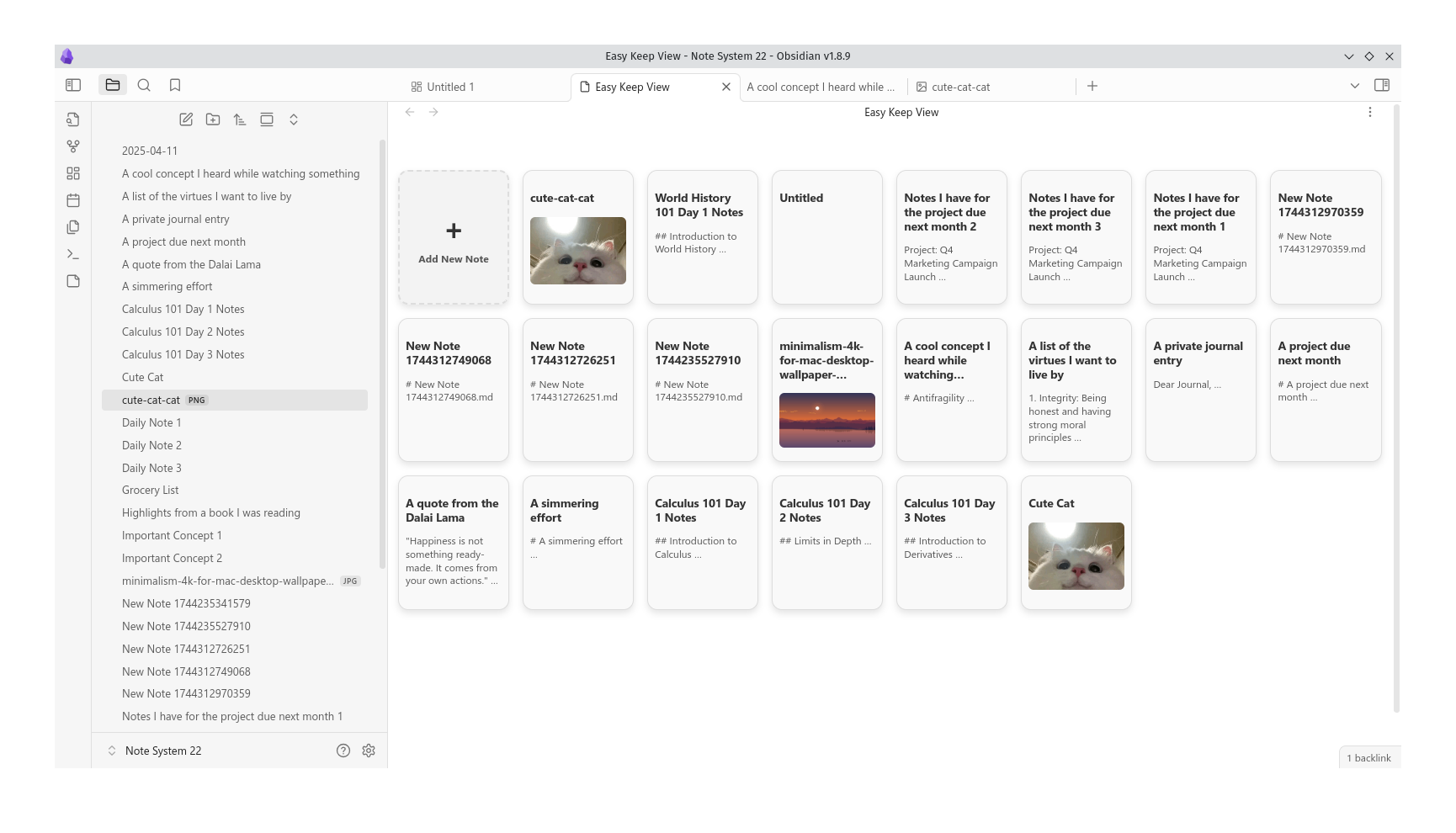
Easy Keep View mimics the Google Keep interface, allowing you to view and manage your notes with image thumbnails and excerpts.
Add to Obsidian
  • Overview
  • Scorecard
  • Updates2

Easy Keep View is a plugin that mimics the Google Keep interface, allowing you to view and manage your notes with image thumbnails and excerpts.

Screenshot

Features

  • Display notes in a card-like view with titles, excerpts, and optional image thumbnails.
  • Easy-to-use interface inspired by Google Keep.
  • Supports dark and light themes.
  • Create new notes directly from the plugin view.

Installation

  1. Download the latest release from the GitHub repository.
  2. Install the plugin by going to Settings > Community Plugins > Install Plugin and selecting Easy Keep View.
  3. Enable the plugin and start organizing your notes!

Usage

  • Once installed, you can access Easy Keep View from the ribbon or sidebar.
  • Click on a note card to open it in a new tab, or create a new note by clicking the "+" card.

Configuration

You can customize the theme mode of the plugin (light, dark, or system-based) via the plugin settings.

Contributing

Feel free to fork and submit pull requests! Contributions are welcome.

License

MIT License. See LICENSE for more details.

72%
HealthGood
ReviewSatisfactory
About
Display notes in a Google Keep–style card view with titles, excerpts, and optional image thumbnails. Create new notes from a "+" card, open notes in new tabs, and switch between light, dark, or system themes.
VisualizationImagesTheming
Details
Current version
1.0.1
Last updated
Last year
Created
Last year
Updates
2 releases
Downloads
2k
Compatible with
Obsidian 1.8.9+
Platforms
Desktop, Mobile
License
MIT
Report bugRequest featureReport plugin
Author
tazihadtazihad
github.com/tazihad
GitHubtazihad
  1. Community
  2. Plugins
  3. Visualization
  4. Easy Keep View

Related plugins

Leaflet

Interactive maps inside your notes.

Note Gallery

A masonry gallery that will visualize your notes, similar to Craft note view.

Advanced Canvas

Supercharge your canvas experience. Create presentations, flowcharts and more.

Minimal Theme Settings

Control the colors and fonts in Minimal Theme.

Hider

Hide interface elements such as tooltips, status bar, titlebar, and more.

Excalidraw

Visual PKM powerhouse. Create and edit Excalidraw drawings.

Mermaid Tools

Improved Mermaid.js experience: visual toolbar with common elements and more.

Maps

Adds a map layout to bases so you can display notes as an interactive map view.

Style Settings

Adjust theme, plugin, and snippet CSS variables.

Image Converter

Convert, compress, resize, annotate, markup, draw, crop, rotate, flip, align, drag-resize, rename with variables, and batch process images: WEBP, JPG, PNG, HEIC, TIF