Search...Search plugins and themes...
⌘K
Sign in
  • Get started
  • Download
  • Pricing
  • Enterprise
  • Account
  • Obsidian
  • Overview
  • Sync
  • Publish
  • Canvas
  • Mobile
  • Web Clipper
  • CLI
  • Learn
  • Help
  • Developers
  • Changelog
  • About
  • Roadmap
  • Blog
  • Resources
  • System status
  • License overview
  • Terms of service
  • Privacy policy
  • Security
  • Community
  • Plugins
  • Themes
  • Discord
  • Forum / 中文论坛
  • Merch store
  • Brand guidelines
Follow us
DiscordTwitterBlueskyThreadsMastodonYouTubeGitHub
© 2026 Obsidian

Auto switch themes between dark/light mode

carlrobertcarlrobert2k downloads

Toggling dark/light mode switches themes automatically

Add to Obsidian
  • Overview
  • Scorecard
  • Updates8

Do you switch between Dark and Light modes but prefer different themes? Then this plugin might be for you. It automatically switches themes when the dark/light mode setting changes. Choose your themes in the settings.
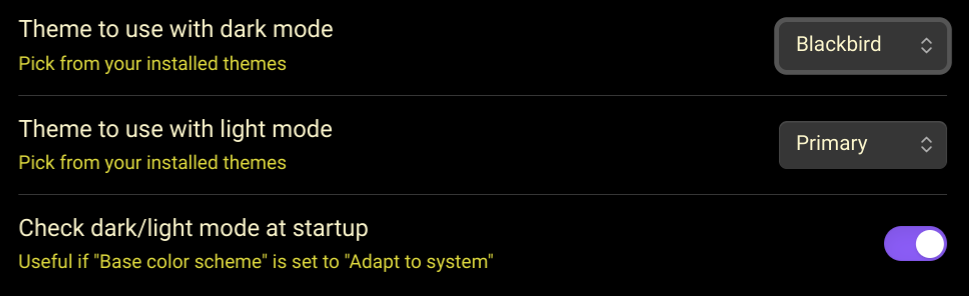
Plugin Settings


Thanks to user ProudBenzene for suggesting an improvement to the plugin.

Sources

This plugin is based on

  • https://github.com/obsidianmd/obsidian-sample-plugin
  • https://github.com/kenset/obsidian-theme-picker
72%
HealthGood
ReviewSatisfactory
About
Switch themes automatically when Obsidian toggles between light and dark mode. Choose a theme for each mode and apply it instantly on change.
ThemingAutomation
Details
Current version
0.7.0
Last updated
Last year
Created
2 years ago
Updates
8 releases
Downloads
2k
Compatible with
Obsidian 0.15.0+
Platforms
Desktop, Mobile
License
MIT
Report bugRequest featureReport plugin
Author
carlrobertcarlrobert
github.com/carlrobert
GitHubcarlrobert
  1. Community
  2. Plugins
  3. Theming
  4. Auto switch themes between dark/light mode

Related plugins

Day and Night

Automatically toggle themes between day theme and night theme on a set time schedule.

Minimal Theme Settings

Control the colors and fonts in Minimal Theme.

QuickAdd

Quickly add new notes or content to your vault.

Templater

Create and use dynamic templates.

Homepage

Open a note, base, or workspace on startup, or set it for quick access later.

Hider

Hide interface elements such as tooltips, status bar, titlebar, and more.

BRAT

Easily install a beta version of a plugin for testing.

Style Settings

Adjust theme, plugin, and snippet CSS variables.

Readwise Official

Sync highlights from Readwise to your vault.

Linter

Format and style your notes. Linter can be used to format YAML tags, aliases, arrays, and metadata; footnotes; headings; spacing; math blocks; regular Markdown contents like list, italics, and bold styles; and more with the use of custom rule options.