DnD Wiki
 InfernoMoon288 downloads
Turn D&D wiki content into interactive reference cards and filtered lists in Obsidian.
- Overview
- Scorecard
- Updates9
DnD Wiki displays spells, feats, magic items, and other wiki content directly inside your notes.
The plugin includes source configurations for both the 2014/5e and 2024 rules. You can add other compatible wiki-style sources in the plugin settings.
Features
- Display DnD entries as collapsible cards.
- Create complete or filtered lists of spells, weapons, feats, items, backgrounds, and lineages.
- Use the included
5eand2024sources or configure your own. - Display complete class pages, subclasses, and selected page sections.
- Load other wiki pages with the generic
customblock. - Get autocomplete for block types, names, and supported filters.
- Create experimental Markdown homebrew files in your vault.
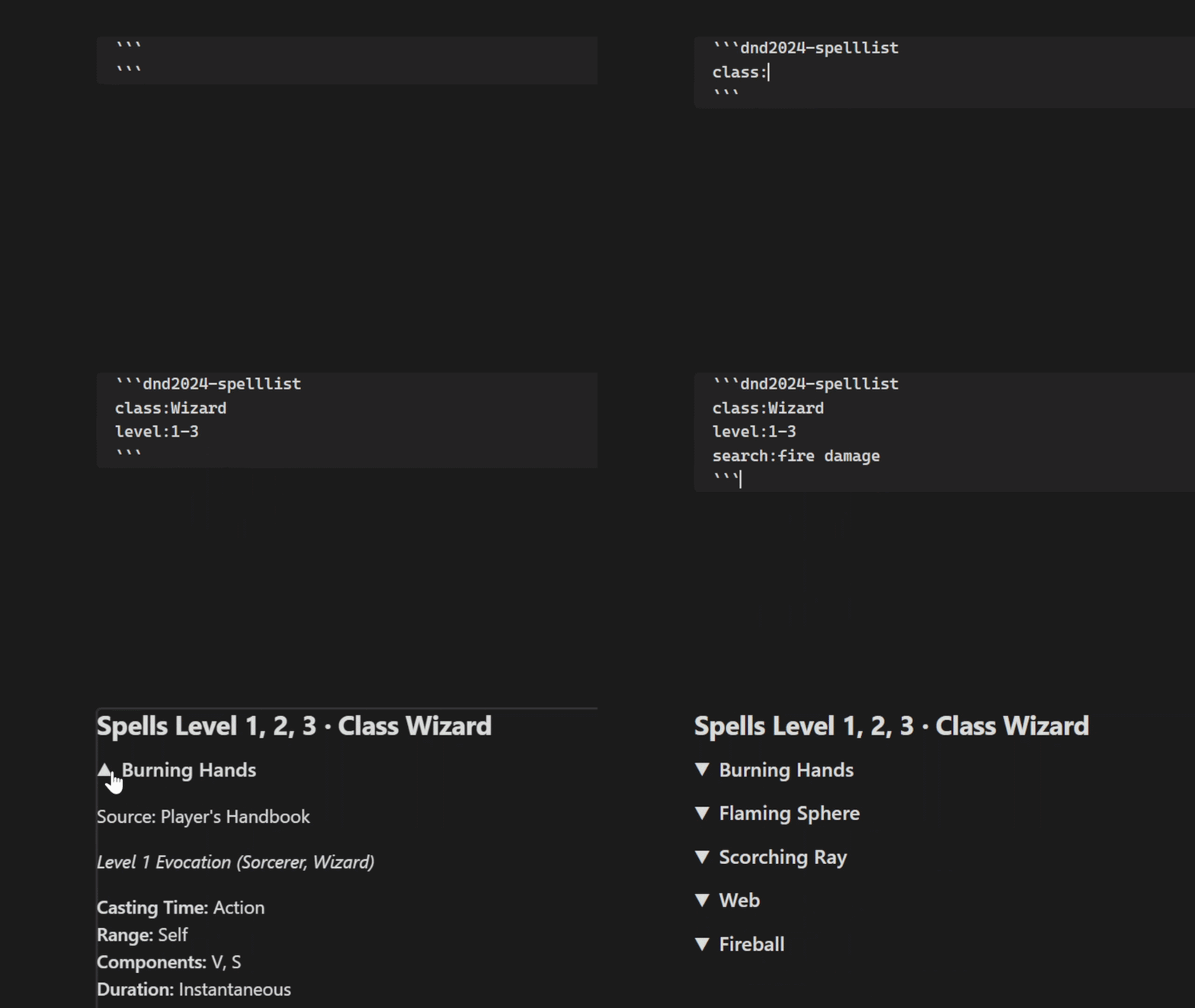
Basics
Every DnD Wiki block follows this pattern:
dnd<version>-<content-type>
Two versions are configured by default:
5euses the DnD 5e source.2024uses the DnD 2024 source.
The content type determines what is displayed. Examples include spell, spelllist, weapon, weaponlist, feat, magicitem, classinfo, and custom:
Individual blocks display named entries:
```dnd5e-spell
Fireball
Mage Hand
```
List blocks load a collection and apply filters:
```dnd5e-spelllist
level: 3
class: Wizard
school: Divination
```
```dnd2024-spelllist
level: 1-4
class: Cleric
```
Open the note in Reading view or Live Preview, then select a card heading to expand or collapse it.
Autocomplete
You do not need to remember block names, spell names, or filter options. Start by typing:
```dnd
DnD Wiki suggests a version such as 5e or 2024, followed by available content types. For example, typing ```dnd5e- suggests spell, spelllist, feat, magicitem, and the other registered types.
Inside a block, autocomplete suggests known card names and supported directives. Some free-form values are not suggested, including custom page paths and section names.
DnD features
Individual cards
Enter one name or identifier per line. The following individual content types share this behavior:
| Content type | Displays |
|---|---|
spell |
Spells |
feat |
Feats |
magicitem |
Magic items |
weapon |
Weapons |
background |
Backgrounds |
lineage |
Lineages, or species for the 2024 source |
class |
Complete class pages |
```dnd5e-feat
Alert
Lucky
```
Spell lists and filters
A spelllist block displays all available spells unless filters are supplied.
| Directive | Purpose | Example |
|---|---|---|
level: |
Levels 0–9, comma-separated values, ranges, or all |
level: 2-4 |
class: |
One or more classes | class: Wizard, Sorcerer |
school: |
One or more schools | school: Evocation |
addspells: |
Add spells after filtering | addspells: Light |
removespells: |
Remove spells from the result | removespells: Fireball |
search: |
Search names and rendered content | search: damage |
searchMode: |
Combine searches with and or or |
searchMode: and |
homebrew: |
Include, exclude, or show only homebrew entries | homebrew: Only |
Values within one class: or school: directive are alternatives. Different filter categories are combined. Repeated search: directives use or by default; use searchMode: and to require every term.
```dnd5e-spelllist
level: 1-3
class: Wizard
school: Evocation
addspells: Healing Word
```
This creates a list of 1st- through 3rd-level Wizard Evocation spells. The character also gained access to Healing Word from another feature, even though it is not normally a Wizard spell, so addspells: includes it manually.
Other lists
| Content type | Filters |
|---|---|
featlist |
homebrew:, search:, searchMode: |
weaponlist |
type:, property:, mastery: (2024 only), showPropertyTable:, showMasteryTable: (2024 only), homebrew:, search:, searchMode: |
backgroundlist |
homebrew:, search:, searchMode: |
lineagelist |
homebrew:, search:, searchMode: |
magicitemlist |
level:, type:, attuned:, homebrew:, search:, searchMode: |
This displays feats whose names or descriptions mention either Constitution or Strength:
```dnd5e-featlist
search: constitution
search: strength
searchMode: or
```
Change searchMode: to and to require both terms.
```dnd5e-magicitemlist
level: Uncommon, Rare
type: Wondrous Item
attuned: required
search: teleport
search: 30 feet
searchMode: And
```
The same repeated search: and searchMode: behavior used by spell lists also applies to these list blocks.
Class information
Use classinfo to display a subclass or another class-related wiki page. class: and the final subinfo: value are combined into {baseUrl}/{class}:{subinfo}.
A subclass can be displayed directly:
```dnd5e-classinfo
class: Fighter
subinfo: Battle Master
```
Use section: to display one matching heading. Use sectionFrom: to display that heading and all following headings at the same level. A sectionFrom: range stops at a higher-level heading or the end of the page.
This example displays Warlock invocations beginning with Agonizing Blast:
```dnd2024-classinfo
class: Warlock
subinfo: Eldritch Invocation
sectionFrom: Agonizing Blast
```
This example displays Blood Hunter mutagens beginning with Aether:
```dnd5e-classinfo
class: Blood Hunter
subinfo: Mutant
subinfo: Mutagens
sectionFrom: Aether
```
When multiple subinfo: lines are present, autocomplete can use the preceding values as a path, while the final value determines the page that is rendered.
You may mix multiple section: and sectionFrom: directives. Their results are rendered in the order in which they are written. Without either directive, the complete page is displayed.
Custom wiki pages
Use custom for content that exists on the wiki but does not have a dedicated DnD Wiki content type. For example, this displays the weapon-mastery properties table:
```dnd2024-custom
source: equipment:weapon
section: Mastery Properties
```
The source: value is appended directly to the selected base URL, producing {baseUrl}/equipment:weapon in this example. Colons and additional path segments are preserved.
Without section: or sectionFrom:, the complete page is displayed. Both section directives behave exactly as described under Class information.
Autocomplete suggests the directive names, but it cannot suggest wiki page paths or section names.
Custom Homebrew
Create a homebrew file from Settings → DnD Wiki → Homebrew templates → Add homebrew file, or run the Create homebrew file command. Each homebrew category includes a starter template you can copy and customize.
If you create or edit a homebrew file manually, run the Update homebrew content command or select Refresh homebrew in the settings to update the plugin's homebrew cache.
You can exclude homebrew files and folders by configuring ignored prefixes in the homebrew settings. The default prefix is _, so template files and folders beginning with _ are ignored automatically.
Data and privacy
DnD Wiki does not collect telemetry, analytics, usage statistics, vault filenames, or note contents.
The plugin sends network requests only to its configured D&D wiki sources. It downloads the index and content pages needed to render cards and lists.
Downloaded content is cached only in memory. It is not saved permanently and is discarded when Obsidian or the plugin restarts. The plugin permanently stores only its settings, such as configured source URLs. Homebrew files remain ordinary files in the user's vault.
Legal notice
DnD Wiki is an unofficial fan-made project. It is not approved, sponsored, or endorsed by Wizards of the Coast.
Dungeons & Dragons, DnD, Wizards of the Coast, and related names, trademarks, rules, artwork, characters, and game materials belong to their respective rights holders, including Wizards of the Coast LLC where applicable. This project does not claim ownership of that material.
The BSD Zero Clause License applies only to the plugin's source code. It does not grant rights to remote wiki content, DnD material, user-created cards, or other third-party content.
DnD Wiki retrieves and displays content from sources selected by the user. Source operators and users are responsible for ensuring that their content and use comply with applicable copyright, trademark, licensing, and website terms.
See the official Wizards of the Coast Fan Content Policy and DnD System Reference Document licensing information.
Project note
This project is mostly for fun. I created it to make writing my DM and player notes in Obsidian easier and to reference DnD rules directly from those notes.
DnD Wiki depends on the structure of external wikis. If those wikis change, some features may stop working. I intend to fix issues when they arise. Also sometimes the wiki pages may be temporarily unavailable, so the plugin won't be able to display content during those times.