
- Overview
- Scorecard
- Updates9
This plugin lets you view DMNs interactively in your Obsidian notes. The viewer is based on the dmn-js library. If you want to evaluate/execute your DMNs inside your note, look at the DMN Eval Plugin.
Install ..
.. automatically in Obsidian
- Go to Community Plugins in your Obsidian Settings and disable Safe Mode
- Click on Browse and search for "DMN Plugin"
- Click install
- Toggle the plugin on in the Community Plugins tab
.. manually from this repo
- Download the latest release
*.zipfile. - Unpack the zip in the
.obsidan/pluginsfolder of your obsidian vault
How to use
- Add a valid
*.dmnfile to your vault (e.g.,my-diagram.dmn) (e.g., modeled with the Camunda Modeler) - Add the DMN to your note:
```dmn
url: [[my-diagram.dmn]]
```
Parameter
You can customize the view with the following parameters:
| Parameter | Description | Values |
|---|---|---|
| url | The url of the *.dmn file (required). | Relative/Absolute path, or [[*.dmn]] as markdown link. |
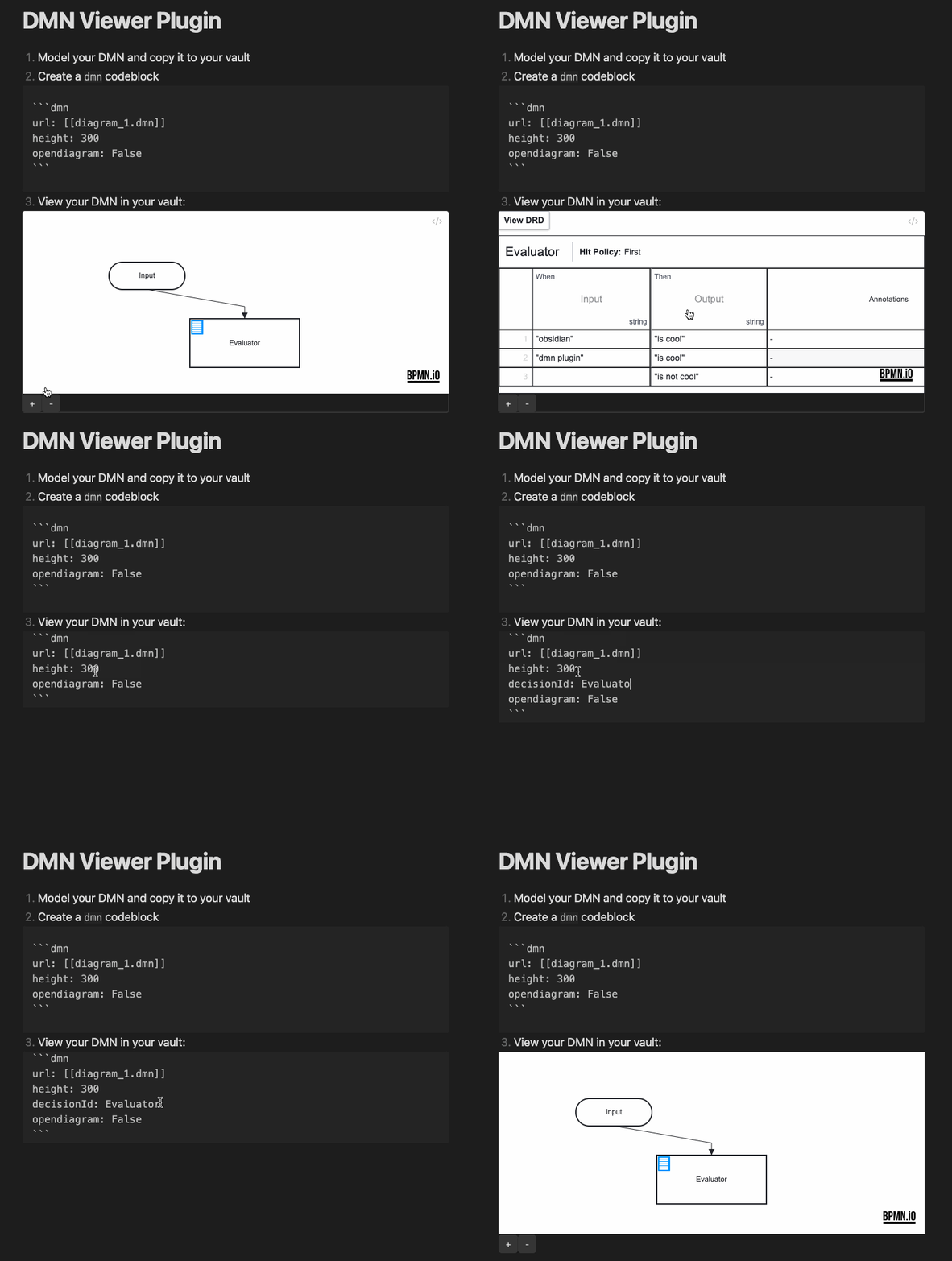
| decisionid | An ID of a decision table to open (if empty open the DRD). | String value |
| height | The height of the rendered canvas. | [300..1000] |
| opendiagram | Show a link to the *.dmn file. | True/False |
| showzoom | Show the zoom buttons below the canvas. | True/False |
| zoom | Set the zoom level. Default is 'fit-viewport'. | 0.0 - 10.0 |
| x | Set the x coordinate, if a zoom value is set. | 0 - ... (default: 0) |
| y | Set the y coordinate, if a zoom value is set. | 0 - ... (default: 0) |
| forcewhitebackground | Force a white background. | True/False |
Example
How to dev
- Clone this repo into the plugin folder of a (non-productive) vault (
.obsidian/plugins/) npm inpm run dev- Toggle the plugin on in the Community Plugins tab
Donate
HealthExcellent
ReviewCaution
About
View DMN decision models interactively inside notes using a dmn-js–based viewer. Embed DMN files with a dmn code block to open DRDs or specific decision tables, control zoom and canvas size, and show a link to the source file.Details
Current version
0.6.0
Last updated
3 weeks ago
Created
4 years ago
Updates
9 releases
Downloads
4k
Compatible with
Obsidian 0.15.0+
Platforms
Desktop, Mobile
License
MIT
Sponsor