Dispatch
 Kai Mysliwiec1k downloads
Dispatch is a board for Obsidian that gives a small agent-native team a working process: skills that run through the wiki and the team chat, and a chip on every card that sends an agent at the work.
- Overview
- Scorecard
- Updates7

"Obsidian is the IDE; the LLM is the programmer; the wiki is the codebase."
— Andrej Karpathy, LLM-Wiki
Dispatch is a board for Obsidian that gives a small agent-native team a working process: skills that run through the wiki and the team chat, and a chip on every card that sends an agent at the work.
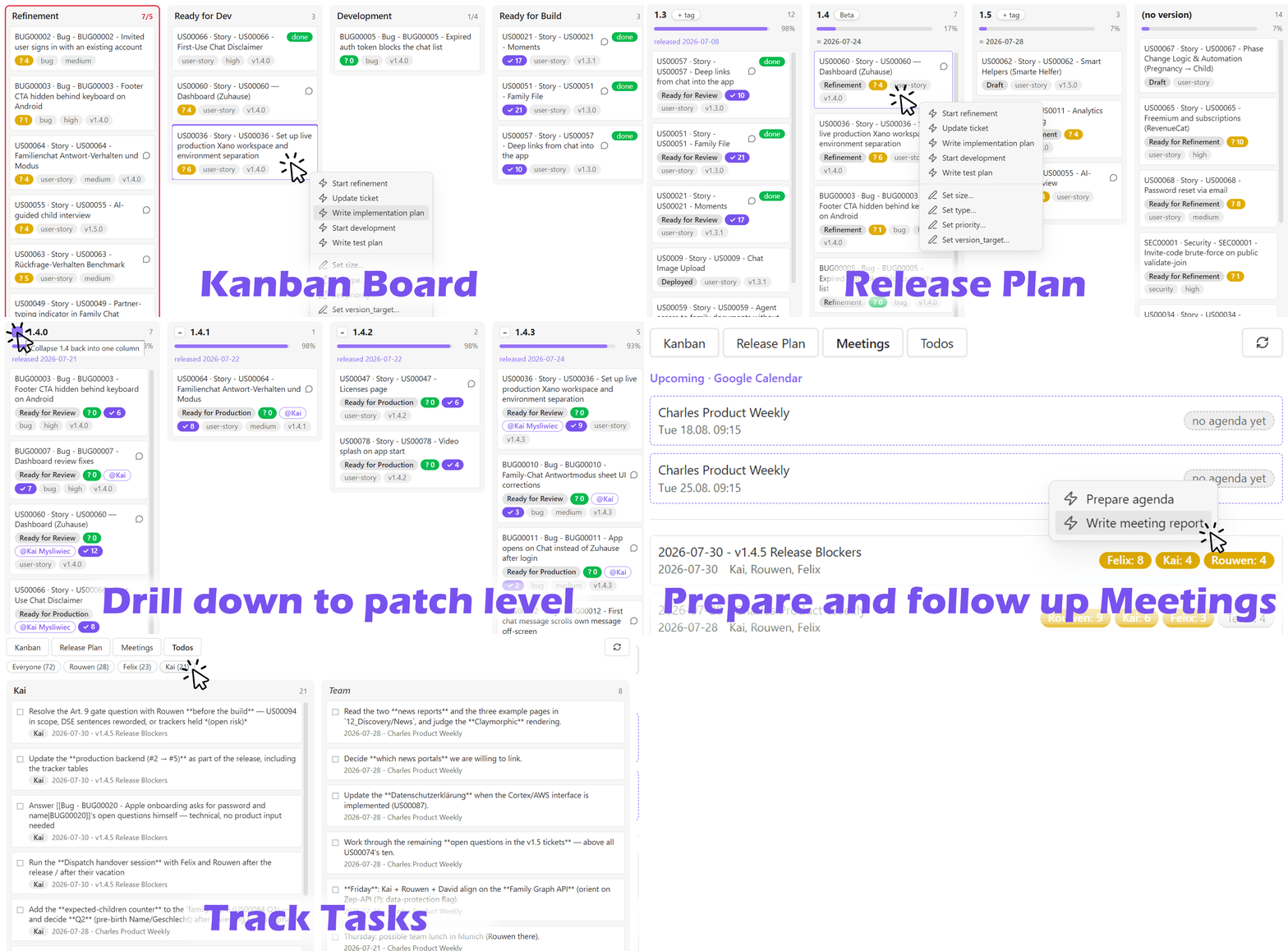
Your coding agents ship faster than you can decide. You are now the bottleneck — what remains of the development cycle is deciding what to build, agreeing on it as a team, and reviewing what comes back. Dispatch turns an agent-friendly wiki (à la Karpathy's LLM wiki pattern) into the cockpit for that human side: tickets are plain notes, boards are live views over their frontmatter, and every card can dispatch a coding agent — Claude Code, Codex, any CLI — into the right repository.
- Refinement is the new development. The agent posts a ticket's open questions into your team chat (Slack via MCP), the team answers where it already talks, and the answers flow back into the spec. Every card shows its refinement state as a
? Nbadge that burns down to green — green means build-ready. - Release planning is drag & drop. The Release Plan view groups tickets by target version: live weighted progress per release, velocity-based forecasts that accumulate across versions, linked release notes for everything shipped. Drag a card — the plan is up to date the moment you drop it.
- Meetings run themselves around you. The agenda is prepared from the board; after the call, a NoteTaker transcript (e.g. Google Gemini) becomes an interpreted report in your vault, decisions are folded into the affected tickets automatically, and the action items show up per person on the Meetings and Todos tabs.
- Testing works like refinement. Manual test plans cover only what the automated suites don't; a
✓ Nbadge counts the open checks through review and turns green when a ticket is safe to ship. - Agent skills and MCP are the glue. Chips on the board are one-liners (
/refine US00042); the workflow logic behind them lives in your code repository — versioned with the code, reviewed like code, shared through git — while MCP connects the agent to your team's Slack, your tracker and your NoteTaker. Each workflow is one file, with a thin stub per agent, so Claude Code and Codex run the same process instead of two copies that drift. Wiki, team and codebase become one loop, and the agents run it with you.
Under the hood, two primitives: boards (kanban views driven by note properties — drag & drop writes frontmatter) and chips (buttons that launch coding agents with the ticket as context). Configure more than one agent and the chip asks which to run, showing you the exact command before it does. Desktop only — chips and automations spawn local processes.
Documentation
| Page | What's in it |
|---|---|
| Overview | The four boards — Kanban, Release Plan, Meetings, Todos — and how each one behaves |
| Wiki structure | The three layers, an example folder tree to adapt, and where the wiki lives relative to your code |
| Page types | The frontmatter contract: every page, tickets (incl. the freeze rule), ADRs, releases, meetings |
| Workflow skills | The ten starter workflows that ship and adapt — ticket loop, small-bug shortcut, releases, meetings |
| Installation & configuration | Install, settings, chips and tool commands, run lifecycle, automations, security model |
New to the idea? Read Overview, then Wiki structure.
Requirements
- Obsidian on desktop, 1.7.2 or newer. Chips and automations spawn local processes, so there is no mobile version.
- A coding agent CLI on your PATH — Claude Code CLI, Codex, or whichever one you point a tool command at. Without one the boards still render; the chips have nothing to launch.
- Node.js 18 or newer, on your PATH. The run-lifecycle hooks that put run badges on cards and the run log back into the note are small Node scripts, as are board automations. The board itself does not need it.
Node is the only thing Dispatch asks of your repository, and it asks for the runtime alone: the
scripts are dependency-free ESM, so there is no package.json, no lockfile, no node_modules and
no build step — a Python or Rust repository does not become a JavaScript project by adopting
Dispatch. Anything beyond that is your project's own choice rather than Dispatch's; this
repository's tracker sync happens to call gh, another project's would call something else.
Quick start
1. Install. Open Settings → Community plugins → Browse, search for Dispatch, install and enable it — or go straight to the directory listing.
2. Let an agent set it up. An unconfigured board says so and offers to start Claude Code or Codex in your vault folder with the right prompt. The button names the agent when this device can launch exactly one — Set up with Claude, Set up with Codex. With both configured it reads Set up with an agent, and the confirmation dialog asks which one, showing you the exact command before anything runs. With Confirm before running off there is no dialog at all: the button names the agent it will start, and a click starts it. With no launch command on the device yet, Copy the prompt hands the same prompt to an agent you already have open.
The skill behind that button lives in this repo's plugin marketplace:
Claude Code:
/plugin marketplace add kaimys/obsidian-dispatch
/plugin install dispatch-setup
Codex:
codex plugin marketplace add kaimys/obsidian-dispatch
codex plugin add dispatch-setup@dispatch
Or, if you would rather have the skill on its own without the plugin, ask Codex to fetch it —
its bundled skill-installer takes a repository path:
$skill-installer install kaimys/obsidian-dispatch plugins/dispatch-setup/skills/dispatch-setup
The prompt names both agents' install commands itself, so the button works before you have installed the skill: an agent that does not find it tells you how to install it, and to start a new session afterwards. The setup interviews you about your wiki, writes both configuration layers, scaffolds ticket templates and workflow commands, and verifies the result.
See Installation & configuration for the tool command, the per-tool prompt prefix, and the Codex hook wiring — including the trust step, which a Codex setup does nothing without.
Prefer to do it by hand? Every setting the skill writes is documented in Installation & configuration.
License
Conclusion
Does the setup work for you? Did you run into problems? Is this plugin usefull for you? Any feedback is welcome. Please leave a post on Github Discussions.
Happy prompting!
Or in the words of Andrej Karpathy:
"... an internal wiki maintained by LLMs, fed by Slack threads, meeting transcripts, project documents, customer calls. Possibly with humans in the loop reviewing updates. The wiki stays current because the LLM does the maintenance that no one on the team wants to do."
— Andrej Karpathy, LLM-Wiki