Dice Tray
 Walker Brown77 downloads
Roll dice, random tables, lists and note sections inline, reading the same dice: syntax as Dice Roller so existing notes keep working.
- Overview
- Scorecard
- Updates7
Roll dice inside your notes. Write `dice: 2d20kh1 + 5` and the note shows the result as a small chip you can click to roll again. Hover it to see every die, or on a phone, tap it: the dice show for a few seconds.
It reads the same notation as the Dice Roller plugin's dice: blocks, so notes written for that plugin keep working here.
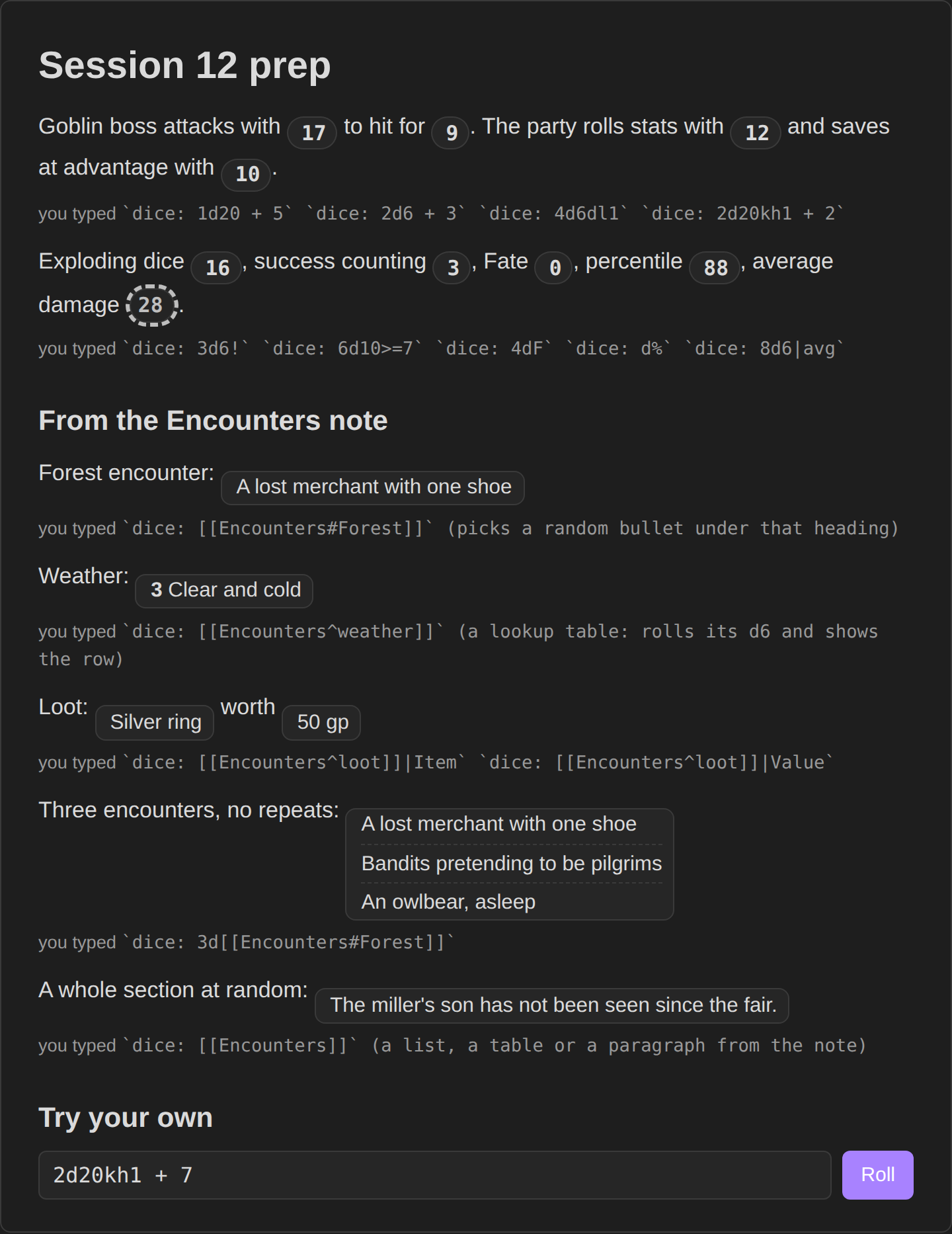
Try it in your browser before installing: https://bulkhead.bananafest-destiny.com/press/dice-tray/ runs the real plugin code over a sample note.
Writing a roll
Inline, anywhere in a note:
`dice: 3d6 + 2`
`dice: d20`
`dice: (1d4 + 2) * 2`
Or a block with one roll per line:
```dice
2d20kh1 + 5
8d6
```
Inline rolls show as chips in Live Preview as well as in reading view. Put the cursor on one (arrow keys, or click just after it) and its code comes back to edit; move away and it rolls. In source mode the code stays as written.
There is also a command, Roll dice, that opens a small roller and remembers your last few rolls.
Notation
| Write | Meaning |
|---|---|
3d6, d20, d% |
three six-siders, one d20, one d100 |
+ - * / ^ ( ) |
arithmetic, with the usual precedence |
2d20kh1, 2d20kl1, 4d6k3 |
keep highest or lowest (k alone keeps the highest one) |
4d6dl1, 4d6dh1, 4d6d1 |
drop lowest or highest |
1d6!, 1d6!3, 1d6!i |
explode on the top face: once, three times, until it stops |
1d6!! |
compound: the exploded dice add into one die |
1d6!>4 |
explode on a condition |
4d6r, 4d6r2, 4d6ri, 4d6r<3 |
reroll the bottom face once, twice, until it stops, or on a condition |
5d10>=8, 3d6=6, 3d6=!6 |
count the dice that pass instead of adding them |
4dF |
Fudge or Fate dice, -1 to 1 |
1d66% |
two d6 read as tens and ones |
3d[2,5] |
a die with faces from 2 to 5 |
8d6s, 8d6sd, 3d6u |
sort ascending, sort descending, reroll duplicates |
1dS |
Fantasy AGE: three d6, the last one the stunt die; doubles show the stunt points |
1d20 + dex |
a number named in the note: frontmatter (dex: 3) or a field line (dex:: 3, [dex:: 3]) |
2g1y2p, 3g4d1s |
Genesys and Star Wars narrative dice (see below) |
Flags go after a |: `dice: 3d6|avg` shows the average, |noform hides the formula, |form shows it, |nodice hides the icon, |none shows nothing until clicked, |text(Roll me) shows a label instead of the number.
A lone d20 glows green on a natural 20 and red on a natural 1.
Dice you can watch
Click a roll, or roll from the panel or the roll window, and the dice tumble across the window and land on what came up: d4, d6, d8, d10, d12 and d20 as solids, d100 as a tens and a ones d10, Fate dice as d6s marked − and +. Dice that were dropped (the low die of advantage, say) land dimmed. They are drawn in the theme's accent colour, and clicks pass straight through them.
The rolls a note makes as it opens never throw dice, and neither does a roll of more than 20 dice. Turn them off with Throw dice in the settings; they are off anyway when your system asks for less motion.
Narrative dice
Letters name Genesys and Star Wars dice, each with an optional count: g or a ability, y proficiency, d difficulty, r or c challenge, b boost, s or k setback, w or f force. p is difficulty, or proficiency when the pool uses a, c or d. The chip shows the net result (2 successes, 1 threat, 1 triumph), and hovering lists each die.
Into your session log
With Session Log installed, a roll you click lands in your session log with the dice it showed:
- 20:16 Rolled 1d20 + dex -> [17] + 3 -> 20
- 20:17 Rolled [[Encounters#Forest]]: Wolves
Only rolls you make count: a click on a roll, or the Roll dice command. The rolls a note makes as it opens are not logged.
Rolls that stay
Most rolls roll again each time the note opens. Two kinds keep their result in the note itself, as plain text you can read anywhere:
| Write | What happens |
|---|---|
`dice+: 1d20 + 5` |
rolls once and writes the result after it: `dice+: 1d20 + 5 -> [17] + 5 -> 22`. The chip shows 22 every time the note opens. Click it to roll again and write the new result |
`dice-mod: 4d6dl1` |
rolls once and replaces itself with the result: 4d6dl1 -> [5, 4, 3] -> 12. Good for rolling up stats or loot that should not change |
Both write into the note only in reading view or live preview, and only the copy you see.
Rolling on notes
Point a roll at a note and it picks from what is inside:
| Write | Picks |
|---|---|
`dice: [[Encounters]]` |
a random section (paragraph, list, table…) of that note |
`dice: 3d[[Encounters]]` |
three different sections |
`dice: [[Encounters#Forest]]` |
a section under that heading |
`dice: [[Loot^gems]]` |
a random row of the table (or item of the list) with block id ^gems |
`dice: [[Loot^gems]]|Item` |
just the Item column of that row |
`dice: [[Rumours]]|line` |
a random line |
A table whose first column holds dice ranges is a lookup table: name the dice in its header and the roll lands on the matching row.
| d20  | Weather        |
| ---- | -------------- |
| 1-5  | Rain           |
| 6-15 | Clear          |
| 16-20 | Fog           |
^weather
`dice: [[Tables^weather]]` rolls a d20 and shows that row. Results render as markdown; add |norender for plain text.
Rolling on a tag
`dice: #npc` rolls on every note tagged #npc (or a tag nested under it, like #npc/elf) and shows a part of each, led by a link to its note. Tags in the text and in the note's properties both count, and the note the roll is in is left out.
`dice: #npc|-`picks one random note and shows a part of it.`dice: #npc|link`gives just a link to one random note.`dice: 2d#npc`takes two parts of each note;|line,|listand|tablework as for a note roll.
It needs no other plugin installed.
The dice panel
For rolls that aren't written in a note. Click the dice icon in the ribbon (or run Open the dice panel) and it opens in the sidebar:
- Tap a die to add it: d4, d6, d8, d10, d12, d20, d100 and Fate dice. Right-click takes one away.
- Set a modifier with − and +, and roll a d20 at advantage or disadvantage.
- Or type any formula into the box, in the same notation as above.
- Save keeps a roll you make often as a button in the panel.
- This session lists every roll from the panel; click one to roll it again.
Panel rolls go into your session log like any other.
For other plugins
Dice Tray has a small API, so another plugin can roll with the same notation and show the same dice:
const tray = app.plugins.getPlugin('dice-tray')?.api;
if (tray) {
    const r = await tray.roll('2d20kh1 + dex', { sourcePath: file.path, show: true });
    r.total; // 17
    r.text; // "2d20kh1 + dex -> [14] + 3 -> 17"
    r.groups; // each group of dice: its notation, and each die's value and whether it was kept (the 9 that was dropped)
    tray.average('8d6'); // 28
}
sourcePathis the note whose fields (dex:: 3) the roll may use.show: truethrows the dice mid-window, or pass an element to throw them beside it. It follows the reader's Throw dice setting, and the promise resolves once they have landed.announce: falsekeeps the roll out of the session log; by default it goes in like a click.- A formula it can't read rejects with an error that says why.
Privacy
Dice Tray does not use the network, has no accounts, collects nothing and sends nothing. Settings are stored in your vault like any plugin's.
Install
From Obsidian: Settings → Community plugins → Browse → search "Dice Tray".
By hand: copy main.js, manifest.json and styles.css from the latest release into <your vault>/.obsidian/plugins/dice-tray/, then enable it under Community plugins.
Also from this maker
- Quick Initiative: a light initiative tracker that keeps the whole fight as plain text in your note and reads Fantasy Statblocks creature notes.
- Session Log: a quick log for game night that writes timestamped lines into your session note.
- Encounter Builder: plan fights against the 5E XP budget, then start them in Quick Initiative.
- Tabletop Clocks: segmented clocks for danger, plans and factions, ticked with a click and kept as text in the note.
Source
On your players' phones
DM Screen, from the same maker, shows the rolls you click on your players' phones. They open a link or a QR code in any phone browser, with nothing to install. DM Screen is paid ($12 once, on itch.io) with a free one-hour trial. Dice Tray stays free.
Playing alone
Solo Oracle, from the same maker, is for games with no GM: ask it yes or no, frame scenes, keep threads and people, and roll on your own tables, with every answer written into the note. It's free.
https://github.com/walkertbrown/dice-tray
Build
npm install
npm test
npm run build
MIT licensed.