Detailed Canvas
 endlessblink795 downloads
Enrich canvas link cards with AI-generated descriptions and cover images using Ollama.
- Overview
- Scorecard
- Updates10
Enrich Obsidian Canvas link cards with AI-generated summaries, images, and metadata. Supports Ollama, OpenAI, Claude, Groq, and OpenRouter.
Features
- AI-generated summaries for canvas link cards using your choice of AI provider
- Automatic metadata extraction — title, description, and cover image from web pages
- Twitter/X support — extracts tweet content, images, and author info via fxtwitter API
- Auto-enrich on paste — automatically process new link cards added to canvas
- Context menu integration — right-click any link card to enrich it
- Batch processing — enrich all link cards in a canvas at once
- Multiple AI providers — Ollama (local), OpenAI, Claude, Groq, OpenRouter
Usage
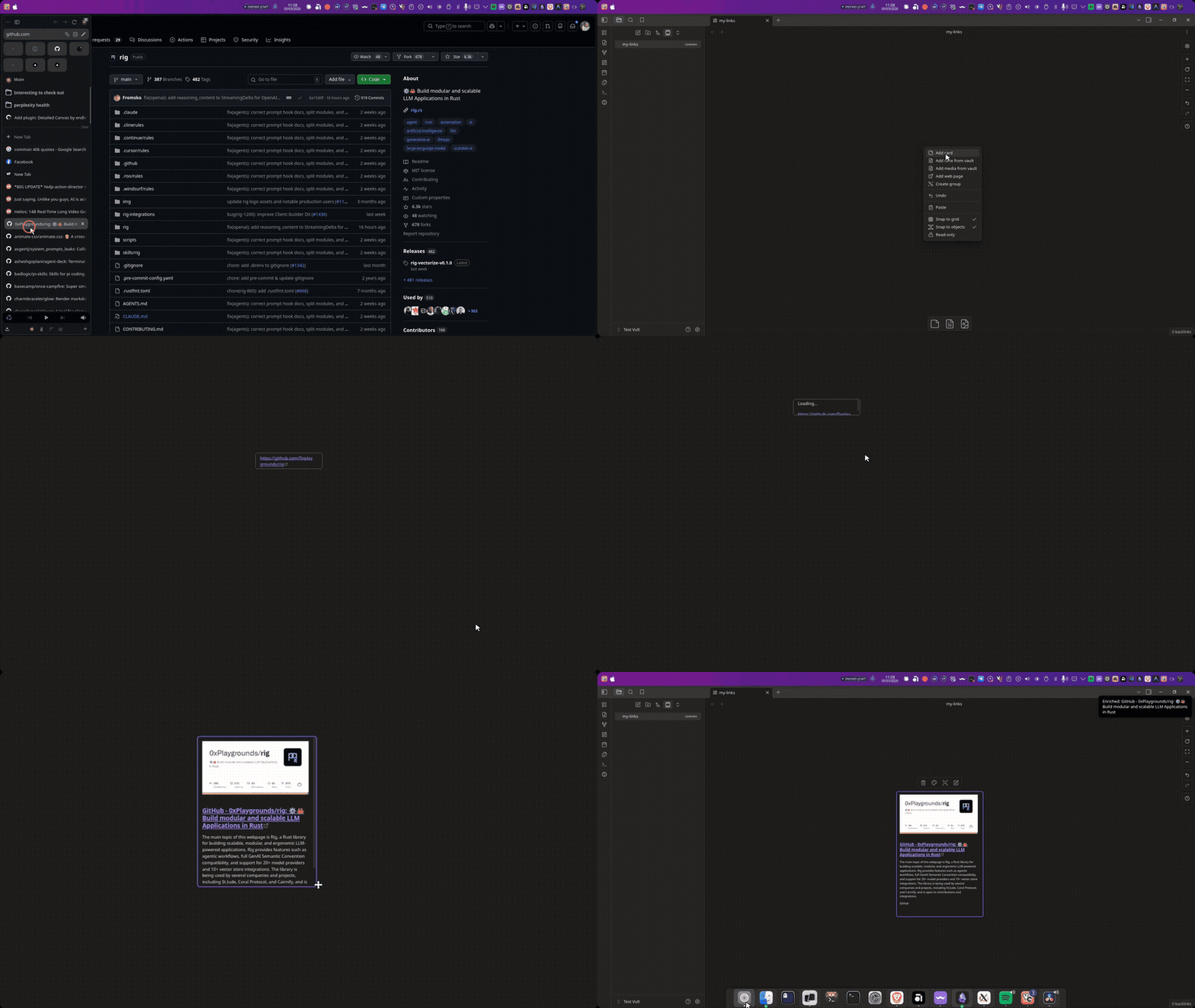
Enrich a single link card
- Right-click a link card on your canvas
- Select Enrich with AI description from the context menu
- The plugin scrapes the URL, generates an AI summary, and replaces the link with a rich card
Enrich all link cards
Open the command palette (Ctrl/Cmd + P) and search for:
- Enrich selected link card — process selected link cards
- Enrich all link cards in canvas — process every link card in the active canvas
Auto-enrich
When enabled in settings, new link cards pasted into a canvas are automatically enriched.
Supported AI Providers
| Provider | Type | Setup |
|---|---|---|
| Ollama | Local | Install Ollama, pull a model (ollama pull llama3.2) |
| OpenAI | Cloud | Get an API key from platform.openai.com |
| Claude | Cloud | Get an API key from console.anthropic.com |
| Groq | Cloud | Get an API key from console.groq.com |
| OpenRouter | Cloud | Get an API key from openrouter.ai |
Settings
AI Provider
- Provider — choose between Ollama, OpenAI, Claude, Groq, or OpenRouter
- API key — required for cloud providers (stored locally in your vault)
- Model — select from available models (auto-fetched where supported)
- Test connection — verify your provider is reachable
Behavior
- Auto-enrich on paste — automatically enrich new link cards
- Show notifications — display progress during enrichment
- Max description length — limit generated summary length (default: 500 chars)
Advanced
- AI prompt — customize the instructions for generating summaries
- Use environment variables — read API keys from env vars instead of stored settings (
OPENAI_API_KEY,OPENROUTER_API_KEY,GROQ_API_KEY,ANTHROPIC_API_KEY) - Reset to defaults — restore all settings
Troubleshooting
| Problem | Solution |
|---|---|
| "Connection failed" with Ollama | Make sure Ollama is running (ollama serve) |
| "Invalid API Key" error | Double-check your API key in settings |
| No models in dropdown | Click "Refresh" or verify your provider connection |
| X/Twitter links show no content | The plugin uses fxtwitter API — ensure the URL is a tweet link (contains /status/) |
| Card not updating | Try the command palette enrichment instead of auto-enrich |
Installation
From community plugins
- Open Settings → Community Plugins
- Search for "Detailed Canvas"
- Click Install, then Enable
Manual installation
- Download the latest release from GitHub
- Extract
main.js,manifest.json, andstyles.cssto your vault's.obsidian/plugins/detailed-canvas/directory - Reload Obsidian
- Enable the plugin in Settings → Community Plugins
Development
npm install
npm run dev    # development with watch mode
npm run build  # production build
npm run lint   # lint the code
License
MIT
HealthExcellent
ReviewCaution
About
Enrich Canvas link cards with AI-generated summaries, cover images, and extracted metadata like title and description. Extract tweet content and author info, auto-enrich pasted links, enrich via context menu or batch-process entire canvases using Ollama, OpenAI, Claude, Groq, or OpenRouter.Details
Current version
1.4.1
Last updated
7 months ago
Created
7 months ago
Updates
10 releases
Downloads
795
Compatible with
Obsidian 1.4.0+
Platforms
Desktop, Mobile
License
MIT