Deadline
 saydullayev017473 downloads
All-in-one productivity plugin with calendar, Pomodoro timer, and task manager.
- Overview
- Scorecard
- Updates2
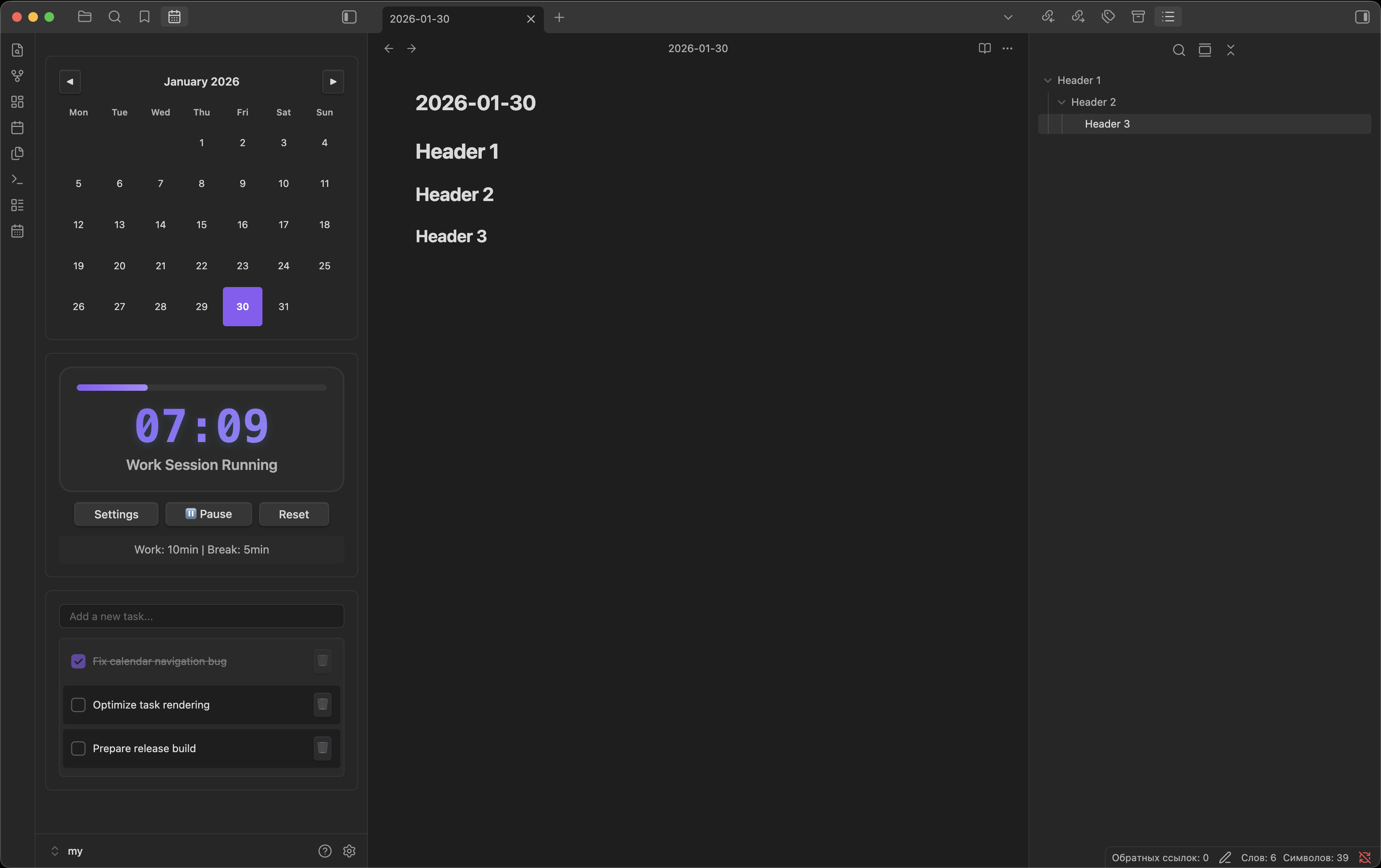
Deadline is an all-in-one productivity plugin for Obsidian that combines a calendar, Pomodoro timer, and task manager into a single, clean workspace view.
It is designed to help you plan your day, stay focused, and manage tasks without switching between multiple plugins.
Quick Access
Open directly in Obsidian:
obsidian://show-plugin?id=deadline
(Copy and paste this link into your browser or Obsidian)
View
| Plugin Interface |
|---|
 |
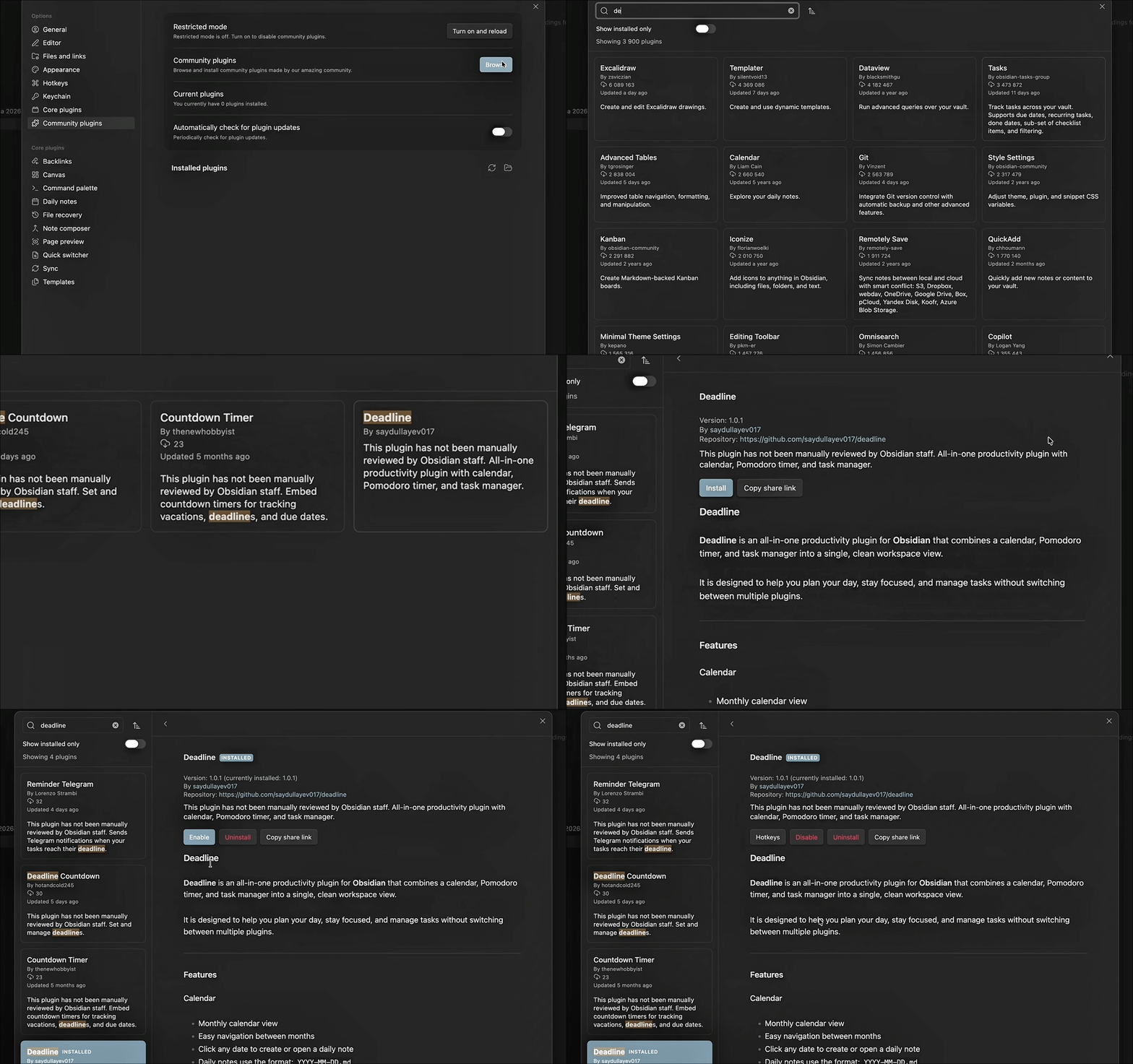
| Demo |
 |
Quick Obsidian link: obsidian://show-plugin?id=deadline
Features
Calendar
- Monthly calendar view
- Easy navigation between months
- Click any date to create or open a daily note
- Daily notes use the format:
YYYY-MM-DD.md - Automatically highlights today
- Opens daily notes in a new tab
Pomodoro Timer
- Default 40-minute work and 5-minute break sessions
- Fully customizable work and break durations
- Large, clear time display (MM:SS)
- Animated progress bar
- Status indicators: Ready / Running / Complete
- Sound notification on completion
- Automatically resets after finishing
Task Manager
- Quickly add tasks with Enter key
- Checkbox-based task list
- Mark tasks as completed or active
- Delete tasks individually
- Clear empty-state messaging
- Visual distinction for completed tasks
Design & UX
- Native Obsidian look and feel
- Fully compatible with light and dark themes
- Smooth animations and transitions
- Responsive layout for different panel sizes
- Uses Obsidian CSS variables for full theme support
Installation
Method 1: Community Plugins (Recommended)
- Open Settings → Community Plugins
- Disable Safe Mode
- Click Browse
- Search for Deadline
- Click Install → Enable
Method 2: Manual Installation
- Download the latest release from
https://github.com/Saydullayev017/deadline/releases - Extract the files into: ~/.obsidian/plugins/deadline/
- Restart Obsidian
- Enable Deadline in Settings → Community Plugins
Opening the Plugin
You can open Deadline using:
- Command Palette →
Open Deadline - Ribbon icon (if enabled)
- Obsidian link:
obsidian://show-plugin?id=deadline
Configuration
Default Settings
- Work duration: 40 minutes
- Break duration: 5 minutes
- Daily note format:
YYYY-MM-DD.md
Customization
All UI elements follow Obsidian's theme variables, ensuring compatibility with:
- Light and dark themes
- Custom color schemes
- Font and scaling preferences
File Structure
deadline/ ├── screenshots/ │ ├── view.png │ └── gg.gif ├── main.js ├── manifest.json ├── styles.css └── README.md
Troubleshooting
Plugin Not Loading
- Ensure the plugin is enabled
- Restart Obsidian
- Check the developer console for errors
Calendar Not Creating Files
- Verify vault permissions
- Ensure files with the same name do not already exist
Timer Issues
- Disable conflicting plugins
- Reset plugin settings
- Restart Obsidian
Task Persistence
- Tasks are currently stored per session
- Persistent task storage is planned for future versions
Roadmap
- Persistent task storage
- Multiple Pomodoro presets
- Custom daily note templates
- Productivity statistics
- Import / export support
License
MIT License — free for personal and commercial use.
Contributing
Contributions, issues, and feature requests are welcome.
Please open an issue or submit a pull request on GitHub.
Support
If you find Deadline useful:
- Rate it in the Obsidian Community Plugins browser
- Report bugs or issues
- Suggest new features
Built for the Obsidian community.