Search...Search plugins and themes...
⌘K
Sign in
  • Get started
  • Download
  • Pricing
  • Enterprise
  • Account
  • Obsidian
  • Overview
  • Sync
  • Publish
  • Canvas
  • Mobile
  • Web Clipper
  • CLI
  • Learn
  • Help
  • Developers
  • Changelog
  • About
  • Roadmap
  • Blog
  • Resources
  • System status
  • License overview
  • Terms of service
  • Privacy policy
  • Security
  • Community
  • Plugins
  • Themes
  • Discord
  • Forum / 中文论坛
  • Merch store
  • Brand guidelines
Follow us
DiscordTwitterBlueskyThreadsMastodonYouTubeGitHub
© 2026 Obsidian

Date Inserter

namikaze-40pnamikaze-40p19k downloads

Insert a date at the cursor position using a calendar.

Add to Obsidian
  • Overview
  • Scorecard
  • Updates41

An Obsidian plugin that lets you insert a date at the cursor position using a calendar.

How to use

Insert date to markdown

  • Place the cursor where you want to insert the date.
  • Open the calendar using one of the following methods:
    • Press the assigned hotkey (recommended).
    • Choose Date Inserter: Open Calendar from the command palette.
  • Select on a date in the calendar to insert it.
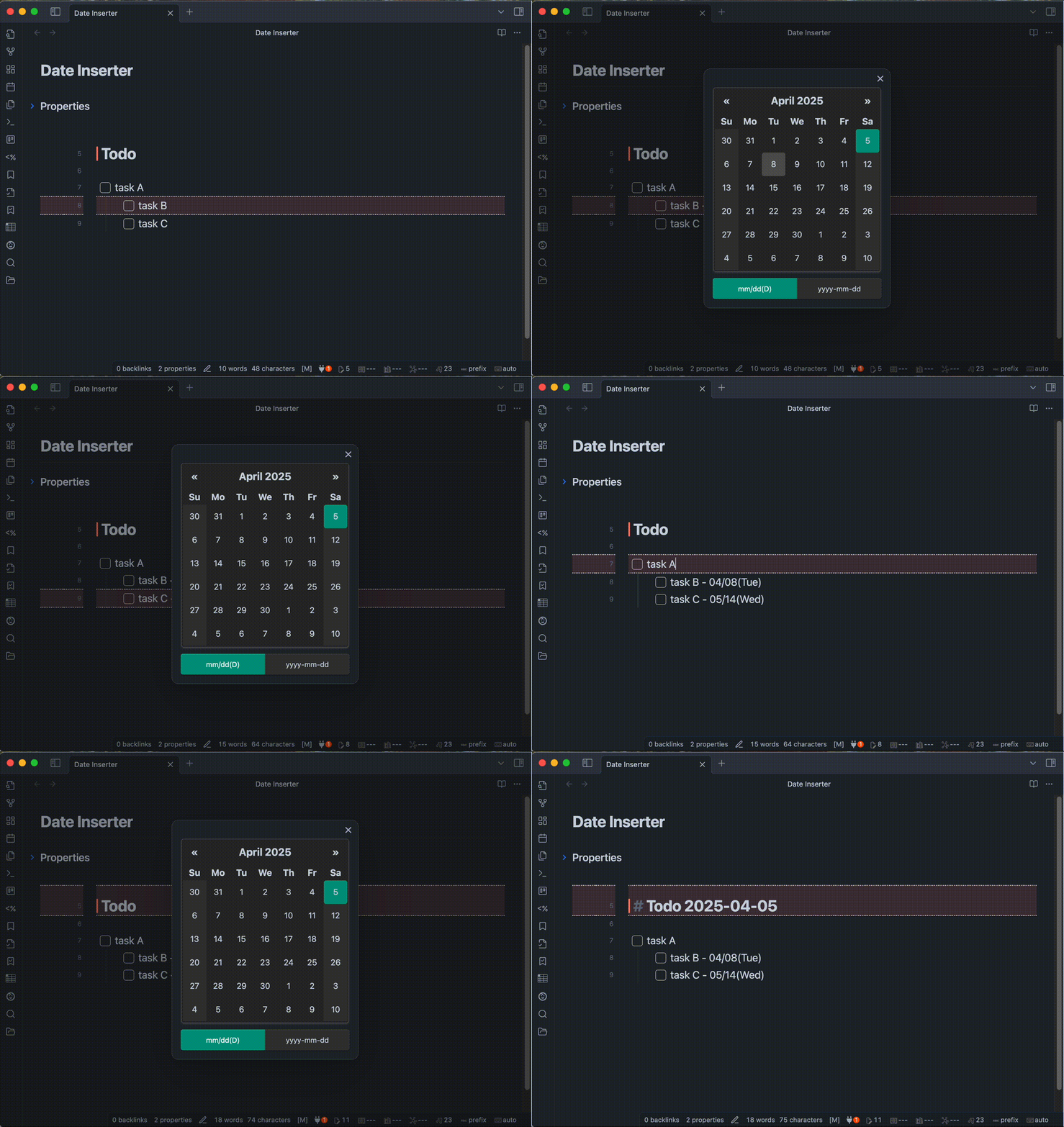
demo

  • You can custom format of date.
    • ex1) mm/dd/yyyy => 01/23/2024
    • ex2) DD mm-dd => Tuesday 01-23
    • ex3) yyyy.mm.dd(D) => 2024.01.23(Tue)

[!NOTE] The calendar for this plugin uses vanillajs-datepicker. Please check this link (vanillajs-datepicker > Date String & Format) for format details.

Copy date to clipboard

  • Open the calendar using one of the following methods:
    • Press the assigned hotkey (recommended).
    • Select Date Inserter: Copy Date to Clipboard from the command palette.
  • Paste the copied date wherever you like.
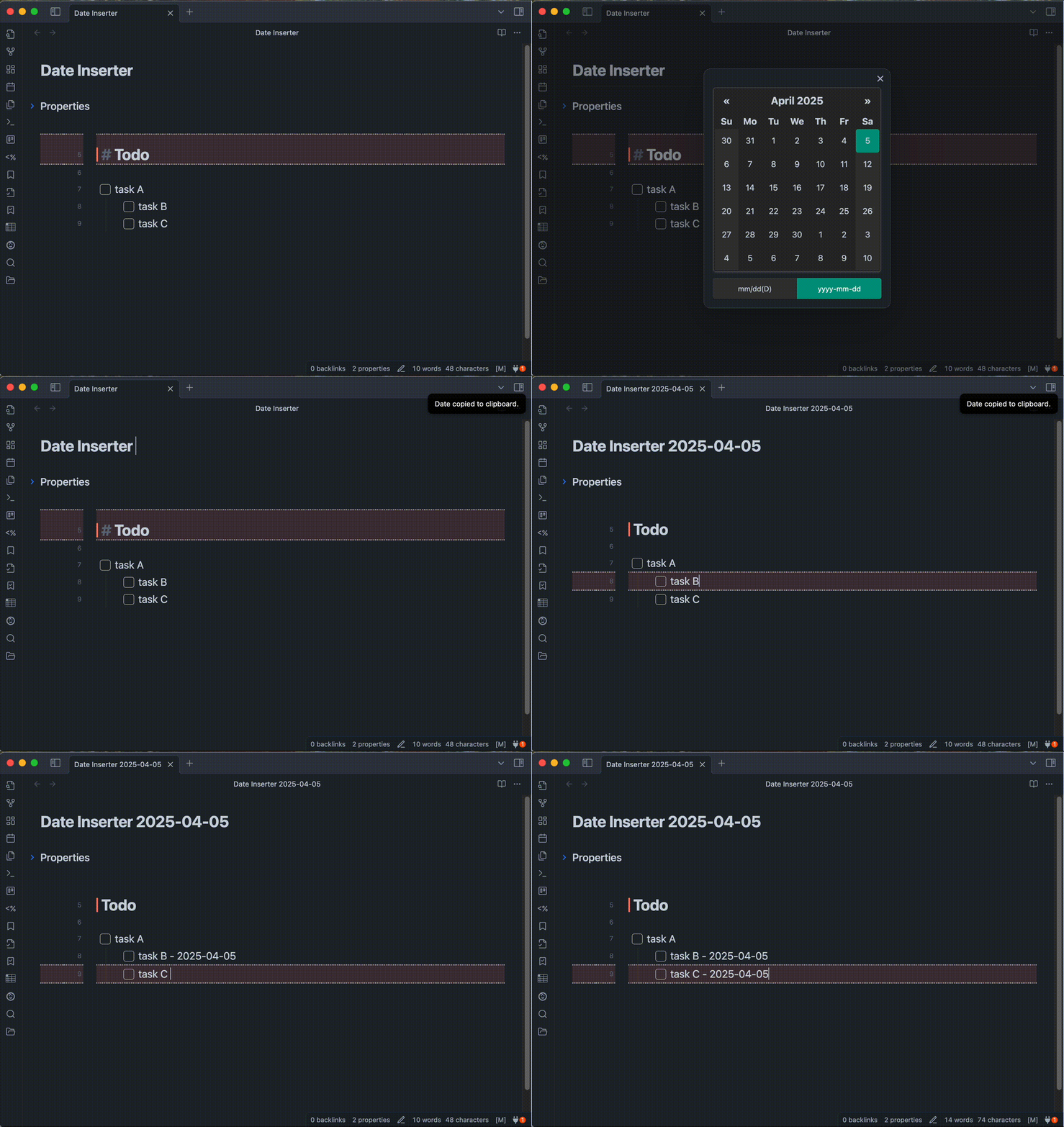
demo

Installation

You can find and install this plugin through Obsidian’s Community Plugins Browser.
For detailed steps or alternative installation methods, click here.

HealthExcellent
ReviewPassed
About
Insert dates at the cursor using an inline calendar with customizable formats. Pick a date to insert into Markdown or copy the formatted date to the clipboard.
CalendarDatesFormatting
Details
Current version
0.7.3
Last updated
4 weeks ago
Created
3 years ago
Updates
41 releases
Downloads
19k
Compatible with
Obsidian 1.9.10+
Platforms
Desktop, Mobile
License
MIT
Report bugRequest featureReport plugin
Author
namikaze-40pnamikaze-40p
github.com/namikaze-40p
GitHubnamikaze-40p
  1. Community
  2. Plugins
  3. Calendar
  4. Date Inserter

Related plugins

Day Planner

Turn tasks from daily notes, the Tasks plugin, and calendars into time blocks on an editable timeline, with built-in time tracker.

Full Calendar Remastered

Complete Calendar HUB experience. Work with all your calendars in one place. Analyze your time and take action!

Journals

Manage your journals.

Periodic Notes

Manage your daily, weekly, and monthly notes.

Tasks Calendar Wrapper

Simple wrapper for Tasks Calendar and Tasks Timeline.

Prisma Calendar

Prisma turns any note with a date into a flexible planning system inside Obsidian. There are no rigid schemas or predefined structures — just your data, your rules, fully under your control.

Calendarium

Craft mind-bending fantasy and sci-fi calendars.

Contribution Graph

Generate an interactive heatmap to visualize and track your productivity.

Yearly Glance

Year at a glance - overview of annual events with customizable management options.

Chronology

A calendar and a timeline of the note's creation and modification.