Search...Search plugins and themes...
⌘K
Sign in
  • Get started
  • Download
  • Pricing
  • Enterprise
  • Account
  • Obsidian
  • Overview
  • Sync
  • Publish
  • Canvas
  • Mobile
  • Web Clipper
  • CLI
  • Learn
  • Help
  • Developers
  • Changelog
  • About
  • Roadmap
  • Blog
  • Resources
  • System status
  • License overview
  • Terms of service
  • Privacy policy
  • Security
  • Community
  • Plugins
  • Themes
  • Discord
  • Forum / 中文论坛
  • Merch store
  • Brand guidelines
Follow us
DiscordTwitterBlueskyThreadsMastodonYouTubeGitHub
© 2026 Obsidian

Daily note creator

mario-holubarmario-holubar2k downloads

Automatically creates missing daily notes

Add to Obsidian
  • Overview
  • Scorecard
  • Updates1

Do you want Obsidian to create your daily notes automatically, without opening the daily note on startup, and including days that you haven't opened the vault? Then this is the plugin for you!

It acts as an alternative to Auto Journal. Auto Journal also has backfill functionality and comes with more features such as monthly notes, but also enforces a certain folder structure.

Daily note creator is designed to be an add-on to the daily notes core plugin, rather than a replacement, and will use the settings you defined there to create missing notes.

Features
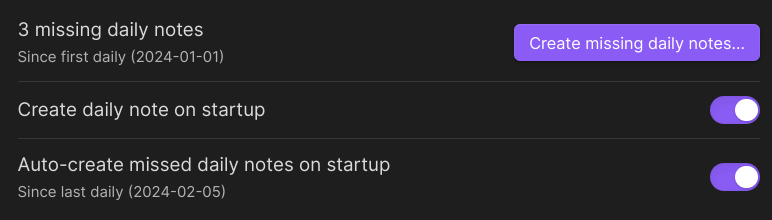
options

Create daily note on startup lets you disable the built-in open daily note on startup option. This is useful if you want to open the vault on your last open note, or your homepage.

Auto-create missed daily notes on startup will fill in daily notes for days that you didn't open the vault. If this is more than a week, it will ask for confirmation.

Create missing daily notes is a command you can trigger anytime to open a pop-up window that lets you fill in missed notes for any range of time. Use this if you want to fill in some missing days in the past.
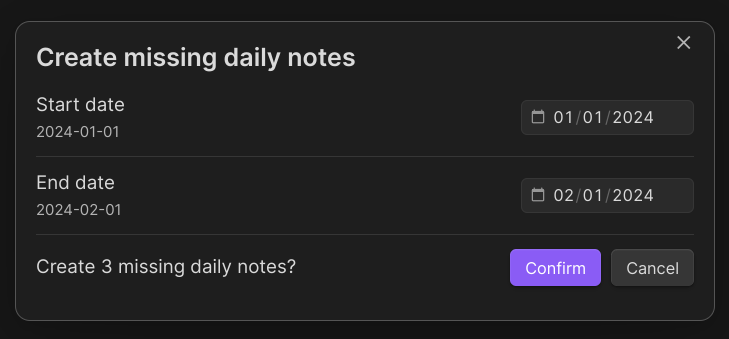
modal

Known issues

As of right now, the plugin will misbehave if your daily notes are organized in a folder structure (e.g. YYYY/MM/DD) or if they have text other than the date in the filename (e.g. 2023-12-31 New Year's Eve). Both of these problems are caused by the underlying obsidian-daily-notes-interface package and have open issues: #21, #27. I will update this plugin once these are resolved.

68%
HealthFair
ReviewSatisfactory
About
Create daily notes automatically at vault startup without opening them, using your Daily Notes settings. Auto-fill missed days on startup or trigger a command to backfill any date range, with confirmation for gaps longer than a week.
DatesAutomationCommands
Details
Current version
1.0.0
Last updated
2 years ago
Created
2 years ago
Updates
1 release
Downloads
2k
Compatible with
Obsidian 0.15.0+
Platforms
Desktop, Mobile
License
MIT
Report bugRequest featureReport plugin
Sponsor
Ko-fi
Author
mario-holubarmario-holubar
github.com/mario-holubar
GitHubmario-holubar
  1. Community
  2. Plugins
  3. Dates
  4. Daily note creator

Related plugins

Task Collector (TC)

Change task status and collect tasks within a document using hotkeys and context menus.

Rollover Daily Todos

Rollover any unchecked checkboxes from your last daily note into today's note.

Attachment Management

Customize attachment path, auto-rename attachments, etc.

Vault Changelog

Maintain a changelog of recently edited notes.

Shell commands

Define system commands that you want to execute via command palette, hotkeys, URI links or automated events. E.g. open external applications or perform automated file modifications.

Update modified date

Automatically update a frontmatter modified date field when the file is modified.

Day and Night

Automatically toggle themes between day theme and night theme on a set time schedule.

QuickAdd

Quickly add new notes or content to your vault.

Templater

Create and use dynamic templates.

Homepage

Open a note, base, or workspace on startup, or set it for quick access later.