CTI STIX Workbench
 rx474769 downloads
Create, visualize, validate, and export local STIX 2.1 intelligence from Obsidian notes, Canvas files, folders, or JSON Bundles.
- Overview
- Scorecard
- Updates10

A local-first Obsidian plugin for turning connected investigation notes into valid STIX 2.1 Bundles.
Obsidian community page · Download the plugin · Get the vault template · Report a problem · Sponsor the project
CTI STIX Workbench keeps the analyst workflow in Obsidian. You write normal Markdown, connect evidence with wiki links and Canvas, edit structured STIX properties when you need them, and export a reviewable Bundle without sending your vault to a hosted service.
What it does
- Provides catalog-driven property editing for standard STIX 2.1 objects.
- Imports validated STIX 2.1 Bundles into typed, linked Markdown notes.
- Validates an active note and its connected graph against pinned local schemas.
- Visualizes STIX JSON or connected notes as an interactive, icon-based graph.
- Gives explicit, readable diagnostics instead of silently changing bad data.
- Persists missing STIX identifiers safely and keeps them stable across exports.
- Exports collision-safe JSON Bundles to a vault-relative folder.
- Runs offline on Obsidian desktop without runtime network calls or telemetry.
Visualize before you export
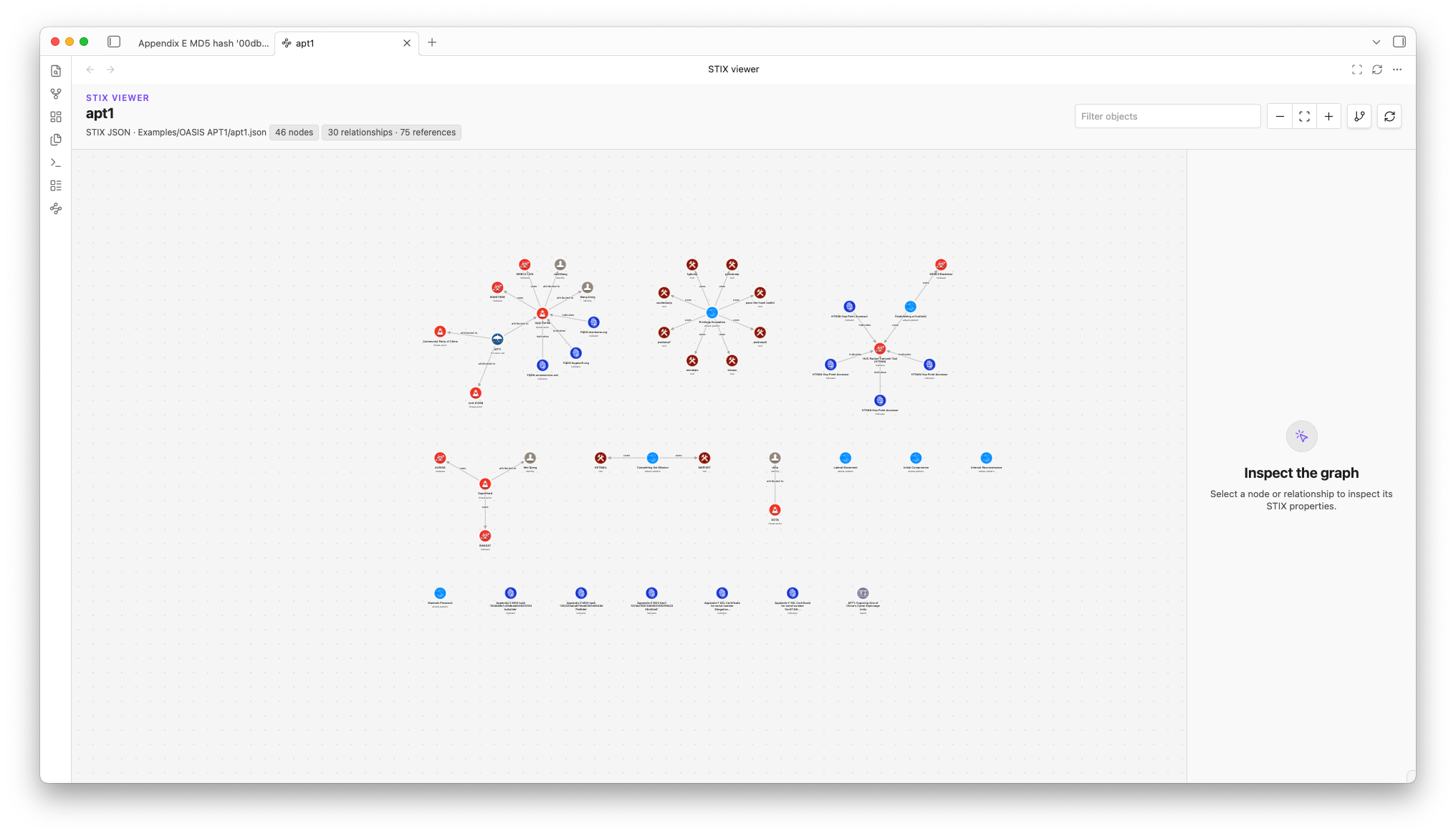
Open a local STIX Bundle, object, object array, or connected typed note graph in the STIX viewer. It renders official OASIS icons, authored Relationships, top-level references, and unresolved targets in one read-only workspace. Pan, zoom, rearrange, filter, and inspect the real STIX properties without modifying the source or sending investigation data off-device.
The viewer follows Obsidian desktop themes and adapts to desktop split panes and popout windows. Its Maltego-style component graph groups connected intelligence around relationship hubs and shows authored Relationships by default, with dense metadata references available on demand. Hover or focus a connection for its semantic label, then select an icon or connection to inspect its complete data in the side panel.
Screenshots
The official OASIS APT1 example rendered as relationship-connected components, with dense metadata references hidden until requested:
Plugin or vault template?
| Project | Use it for |
|---|---|
| CTI STIX Workbench (this repository) | Editing, validation, graph traversal, and Bundle export. |
| CTI Investigation Vault | A clean starting structure with all STIX templates, the official OASIS APT1 Bundle, and 76 browseable generated notes. |
They are independent. The plugin never creates, replaces, or uploads your vault. This repository contains plugin source and test fixtures, not a distributable vault. The separate vault repository owns its README, attribution, and analyst workspace; automation proposes only generated templates and example data.
Install
Open the CTI STIX Workbench community page for the current Obsidian listing and installation status.
For a manual installation, download main.js, manifest.json, and styles.css from the
latest release,
then place them in:
<your-vault>/.obsidian/plugins/cti-stix-workbench/
Restart Obsidian, open Settings → Community plugins, and enable CTI STIX Workbench. Obsidian 1.8.10 or newer is required.
A five-minute first run
Choose a starting point:
- Run Create STIX object for a new manually authored object, then use Edit STIX properties to complete its catalog-defined fields.
- Run Create analyst workflow for a guided triage, assessment, review, or feedback Note linked to the active investigation.
- Open a local STIX Bundle such as
Examples/OASIS APT1/apt1.jsonand run Import STIX Bundle as notes. Imported notes are already populated from the source objects and remain editable.
Connect related notes with ordinary
[[wiki links]]for analyst context.Add an exportable relationship as a list item, for example:
- stix:uses [[Target note]]Run Validate active STIX graph and review any diagnostics.
Run Open in STIX viewer to inspect and temporarily arrange the graph.
Run Export active STIX graph to write a STIX Bundle to
Exports/.
For investigation-led work, keep the typed investigation Note active when you
validate or export. Its object_refs wiki links provide the Bundle scope under
the default traversal settings. Use folder or Canvas export when that is the
more accurate sharing boundary.
The APT1 example imports 76 objects, including 30 typed Relationships. It is
the official OASIS example and demonstrates that created_by_ref is optional.
Ordinary links remain useful context and appear in Graph view. They become STIX
Relationships only when you use the explicit stix:<relationship-type> form.
Canvas, folder, and whole-vault commands are also available. Canvas semantics
come only from directed file-node edges labeled stix:<relationship-type>.
Import creates Markdown notes and an import overview, while Canvas generation
remains a separate action. Create one manually or run Generate canvas from
current folder after importing when you want a visual, explicit scope.
Existing Relationship notes become labeled edges without creating duplicate
STIX Relationships.
Whole-vault export always requires confirmation and can be cancelled before any
Bundle is written.
Documentation
- User guide and complete workflow
- Analyst workflow library
- Property editor
- Command reference
- Settings reference
- Official OASIS APT1 example
- Mapping rules
- Canvas semantics
- STIX viewer
- Patterns
- Markings
- Custom content
- Compatibility and limitations
- Roadmap
- Troubleshooting
- Architecture
Privacy and safety
Validation and export happen on your device. The installed plugin does not call remote APIs, load schemas from the internet, or transmit vault contents.
Keep operational vaults private. Do not commit credentials, customer data, restricted intelligence, malware samples, exploit payloads, or personal data to a public repository.
CTI STIX Workbench is a desktop-only Obsidian plugin. Mobile installations are not supported.
Obsidian scorecard network disclosure
The Obsidian scorecard reports three network-request calls in main.js. These
are a scanner false positive from the bundled antlr4ng STIX-pattern parser:
one local token-buffer method named fetch and two calls to that method. They
read lexer tokens from memory and are not the browser or Obsidian network API.
The plugin contains no runtime HTTP client, telemetry, or remote-data path, and
no vault data leaves the device.
Development
Requirements: Node.js 22.22.1 or newer and Corepack.
corepack enable
corepack pnpm install --frozen-lockfile
corepack pnpm format:check
corepack pnpm verify:sources
corepack pnpm test
corepack pnpm lint:biome
corepack pnpm lint:marketplace
corepack pnpm typecheck
corepack pnpm build
corepack pnpm smoke
corepack pnpm check:release
Corepack pins pnpm for reproducible installs. Biome is the formatter, baseline
linter, and staged-file checker. ESLint remains only as the type-aware Obsidian
Marketplace gate because Biome cannot yet express every Obsidian-specific rule.
The project does not use Prettier. Husky runs Biome through nano-staged before a
commit, commitlint validates Conventional Commit messages, and the pre-push
hook runs both linters, typechecking, tests, a production build, and the bundle
smoke test through corepack pnpm check:push.
The validation toolchain uses checksum-pinned OASIS STIX 2.1 sources under
standards/. Generated runtime files stay out of Git; small declaration files
remain committed so source review and type-aware linting work from a clean clone.
Releases
Maintainers add release notes under ## Unreleased in CHANGELOG.md, then run
the Prepare release workflow to choose a patch, minor, or major increment.
That workflow opens a reviewable version PR. After it is merged, the
Release Obsidian plugin workflow creates an annotated tag, verifies the
project, attests the three release files, and opens a draft release for manual
review.
Support the project
If this saves you time, you can support ongoing maintenance through GitHub Sponsors.
Financial recognition is opt-in: only sponsors who explicitly want public credit are listed. Sponsor the project or get in touch after sponsoring to add a name or logo.
| Tier | Recognition |
|---|---|
| 💎 Platinum | Prominent name or logo and project link. Become the first Platinum sponsor. |
| 🥇 Gold | Name and project link. Become the first Gold sponsor. |
| 🥈 Silver | Name in the supporter roll. Become the first Silver sponsor. |
Bug reports, careful testing, documentation, and focused pull requests are equally valuable ways to support the project.
Contributors
Thank you to everyone who improves the Workbench. This wall is refreshed by a reviewable monthly pull request; automated bot accounts are not rendered.

@rx4747 |
License
The plugin and its tooling are available under the Apache License 2.0. Vendored standards retain their original license notices.