CryptoPad
 CryptoPad135 downloads
Encrypt and decrypt text efficiently using keyboard shortcuts
- Overview
- Scorecard
- Updates4
Encrypt and decrypt text inline using a keyboard shortcut. Powered by AES-GCM + PBKDF2 via the Web Crypto API. Everything runs client-side — nothing is sent anywhere.
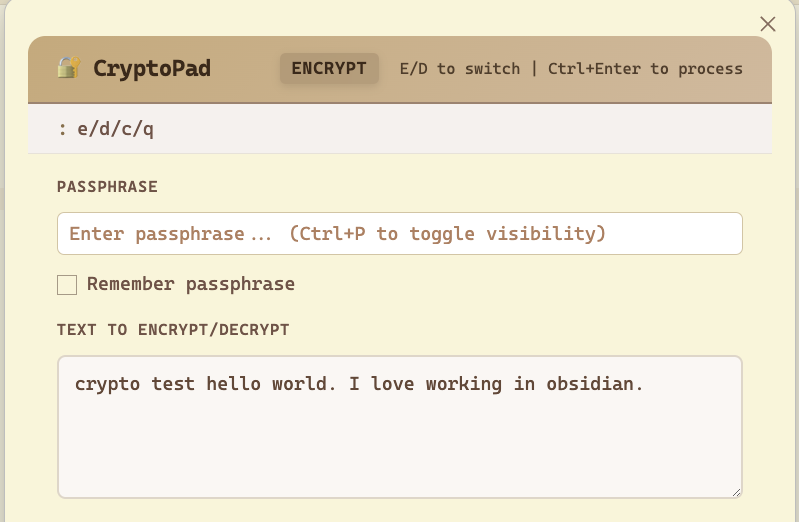
Features
- Keyboard shortcuts influenced by vim to efficiently encrypt/decrypt your text
- Encrypt & Decrypt tabs in one modal
- Optional passphrase memory via plugin settings
- Works on desktop and mobile
- AES-256-GCM encryption with your passphrase
- PBKDF2-SHA256 key derivation (200,000 iterations)
- Random salt + IV per encryption — every ciphertext is unique
Installation
From source (development)
- Clone / copy this folder into your vault under
.obsidian/plugins/cryptopad/ - Run:
npm install npm run build - In Obsidian: Settings → Community Plugins → enable CryptoPad
Manual install (pre-built)
- Copy
manifest.json,main.js, andstyles.cssinto.obsidian/plugins/cryptopad/ - Reload Obsidian and enable the plugin in Community Plugins
Usage
| Action | How |
|---|---|
| Open CryptoPad | Ctrl+Shift+E (Windows/Linux) / Cmd+Shift+E (Mac) |
| Encrypt | Type text → enter passphrase → click Encrypt |
| Decrypt | Switch to Decrypt tab → paste ciphertext → enter passphrase → click Decrypt |
| Copy result | Click 📋 Copy |
| Quick action | Ctrl+Enter / Cmd+Enter while focused in the textarea |
| Close modal | Escape |
Customizing the Shortcut
Go to Settings → Hotkeys, search "CryptoPad", and set your preferred key combination.
Security Notes
- Passphrase is never transmitted — all operations are local
- If "Remember passphrase" is enabled, it's stored via Obsidian's
saveData()in the plugin's data file inside your vault - Each encryption generates a fresh random 16-byte salt and 12-byte IV
- Output format:
base64(salt[16] || iv[12] || ciphertext) - AES-GCM provides both confidentiality and integrity
Technical Details
| Property | Value |
|---|---|
| Cipher | AES-256-GCM |
| Key derivation | PBKDF2-SHA256 |
| Iterations | 200,000 |
| Salt | 16 bytes random |
| IV | 12 bytes random |
| Output encoding | Base64 |
License
MIT
HealthExcellent
ReviewSatisfactory
About
Use keyboard shortcuts influenced by vim to efficiently encrypt and decrypt text. Keyboard shortcuts are list on the user interface.
Encrypt and decrypt selected text inline using AES-256-GCM with PBKDF2-SHA256 key derivation, all client-side so nothing leaves your vault.Details
Current version
1.2.0
Last updated
4 months ago
Created
4 months ago
Updates
4 releases
Downloads
135
Compatible with
Obsidian 1.4.0+
Platforms
Desktop, Mobile
License
MIT