Count Block
 Jongwoo Lee79 downloads
Add editable text blocks with a live count beneath them. Supports customizable metrics, including NEIS bytes!
- Overview
- Scorecard
- Updates2
An Obsidian plugin for text-counting blocks. Add editable text blocks with a live counter beneath them.
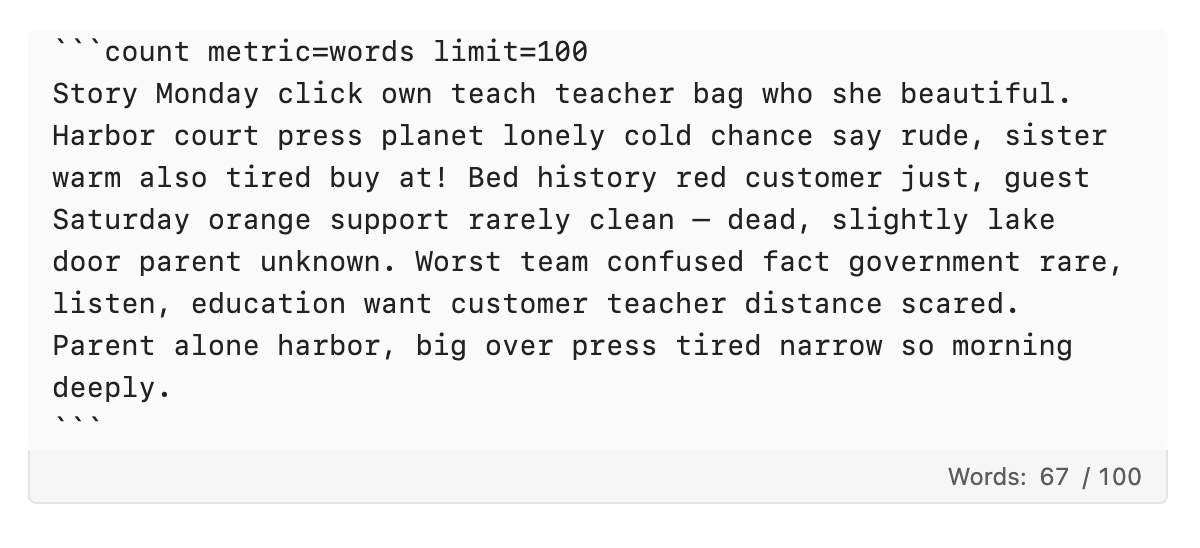
The block lives with the rest of your Markdown content: it's really just a code block with its language set as count. This plugin displays a footer with its count (of whatever metric you get to choose) right below each block. No content is stored outside your vault.
Metrics
Word count is the default metric, while more options are available. It can be changed globally in the plugin settings or per block with inline options.
words: whitespace-separated wordscharacters: Unicode code points, including whitespacecharacters-no-spaces: Unicode code points, excluding Unicode whitespaceutf8-bytes: standard UTF-8 byte lengthneis-bytes: NEIS-style byte counting (a custom standard followed by Korean schools)
Block options belong on the opening fence and are not included in the count:
metric=<metric-id>limit=<positive-integer>
Example:
```count metric=words limit=500
Write plain text here.
Use the Count Block: Insert command to create a block or wrap selected text.
Invalid metrics, limits, or option names are shown in the footer. Top-level fenced blocks are supported in the initial release; nesting a count block inside a list or blockquote is not yet supported by the live editor footer.
NEIS bytes
Yes this is a niche option, but is really the reason I built this thing. Korean schools happen to follow a weird counting method that counts Korean letters as three bytes, English as one and such. This differs significantly from standard byte counting, so a separate metric is needed.
Behavior follows the NEIS counter: logical line breaks count as two bytes; its listed math, Greek, middle-dot, and curly-quote exceptions count as one byte; other characters use their UTF-8 byte length. CRLF and CR line endings are normalized to logical line breaks before counting.
Roadmap
- User-friendly dropdown controls & more
- i18n
- Custom metrics support (w. regex?)
I'd love to add support for custom metrics and more, but being quite occupied at the moment I'm not able to work on it right now. Will have my hands on it once I'm free.
Feedback
If you happen to encounter any bugs or have feature requests, please file an issue on GitHub. Contributions are welcome as well.
Development
npm install
npm test
npm run build
And then copy main.js, manifest.json, and styles.css to a test vault's .obsidian/plugins/count-block/ directory. Reminder: never develop against your primary vault!