Search...Search plugins and themes...
⌘K
Sign in
  • Get started
  • Download
  • Pricing
  • Enterprise
  • Account
  • Obsidian
  • Overview
  • Sync
  • Publish
  • Canvas
  • Mobile
  • Web Clipper
  • CLI
  • Learn
  • Help
  • Developers
  • Changelog
  • About
  • Roadmap
  • Blog
  • Resources
  • System status
  • License overview
  • Terms of service
  • Privacy policy
  • Security
  • Community
  • Plugins
  • Themes
  • Discord
  • Forum / 中文论坛
  • Merch store
  • Brand guidelines
Follow us
DiscordTwitterBlueskyThreadsMastodonYouTubeGitHub
© 2026 Obsidian

Copy path button

Tyrel DelaneyTyrel Delaney361 downloads

One-click button in the note tab header that copies the current file's path.

Add to Obsidian
  • Overview
  • Scorecard
  • Updates6

Adds a copy button to the note tab header that copies the current file's absolute path in one click. Also registers a command, so you can bind a hotkey to it.
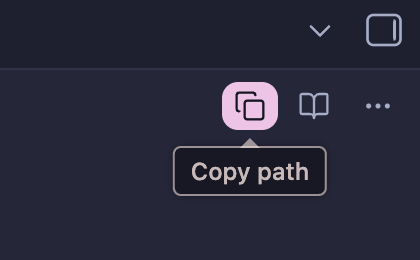
Copy path button in the note tab header, showing its "Copy path" tooltip

Usage

Click the copy icon in the tab header of any note, or run Copy path of current file from the command palette (Settings → Hotkeys to bind a key).

Settings

A single Copy template field controls what lands on the clipboard. Tokens:

Token Expands to
{{path}} Absolute path, e.g. /Users/you/Vault/notes/idea.md
{{relative}} Path relative to vault root, e.g. notes/idea.md
{{wikilink}} [[idea]]

Everything else in the template is copied literally, so <{{path}}> gives </Users/you/Vault/notes/idea.md> and `{{path}}` wraps the path in backticks. The default is {{path}}.

Installation

Desktop only. Absolute paths do not exist on mobile.

Manual install: copy main.js and manifest.json into <vault>/.obsidian/plugins/copy-path-button/, then enable the plugin in Settings → Community plugins.

License

MIT

HealthExcellent
ReviewPassed
About
Add a copy button to note tabs to copy the current file's path in one click. Customize clipboard output with a template using {{path}} (absolute), {{relative}} (vault-relative) or {{wikilink}}, and run the command to bind a hotkey.
FilesCommandsHotkeys
Details
Current version
1.1.3
Last updated
2 weeks ago
Created
4 weeks ago
Updates
6 releases
Downloads
361
Compatible with
Obsidian 1.4.0+
Platforms
Desktop only
License
MIT
Report bugRequest featureReport plugin
Author
Tyrel DelaneyTyrel Delaneysuperflux
superflux.dev
GitHubtyrelh
  1. Community
  2. Plugins
  3. Files
  4. Copy path button

Related plugins

Find orphaned files and broken links

Find files that are not linked anywhere and would otherwise be lost in your vault. In other words: files with no backlinks.

Tab Switcher

Switch your tabs with Ctrl + Tab in recently used order like in a browser.

Hotkey Helper

Easily see and access any plugin's settings or hotkey assignments (and conflicts) from the Community Plugins tab.

Keyshots

Add classic hotkey/shortcuts commands from popular IDEs like Visual Studio Code or JetBrains Family.

Tray

Run Obsidian from the system tray for customisable window management and global quick notes.

Print

Print notes and documents directly from your workspace.

Leader Hotkeys

Add leader hotkey support to any command (like tmux or vim).

Notebook Navigator

A better file browser and calendar inspired by Apple Notes, Bear, Evernote and Day One.

Copilot

Run AI agents such as Claude Code, Codex, and OpenCode inside your vault. Turn your second brain into a smart assistant that gets knowledge work done.

Claudian

Embeds Claude Code/Codex and other local Agents as AI collaborators in your vault.