Combat Ledger
 Snifer1k downloads
Battle tracker for role-playing games. Reads YAML properties from your combatant notes.
- Overview
- Scorecard
- Updates8
📖 Para la versión en Castellano/Español, lee README-es.md.
A simple and lightweight battle tracker for tabletop RPGs (such as D&D, Pathfinder, Dragonbane, etc.) directly inside Obsidian.
Why this plugin?
This plugin was born out of a personal need: I wanted a simple, lightweight way to track initiative and health in my RPG sessions without overcomplicating things. I didn't want heavy systems or cluttered panels. I just wanted something that reads my notes, lets me manage combat turns, and logs the actions. That's how Combat Ledger was born.
Key Features
- YAML Frontmatter Integration: Reads initiative, HP, maximum HP, defense (AC), and character type directly from the frontmatter of your Obsidian notes.
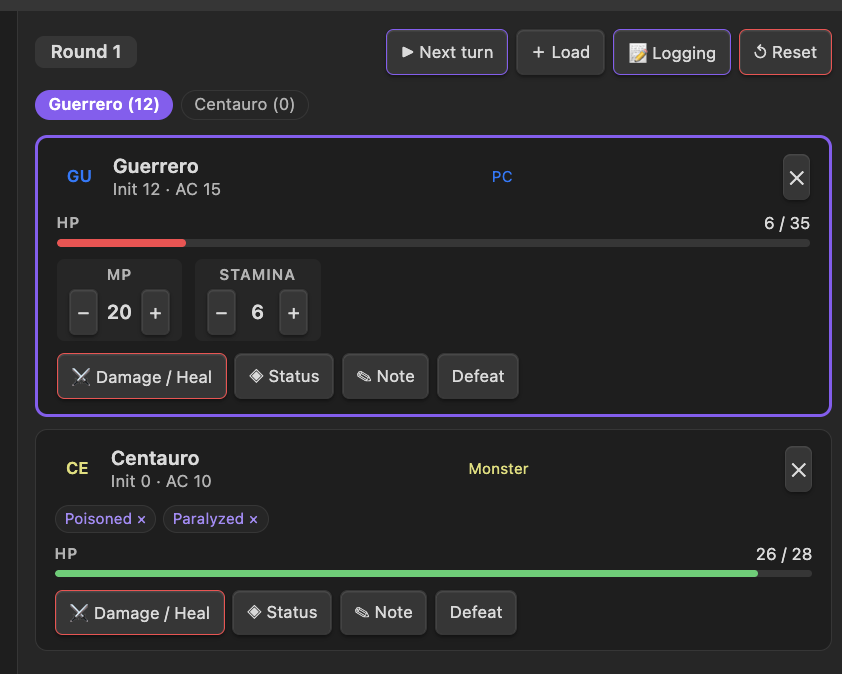
- Turn & Round Management: Automatically sorts combatants by initiative. Highlighting the active combatant and advancing rounds.
- Interactive Combat Log: Records every combat event (turn changes, damage, healing, conditions, custom notes) in a Markdown note of your choice:
- New Note: Automatically generated with timestamps.
- Existing Note: Appended under a specific header (e.g.
## Combat Log/## Registro de Combate).
- Dual Language Support (EN/ES): Easy toggle in settings that translates the entire interface and automatically translates default conditions and log settings.
- Customizable Extra Fields: Track additional numeric parameters such as MP, stamina, focus, or stress with quick click buttons.
- Condition Tracking: Easily toggle states (like Stunned, Poisoned, Cursed) and see them listed on combatant cards.
Installation
- Copy the plugin files (
main.js,manifest.json, andstyles.css) into your Obsidian vault's plugin directory:<vault>/.obsidian/plugins/combat-ledger/. - Open Obsidian settings, navigate to Community Plugins, and enable Combat Ledger.
How it Works
1. Preparing Combatant Notes
Create a markdown note for each character or monster. The plugin reads metadata properties from the frontmatter YAML. By default, it expects:
---
type: PC            # PC, Enemy, or NPC
initiative: 12
hp: 35
hp_max: 35
ac: 15
mp: 20              # Extra field
stamina: 3          # Extra field
---
2. Loading Combatants
- Open the Combat Ledger sidebar view by clicking the Sword Ribbon Icon on the left ribbon, or run the command
Open Combat Ledger. - Click + Load in the top bar.
- If a Combatant Folder is defined in your settings, it will automatically load all files inside that folder.
- If the path is empty, a modal will open allowing you to search and select one or multiple notes manually.
3. Setting Up the Combat Log
When combat begins or you perform the first action, if logging is enabled, a modal will prompt you to set up where you want to keep the log:
- Create New Note: Creates a markdown file named with the current timestamp.
- Use Existing Note: Lets you search and select an existing file. All actions will be written chronologically under your configured header.
- Do Not Log: Runs the combat in memory only.
4. Running the Battle
- Advancing Turns: Click ▶ Next Turn to move to the next alive combatant. The round indicator increments automatically.
- Damage/Healing: Click ⚔ Damage / Heal on any card to subtract or add HP.
- Conditions: Click ◈ Status to toggle active conditions. You can remove a condition quickly by clicking on its badge (
Aturdido ×) on the card. - Quick Notes: Write brief notes (like "flying 10ft high") using the ✎ Note button.
- Defeat & Revive: Defeated characters are greyed out and skipped in the initiative order automatically.
Configuration
In the plugin's setting tab, you can customize:
- Language: English or Español.
- YAML Fields Mappings: Adjust the exact YAML keys the plugin reads from your notes (e.g. changing
actodefense). - Condition List: A comma-separated list of conditions available in the selection modal.
- Combatant Folder: Automate loading by targeting a specific vault folder.
- Combat Log Settings: Enable/disable logging, choose the target markdown header, and define the folder and naming pattern for newly created log files.