Colors for Folders Files and Tabs
 jhojanl2 downloads
Bring your vault to life with custom folder colors that flow to files and tab icons.
- Overview
- Scorecard
- Updates2
Give related folders, files and tab icons coordinated colors in Obsidian. Assign a named color to a folder; its descendants inherit from the nearest colored ancestor. Child folders can override that assignment. Notes are never read or edited.
Desktop MVP · Obsidian 1.14.4 or later. The plugin is not yet published in the community directory. Follow the manual installation steps in the user guide.
Features
- Named palette with editable names, six-digit hex colors and a native color picker.
- Folder inheritance with subtle color variations for descendants.
- File-type icons and independent Explorer icon, Explorer name and tab-icon coloring.
- Folder context-menu actions, native settings and command-palette access.
- Local settings, failed-save retry and protection for damaged or newer settings.
- Offline operation without telemetry, accounts, note edits or a self-updater.
See it in use
| Icons only (default) | Icons and names (optional) |
|---|---|
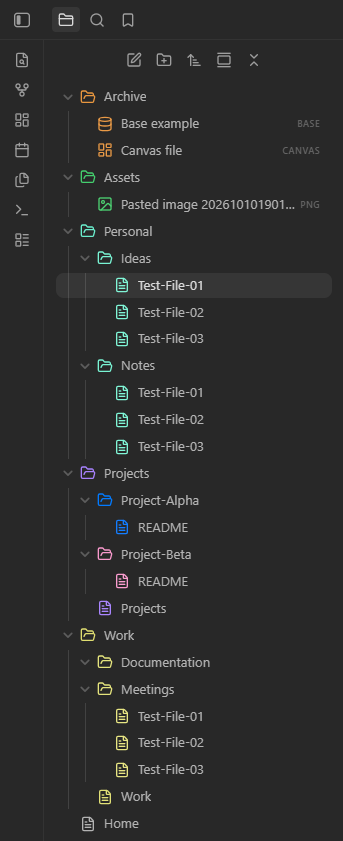 |
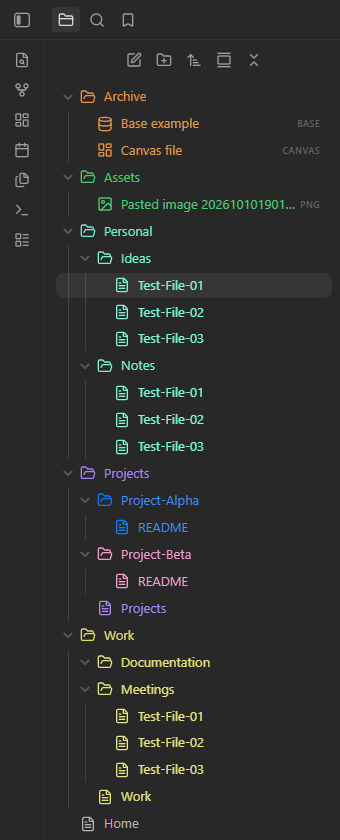 |
Color names is disabled by default. Enable it in the plugin's Appearance section to use the presentation on the right. Tab names keep the theme's styling.

Maintainer-supplied captures show synthetic ColorsTest content in Obsidian 1.14.4, with dark appearance. The maintainer confirms the latest build; the theme name and capture artifact hash are unspecified. See the image notes.
First use
- Enable the installed plugin in Settings → Community plugins.
- Open a folder's context menu and choose Set folder color….
- Select a named color and choose Apply.
Choose Use inherited color to clear an explicit assignment. Manage colors in Settings → Colors for Folders Files and Tabs → Palette, or run Manage palette from the command palette. See the user guide for inheritance, appearance preferences and settings recovery.
Windows Narrator compatibility
Use Tab to focus an Appearance switch and Space to toggle it. With Windows Narrator enabled, first disable Scan Mode using Caps Lock + Space. The maintainer verified this workflow in Obsidian 1.14.4; the Narrator version was not recorded. See accessibility for verification scope and reporting guidance.
Support and limitations
Verification covers the recorded Windows workflows. Current-build validation on Linux/macOS and other themes is pending; mobile support and automated E2E tests are future work. Unsupported surfaces keep native colors. Tracked pop-out cleanup passed, but an earlier observation of two retained closed documents has no established owner. See testing.
Report ordinary bugs through the repository's issue forms. Report suspected vulnerabilities privately using SECURITY.md.
Development and contribution
Development covers setup and deployment. Releases covers GitHub configuration, publication and submission. Use mise with Node 24.21.0, pnpm 12.8.1 and the committed TypeScript 6.0.3 pin. The full local check is:
mise exec -- pnpm run check
Start with CONTRIBUTING.md, architecture and testing. The changelog describes version 0.1.0, the initial desktop MVP.
Support development
If this plugin is useful to you, you can support its development on Ko-fi. Donations are optional.
License and provenance
MIT. Contributors retain ownership of their work. This project began with the official Obsidian sample plugin; the original license and attribution are preserved in NOTICE.