Cognitive Glow
 Justin Shank3k downloads
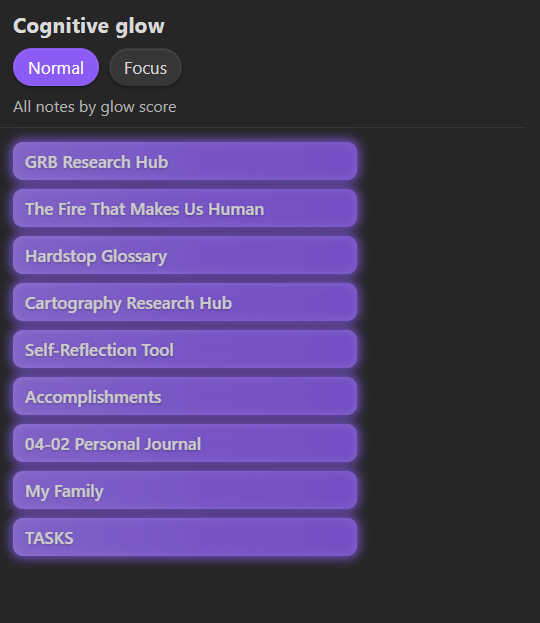
Note activity heatmap in a sidebar. Navigate your vault by visual glow instead of hunting filenames.
- Overview
- Scorecard
- Updates12
An Obsidian plugin that surfaces the notes you actually use. Notes you actively visit glow brighter in a ranked sidebar; ones you haven't touched fade out. No tags, no manual curation — just open notes and let the glow tell you where your attention lives.
Why
Most note-taking setups bury active work under search results and folder hierarchies. Cognitive Glow gives you a persistent, at-a-glance view of what matters right now, ranked by a blend of recency and visit frequency.
Features
- Visual glow — notes render as embers on a darkened ground. Freshly visited notes ignite white-gold; aging ones cool through amber to ash. Row width tracks visit frequency, brightness tracks rank, and color temperature tracks how recently you were there — three signals you can read at a glance.
- Normal and Focus modes — Normal shows your full ranked list; Focus narrows it to your top N.
- Dwell-time gating — visits only count after a configurable minimum open time (default 30 s), so quick flick-throughs don't inflate scores.
- Folder scope — restrict tracking to specific folders, or exclude folders like
Templates/orArchive/. - Sidebar placement — left or right, whichever fits your layout.
- Ribbon shortcut — sparkles icon in the ribbon opens the panel.
Installation
From community plugins
In Obsidian, go to Settings > Community plugins > Browse, search for Cognitive Glow, and install.
Manual
npm install
npm run build
Copy manifest.json, main.js, and styles.css into .obsidian/plugins/cognitive-glow/, then enable in Settings > Community plugins.
Usage
- Open notes normally — Cognitive Glow tracks visits automatically.
- Open the panel from the ribbon (sparkles icon) or command palette (
Open sidebar). - Toggle between Normal and Focus with the header buttons.
- Click any row to jump to that note.
Settings
Display
| Setting | Default | Description |
|---|---|---|
| Glow fades after | 3 days | How quickly a note loses glow. Presets: 1 day / 3 days / 1 week / 1 month. |
| Max notes in focus mode | 5 | Top N notes shown in focus mode. |
| Hide faded notes | Off | Only show notes above a minimum score. |
| Sidebar placement | Right | Which sidebar hosts the panel. |
Tracking
| Setting | Default | Description |
|---|---|---|
| Minimum open time | 30 s | A note must stay open this long to count as a visit. Set to 0 for instant tracking. |
| Tracked folders | (all) | Only track notes in these folders. One path per line. |
| Excluded folders | (none) | Never track notes in these folders. Takes priority over inclusions. |
Advanced
| Setting | Default | Description |
|---|---|---|
| Recency weight | 0.6 | Contribution of recent activity to the score (0-1). |
| Frequency weight | 0.4 | Contribution of visit count to the score (0-1). |
| Manual pin weight | 0 | Boost for manually pinned notes (0-1). |
| Frequency scale | 20 | Opens treated as "max frequency". |
| Max tracked notes | 3000 | Memory cap. 0 = unlimited. |
| Recency decay (ms) | 259200000 | Raw exponential decay constant. Overrides dropdown. |
Commands
| Command | Description |
|---|---|
| Open sidebar | Opens or reveals the Cognitive Glow panel. |
| Pin or unpin active note | Toggles a manual glow boost on the current note (also on the file right-click menu). |
| Dump glow scores to console | Logs the top 20 notes by score (dev console). |
| Show persisted data (JSON) | Opens a modal with the full saved payload. |
Pinning: a pin sets the note's manual gravity to its maximum. Pins only affect the score when Manual pin weight (Advanced settings) is above 0 — it defaults to 0, so raise it first if you want pins to glow.
How scoring works
recency   = exp(-(now - lastOpened) / tauRecencyMs)
frequency = log(1 + hitCount) / log(1 + hitCountMaxScale)
gravity   = manualGravity  (0 if unset)

glowScore = wRecency * recency + wFrequency * frequency + wGravity * gravity
Weights are normalized if their sum exceeds 1. See SPEC.md for full implementation details.
Development
npm install          # install dependencies
npm run build        # compile plugin
npm run dev          # watch mode
npm run lint         # eslint (Obsidian rules)
npm run test         # unit tests
Data
Stored in .obsidian/plugins/cognitive-glow/data.json. No network requests, no telemetry.