Search...Search plugins and themes...
⌘K
Sign in
  • Get started
  • Download
  • Pricing
  • Enterprise
  • Account
  • Obsidian
  • Overview
  • Sync
  • Publish
  • Canvas
  • Mobile
  • Web Clipper
  • CLI
  • Learn
  • Help
  • Developers
  • Changelog
  • About
  • Roadmap
  • Blog
  • Resources
  • System status
  • License overview
  • Terms of service
  • Privacy policy
  • Security
  • Community
  • Plugins
  • Themes
  • Discord
  • Forum / 中文论坛
  • Merch store
  • Brand guidelines
Follow us
DiscordTwitterBlueskyThreadsMastodonYouTubeGitHub
© 2026 Obsidian

Click Hint

kbwokbwo416 downloads

Provide keyboard-driven hints for clickable elements.

Add to Obsidian
  • Overview
  • Scorecard
  • Updates3

A plugin for Obsidian that enhances navigation by providing keyboard-driven hints for clickable elements.
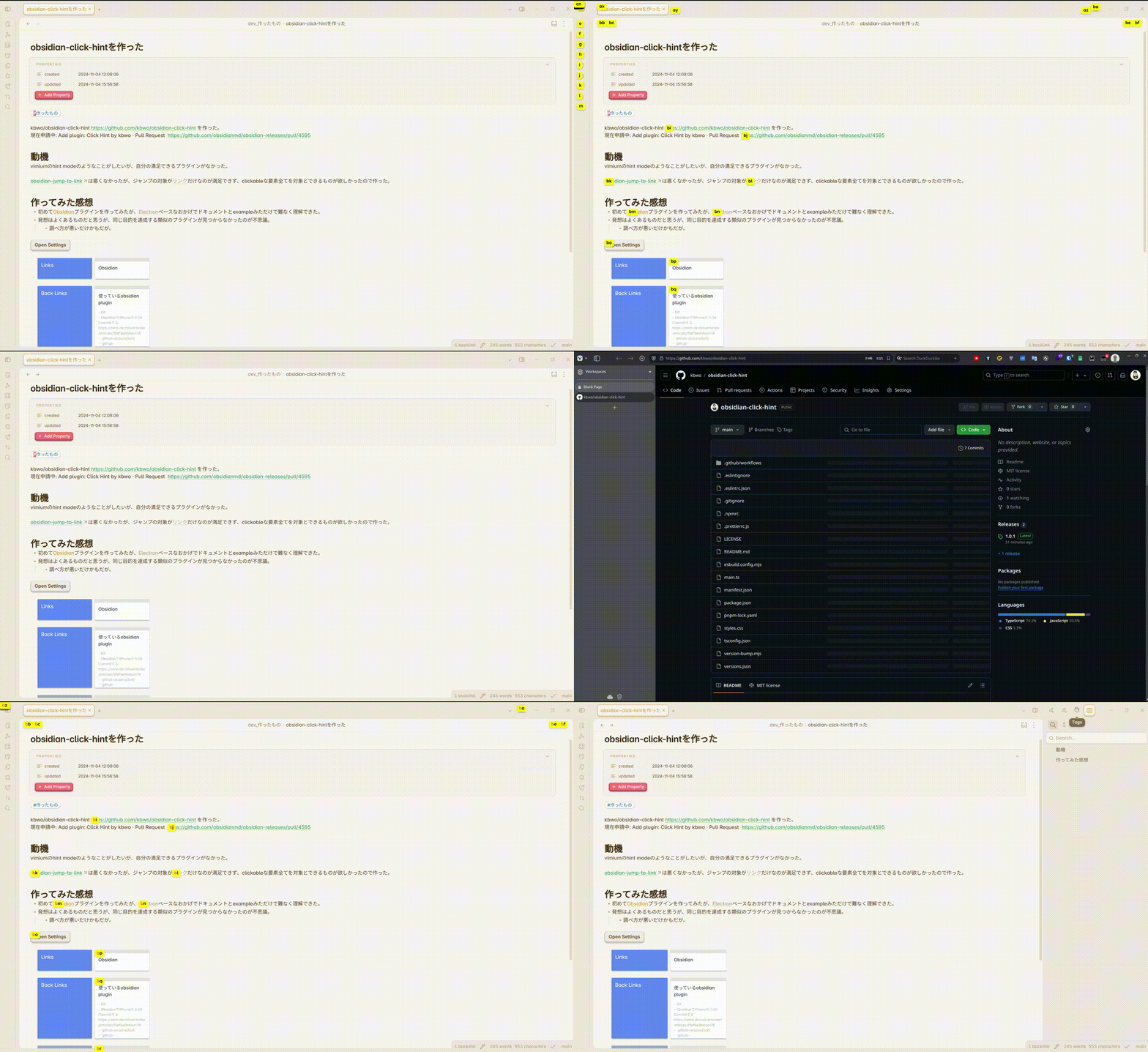
Image from Gyazo

Inspired by:

  • easymotion/vim-easymotion: Vim motions on speed! https://github.com/easymotion/vim-easymotion
  • philc/vimium: The hacker's browser. https://github.com/philc/vimium
  • mrjackphil/obsidian-jump-to-link: Quick jump between links using hotkeys https://github.com/mrjackphil/obsidian-jump-to-link

Features

  • Quick keyboard navigation to any clickable element (links, buttons, etc.)
  • Customizable hint characters
  • Support for both internal and external links
  • Visual feedback for partial matches

How to Use

  1. Install the plugin from Obsidian's Community Plugins
  2. Enable the plugin in Obsidian settings
  3. Use the command "Show click hints" to activate hint mode
  4. Type the characters shown in the hints to navigate to your desired element

Configuration

You can customize the following settings:

  • Hint Characters: Define which characters to use for hints (default: a-z)

Installation

From Obsidian

  1. Open Settings in Obsidian
  2. Navigate to Community Plugins and disable Safe Mode
  3. Click Browse and search for "Click Hint"
  4. Install the plugin and enable it

Manual Installation

  1. Download the latest release from the releases page
  2. Extract the files to your .obsidian/plugins/click-hint/ folder
  3. Reload Obsidian
  4. Enable the plugin in Community Plugins settings
70%
HealthGood
ReviewSatisfactory
About
Navigate to any clickable element using keyboard-driven hints that label links, buttons and other targets. Customize hint characters, jump to internal or external links, and see visual feedback for partial matches.
NavigationLinksHotkeys
Details
Current version
1.0.1
Last updated
2 years ago
Created
2 years ago
Updates
3 releases
Downloads
416
Compatible with
Obsidian 0.15.0+
Platforms
Desktop, Mobile
License
MIT
Report bugRequest featureReport plugin
Author
kbwokbwo
github.com/kbwo
GitHubkbwo
  1. Community
  2. Plugins
  3. Navigation
  4. Click Hint

Related plugins

Strange New Worlds

Reveal networked thought and the strange new worlds created by your vault.

Leader Hotkeys

Add leader hotkey support to any command (like tmux or vim).

Table of Contents

Create a table of contents for a note.

Surfing

Surf the net like a web browser.

Notebook Navigator

A better file browser and calendar inspired by Apple Notes, Bear, Evernote and Day One.

Homepage

Open a note, base, or workspace on startup, or set it for quick access later.

Recent Files

Display a list of recently opened files.

Smart Connections

AI link discovery copilot. See related notes as you write. Lookup using semantic (vector) search across your vault. Zero-setup local model for embeddings, no API keys, private.

Vertical Tabs

Offer an alternative view that displays open tabs vertically, allowing users to group and organize tabs for a better navigation experience.

Quick Switcher++

Enhanced Quick Switcher, search open panels, and symbols.