Claude Anywhere
 derek-larson142k downloads
Run Claude Code from any device via remote relay server.
- Overview
- Scorecard
- Updates19
Your Mac's Claude Code, from your phone or tablet.
Built by Derek Larson. Pair with commands →
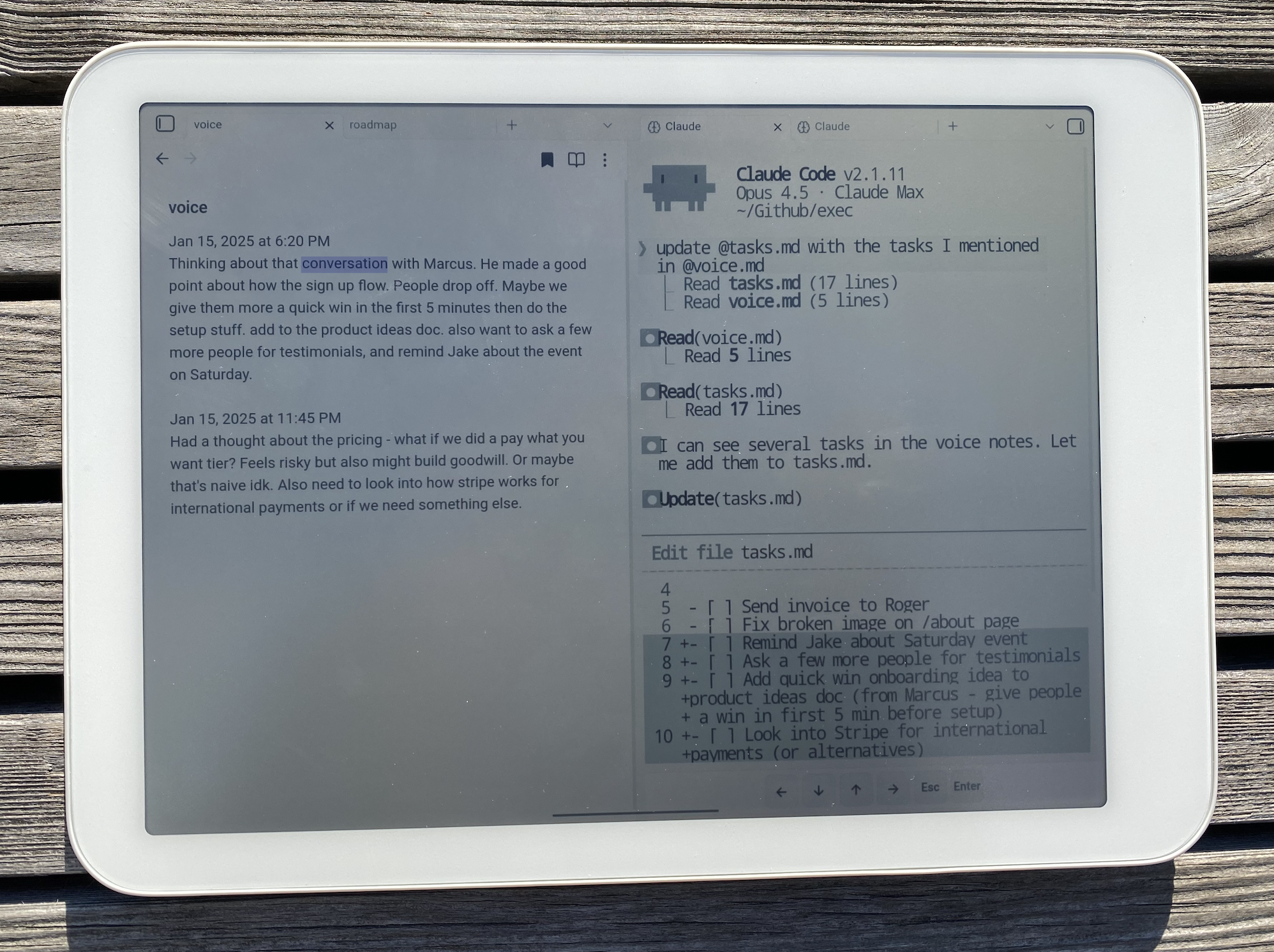
- Edit files across your Mac - Notes in your vault, code in other repos, config files. Not limited to Obsidian.
- Run your skills -
/morning,/mail,/voice, whatever you've built. Your workflow travels with you. - Full terminal access - Git, npm, scripts. Anything Claude Code can do on desktop.
- Resume on desktop - Pick up conversations where you left off with
/resume.
Compatibility
- Android (phone, tablet)
- iOS (iPhone, iPad)
Requirements
- Mac with Claude Code installed
- Tailscale on both devices (same account)
- File sync between Mac and mobile (Obsidian Sync, iCloud, Dropbox, etc.)
- External keyboard recommended
Setup
Mac (Server)
1. Install Tailscale
Download from tailscale.com/download, open the app, and sign in.
2. Install the Plugin
Open Terminal, navigate to your Obsidian vault, and run:
mkdir -p .obsidian/plugins/claude-anywhere && cd .obsidian/plugins/claude-anywhere && curl -LO https://github.com/derek-larson14/obsidian-claude-anywhere/raw/main/main.js && curl -LO https://github.com/derek-larson14/obsidian-claude-anywhere/raw/main/manifest.json && curl -LO https://github.com/derek-larson14/obsidian-claude-anywhere/raw/main/styles.css
3. Enable the Plugin
- Open Obsidian
- Settings → Community plugins → Enable "Claude Anywhere"
- Settings → Claude Anywhere → Enable Remote Access
4. Keep Your Mac Awake
While using Claude remotely, prevent your Mac from sleeping.
Option A: Amphetamine (Recommended)
Install Amphetamine from the App Store. It provides a menu bar icon to easily toggle sleep prevention with options for timed sessions, triggers, and more.
Option B: Terminal
caffeinate -dis
This prevents sleep even when closing the lid (while plugged in). Close the Terminal window or press Ctrl+C to restore normal sleep behavior.
Mobile Device (Client)
- Install Tailscale and sign in (same account as Mac)
- Get the plugin onto your device:
- Obsidian Sync (easiest): Settings → Sync → enable "Installed community plugins", restart Obsidian
- Manual: Download the plugin files (via cloud storage, email, etc.), then use a file manager to move them to your vault's
.obsidian/plugins/claude-anywhere/folder
- Enable the plugin: Settings → Community plugins → Enable "Claude Anywhere"
- Open Claude from the command palette (swipe down): search "Claude"
Files needed for manual install: main.js, manifest.json, styles.css
Updating
Paste into a Claude Code session from your vault:
Update the Claude Anywhere plugin. Download main.js, manifest.json, and styles.css from https://github.com/derek-larson14/obsidian-claude-anywhere/releases/latest/download/ into .obsidian/plugins/claude-anywhere/. Tell me the old and new version numbers.
Then restart Obsidian or disable/re-enable the plugin.
Usage
Opening Claude
Use the command palette (swipe down or Cmd+P) and search "Claude":
- "Open Claude Code" - Opens or focuses existing terminal
- "New Claude Tab (Sidebar)" - Opens in right sidebar
- "New Claude Tab (Split View)" - Opens alongside current note
- "New Claude Tab (Full Width)" - Opens as full-screen tab
You can also tap the brain icon in the left ribbon.
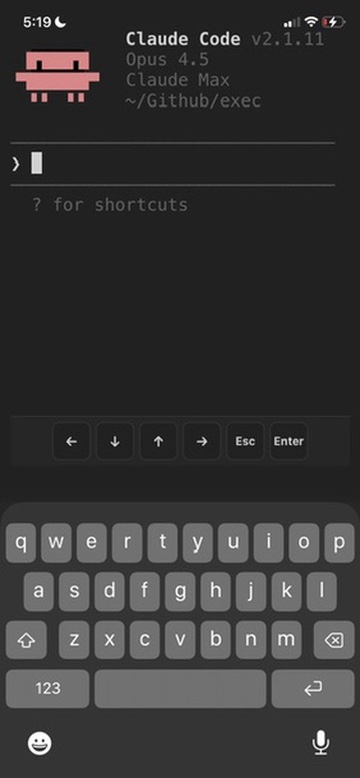
Mobile Controls
On-screen buttons appear at the bottom for keys missing from software keyboards:
- ← ↓ ↑ → - Arrow keys
- Esc - Escape key
- Enter - Submit
Multi-line Input
For multi-line prompts in Claude Code, press Alt+Enter or Shift+Enter on your external keyboard.
How It Works
Streams your Mac's Claude Code session to mobile over Tailscale. File sync pushes Claude's edits back to your device.
Mobile                          Mac
┌─────────────────┐             ┌─────────────────┐
│ Obsidian        │  Tailscale  │ Obsidian        │
│ + Plugin        │◄───────────►│ + Plugin        │
│ + xterm.js      │   (secure)  │ + relay_server  │
│                 │             │ + Claude Code   │
└─────────────────┘             └─────────────────┘

Connection: ws://100.x.x.x:8765 (Tailscale IP)
YOLO Mode
Skip all permission prompts. Claude acts without asking.
Settings → Claude Anywhere → Advanced → YOLO Mode
Session Behavior
On disconnect: Claude session is killed
To continue a conversation: Use Claude's /resume command after reconnecting.
Known Limitations
Scrolling on mobile - Dragging inside the terminal doesn't scroll well. Use the scrollbar on the right edge, or Alt+↓ to jump to the bottom.
Troubleshooting
"Connection failed"
- Check Obsidian is open on your Mac
- Check Tailscale is connected on both devices
- Check server is running: Settings → Claude Anywhere on Mac
- Toggle Remote Access off and back on
Terminal looks garbled
- Close the terminal tab and open a new one
Files
main.js- Obsidian plugin code (includes embedded relay server)manifest.json- Plugin metadatastyles.css- Terminal styling
Development
The relay server (relay_server.py) is embedded as base64 in main.js for Obsidian plugin directory compatibility. To rebuild after modifying:
./build.sh
Contributing
Issues and PRs welcome at github.com/derek-larson14/obsidian-claude-anywhere
License
MIT
Related
- Claude Sidebar - Run Claude Code in your Obsidian sidebar (desktop)