Search...Search plugins and themes...
⌘K
Sign in
  • Get started
  • Download
  • Pricing
  • Enterprise
  • Account
  • Obsidian
  • Overview
  • Sync
  • Publish
  • Canvas
  • Mobile
  • Web Clipper
  • CLI
  • Learn
  • Help
  • Developers
  • Changelog
  • About
  • Roadmap
  • Blog
  • Resources
  • System status
  • License overview
  • Terms of service
  • Privacy policy
  • Security
  • Community
  • Plugins
  • Join the community
  • Discord
  • Forum / 中文论坛
  • Merch store
  • Brand guidelines
Follow us
DiscordTwitterBlueskyThreadsMastodonYouTubeGitHub
© 2026 Obsidian

Chronology

canna71canna7165k downloads

A calendar and a timeline of the note's creation and modification.

Add to Obsidian
  • Overview
  • Scorecard
  • Updates22

Provides a sidebar with a calendar view of your notes.
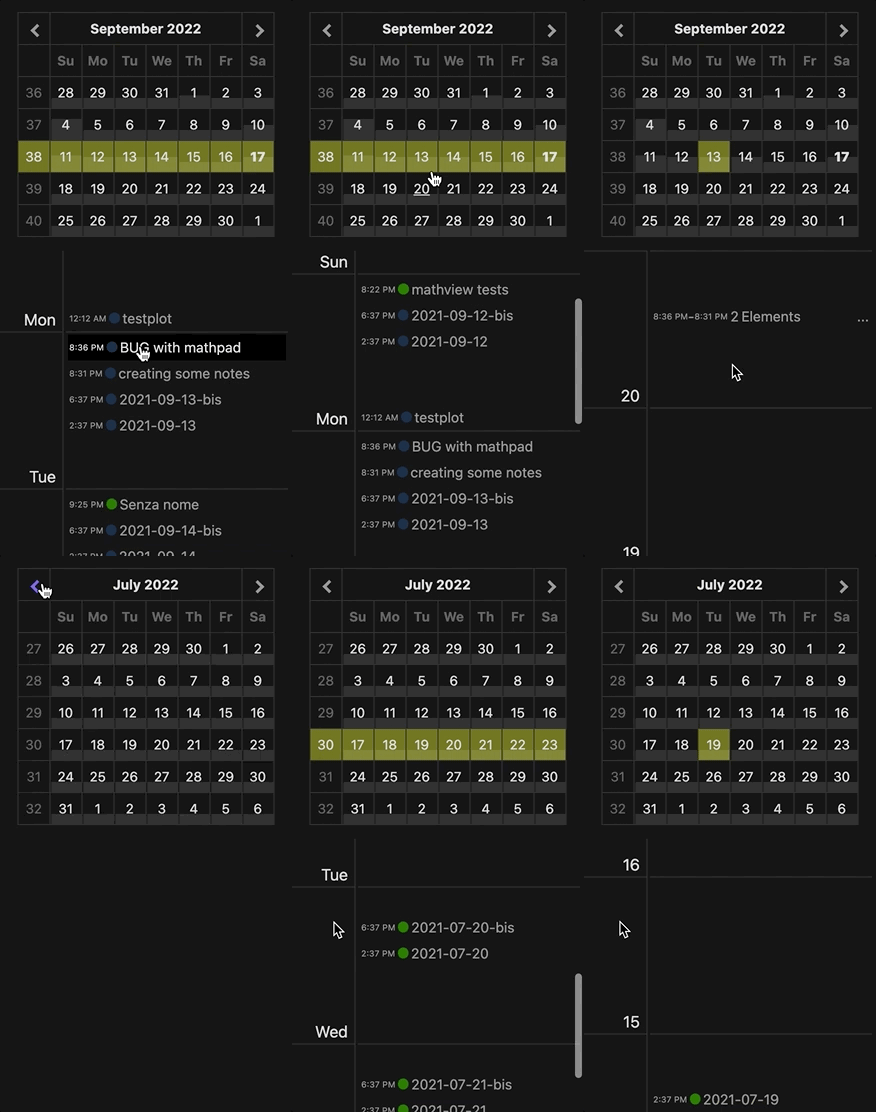
The calendar allow to navingate and select a daily, weekly, monthly or custom range of notes. Daily and Weekly range are displayed in a time line but you can force the display of the notes in a simple list by enabline the setting Display Simple List. In the timeline visualization, you can group notes that were created or modified in the same time slot by enabling Group Notes in same time slot.

Click the month name to see a list of all notes of that month.

To select a range of dates to display: select one date than shift-click the other date of the range.

The notes in the timeline will be shown with a colored marked indicating if they were created or modified at that moment.

Clicking on the name of the note will open it. Ctrl-(or Command-) clicking the note name will open it in a new pane.

In the calendar you can select the single days or the week number (on the left).

The days tiles background gives an indication about how many notes were created or edited that day. The scale depends also on the average number of daily notes set in the settings.

Obsidian Sync Issues

If you have Obsidian Sync, you might have noticed that synced file will have a creation timestamp corresponding to when they were synced to the other machines. In version 1.1.9 a couple of settings were added in order to work around this issue by (optionally) reading from the file metadata the actual creation date of the note. It is not mandatory that every note has a creation/modification date in the metadata, if it is missing the plugin will fallback to the file creation or modification date.

79%
HealthExcellent
ReviewCaution
About
Display a calendar sidebar to navigate notes by day, week, month, or custom date range. View notes as a timeline (with grouping for notes created or modified in the same time slot) or as a simple list, and click a month to list its notes. Read file metadata to infer true creation dates for synced files.
CalendarDatesSidebar
Details
Current version
1.1.14
Last updated
Last week
Created
4 years ago
Updates
22 releases
Downloads
65k
Compatible with
Obsidian 0.15.0+
License
OTHER
Report bugRequest featureReport plugin
Sponsor
Buy Me a Coffee
Author
canna71canna71
github.com/Canna71
GitHubcanna71
  1. Community
  2. Plugins
  3. Calendar
  4. Chronology

Related plugins

Day Planner

Day planning from a task list in a Markdown note with enhanced time block functionality.

Periodic Notes

Manage your daily, weekly, and monthly notes.

Calendar

Explore your daily notes.

Calendarium

Craft mind-bending fantasy and sci-fi calendars.

Journals

Manage your journals.

ICS

Add events from calendar ics on the web to daily notes on demand. Includes vdir support. Daily Planner, Templater and Dataview friendly.

Contribution Graph

Generate an interactive heatmap to visualize and track your productivity.

Jump-to-Date

Popup calendar for quickly navigating dates.

Daily Notes Editor

Edit daily notes in one page (inline), which works similar to Roam Research's default daily note view.

Daily Note Navbar

Navigate between sequential daily notes with ease.