Chrono Notes
 ZhengYX648 downloads
A calendar workspace for periodic notes, calendar extensions, regional holidays, tasks, and time ranges.
- Overview
- Scorecard
- Updates27
English · 简体中文 · 繁體中文 · 日本語 · 한국어 · Deutsch · Français · Español · Português (Brasil) · Русский · Tiếng Việt · العربية · فارسی · עברית · አማርኛ · हिन्दी
Chrono Notes adds a calendar to Obsidian for daily, weekly, and other periodic notes. View tasks, holidays, statistics, and notes that span multiple days alongside your calendar.
Features
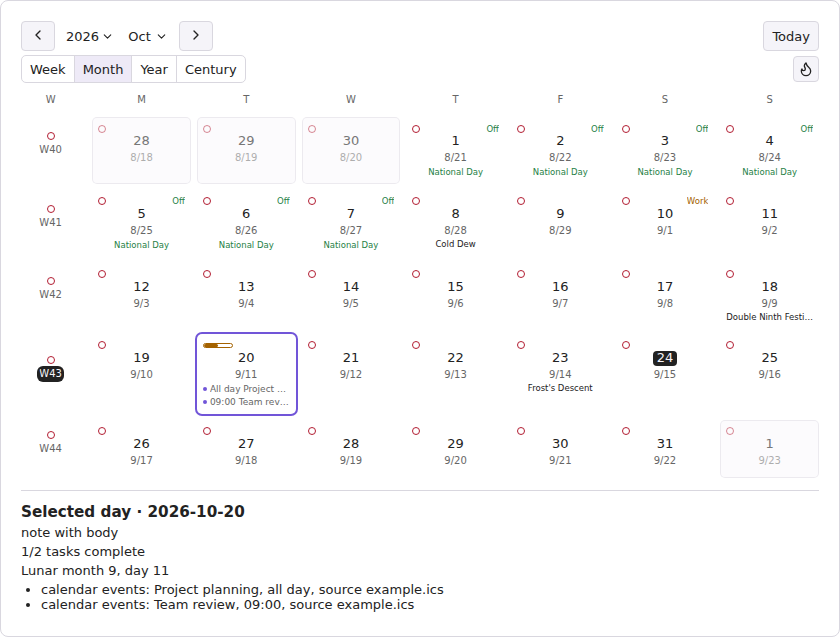
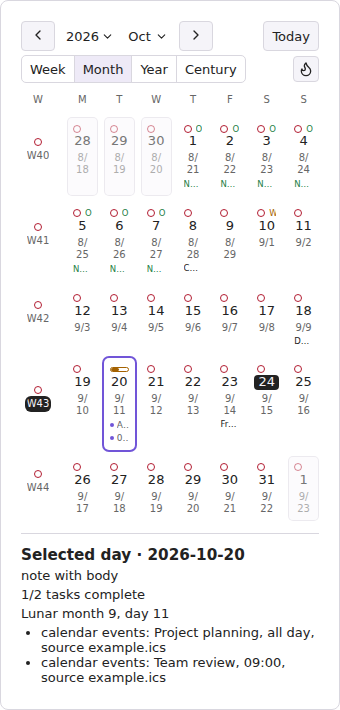
Current wide and narrow calendar layouts, rendered from the plugin UI in a browser fixture. These images are examples of the layout, not Obsidian or Android host screenshots.
- A century view grouped by decade, with the same periodic-note cells, indicators and interactions as the year overview.
- Year, month, and week calendar views with note state, tasks, holidays, local ICS events, and time-range notes.
- Daily, weekly, monthly, quarterly, yearly, decadal, and century periodic notes with built-in or Templater templates.
- A navigation bar above periodic notes to open adjacent notes, larger periods, selected dates, and the calendar.
- Chinese lunar and Ganzhi calendar extensions, including solar terms and traditional festivals.
- Persian (Solar Hijri), Ethiopic, Hebrew, Indian national (Saka), Islamic civil, and Umm al-Qura calendar extensions.
- Mainland China and Singapore holiday extensions.
- Tasks, statistics, month and year heatmaps, note previews, task completion, and due-date adjustments.
- Time-range note creation by date-range dragging, cross-week layouts, templates, and a searchable range-note list.
- Local, read-only ICS calendar sources.
- Choose how Obsidian Date and Date & time properties look without changing their saved values or Obsidian's editing controls. Optionally open the daily note from a date property.
- Interface and setup guides in 16 languages, with right-to-left layouts for Arabic, Persian, and Hebrew.
Your notes and plugin settings remain in your Obsidian Vault. Chrono Notes reads local ICS files only when you choose them, and never uploads them. To make the calendar faster, it keeps a rebuildable note index in this device's IndexedDB storage; the index is not added to your Vault. No account is needed.
Requirements and compatibility
- Obsidian 1.12.7 or later on desktop or mobile.
- Local ICS sources inside the Vault work across supported platforms; explicitly configured paths outside the Vault are desktop-only.
- Optional non-Gregorian calendars depend on the calendar data provided by the Obsidian runtime and are omitted safely when unavailable.
Installation
Community Plugins (recommended)
In Obsidian, open Settings → Community plugins → Browse, search for Chrono Notes, select Install, then Enable. You can also open the Chrono Notes community listing. No ZIP extraction is needed for this route.
Manual installation
Download chrono-notes-<version>.zip from the latest release and extract it into Vault/.obsidian/plugins/. The archive contains the chrono-notes/ directory with main.js, manifest.json, and styles.css. Reload Obsidian, then enable Chrono Notes under Community plugins.
Upgrade
Back up and preserve Vault/.obsidian/plugins/chrono-notes/data.json when it exists. Replace only main.js, manifest.json, and styles.css; delete data.json only when you explicitly want to reset all plugin preferences.
Usage
The main calendar, month selectors, and date dialogs always use the Gregorian calendar. Changing the interface language translates month names and digits; it does not select a different calendar. Choose calendar extensions separately to show additional date information.
Before adding ICS events: Chrono Notes reads local calendar files, not remote subscriptions, and does not expand RRULE or RDATE recurring events. Skipped events are counted, so a calendar relying on recurrence may look incomplete. A source path outside the Vault is desktop-only.
First time: Choose your periodic-note types and note paths under Chrono Notes settings, then open the calendar from the ribbon. Click a date to select it; double-click or press Enter to open or create its note. On a touch screen, long-press a date and choose the note action from its menu. Selecting a date alone never creates a note.
- Enable the periodic-note types you use and confirm their path patterns in Chrono Notes settings.
- Open the calendar from the ribbon or command palette.
- Optionally enable calendar and holiday extensions or add local ICS sources.
- Click a date to select it; double-click or press Enter to open or create its periodic note. Right-click opens date actions; when ICS events exist, View calendar events shows the complete event list. On a touch screen, long-press a date to open its menu. If no menu appears, releasing your finger opens or creates the daily note. Long-pressing a week, month, or other period entry opens its note directly.
Select a date in Month view to read its note status, calendar details, holidays, and complete ICS event list with sources below the grid. When creation confirmation is enabled, the dialog shows the target path and any larger-period notes that will be created or kept.
Tasks on the calendar
Add a checkbox task to a note and include a date marker:
- [ ] Submit the weekly report 📅 2026-10-20
- [ ] Prepare the materials 🛫 2026-10-18 ⏳ 2026-10-19 📅 2026-10-20
🛫 marks the start date, ⏳ the scheduled date, and 📅 the due date. Use YYYY-MM-DD dates. Week view lists tasks whose start, scheduled, or due date falls in the displayed week. A task appears on each distinct date; multiple markers for the same day share one entry. Tasks without dates still count toward their note's task progress.
Use the due-date dropdown in Week view to move a deadline to another day of the displayed week. On desktop, you can also drag a due-date task onto a day. These actions change the task's existing due date in its source note.
In Week view, tick a task to change its completion state in the source note. While an update runs, that task’s checkbox, due-date control, and drag action are disabled; a message beside the task explains any failure or saving warning. Check the source note before retrying an uncertain update. Lists longer than 100 entries have Previous tasks and Next tasks buttons, with the full count retained.
Decadal and century notes
The century view places each decade beside two rows of five years. Narrow layouts move the decade above its years; very narrow panes or large text use two year columns. Years outside the century leave empty slots. Entering the view reveals the selected year's decade; This century returns to the current decade. Navigation stays visible while the years scroll.
Enable these note types in settings, then select Century in the sidebar. Use the decade cells on the left to access decadal notes; the enabled century note has its own cell. The view tabs are Week, Month, Year and Century. Period cells share the year view's note dots, task progress, selection and preview. Click to select; double-click or press Enter to open or create the note. Ctrl/Cmd-click or middle-click opens a new tab; touch supports long press. Use the view tabs to browse the selected period. Default paths are [diary]/DEC[s] (2020s) and [diary]/[C]CEN (C21).
Decades span 2020–2029; century 21 spans 2001–2100. DEC and CEN are Chrono Notes extensions that output fixed digits. Prefer either century or decade folders: 2000s crosses C20/C21, and its decade note uses the first year (2000, in C20). Existing notes stay in place.
Templates use the same formats: {{date:DEC[s]}}, {{date:[C]CEN}}, and {{start:YYYY}}–{{end:YYYY}}. All periodic templates support start/end dates and inclusive {{days}}; each note settings page lists its placeholders, meanings, examples, and Templater equivalents. General > Template settings explains shared syntax and default formats.
Range notes
First choose a destination folder under Settings → Chrono Notes → Range notes. On desktop, drag from a start date to a different end date in the month calendar to create a range note. You can also choose Create range note from a date menu or the command palette, then enter the dates. Creation requires at least two calendar days; reversed dates are put in chronological order.
To make an existing note appear as a range, add these properties at the top of its Markdown file:
---
chrono-notes: interval
start: 2026-10-18
end: 2026-10-20
---
Use complete YYYY-MM-DD dates, with the start no later than the end. The displayed range includes both dates. Existing notes may also use complete ISO date-time values with at least hours and minutes, or a range within one day.
A range note must contain valid start and end properties. New range notes created by Chrono
Notes also write chrono-notes: interval and are recognized anywhere in the Vault. A note without
the chrono-notes property is recognized only within the configured unmarked range-note scope. A
different chrono-notes value excludes the note from range-note recognition. Existing notes are
not modified automatically.
Settings
General settings includes the User guide and Report an issue. Changing a calendar or holiday extension keeps the current settings tab visible and keyboard focus on the control you just used.
Settings cover periodic-note paths and templates, calendar and holiday extensions, task and statistics display, local ICS sources, time-range notes, and Obsidian Date and Date & time property display. Plugin settings are stored in data.json; note content and properties remain in the Vault.
Limitations
- ICS sources are local read-only files; remote calendar subscriptions are not fetched directly. One refresh reads at most 32 configured sources by default and reports any excess sources as omitted. Recurring
RRULE/RDATEevents are currently skipped and counted instead of being expanded. Events with invalid or unsupported time-zone definitions are also skipped and reported. - Holiday availability depends on verified official data. Unpublished future schedules are shown as unavailable rather than predicted.
- Calendar extensions change the display only. Note names, date navigation, and task dates still use the Gregorian calendar. Extensions that Obsidian's runtime cannot provide are hidden.
- Mobile interactions and layouts can vary with the Obsidian app, device, and input method.
Privacy and security
Chrono Notes lists Markdown files and reads relevant notes in your Vault to show note status, calendars, tasks, statistics, and path suggestions. It also reads the local ICS files you select. It does not upload notes, tasks, calendars, or ICS data and does not require an account. The saved note index stays on your device in IndexedDB, can be rebuilt from your notes, and is not included in Vault sync. The plugin writes a formatted date to the system clipboard only after you choose Copy date; it never reads the clipboard.
Development
Development requires exactly Node.js 24.19.0 and npm 11.17.0.
npm ci
npm run check
npm exec playwright -- install chromium
npm run test:browser
Developer references:
- Product requirements
- UX specification
- Architecture
- Testing strategy
- Changelog
- Contributing guide
- Security policy
Support
- Q&A: Usage and configuration questions.
- Ideas: Early feature and workflow ideas.
- Show and tell: Tips, workflows, and reference implementations.
- Use the structured GitHub issue forms for reproducible bugs and concrete feature requests.
- Report vulnerabilities only through GitHub's private vulnerability reporting; see the security policy for details.
Never post real private Vault paths, note or task content, calendar or ICS data, source URLs, credentials, or personal information publicly.
License
MIT © ZhengYX
Acknowledgements
Chrono Notes draws inspiration from:
- Liam Cain: Calendar
- a-nano-dust (纳米级尘埃): Dust Calendar