Chapter Diff
 Beppe120 downloads
Compare the working version of a note with any past Git commit, side by side with inline diff highlighting.
- Overview
- Scorecard
- Updates4
Chapter Diff shows exactly what changed between the note you are editing and any earlier version saved in Git. The past revision appears on the left, the live note appears on the right, and additions and removals are highlighted inline.
It is designed for long-form writing: choose the version you want on the left, then continue drafting directly in the editable Working Tree on the right. You can also keep the note open in a normal editor tab; the comparison stays in sync.
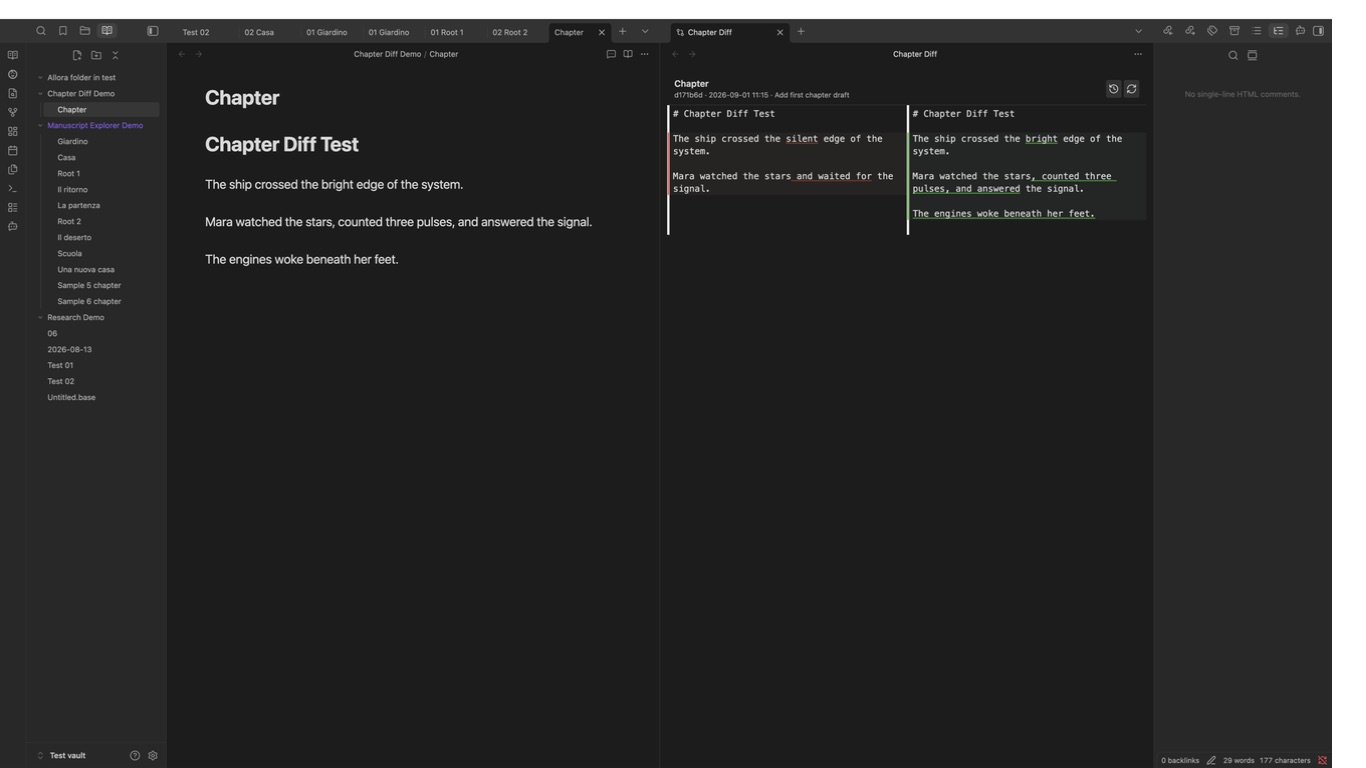
What it does
- Lists the Git history of the active note.
- Replaces the note's current tab with a two-column comparison, preserving navigation back to the note.
- Keeps the selected revision read-only and makes the Working Tree editable.
- Highlights removed text in red and added text in green.
- Collapses long unchanged ranges into clickable “unchanged lines” bars.
- Saves edits made in the right-hand pane back to the note automatically.
- Refreshes the comparison when the same note changes elsewhere in Obsidian.
- Lets you switch revisions without closing the diff pane.
- Continues to find older versions when a note was renamed in Git.
Chapter Diff writes only the note you edit in its right-hand pane. It never stages, commits, pushes, switches branches, or rewrites Git history.
Command and suggested hotkey
Chapter Diff does not assign a default hotkey, so it cannot overwrite an existing shortcut. Open Settings → Hotkeys, search for Chapter Diff, and assign the shortcut if you want it.
| Command | What it does | Suggested macOS hotkey |
|---|---|---|
| Compare current file with a past revision | Opens the commit picker for the active note, then replaces its tab with an editable split diff. | ⌥⇧⌘D |
Requirements
- A desktop vault that is (or lives inside) a Git working tree — for example one already versioned with obsidian-git.
gitinstalled and available on your systemPATH. Chapter Diff shells out to your system Git; it does not bundle or depend on obsidian-git's internals.- Desktop only. Reading arbitrary commits requires Node's
child_process, which is not available on mobile.
The Obsidian Git plugin is optional. It is a convenient way to create and sync commits, but Chapter Diff talks directly to the Git installation on your computer and does not depend on Obsidian Git.
Installation with BRAT
- Install and enable BRAT.
- Open Settings → BRAT.
- Select Add beta plugin.
- Enter
beppepic/chapter-diff. - Keep Enable after installing selected and choose Add plugin.
You can also run BRAT: Plugins: Add a beta plugin for testing from the Command Palette and enter the same repository identifier.
After installation, open a note with Git history and run Chapter Diff: Compare current file with a past revision from the Command Palette.
Usage
- Open the note you want to compare.
- Run Chapter Diff: Compare current file with a past revision from the Command Palette.
- Pick a commit from the file's history.
- The current tab becomes a two-column diff showing that commit on the left and the file's current content on the right, with changes highlighted.
- Edit the Working Tree directly in the right-hand column. Changes are saved to the note automatically. You can also keep writing in a normal editor tab, and the diff updates from there.
- Use the panel's toolbar to switch to a different revision or force a refresh. Use Obsidian's back button to return to the normal note view.
How it works
Chapter Diff reads Git history with git log and git show; it never stages,
commits, or pushes anything. The "current" side of the comparison is the
actual note in the Obsidian vault. Editing the right-hand column updates that
note, so Git sees the result as an ordinary Working Tree change.
Development
pnpm install
pnpm dev     # watch build
pnpm build   # type-check + production build
pnpm test    # unit tests
pnpm lint    # eslint
Symlink (or copy) main.js, manifest.json, and styles.css into
<vault>/.obsidian/plugins/chapter-diff/ to test in a real vault.
Manual installation
Download main.js, manifest.json, and styles.css from the
latest release.
Place them in <vault>/.obsidian/plugins/chapter-diff/, reload Obsidian, and
enable Chapter Diff under Settings → Community plugins.