Calendar Panel
 LL_Ricky525 downloads
日记与周记的日历面板插件 / Calendar panel view for daily and weekly note.
- Overview
- Scorecard
- Updates6
本项目以 Obsidian 官方的 obsidian-sample-plugin 为工程与发布规范参考,日历功能参考 Liam Cain 的 obsidian-calendar-plugin。
这是一个为 Obsidian 设计的插件,创建一个简单的日历视图,用于可视化和导航每日笔记。
功能
- 跳转到任何每日笔记。
- 使用当前的每日笔记模板为没有笔记的日期创建新的每日笔记。
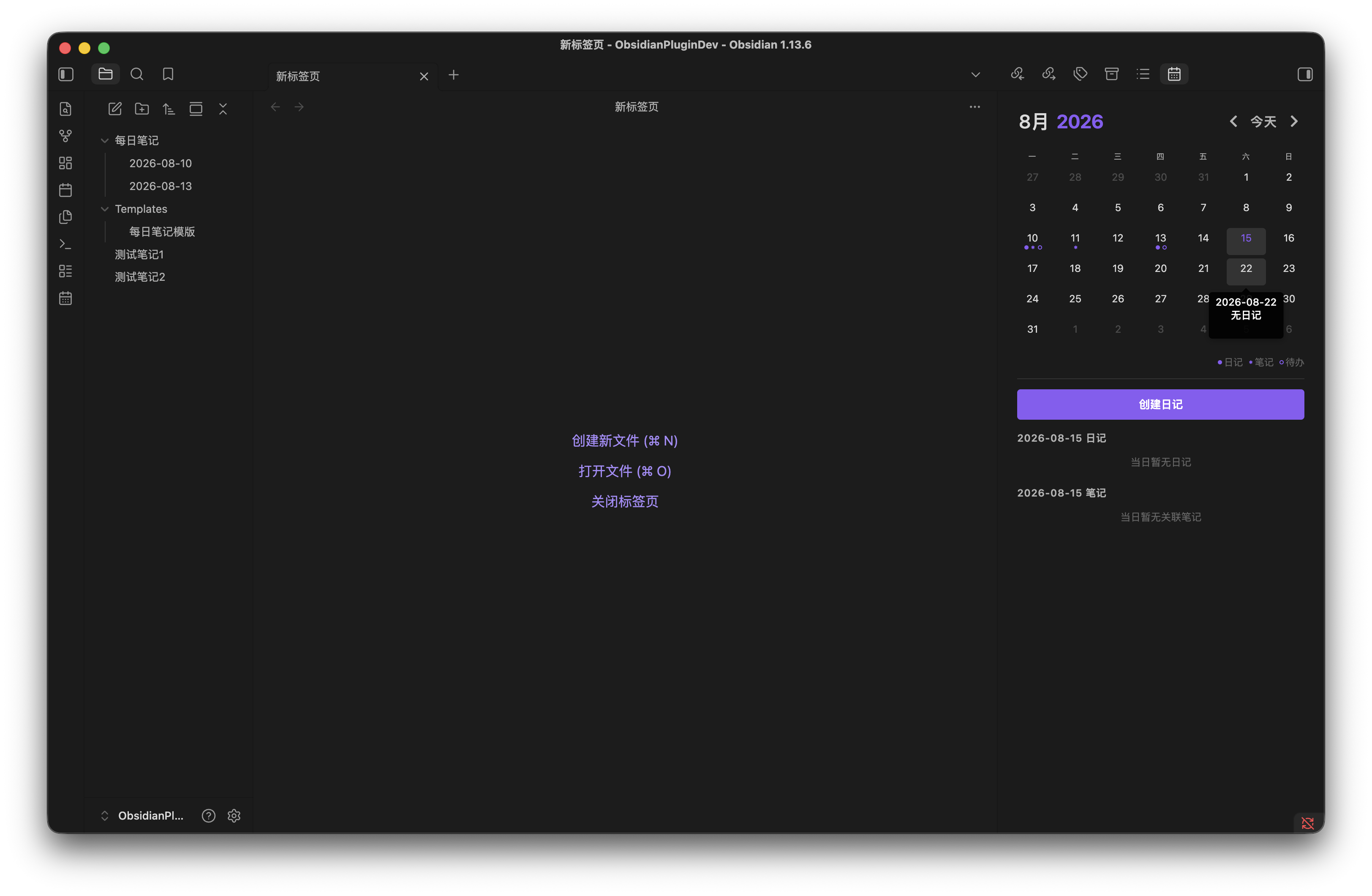
- 在右侧边栏显示月历,支持切换上月、下月和返回今天,也可以通过月/年选择器快速跳转。
- 默认展示当天内容;选择日期后,在日历下方显示对应日记或创建入口。
- 日历面板中,实心圆点表示当日日记存在,空心圆点表示笔记中存在待办任务。
- 可选显示周数;点击周数打开或创建周记。
- 按住
Ctrl或Command点击,在新分栏中打开日记或周记。 - 按住
Ctrl或Command悬停,使用 Obsidian 原生链接预览查看已有笔记。
语言与日期
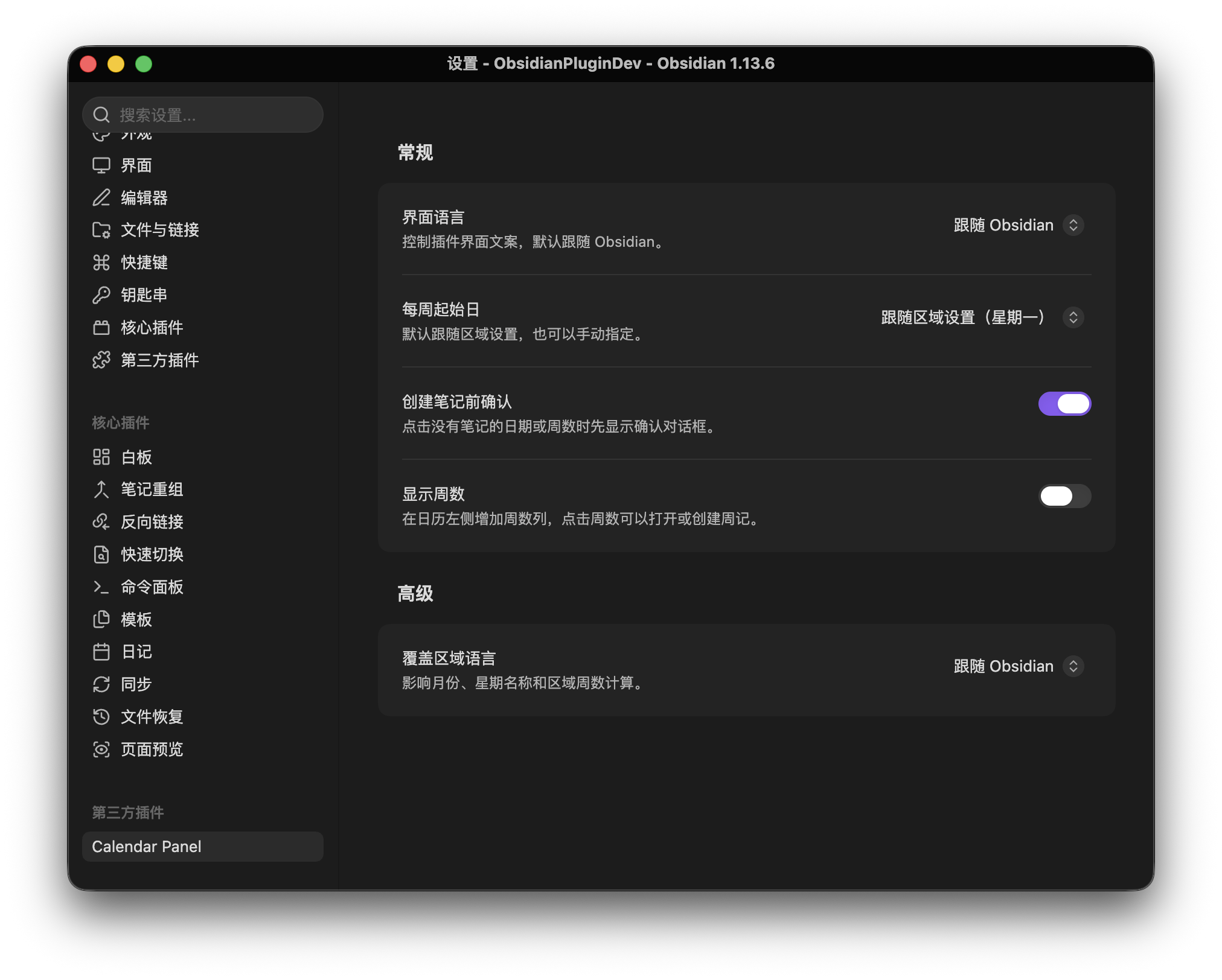
- “界面语言”控制按钮、设置、命令、提示和无障碍文案,可选择跟随 Obsidian、中文或 English。
- 跟随 Obsidian 时,中文区域使用中文界面,其他区域回退为英文。
- “覆盖区域语言”仅控制月份、星期名称和区域周数规则,与界面语言相互独立。
- 用户可见的完整日期统一显示为
YYYY-MM-DD;月份标题、星期名称及笔记文件名仍遵循各自的区域或周期笔记配置。
配置来源
日记
插件按以下顺序读取日记配置:
- Obsidian 核心 Daily Notes 插件配置。
- 默认格式
YYYY-MM-DD和仓库根目录。
创建日记时会沿用所选配置的文件名格式、目录和模板。
周记
开启“显示周数”后,插件按以下顺序读取周记配置:
- Calendar Panel 设置中的周记格式、目录和模板。
命令
插件注册以下命令,并根据界面语言显示对应文案:
- Calendar Panel: 打开日历视图 / Open calendar view
- Calendar Panel: 打开本周周记 / Open current weekly note
- Calendar Panel: 在日历中定位当前笔记 / Reveal active note in calendar
插件启用后也会在左侧功能区添加日历图标,并在 Obsidian 工作区布局准备完成后自动创建右侧日历视图。
手动安装
Calendar Panel 最低支持 Obsidian 1.13.0。
下载 Release 中的
main.js、manifest.json和styles.css,或在本地执行npm run build生成这些文件。在 Obsidian 仓库中创建插件目录:
<Vault>/.obsidian/plugins/calendar-panel/将以下文件复制到该目录:
main.js
manifest.json
styles.css
重启 Obsidian,或重新加载插件。
前往 设置 → 第三方插件,启用 Calendar Panel。
隐私与网络访问
Calendar Panel 完全在本地运行:
- 不收集分析数据。
- 不发送仓库内容、文件名或插件设置。
- 不调用外部网络服务。
- 只通过 Obsidian API 读取和创建仓库内的 Markdown 文件。
许可证
本项目使用 MIT License。
HealthExcellent
ReviewSatisfactory
About
一款为 Obsidian 打造的本地日历插件,在侧边栏中用日历面板直观地浏览、创建和管理日记与周记。支持月份和年份快速跳转、每日笔记模板配置、周数导航、待办状态标记、新分栏打开笔记,并提供中文、英文界面和可独立配置的日期区域格式。插件完全在本地运行,不收集数据,不访问外部网络。
A local-first calendar plugin for Obsidian that lets you intuitively browse, create, and manage daily and weekly notes from a calendar panel in the sidebar. It supports quick month and year navigation, daily note template configuration, week number navigation, task status indicators, opening notes in a new split, Chinese and English interfaces, and independently configurable date locales. The plugin runs entirely locally, collects no data, and makes no external network requests.Details
Current version
0.1.5
Last updated
4 weeks ago
Created
Last month
Updates
6 releases
Downloads
525
Compatible with
Obsidian 1.13.0+
Platforms
Desktop, Mobile
License
MIT