Budget Planner
 Ivan Kalinichenko918 downloads
A minimalist budget planning tool. Create, track, and manage budgets using markdown code blocks directly in your notes.
- Overview
- Scorecard
- Updates13
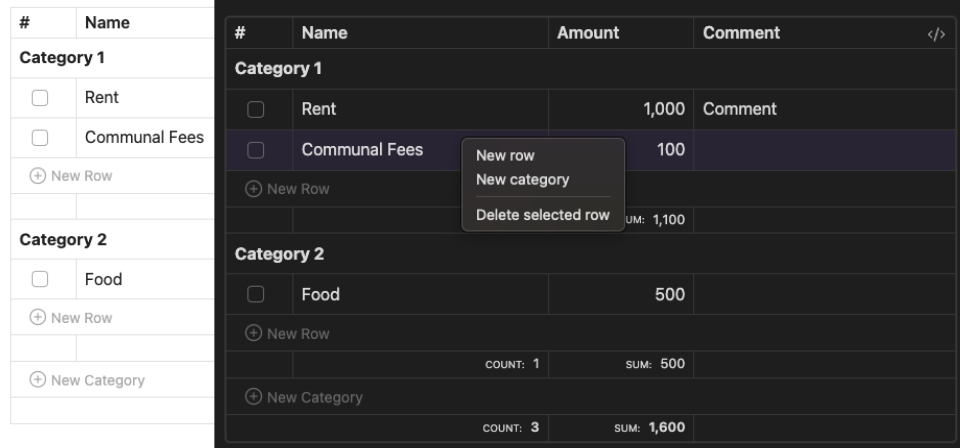
A minimalist budget planning plugin that lets you manage finances directly in your notes using markdown code blocks.
✨ Features
- 📝 Plain markdown storage — the table is just a
budgetcode block, editable by hand - 📊 Categories with per-category count and sum (shown when there is more than one category)
- ✅ Click a row's checkbox to mark it paid; totals also show unchecked count and sum
- ✏️ Inline editing of name, amount and comment (Enter saves, Escape cancels)
- 🔗 Comments render inline markdown (wikilinks, external links, bold, tags) in editing view
- 🔀 Drag rows between categories and reorder categories via the grip handle
- 📈 Right-click a column header (
#,Name,Amount) to sort rows inside every category - 🖱️ Right-click a row or category for new row / new category / delete
- 🔄 Markdown is rewritten column-aligned on every change
- ⚙️ Configurable default block template in plugin settings
📖 Usage
Quick Start
- Open a note in Obsidian where you want to add a budget planner
- Use the command palette (Cmd+P on macOS or Ctrl+P on Windows/Linux) and run
Budget Planner: Insert budget block - Start editing your budget!
The table renders in editing view (Live Preview and Source mode). In Reading view the block stays a plain code block.
Syntax
Create budgets using the budget code block:
Online Services:
    [x] | Spotify   | 4.99
    [ ] | Youtube   | 16.99
    [ ] | 1Password | 6.95
Entertainment:
    [ ] | Netflix   | 12.99  | Family plan
- A line ending with
:starts a category - Row cells are
[x]/[ ] | name | amount | comment; the checkbox and the comment are optional. The comment is the whole rest of the line after the amount, so|is safe to use inside it — but a|inside name or amount still splits the row wrong - Lines without
|are ignored - Amounts are parsed as numbers — anything else in the cell is stripped, an unparsable amount becomes
0
🚀 Installation
From Obsidian (recommended)
- Open Settings → Community Plugins → Browse
- Search for Budget Planner (community plugin page)
- Install and enable it
Manual
- Download
main.jsandmanifest.jsonfrom the latest GitHub release - Create a
budget-planner/folder inside your vault's.obsidian/plugins/folder and put both files in it - Reload Obsidian
- Enable plugin in Settings > Community Plugins
🤝 Contributing
- Fork the repository
- Create feature branch (
git checkout -b feature/amazing-feature) - Commit changes (
git commit -m 'Add amazing feature') - Push to branch (
git push origin feature/amazing-feature) - Open Pull Request
📄 License
MIT License - see LICENSE for details
💬 Support
🔖 Docs
HealthGood
ReviewPassed
About
Manage budgets directly in notes using native Markdown code blocks and interactive checkboxes. Organize expenses by category, auto-format and align columns, sort entries, and compute category totals and overall sums.Details
Current version
1.3.0
Last updated
3 months ago
Created
2 years ago
Updates
13 releases
Downloads
918
Compatible with
Obsidian 1.3.5+
Platforms
Desktop, Mobile
License
MIT