Browser Note
 fengshuzi53 downloads
Expose a localhost HTTP API (API-key protected) to view, create, edit and delete vault notes, with a built-in browser UI.
- Overview
- Scorecard
- Updates2
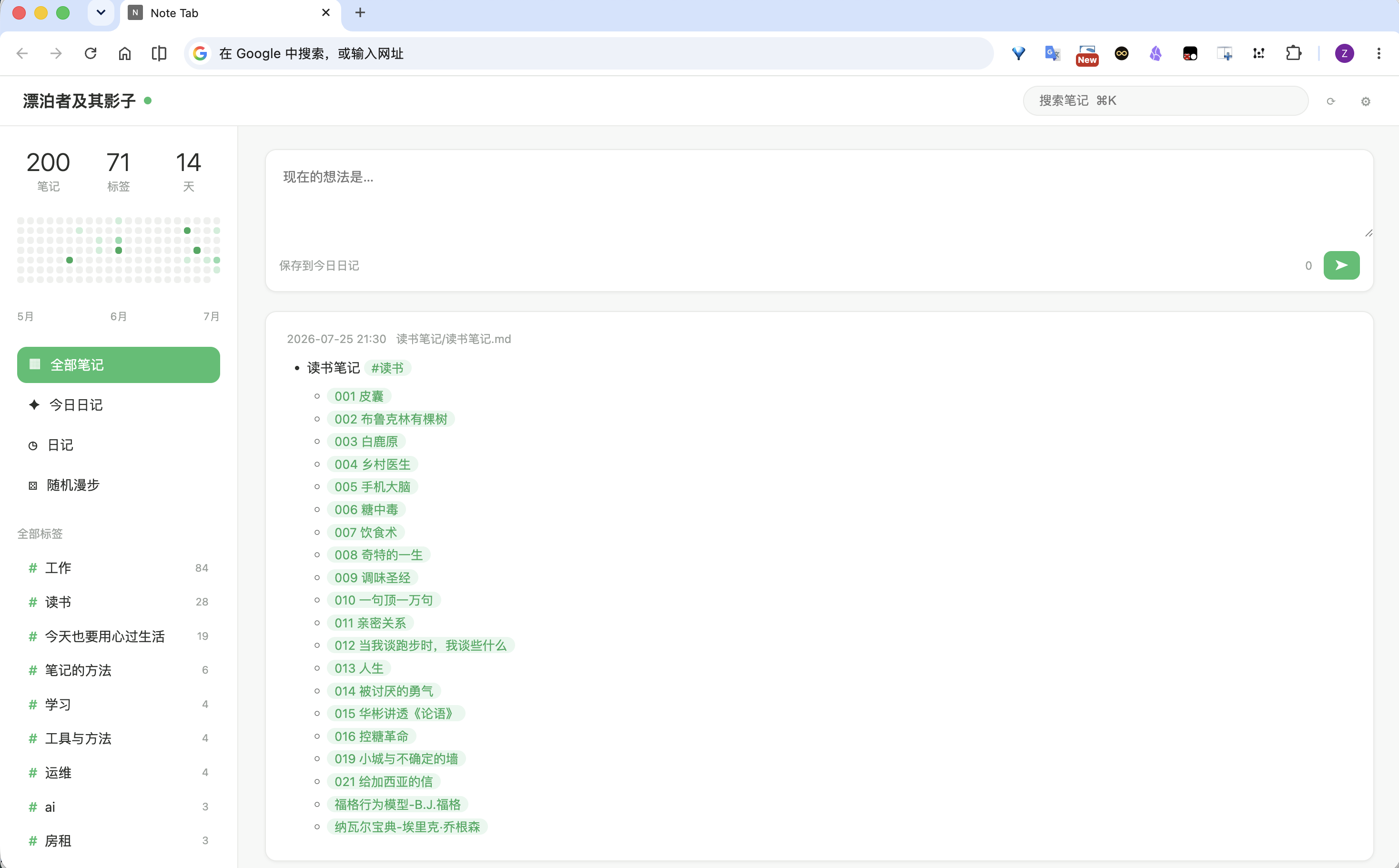
Expose your vault through a localhost HTTP API (API-key protected) — view, create, edit and delete notes, resolve wiki links and serve binary assets from external tools — with a built-in browser UI: open http://127.0.0.1:27124/ in any browser (or set it as your browser's new-tab URL) to browse and edit your journals.
Features
- Built-in web UI — an Infinity-style journal page (evolved from the Note Tab Chrome extension) served by the plugin itself; no extension install needed. Disable it in settings if you only want the API.
- Localhost by default — the HTTP server binds to
127.0.0.1; an opt-in "Allow LAN access" setting binds0.0.0.0so phones/tablets on your network can connect. - API-key required — every API request needs
Authorization: Bearer <key>; the key is auto-generated on first run and can be copied or regenerated in settings. - Full note CRUD over the Vault API (markdown files only).
- Wiki-link resolution — uses Obsidian's own
metadataCache.getFirstLinkpathDest, so shortest-path links like[[001 皮囊]]resolve exactly as they do in the app. - Binary asset serving — images, PDFs, audio/video from the vault over HTTP.
- Daily-notes config — reads the vault's daily-notes folder/format so clients can find journals.
- Desktop only.
API
Base URL: http://127.0.0.1:27124 (port configurable).
All endpoints require Authorization: Bearer <api-key>. For GET requests the key may also be passed as ?key= (needed by <img> tags, which cannot send headers).
| Method | Path | Description |
|---|---|---|
| GET | /api/status |
Health check: vault name, plugin version. |
| GET | /api/notes?q=&folder=&content=1&limit= |
List notes. q matches path and content; content=1 includes note bodies; limit caps results (max 500). |
| GET | /api/notes/<path> |
Read a note's content. |
| POST | /api/notes |
Create a note. Body: {"path": "folder/note.md", "content": "..."}. Parent folders are created automatically. |
| PUT | /api/notes/<path> |
Replace a note's content. Body: {"content": "..."}. |
| DELETE | /api/notes/<path> |
Move a note to trash (respects the system/Obsidian trash setting). |
| GET | /api/resolve?path=<linkpath>&source=<note> |
Resolve a wiki/markdown link to a real vault path (shortest-path aware). |
| GET | /api/assets/<path> |
Serve a vault file as binary (images, PDF, audio, video). |
| POST | /api/assets?filename=<name>&folder=assets |
Upload raw bytes (Content-Type: application/octet-stream) as a vault file. Defaults to assets/; auto-renames on conflict. |
| GET | /api/daily-notes/config |
Daily-notes folder + filename format. |
| GET | /api/journals?limit=&offset= |
List journal entries only: files in the daily-notes folder whose basename parses as a date in the configured format, sorted by that date desc. limit defaults to 50 (max 500). Response includes total, folder, and format. |
Examples
KEY="<paste from settings>"

curl -H "Authorization: Bearer $KEY" http://127.0.0.1:27124/api/status

curl -H "Authorization: Bearer $KEY" "http://127.0.0.1:27124/api/notes?q=%23读书&content=1&limit=50"

curl -H "Authorization: Bearer $KEY" http://127.0.0.1:27124/api/notes/journals/2026-07-25.md

curl -X POST -H "Authorization: Bearer $KEY" -H "Content-Type: application/json" \
  -d '{"path":"Inbox/hello.md","content":"# Hello"}' \
  http://127.0.0.1:27124/api/notes

curl -X PUT -H "Authorization: Bearer $KEY" -H "Content-Type: application/json" \
  -d '{"content":"# Updated"}' \
  http://127.0.0.1:27124/api/notes/Inbox/hello.md

curl -X DELETE -H "Authorization: Bearer $KEY" http://127.0.0.1:27124/api/notes/Inbox/hello.md

# Resolve a shortest-path link, then fetch the image
curl -H "Authorization: Bearer $KEY" \
  "http://127.0.0.1:27124/api/resolve?path=pasted-image.png&source=journals/2026-07-25.md"
open "http://127.0.0.1:27124/api/assets/assets/pasted-image.png?key=$KEY"
Settings
- Server status — start/stop the HTTP server.
- Port — localhost port (default
27124); apply & restart after changing. - API key — required for every request. Fresh installs start with the shared default
addwxfengshu4511(so clients like note-tab connect out of the box); regenerate here if you see that as a risk. - Start on launch — auto-start the server when the vault opens.
Installation
- Download
main.js,manifest.json,styles.cssfrom the latest release. - Place them in
<vault>/.obsidian/plugins/browser-note/. - Enable Browser Note in Settings → Community plugins.
- Open
http://127.0.0.1:27124/in your browser, or copy the API key from the plugin settings and configure your own client.
Development
npm install
npm run dev      # watch build
npm run build    # strict lint + typecheck + production bundle to dist/
npm run deploy   # build + copy into local vaults
npm run release  # build + GitHub release via gh CLI
License
MIT
Browser Note(中文说明)
把 vault 通过本地 HTTP API 暴露给外部工具:查看、新建、编辑、删除笔记,解析 wiki 链接,并提供图片等二进制资源访问。内置浏览器界面:直接在浏览器打开 http://127.0.0.1:27124/(或设为浏览器新标签页 URL)即可浏览/编辑日记,无需安装扩展。默认只监听 127.0.0.1,所有 API 请求必须携带 API key(Authorization: Bearer <key>,设置页可复制/重新生成)。
Web 界面源自 Chrome 扩展 Note Tab:Infinity 风格,默认打开今日日记,支持 markdown 渲染、双击编辑、标签、热力图、wiki 链接和图片显示。
接口、示例与设置说明见上方英文部分。