Boardgame Search
 marlon1541k downloads
Helps board game enthusiasts track their game collection seamlessly within their notes.
- Overview
- Scorecard
- Updates19
Action Required: BoardGameGeek now requires API key registration for all API access.
What You Need to Do
- Update the plugin to the latest version (2.0.0+) that supports API keys
- Create a BGG account at BoardGameGeek if you don't have one
- Register your application at BoardGameGeek Applications
- Note: Approval typically takes a few days
- Most users should select "non-commercial" for personal use
- Generate an API token once your application is approved
- Add your token in Obsidian → Settings → Board Search → Insert at BoradGameGeek API key
Why This Matters
Without an API key, the plugin will not work. BGG now requires authentication for all API requests.
Board Game Search
Track and manage your board game collection directly within Obsidian.
Features
🎲 Board Game Integration
- Search and import board games from BoardGameGeek (BGG)
- Automatically create game entries with detailed metadata
- Download and save game cover images
- Include game categories and mechanics in game details
Image download quality
Images are downloaded and stored in different resolutions to optimize for various use cases. Here is an example comparison of the different image sizes and their characteristics:
| Version | Dimensions | File Size | Percentage |
|---|---|---|---|
| Thumbnail | 95 x 150 | 3.4 KB | 11% |
| Medium | 244 x 385 | 14.1 KB | 47% |
| Full | 488 x 771 | 29.9 KB | 100% |
📊 Session Tracking
Work in progress
- Record individual game play sessions
- Track players, winners, play time, and notes
- Append session details to game entries
🛠️ Customizable Settings
- Configure file location for game entries
- Customize file name format
- Control image saving preferences
- Toggle session tracking features
Installation
From Obsidian Plugin Store
- Open Obsidian
- Go to Settings → Community plugins
- Enable Community Plugins
- Click "Browse" and search for "Boardgame Search"
- Click "Install" and then "Enable"
Manual Installation
- Download the latest release from GitHub
- Create a folder
your-vault/.obsidian/plugins/obsidian-boardgame-plugin - Copy
main.js,manifest.json, andstyles.cssinto the folder or just extract and move the zip - Enable the plugin in Obsidian
Usage
Searching for Games
- Click the dice icon in the ribbon
- Type the game name in the search bar
- Browse and select a game
- Choose to create a game entry or start a game session
or use the command
Search BoardGameGeek
Creating Game Entries
- Game entries include:
- Game title
- BGG ID
- Player count
- Play time
- Year published
- Rating
- Optional thumbnail image
Example Workflow
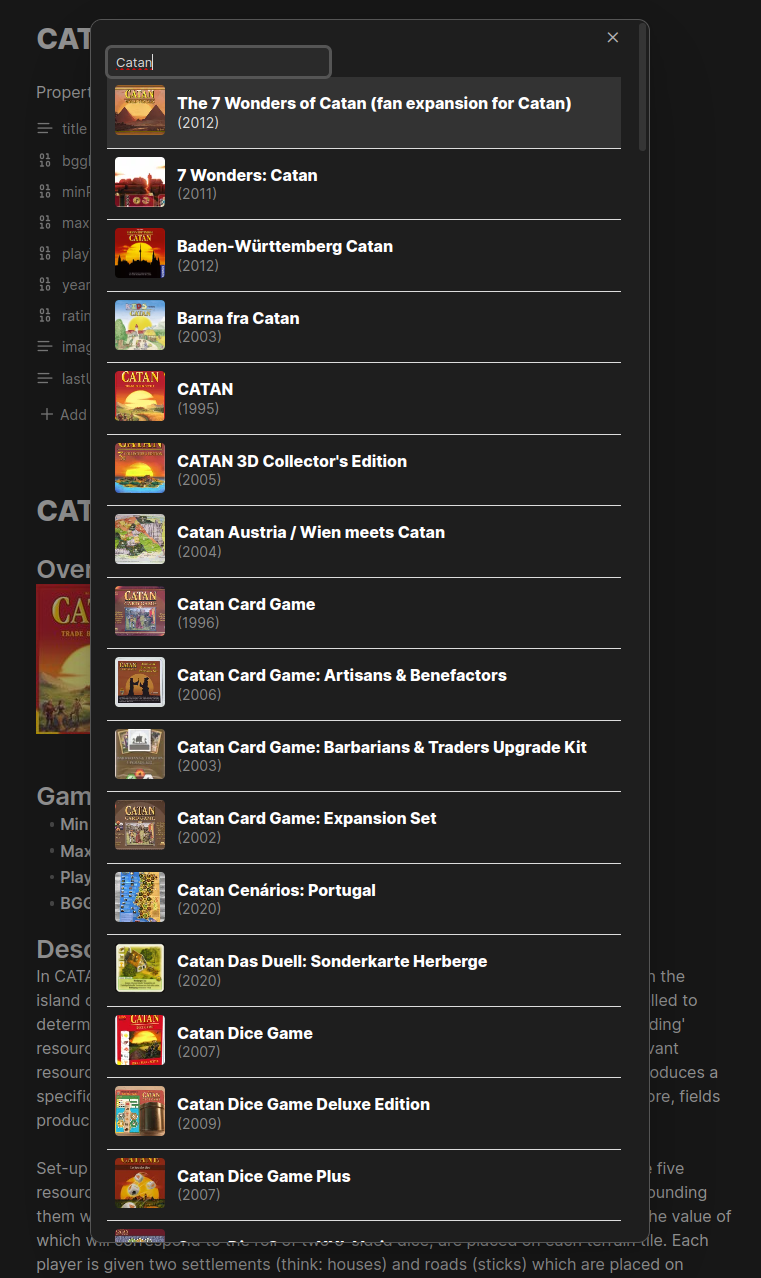
- Click "Search BoardGameGeek"
- Search "Catan"
- Select the game
- Plugin creates a detailed game entry
📈 Statistics and Visualization
- Support for Obsidian Charts plugin
- Visualize player count data
- Age recommendation statistics
- Language dependency information
Templating
The plugin uses Nunjucks templating for customizable game entries. If no template is defined, it will fall back to a default template.
Use double curly braces to access template variables in your template, for example {{ game.name }} or {{ game.rating }}.
The following fields are available:
Game Object Fields
| Variable Path | Type | Description |
|---|---|---|
game.id |
string | BoardGameGeek game ID |
game.name |
string | Game name |
game.yearPublished |
string | Year the game was published |
game.description |
string | Full game description from BGG |
game.image |
string | URL or local path to full-size game image |
game.thumbnail |
string | URL or local path to thumbnail image |
game.minPlayers |
number | Minimum number of players |
game.maxPlayers |
number | Maximum number of players |
game.playingTime |
number | Average playing time in minutes |
game.minPlayTime |
number | Minimum playing time in minutes |
game.maxPlayTime |
number | Maximum playing time in minutes |
game.minAge |
number | Minimum recommended age |
game.rating |
number | BGG average rating (out of 10) |
game.weight |
number | Game complexity rating |
game.categories |
string[] | Array of game categories |
game.mechanics |
string[] | Array of game mechanics |
Suggested Player Count
| Variable Path | Type | Description |
|---|---|---|
game.suggestedPlayerCount.best |
string | Community-voted best player count |
game.suggestedPlayerCount.recommended |
string | Community-voted recommended player count |
Player Count Poll (Array)
| Variable Path | Type | Description |
|---|---|---|
game.playerCountPoll[].playerCount |
string | Number of players (e.g., "3", "4+") |
game.playerCountPoll[].votes |
object | Vote counts by category (Best, Recommended, Not Recommended) |
game.playerCountPoll[].total |
number | Total votes for this player count |
Player Age Poll
| Variable Path | Type | Description |
|---|---|---|
game.playerAgePoll.results[] |
array | Array of age poll results |
game.playerAgePoll.results[].value |
string | Age category (e.g., "8+", "12+") |
game.playerAgePoll.results[].votes |
number | Number of votes for this age |
game.playerAgePoll.totalVotes |
number | Total votes in age poll |
Language Dependence Poll
| Variable Path | Type | Description |
|---|---|---|
game.languageDependencePoll.results[] |
array | Array of language dependence results |
game.languageDependencePoll.results[].value |
string | Dependence level description |
game.languageDependencePoll.results[].votes |
number | Number of votes for this level |
game.languageDependencePoll.totalVotes |
number | Total votes in language poll |
Additional Context Variables
| Variable | Type | Description |
|---|---|---|
useLocalImages |
boolean | Whether images are saved locally |
useCharts |
boolean | Whether Charts plugin integration is enabled |
chartWidth |
string | Configured chart width (e.g., "80%", "600px") |
date |
Date | Current date/time when note is created |
Example Template
## {{game.name}}
### Overview
{% if game.image %}
{% if useLocalImages %}
![[{{ game.image }}]]
{% else %}

{% endif %}
{% endif %}
### Game Details
- **Min Players:** {{ game.minPlayers | default('Unknown') }}
- **Max Players:** {{ game.maxPlayers | default('Unknown') }}
- **Play Time:** {{ game.playingTime | default('Unknown') }}{% if game.playingTime %} minutes{% endif %}
- **Year Published:** {{ game.yearPublished | default('Unknown') }}
- **BGG Rating:** {{ game.rating | number(1) | default('N/A') }}{% if game.rating %}/10{% endif %}
- **Categories:** {% for category in game.categories %}#{{ category | replace(" ", "_") }}{% if not loop.last %}, {% endif %}{% endfor %}
- **Mechanics:** {% for mechanic in game.mechanics %}#{{ mechanic | replace(" ", "_") }}{% if not loop.last %}, {% endif %}{% endfor %}
### Notes
{% persist "notes" %}
Add your personal notes here - this section won't be overwritten on reimport
{% endpersist %}
Persistent Sections
Use the persist tag to create sections that won't be overwritten on reimport:
{% persist "section-name" %}
Your persistent content here
{% endpersist %}
Inspired by zotero integration.
Array Templates
The categories and mechanics fields are arrays that can be looped through using Nunjucks syntax:
Looping through arrays:
- **Categories:** {% for category in game.categories %}#{{ category | replace(" ", "_") }}{% if not loop.last %}, {% endif %}{% endfor %}
- **Mechanics:** {% for mechanic in game.mechanics %}#{{ mechanic | replace(" ", "_") }}{% if not loop.last %}, {% endif %}{% endfor %}
Template syntax explained:
{% for ... in ... %}- Iterate through each item in the array#{{ category | replace(" ", "_") }}- Format as hashtag and replace spaces with underscores{% if not loop.last %}, {% endif %}- Add comma separator between items (but not after the last one)
Example output:
- Categories: #Strategy, #Family
- Mechanics: #Worker_Placement, #Hand_Management
Charts Support
If you have the Obsidian Charts plugin installed, enable chart support in settings to visualize data:
{% if useCharts %}
^playerCountData

\`\`\`chart
type: bar
id: playerCountData
layout: rows
width: {{ chartWidth }}
legend: true
title: Player Count Votes
beginAtZero: true
\`\`\`
{% endif %}
Example Overview
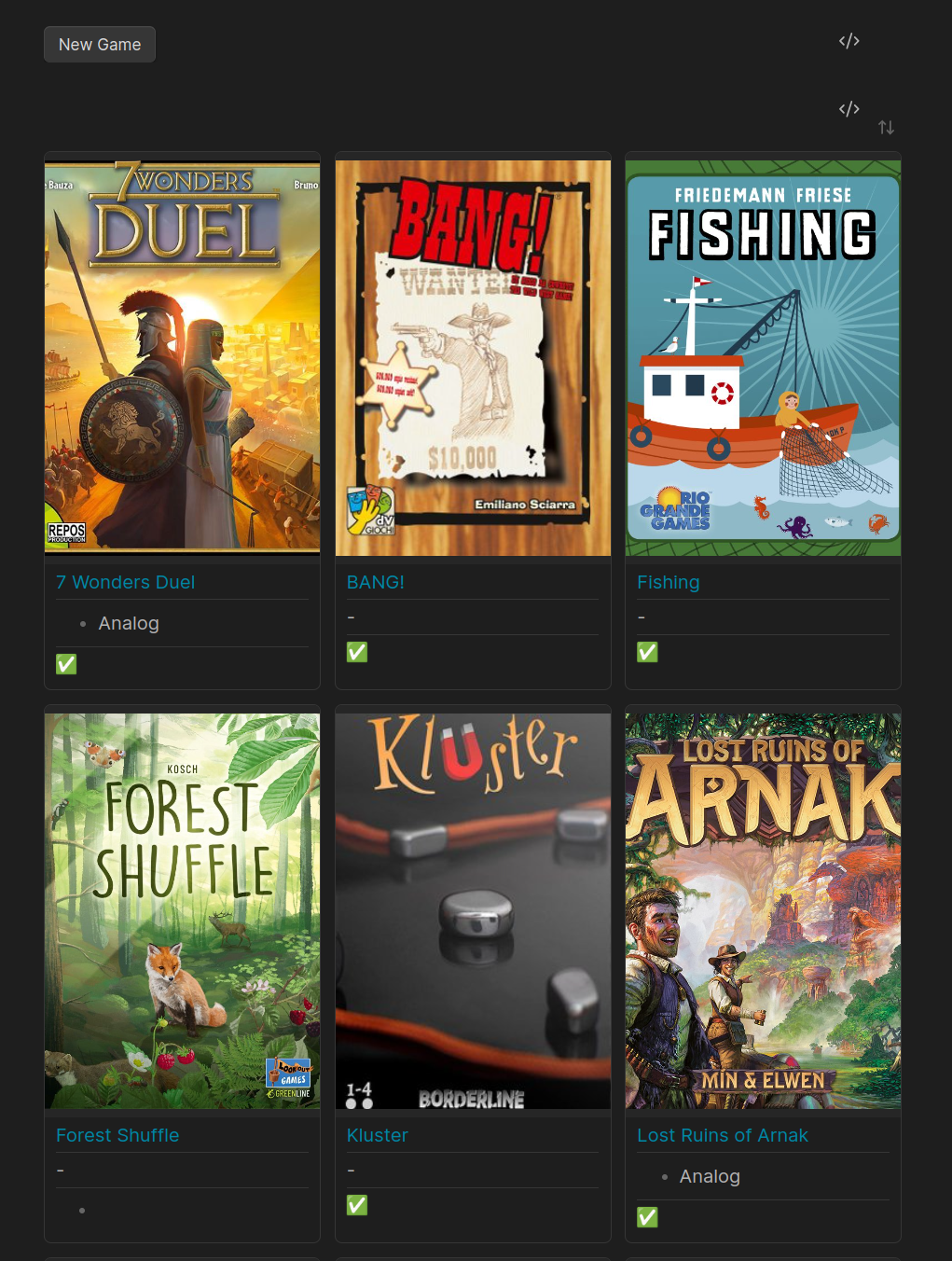
Here is an example for a collection, which uses:
Alternatively use Obsidian bases.
Code:
---
notetype: database
cssclasses:
  - cards
  - cards-2-3
  - cards-cover
  - table-max
  - table-nowrap
---

```meta-bind-button
label: New Game
icon: ""
hidden: false
class: ""
tooltip: ""
id: ""
style: default
actions:
  - type: command
    command: boardgame-search:search-bgg

```

```dataview
TABLE WITHOUT ID
    embed(link(meta(link(image)).path)) as "",
    link(file.link, title) as Title,
    ownership,
    choice(played, "✅", " - ") as Played
FROM #boardgame
WHERE !contains(file.path, "templates")
SORT title ASC
```
Support
If you find this plugin useful, please consider a donation.
Contributing
- Report issues on GitHub
- Submit pull requests
Credits
This plugin uses the BoardGameGeek XML API 2 to fetch game data. All game information is provided by BoardGameGeek.
:strip_icc()/pic7779581.png)
All game data is property of BoardGameGeek and its users. Usage of this plugin is subject to BoardGameGeek's Terms of Service and XML API Terms of Use.
Built for the Obsidian community.