Search...Search plugins and themes...
⌘K
Sign in
  • Get started
  • Download
  • Pricing
  • Enterprise
  • Account
  • Obsidian
  • Overview
  • Sync
  • Publish
  • Canvas
  • Mobile
  • Web Clipper
  • CLI
  • Learn
  • Help
  • Developers
  • Changelog
  • About
  • Roadmap
  • Blog
  • Resources
  • System status
  • License overview
  • Terms of service
  • Privacy policy
  • Security
  • Community
  • Plugins
  • Themes
  • Discord
  • Forum / 中文论坛
  • Merch store
  • Brand guidelines
Follow us
DiscordTwitterBlueskyThreadsMastodonYouTubeGitHub
© 2026 Obsidian

Big Characters

artemartem74 downloads

Styles Chinese and Korean text with optional pronunciation (pinyin, romanization) annotations.

Add to Obsidian
Big Characters screenshot
  • Overview
  • Scorecard
  • Updates5

An Obsidian plugin for styling Chinese (Simplified and Traditional) Korean characters, with optional automatic ruby pronunciation annotations.

Use <span class="bc-zh-cn">...</span> for Chinese characters without pinyin, such as a flashcard front side. This supports Simplified and Traditional Chinese.
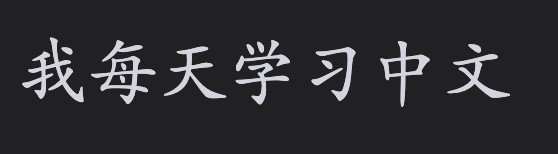
Chinese characters without pinyin

For Korean characters use <span class="bc-ko-kr">...</span>.

When pinyin should be shown, use <span class="bc-zh-cn-pinyin">...</span>. Traditional Chinese uses Pinyin Pro’s Traditional dictionary for contextual pronunciation (for example, 轉盤 → zhuàn pán).

Korean characters with pronunciation use <span class="bc-ko-kr-rom">...</span>. Korean romanization follows pronunciation rules, so 같이 becomes gachi and 백마 becomes baengma.
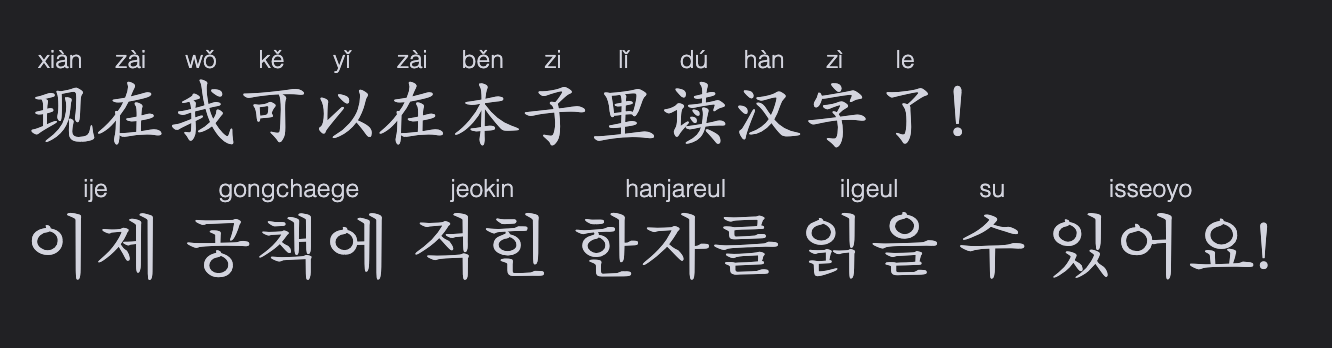
Chinese characters with pinyin

Fenced blocks work too: use zh-cn / zh-cn-pinyin for Chinese and ko-kr / ko-kr-rom for Korean.

```zh-cn
你好,世界!
```

```zh-cn-pinyin
我喜欢学习中文。
```

```ko-kr
안녕하세요.
```

```ko-kr-rom
같이 먹어요.
```

All markers support bold and italic text.

Chinese characters with mixed styling

Hotkeys

Assign shortcuts in Obsidian Settings → Hotkeys.

Use Big Characters: Toggle selection as ... to add or remove their plain markers. Use the corresponding … pinyin or … romanization command for annotated styles.

Settings

The plugin’s settings lets you independently toggle pronunciations in Live Preview and Reading View for bc-zh-cn-pinyin and bc-ko-kr-rom, and change the character and pronunciation size/font. Restore defaults if custom values went too off.

Roadmap

  • Support Traditional Chinese
  • Support Korean
  • Support Japanese
    • Support Romanji
    • Support Furigana
  • Support Cantonese
HealthExcellent
ReviewSatisfactory
About
Style Chinese and Korean characters, with optional automatic ruby annotations (pinyin, romanization). 2 styles: with and without pronunciation. Both styles support bold and italic text. Hotkeys help to apply style quick. Font settings customization. Currently only Chinese (Simplified, Traditional) and Korean are fully supported. Planned support for: Japanese (Romanji and Furigana), Cantonese.
AnnotationAppearanceLanguages
Details
Current version
0.4.0
Last updated
4 weeks ago
Created
Last month
Updates
5 releases
Downloads
74
Compatible with
Obsidian 1.5.0+
Platforms
Desktop, Mobile
License
MIT
Report bugRequest featureReport plugin
Sponsor
Buy Me a Coffee
Author
artemartem
GitHuba-zasypalov
  1. Community
  2. Plugins
  3. Annotation
  4. Big Characters

Related plugins

Japanese Novel Ruby

Treat ruby(Furigana) ​​marks commonly used in Japanese novels

Minimal Theme Settings

Control the colors and fonts in Minimal Theme.

Hider

Hide interface elements such as tooltips, status bar, titlebar, and more.

Supercharged Links

Add attributes to internal links with the values of target note's frontmatter attributes.

Note Toolbar

Add customizable toolbars to your notes.

Admonition

Admonition block-styled content.

Style Settings

Adjust theme, plugin, and snippet CSS variables.

Simplified Chinese Word Splitting

Adds Simplified Chinese word splitting support for the editor and Vim mode.

Link Favicons

See the favicon for a linked website.

Chat View

Chat View lets you quickly and easily create elegant Chat UIs in your Markdown Files.