Search...Search plugins and themes...
⌘K
Sign in
  • Get started
  • Download
  • Pricing
  • Enterprise
  • Account
  • Obsidian
  • Overview
  • Sync
  • Publish
  • Canvas
  • Mobile
  • Web Clipper
  • CLI
  • Learn
  • Help
  • Developers
  • Changelog
  • About
  • Roadmap
  • Blog
  • Resources
  • System status
  • License overview
  • Terms of service
  • Privacy policy
  • Security
  • Community
  • Plugins
  • Themes
  • Discord
  • Forum / 中文论坛
  • Merch store
  • Brand guidelines
Follow us
DiscordTwitterBlueskyThreadsMastodonYouTubeGitHub
© 2026 Obsidian

Better Headings

zachbugayzachbugay2k downloads

Automatically prefix headings with a decimal system.

Add to Obsidian
  • Overview
  • Scorecard
  • Updates5

Better Headings makes your headings better by automatically prefixing them with a decimal style numbered heading. More features are planned, but the immediate goal is to make it simpler to number your headings.
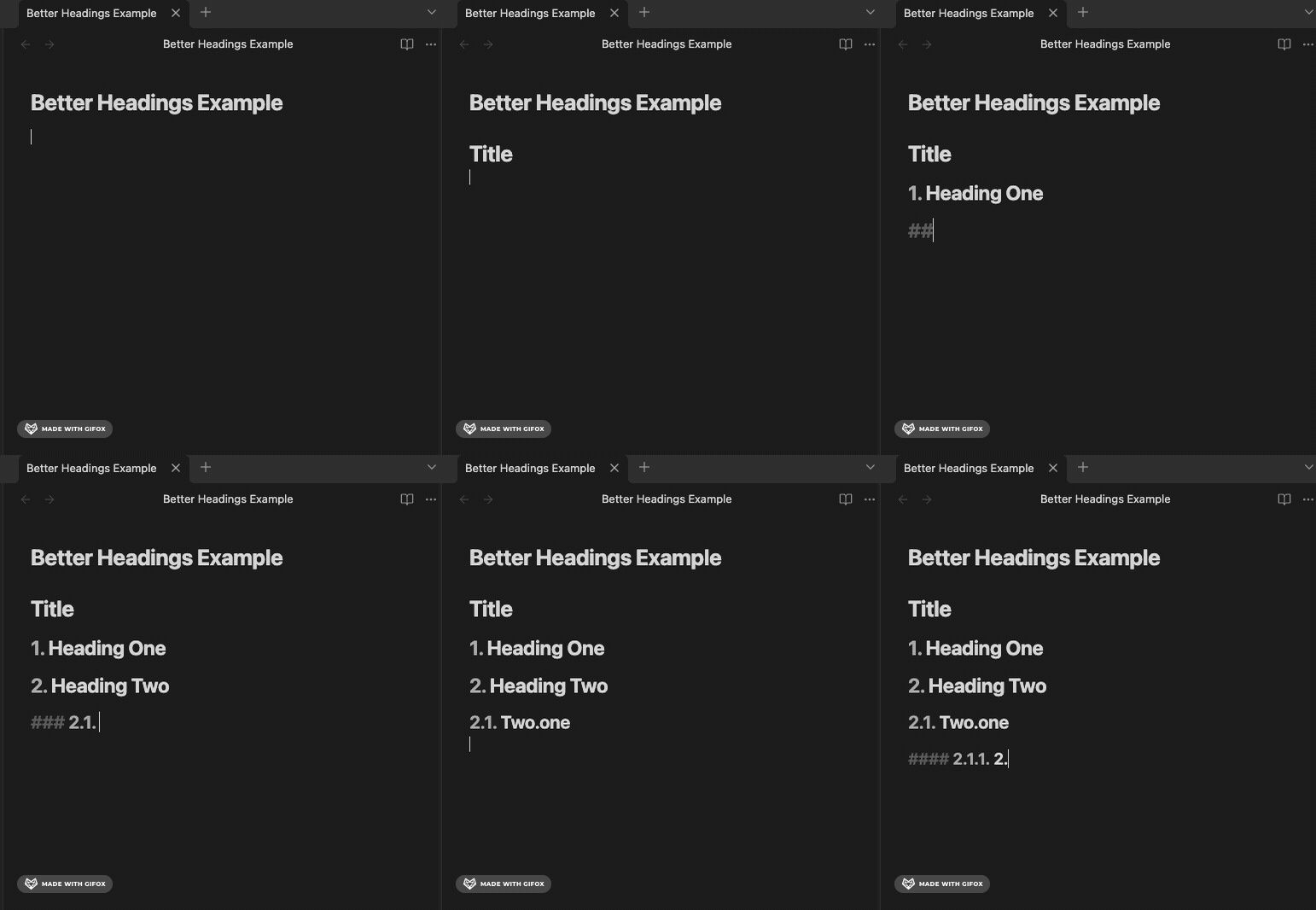
Demonstration

Installation

Install via the Obsidian community plugins panel.

Recommendations

Use the default settings when working with this plugin.

Feedback

Feedback is welcomed. Please file an issue or feature request.

HealthExcellent
ReviewPassed
About
Prefix headings automatically with decimal-style numbered prefixes to create clear, ordered sections. Simplify numbering in your notes for easier navigation and consistent document structure.
OutliningAutomation
Details
Current version
1.0.4
Last updated
5 months ago
Created
6 months ago
Updates
5 releases
Downloads
2k
Compatible with
Obsidian 1.7.2+
Platforms
Desktop, Mobile
License
MIT
Report bugRequest featureReport plugin
Sponsor
Buy Me a Coffee
Author
zachbugayzachbugayzachbugay
GitHubzachbugay
zachbugay.com
  1. Community
  2. Plugins
  3. Outlining
  4. Better Headings

Related plugins

Homepage

Open a note, base, or workspace on startup, or set it for quick access later.

BRAT

Easily install a beta version of a plugin for testing.

Templater

Create and use dynamic templates.

Linter

Format and style your notes. Linter can be used to format YAML tags, aliases, arrays, and metadata; footnotes; headings; spacing; math blocks; regular Markdown contents like list, italics, and bold styles; and more with the use of custom rule options.

Advanced URI

Control everything with URI.

Hot Reload

Automatically reload in-development plugins when their files are changed

Lazy Loader

Load plugins with a delay on startup, so that you can get your app startup down into the sub-second loading time.

Update modified date

Automatically update a frontmatter modified date field when the file is modified.

QuickAdd

Quickly add new notes or content to your vault.

MetaEdit

Manage your metadata.