Search...Search plugins and themes...
⌘K
Sign in
  • Get started
  • Download
  • Pricing
  • Enterprise
  • Account
  • Obsidian
  • Overview
  • Sync
  • Publish
  • Canvas
  • Mobile
  • Web Clipper
  • CLI
  • Learn
  • Help
  • Developers
  • Changelog
  • About
  • Roadmap
  • Blog
  • Resources
  • System status
  • License overview
  • Terms of service
  • Privacy policy
  • Security
  • Community
  • Plugins
  • Themes
  • Discord
  • Forum / 中文论坛
  • Merch store
  • Brand guidelines
Follow us
DiscordTwitterBlueskyThreadsMastodonYouTubeGitHub
© 2026 Obsidian

Bases Conditional Format

chilipepperschilipeppers59 downloads

Add conditional formatting, colour badges, row highlights and inline progress bars to Bases tables and cards.

Add to Obsidian
  • Overview
  • Scorecard
  • Updates3

⭐ If Bases Conditional Format makes your Bases easier to scan, a star helps other Obsidian users find it. Found a bug or have an idea? Open an issue.

Add spreadsheet-style conditional formatting, colour pill badges, row/card highlights and inline progress bars to Obsidian Bases (and optionally Markdown / Dataview tables).
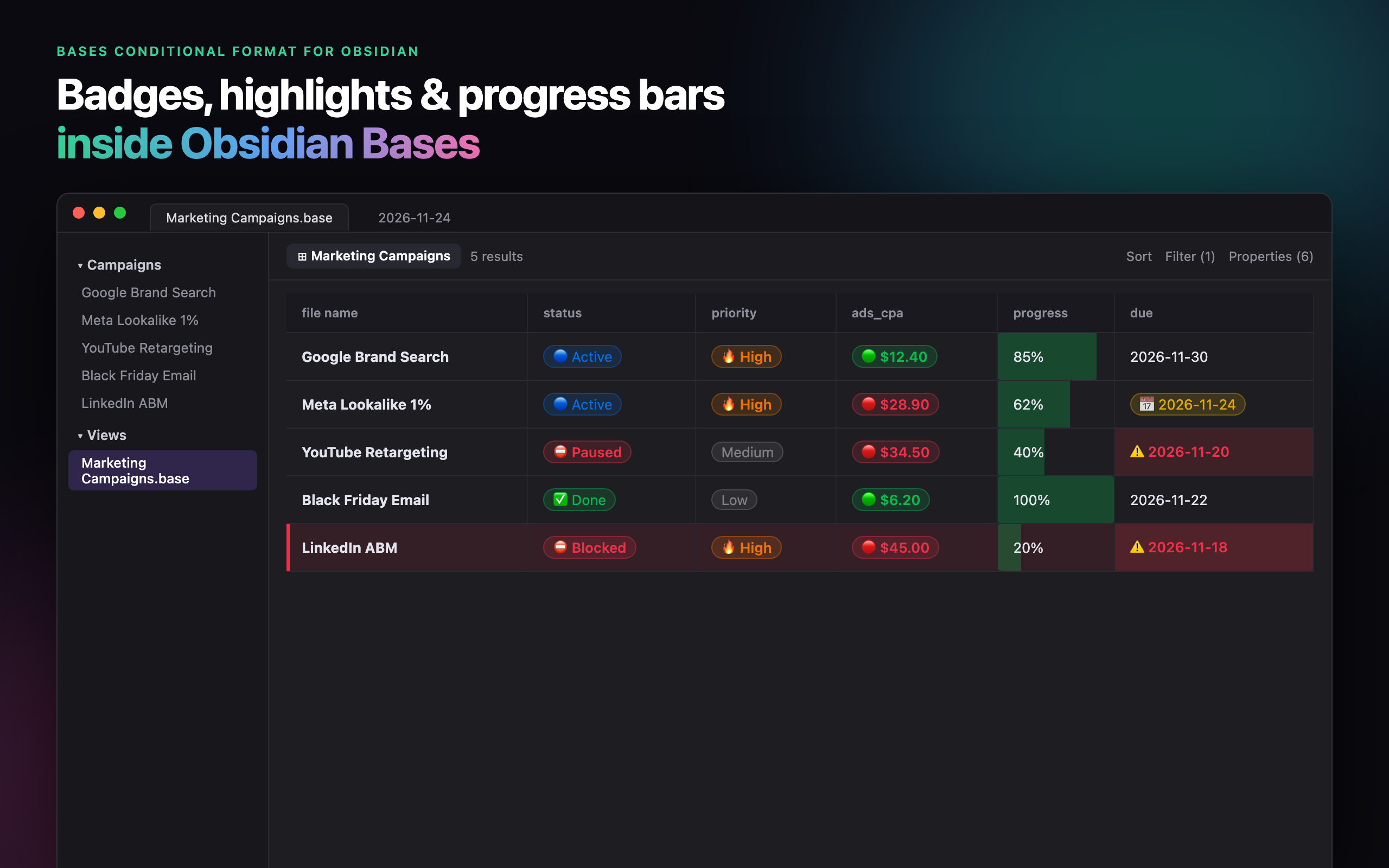
Conditional formatting badges, highlights and progress bars in Obsidian Bases

Features

  • 5 visual styles: Pill badge, Cell fill, Text colour, Row / Card highlight, and pure-CSS Inline progress bar
  • Rich conditions: =, ≠, contains, starts with, regex, >, ≥, <, ≤, between, is empty, date overdue, date is today, date within N days, and always
  • Smart value parsing: understands currency ($25.50, € 1.234,56), percentages (85%), ratios (3.2×) and ISO dates (YYYY-MM-DD)
  • Non-destructive: never edits your notes or breaks inline editing in Bases — uses pure CSS classes, CSS variables and ::before icons
  • One-click presets: Ad CPA thresholds, Task status badges, Priority highlights, Overdue due dates, and 0–100% Progress bars
  • Export / Import JSON: share rule sets across vaults or teams
  • Theme-aware & mobile-friendly: uses Obsidian's semantic colour variables so badges look great in both light and dark themes

Visual rule builder
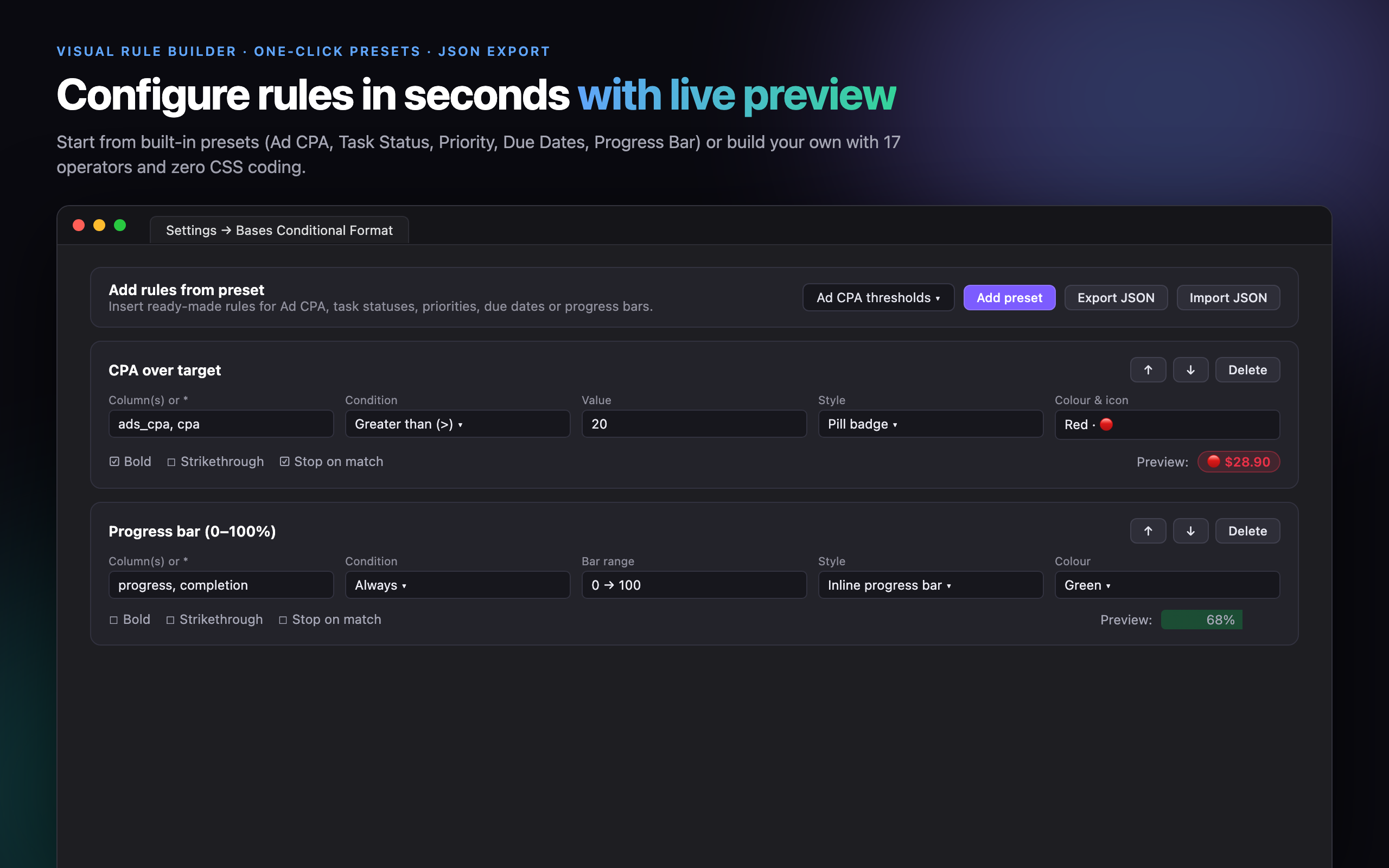
Visual rule builder with built-in presets and live preview

Commands

Command What it does
Toggle conditional formatting Quickly enable or disable all formatting rules
Refresh formatting in current view Re-evaluate visible Bases and tables
Add rule from preset Pick a ready-made rule pack from the command palette

Privacy

Bases Conditional Format makes zero network requests. All rules stay locally inside your vault.

Install

Search for Bases Conditional Format in Settings → Community plugins, or install manually by copying main.js, manifest.json and styles.css from the latest release to <vault>/.obsidian/plugins/bases-conditional-format/ and enabling the plugin.

More Obsidian plugins & themes

  • Ad Recap — Google Ads & Meta Ads metrics in your notes
  • Traffic Recap — GA4, Search Console, Plausible & PostHog metrics in your notes
  • UTM Vault — build, validate and audit UTM tracking links
  • Chili & Popcorn — Obsidian themes

License

MIT © 2026 David (chi-li-peppers)

HealthExcellent
ReviewSatisfactory
About
Add spreadsheet-style conditional formatting to Bases and optional Markdown/Dataview tables. Create color pill badges, cell fills, text colors, row/card highlights and inline progress bars with rich conditions and smart parsing for numbers, percentages, dates. Apply rules non-destructively via CSS, use presets, and export/import JSON.
BasesTablesFormatting
Details
Current version
1.0.2
Last updated
Yesterday
Created
2 days ago
Updates
3 releases
Downloads
59
Compatible with
Obsidian 1.9.0+
Platforms
Desktop, Mobile
License
MIT
Report bugRequest featureReport plugin
Sponsor
Patreon
Author
chilipepperschilipeppers
GitHubchi-li-peppers
  1. Community
  2. Plugins
  3. Bases
  4. Bases Conditional Format

Related plugins

Bases Paginator

Adds a paginated table view with quick filtering to Bases. Features include pagination controls, global search, click-to-filter, and filter presets.

Admonition

Admonition block-styled content.

Linter

Format and style your notes. Linter can be used to format YAML tags, aliases, arrays, and metadata; footnotes; headings; spacing; math blocks; regular Markdown contents like list, italics, and bold styles; and more with the use of custom rule options.

Advanced Tables

Improved table navigation, formatting, and manipulation.

TaskNotes

Note-based task management with calendar, pomodoro and time-tracking integration.

Maps

Adds a map layout to bases so you can display notes as an interactive map view.

Editing Toolbar

The Editing Toolbar is modified from cMenu, which provides more powerful customization settings and has many built-in editing commands to be a MS Word-like toolbar editing experience.

Underline

Add underline with shortcut.

Text Format

Format selected text upper/lower/capitalize.

Kanban Bases View

A kanban-style drag-and-drop custom view for Bases.