Backleaf
 zefei12429 downloads
Discuss PDF selections with AI and save structured reading notes.
- Overview
- Scorecard
- Updates3
Backleaf 叶间
Don't let a highlight end inside the PDF.
Select a passage, question it with AI, and turn what you understand into linked Markdown reading notes—without leaving Obsidian.
Install from Obsidian · See how it works · Privacy · Changelog
Highlights are easy to collect and easy to forget. Backleaf keeps the important part of reading together: the source passage, the questions it raised, the conversation that followed, and the understanding you decided to keep.
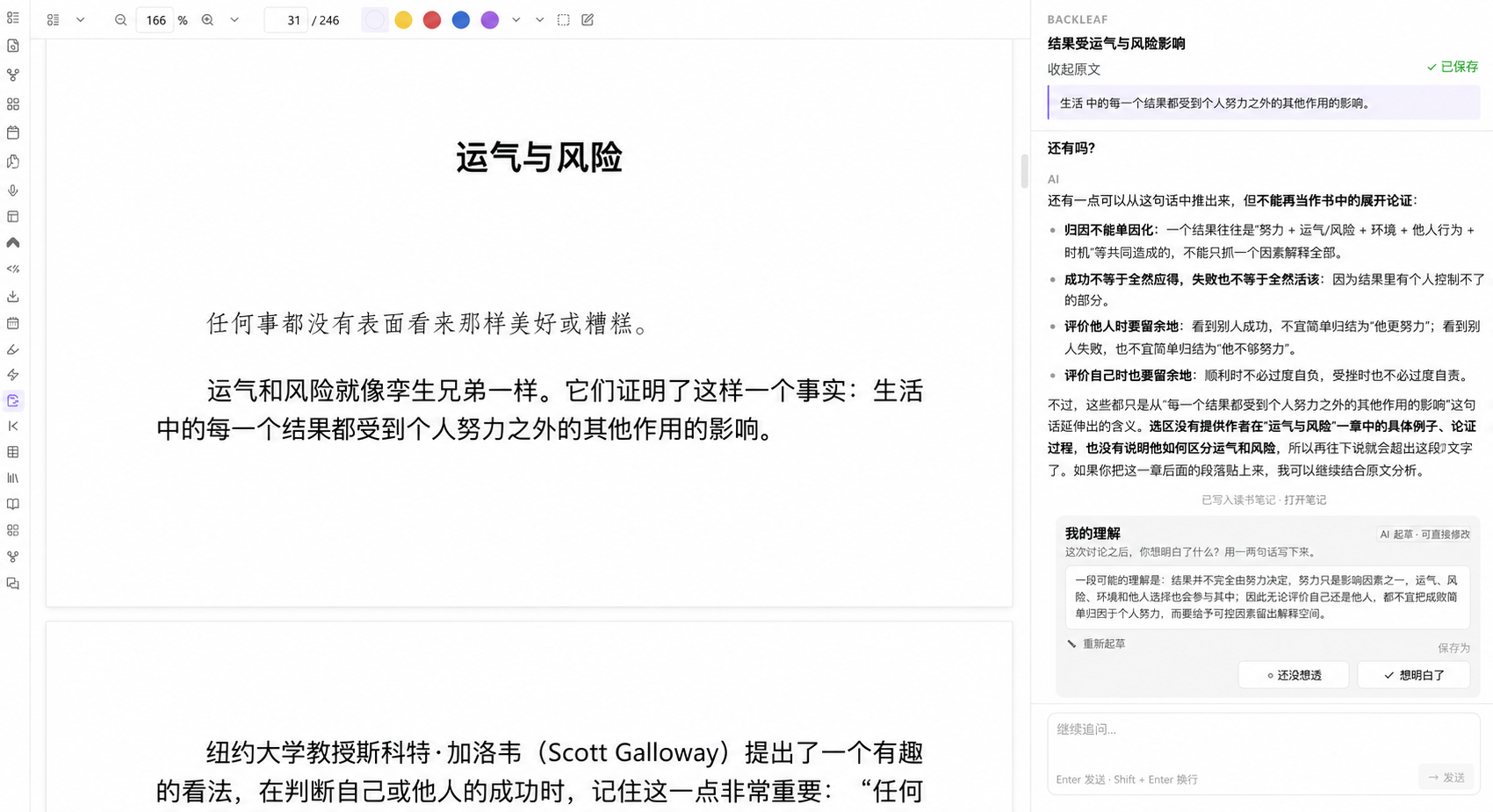
From a passage to a line of thought
- Select what stopped you. Highlight a sentence in an Obsidian PDF.
- Ask from the source. Backleaf carries the quote, book, chapter, page, and source link into the conversation.
- Decide what is worth keeping. Continue asking until the idea becomes clear, then write or edit your own understanding.
- Return to the thought later. Save the discussion as ordinary Markdown and revisit it through history, the note, or the Thought Tree.
More than an AI chat beside a PDF
- Context stays attached. A discussion remembers the passage, page, chapter, book, and route back to the source.
- Useful conversations become durable notes. Quotes, questions, dialogue, and your final understanding stay together in plain Markdown.
- You remain the author. Draft with AI if you want, revise it directly, or write the conclusion yourself.
- Your Vault remains the source of truth. Backleaf respects edits made outside the plugin and refuses to overwrite a changed discussion silently.
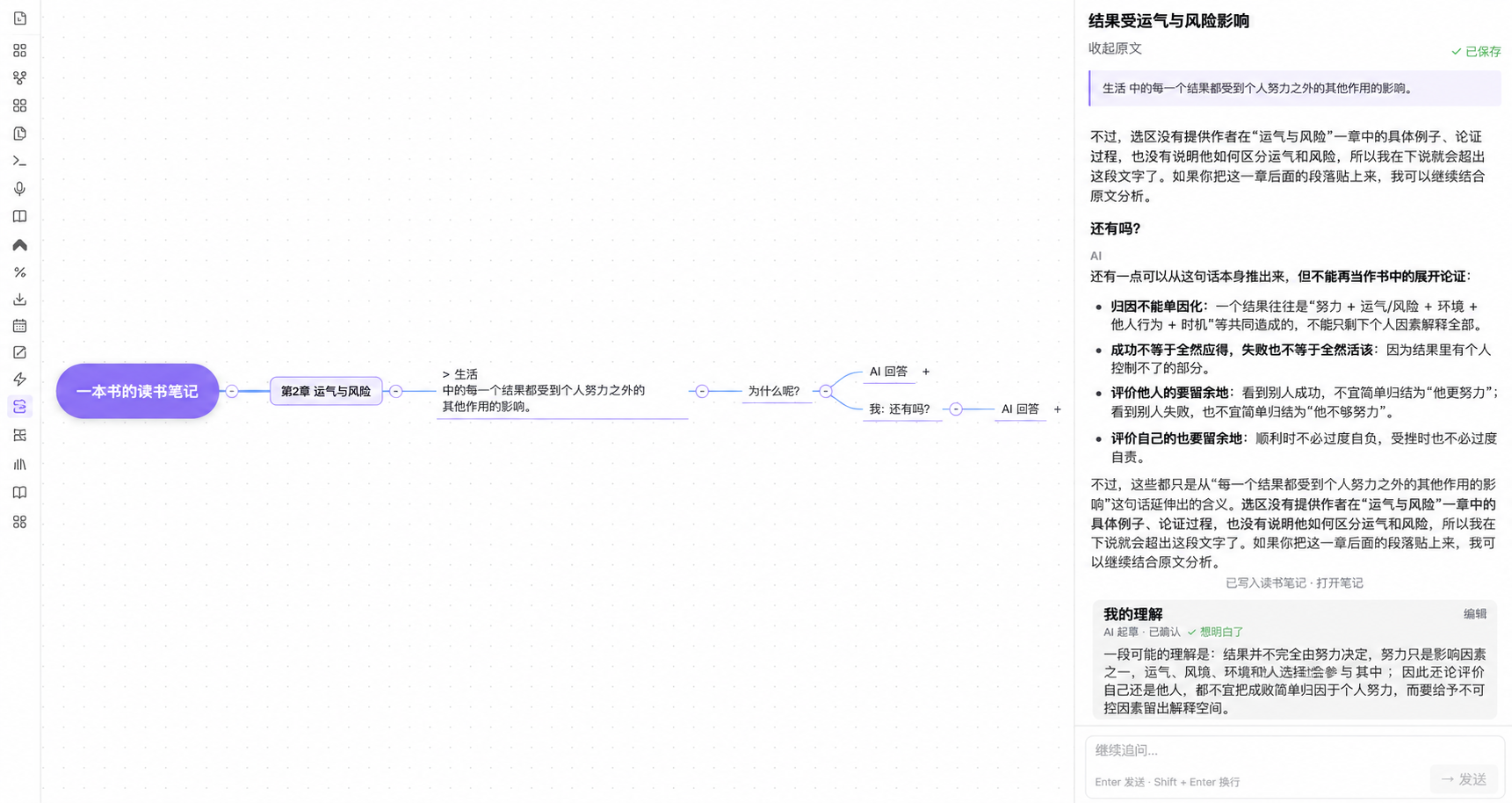
See the path your reading took
The Thought Tree turns a compatible reading note into a visual trail from book and chapter to source passage, questions, and answers.
Installation
- Open Settings → Community plugins → Browse in Obsidian.
- Search for Backleaf.
- Select Install, then Enable.
[!NOTE] Backleaf requires Obsidian 1.11.4 or later.
Manual installation
- Download
main.js,manifest.json, andstyles.cssfrom the latest release. - Create
<vault>/.obsidian/plugins/backleaf/. - Copy the three files into that folder, reload Obsidian, and enable Backleaf.
Set up your AI provider
Open Settings → Community plugins → Backleaf, then add your DeepSeek API key. The key is stored through Obsidian SecretStorage and is never written to Backleaf's data.json.
The default endpoint is https://api.deepseek.com. Advanced settings accept another compatible HTTPS endpoint or a local HTTP endpoint. Backleaf uses your own account and API quota.
A private reading workflow
[!IMPORTANT] Backleaf makes a network request only when you send a message. It sends the selected passage, book title, chapter when available, and the current Backleaf conversation to the endpoint you configured.
It does not intentionally send the whole PDF, unrelated vault notes, saved reading notes, local file paths, or other local data. Backleaf contains no client-side telemetry, advertising, or self-update mechanism. See the full privacy documentation.
Contact
Questions, ideas, and feedback are welcome.
- Email: [email protected]
- WeChat: please include Backleaf in your friend request
Show the WeChat QR code

The QR code will appear after docs/assets/contact-wechat.png is uploaded.
For contributors
npm install
npm run build
npm test
The release files are generated at the repository root: main.js, manifest.json, and styles.css. Backleaf is released under the MIT License.