Auto Periodic Notes
 jamiefdhurst6k downloads
Creates new periodic notes automatically in the background and allows these to be pinned in your open tabs, requires the Periodic Notes plugin.
- Overview
- Scorecard
- Updates23
Creates new periodic notes automatically in the background and allows these to be pinned in your open tabs; supports daily, weekly, monthly, quarterly and yearly notes.
Designed to work with Obsidian. The Periodic Notes plugin is optional.
Note: this supports the current (v0.0.17) and newer Beta (v1.0.0-beta3) versions of Periodic Notes available via BRAT, as well as running without that plugin at all. This functionality is provided through an abstract provider.
When the Periodic Notes plugin is installed, this plugin respects its settings, creating your notes using the templates, format and location you have selected.
Running without the Periodic Notes plugin
If the Periodic Notes plugin isn't installed, all five note types are still available and are created using Obsidian's own defaults - YYYY-MM-DD for daily, gggg-[W]ww for weekly (or your Calendar plugin settings, if you have it), YYYY-MM for monthly, YYYY-[Q]Q for quarterly and YYYY for yearly, each in the vault root with no template. Your daily notes also pick up the settings from Obsidian's built-in Daily Notes core plugin.
Which of those note types you actually want created remains entirely up to this plugin's own settings - nothing is turned on for you.
Features

- Creates new notes in the background for your periodic notes
- Supports daily, weekly, monthly, quarterly and yearly notes with individual settings for each
- Supports opening and pinning the new notes automatically when created
- Supports automatically closing older notes
- Can exclude weekends from daily note generation
- Can create weekly, monthly, quarterly and yearly notes at the end of their period rather than the start, which suits review notes
- Optionally commits and pushes your vault to git at the end of each day (desktop only, off by default)
Automatic git commits
If your vault is a git repository, the plugin can commit and push your changes once a day. This is disabled by default and only runs when you turn it on in the settings.
When enabled, and only between 18:00 and 18:05 local time, the plugin runs three commands in your vault directory:
git add .
git commit -m "<your configured message>"
git push
These are run by spawning the git binary already installed on your machine, via Node's child_process module. That module is loaded lazily, behind a Platform.isDesktop check, so nothing Node-related is touched on mobile — the rest of the plugin works there as normal, with this feature simply unavailable. No other process is ever spawned, and the plugin makes no network requests of its own; only your own git push talks to your own remote.
Settings
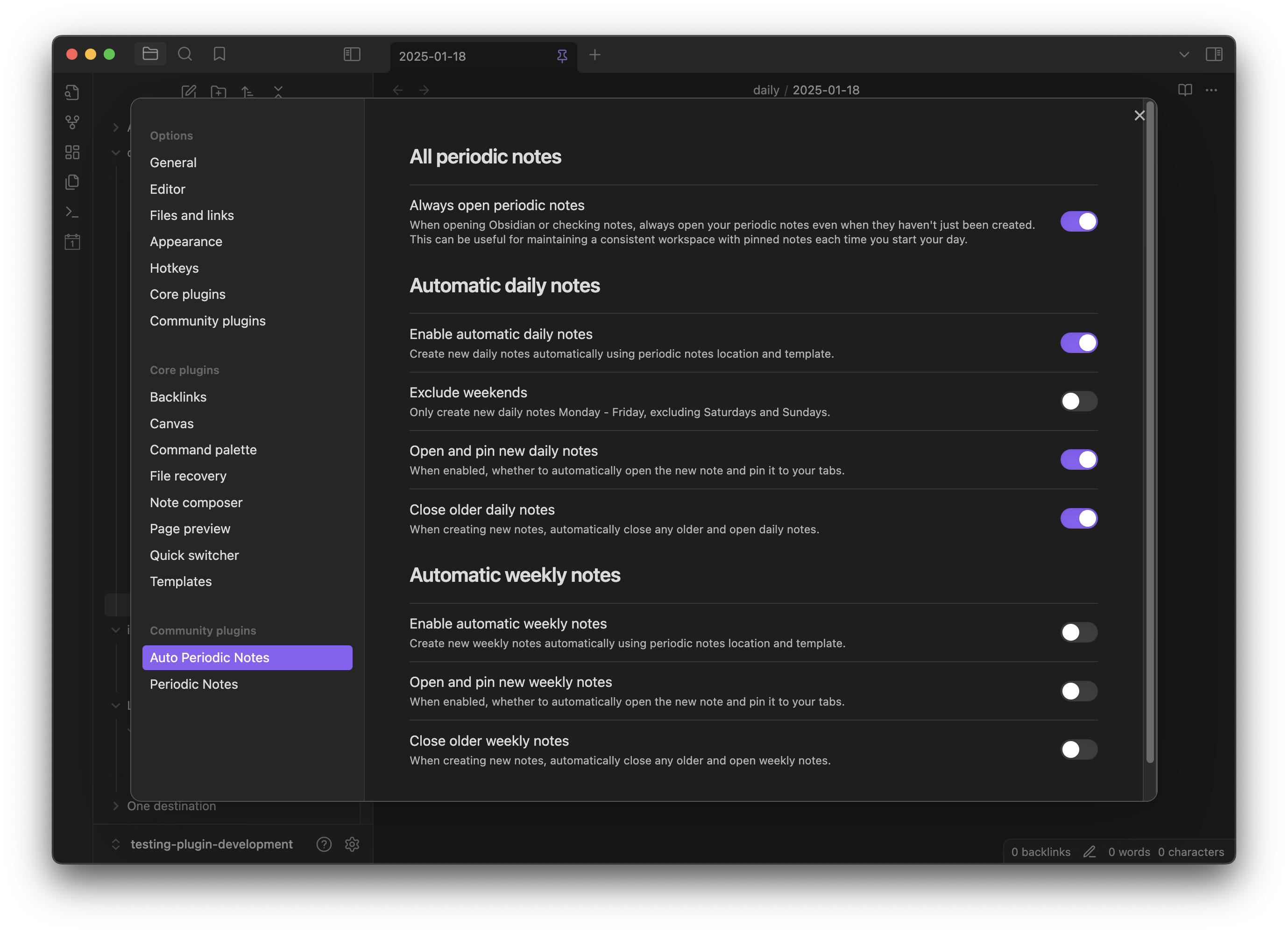
Automatic creation can be toggled on and off for each of the supported note types. If you have the Periodic Notes plugin installed, only the note types you have enabled and configured there are shown; without it, all five are available. Within each note type, you can set whether to open and pin the note automatically, or whether to simply create it in the background, showing a notice when complete.
Choosing when in the period a note is created
Weekly, monthly, quarterly and yearly notes have a Create new notes on setting, with three choices, each named after the period itself - a monthly note offers "First day of the month", a yearly note "First day of the year", and so on:
| Option | When the note is created |
|---|---|
| First day | At the start of the period. This is the default. |
| Last weekday | On the last Monday to Friday within the period. |
| Last day | On the final day of the period, whether or not it is a weekday. |
This changes only when the note is created, never which note it is or how it is dated — August's monthly note is still August's monthly note. Creating a note at the end of its period suits reviews, where you want the period to have happened before you write anything.
Each option shows the date it lands on for the current period, so you can see all three side by side before choosing - for example "Last weekday of the month (Mon 31 Aug)".
Weekly notes follow your vault's configured week start, so with a week running Monday to Sunday, "first day" is Monday, "last weekday" is Friday and "last day" is Sunday.
Daily notes do not have this setting, since it would have no effect.
Development
This plugin has been developed using Typescript with the Obsidian and Periodic Notes APIs and Jest for testing.
Once you've cloned the repository, to speed up plugin development it is recommended to symlink the location of the plugin directly into your local Obsidian:
ln -s obsidian-auto-periodic-notes ~/.obsidian/plugins/
You can then run the plugin build automatically to pick up any changes:
npm run dev
To test the plugin using just, you can run it with or without coverage:
npm run test
npm run coverage
When submitting a PR, the plugin will be automatically tested, and when merged into main this will be built and released using GitHub Actions.
Thanks
Many thanks to Liam Cain for the awesome work on the Periodic Notes plugin!