Search...Search plugins and themes...
⌘K
Sign in
  • Get started
  • Download
  • Pricing
  • Enterprise
  • Account
  • Obsidian
  • Overview
  • Sync
  • Publish
  • Canvas
  • Mobile
  • Web Clipper
  • CLI
  • Learn
  • Help
  • Developers
  • Changelog
  • About
  • Roadmap
  • Blog
  • Resources
  • System status
  • License overview
  • Terms of service
  • Privacy policy
  • Security
  • Community
  • Plugins
  • Themes
  • Discord
  • Forum / 中文论坛
  • Merch store
  • Brand guidelines
Follow us
DiscordTwitterBlueskyThreadsMastodonYouTubeGitHub
© 2026 Obsidian

A3 Problem-Solving

Fabrice BernhardFabrice Bernhard544 downloads

Render markdown notes as a Toyota-style A3 problem-solving report: a 42cm x 29.7cm two-column page that fits on screen, with mermaid diagrams.

Add to Obsidian
A3 Problem-Solving screenshot
  • Overview
  • Scorecard
  • Updates9

Render markdown as a Toyota-style A3 problem-solving report (the format from "Managing to Learn"): a 42cm x 29.7cm two-column A3 landscape page, scaled to fit the pane, with mermaid diagrams, adjustable font size and a print export.
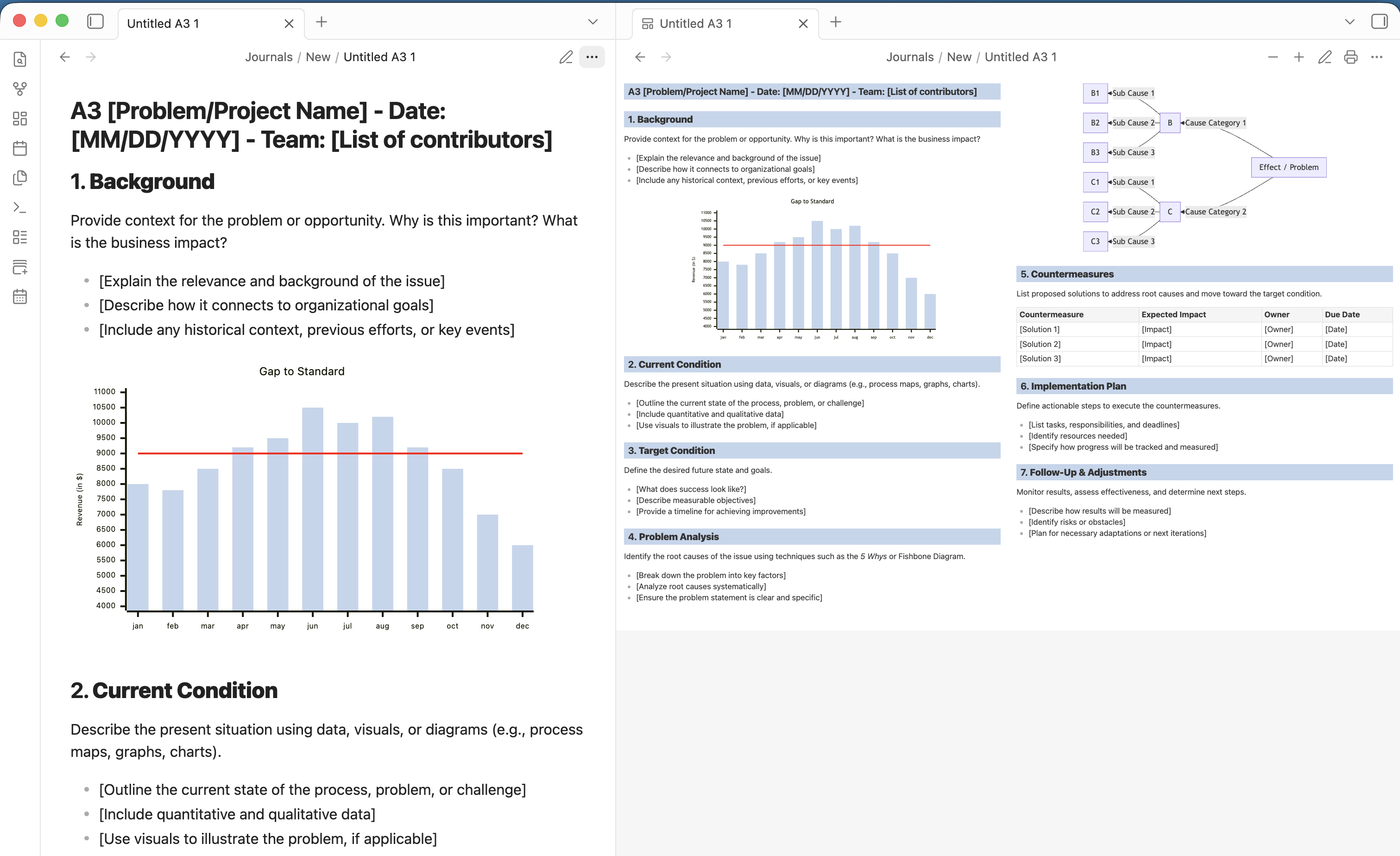
A3 view

This repository holds three packages:

Package What it is
packages/core The shared, host-agnostic renderer: markdown (markdown-it) to an A3 page, mermaid diagrams re-laid-out at the chosen font size, fit-to-pane zoom, the standalone print export and the A3 template.
packages/obsidian The Obsidian plugin ("A3 Problem-Solving").
packages/vscode The VS Code extension ("A3 Problem-Solving").

Development

npm install
npm run build        # type-check and bundle every package
npm test             # unit tests (vitest, jsdom)
npm run lint
npm run dev:obsidian # watch mode for the Obsidian plugin
npm run dev:vscode   # watch mode for the VS Code extension

To try the VS Code extension, open packages/vscode in VS Code and press F5 (Run Extension), or build a .vsix with npm run package --workspace packages/vscode.

The Obsidian plugin's end-to-end scenarios live in packages/obsidian/tests/e2e.

Releasing

Releases are cut by pushing a tag; .github/workflows/release.yml builds and attaches the artifacts as a draft GitHub release.

  • Obsidian plugin: bump version in manifest.json and add it to versions.json (both at the repository root, where Obsidian's release scanner reads them from the default branch), then tag with the bare version (0.2.0). Obsidian requires the tag to equal the manifest version. The release carries main.js, manifest.json and styles.css.
  • VS Code extension: bump version in packages/vscode/package.json, then tag vscode-v<version> (vscode-v0.1.0). The release carries the .vsix; when a VSCE_PAT repository secret is set, the workflow also publishes it to the Visual Studio Marketplace.

License

MIT

HealthExcellent
ReviewSatisfactory
About
Render Markdown notes as a Toyota-style A3 problem-solving report in a 42×29.7cm two-column landscape layout, scaled to the pane and supporting Mermaid diagrams. Toggle A3 view, create prefilled A3 templates, adjust font size with diagrams reflowing, and export a standalone HTML ready for A3 printing.
FormattingExportTemplating
Details
Current version
0.2.1
Last updated
Last month
Created
2 months ago
Updates
9 releases
Downloads
544
Compatible with
Obsidian 1.5.0+
Platforms
Desktop only
License
MIT
Report bugRequest featureReport plugin
Author
Fabrice BernhardFabrice Bernhardfabriceb
GitHubfabriceb
fabricebernhard
  1. Community
  2. Plugins
  3. Formatting
  4. A3 Problem-Solving

Related plugins

Advanced PDF Export

Export notes as pixel-perfect PDFs with live preview, style presets, manual page breaks, tables, and full layout control.

Heading Level Indent

Indenting content under headers based on their level.

Admonition

Admonition block-styled content.

Templater

Create and use dynamic templates.

Linter

Format and style your notes. Linter can be used to format YAML tags, aliases, arrays, and metadata; footnotes; headings; spacing; math blocks; regular Markdown contents like list, italics, and bold styles; and more with the use of custom rule options.

QuickAdd

Quickly add new notes or content to your vault.

Editing Toolbar

The Editing Toolbar is modified from cMenu, which provides more powerful customization settings and has many built-in editing commands to be a MS Word-like toolbar editing experience.

Folder notes

Create notes within folders that can be accessed without collapsing the folder, similar to the functionality offered in Notion.

Image Captions

Add captions to images with inline Markdown and link support. The caption format is compatible with the Commonmark spec and other Markdown applications.

Sort and Permute lines

Sort and Permute lines in whole file or selection.