Search...Search plugins and themes...
⌘K
Sign in
  • Get started
  • Download
  • Pricing
  • Enterprise
  • Account
  • Obsidian
  • Overview
  • Sync
  • Publish
  • Canvas
  • Mobile
  • Web Clipper
  • CLI
  • Learn
  • Help
  • Developers
  • Changelog
  • About
  • Roadmap
  • Blog
  • Resources
  • System status
  • License overview
  • Terms of service
  • Privacy policy
  • Security
  • Community
  • Plugins
  • Join the community
  • Discord
  • Forum / 中文论坛
  • Merch store
  • Brand guidelines
Follow us
DiscordTwitterBlueskyThreadsMastodonYouTubeGitHub
© 2026 Obsidian

@ Symbol Linking

ebonsignoriebonsignori15k downloads

Link to notes with any symbol (e.g. `@`). Can map symbols to link to a specific directory or to create files in directories using templates.

Add to Obsidian
  • Overview
  • Scorecard
  • Updates30

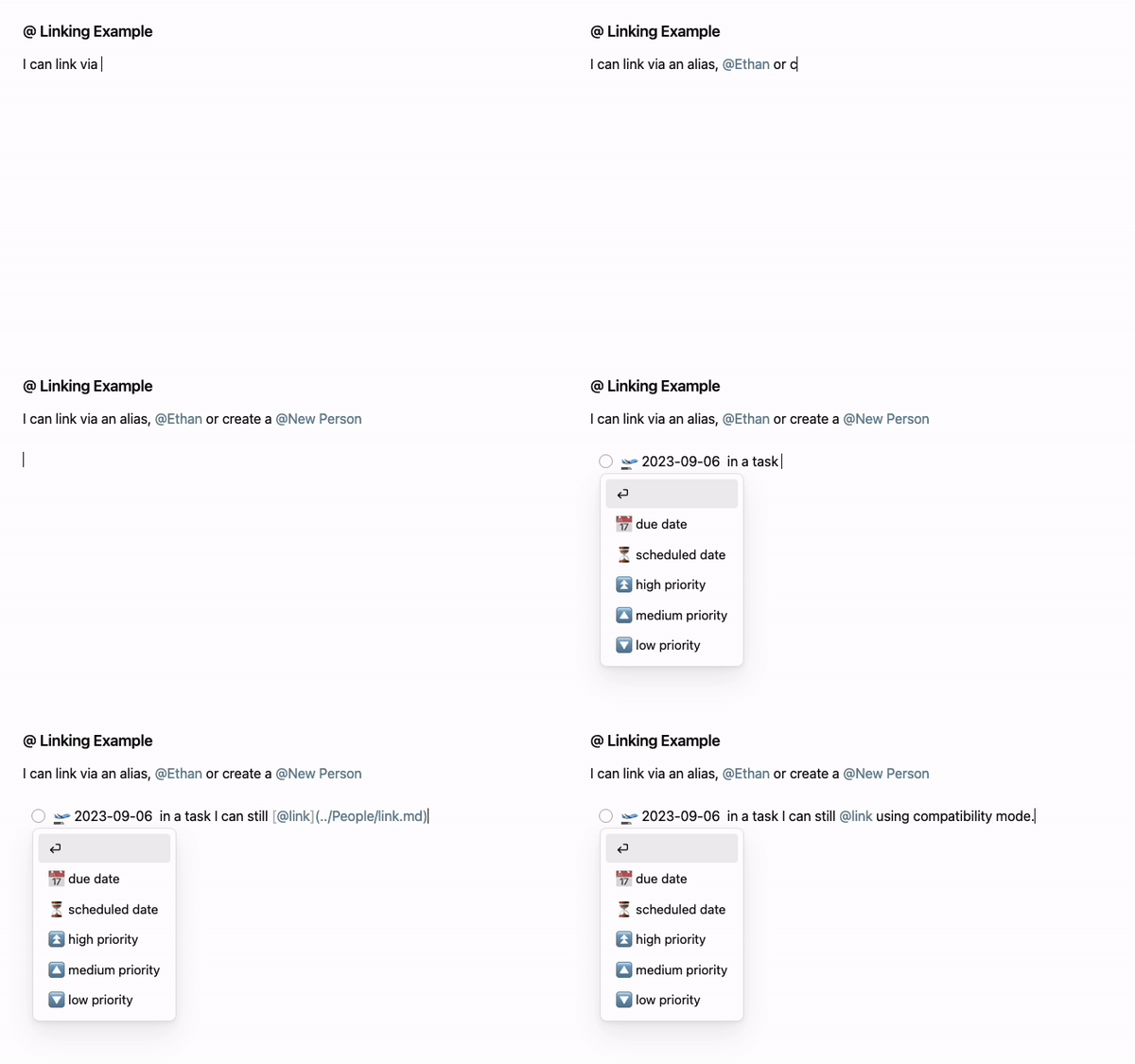
Gif demo of using the @ symbol to link to a name in Persons/

Adds the ability to link using any symbol (e.g. @) in Obsidian. Can limit linking to specific folders, like People/, or map specific characters to open specific folders, like $ to open References/ and @ to open People/ for more information see release 2.0 notes.

Supports aliases (nicknames for a file) that you can set in the properties/metadata of a note via the alias or aliases field.

Settings

  • Limit symbol links to only source links from specific directories, like your People/ directory.
  • Create a new note from a template in a specified directory if no symbol link is found.
    • As of v2+ you can specify symbols to create notes from specific templates in given directories.
  • Turn on compatibility mode to enable symbol linking when plugins that show suggestions like the Tasks plugin are enabled.
  • Optionally include the linking symbol in the final link text, e.g. [@evan](./evan.md) as opposed to [evan](./evan.md)

Inferred settings

  • Uses the link type specified by your Obsidian "Files & Links" -> "Use [[Wikilinks]]" setting.
  • Uses the link format specified by your Obsidian "Files & Links" -> "New link format" setting.

Hotkeys

Supports up, down, enter, and escape keys for navigating the link search popup.

Installing

Search "@ symbol linking" via the built-in community plugin browser in Obsidian.

Contributing

Please open an issue with any suggestions or bug reports.

See developer docs if you'd like to open a PR.

Acknowledgements

The Obsidian team for creating a wonderful product :purple_heart:

The implementation borrows from:

  • suggest.ts, file-suggest.ts, folder-suggest.ts, and extension-popup.ts are derived from copyrighted works by Liam Cain, obsidian-periodic-notes.
  • obsidian-completr: For suggestion popup hotkey handling
75%
HealthGood
ReviewCaution
About
Link using any symbol (e.g., @) to create quick links to notes and match aliases set in note metadata. Map symbols to specific folders or restrict linking to selected directories, and auto-create new notes from templates when no matching note exists.
LinksTemplatingProperties
Details
Current version
2.1.0
Last updated
7 months ago
Created
3 years ago
Updates
30 releases
Downloads
15k
Compatible with
Obsidian 0.15.0+
License
MIT
Report bugRequest featureReport plugin
Author
ebonsignoriebonsignori
github.com/Ebonsignori
GitHubebonsignori
  1. Community
  2. Plugins
  3. Links
  4. @ Symbol Linking

Related plugins

PodNotes

Write notes on podcasts with ease.

Templater

Create and use dynamic templates.

Smart Connections

AI link discovery copilot. See related notes as you write. Lookup using semantic (vector) search across your vault. Zero-setup local model for embeddings, no API keys, private.

Meta Bind

Make your notes interactive with inline input fields, metadata displays, and buttons.

Fantasy Statblocks

Create, manage and view a Fantasy Bestiary with Dungeons and Dragons style statblocks.

Advanced Canvas

Supercharge your canvas experience. Create presentations, flowcharts and more.

Advanced URI

Control everything with URI.

Waypoint

Easily generate dynamic MOCs in your folder notes using waypoints. Enables folders to show up in the graph view and removes the need for messy tags!

Auto Link Title

Automatically fetches the titles of links from the web.

Periodic Notes

Manage your daily, weekly, and monthly notes.