Alert Banner
 samgg220 downloads
Display a configurable warning banner at the top of notes with a specific tag.
- Overview
- Scorecard
- Updates1
An Obsidian plugin that puts a clear, always-visible banner at the top of any note that has a tag you choose.
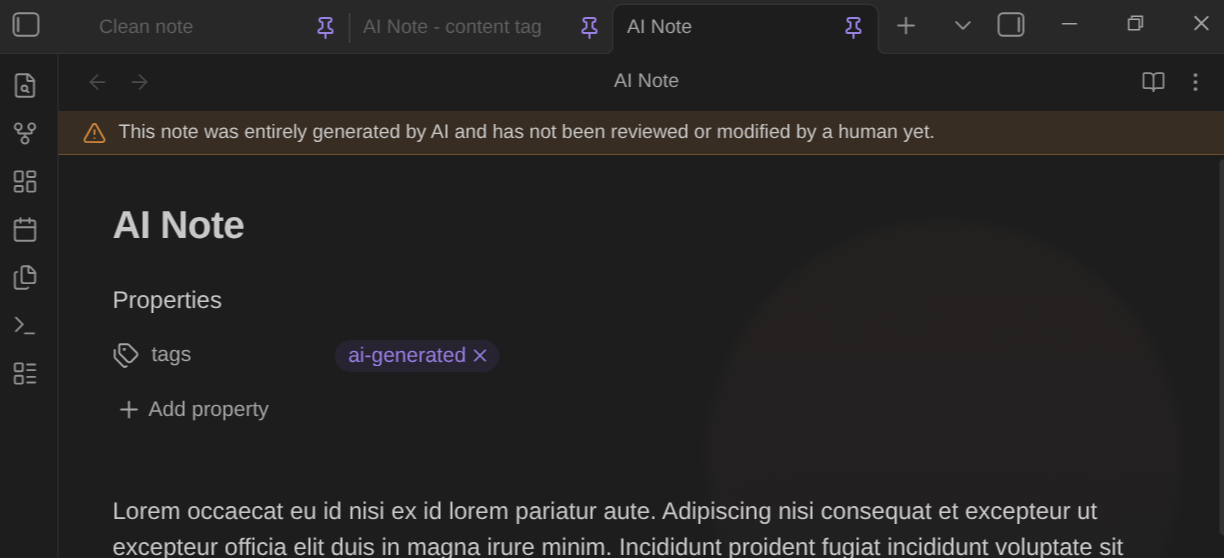
Why I built this
I sometimes use AI to draft notes. A tag like #ai-generated did the job, but it wasn't visual enough. I wanted to tell at first glance which notes I had really worked on and which ones I hadn't.
So now the tag shows a banner at the top of the note that I see right away and can't hide by accident.
Features
- Always visible. The banner is pinned to the top of the note in both Reading and Editing views, and it stays there while you scroll.
- Triggered by a tag. The banner appears when a note contains a specific tag, written inline (
#ai-generated) or in frontmatter. Matching is case-insensitive. - Multiple banners. Set up to five, each with its own tag, message, color, and icon. A note that matches more than one shows them stacked.
- Customizable colors and icons. Pick a preset color or a custom one, plus any Lucide icon.
- Not dismissible. It shows whenever a matching tag is present, so you can't hide the warning by accident.
- Theme-friendly. Colors come from Obsidian's palette and adapt to your theme.
Usage
- Install and enable the plugin.
- Open Settings → Alert Banner.
- Set the tag (for example
ai-generated), the message, a color, and an icon. A live preview shows how the banner will look. - Add that tag to any note, inline (
#ai-generated) or in frontmatter. The banner appears at the top right away.
Use Add banner for more, the arrows to reorder them, the toggle to turn one off without deleting it, or the trash button to remove it.
Settings
| Setting | Description | Default |
|---|---|---|
| Tag | Tag that triggers the banner (without #) |
ai-generated |
| Message | Text shown in the banner (max 200 characters) | AI-generated content warning |
| Color | A preset color or a custom one | Orange |
| Icon | A Lucide icon name, or empty for none | alert-triangle |
Installation
Copy main.js, manifest.json, and styles.css into <vault>/.obsidian/plugins/alert-banner/, then enable Alert Banner in Settings → Community plugins.
Development
I'm happy to add more tweaks and configuration options if they're useful. If you have an idea, open an issue for me 🙂.
License
MIT