AI CodingPlan Check
 Jiao Yingxing1k downloads
一站式查询多家 AI 编程平台的套餐余额与用量,支持多账号管理。Check plan balances and usage for multiple AI coding platforms in one place, with multi-account support.
- Overview
- Scorecard
- Updates7
如果你同时订阅了多家 AI 编程服务,或者同一服务挂了不止一个账号,可以在 Obsidian 侧栏里,聚合查看多家 AI 编程订阅套餐的剩余额度,不用挨个开官网控制台。
1. 支持的服务
| 服务 | 接入凭证 | 说明 |
|---|---|---|
| OpenCode Go | API Key | 展示 5 小时 / 7 天 / 30 天美元预算窗口与余额 |
| Command Code | API Key | 官方仅提供 5 小时与每周两档用量窗口,另有余额展示 |
| 火山方舟 | AK/SK | Coding Plan 与 Agent Plan 双订阅自动探测 |
| 智谱 GLM | API Key | 展示官方返回的 5 小时 / 日 / 周等窗口(随套餐档位而异),MCP 额度另列为附加信息 |
| Kimi For Coding | API Key | 展示 5 小时与周窗口 |
| MiniMax | Subscription Key | Token Plan 订阅的 5 小时与周窗口 |
| DeepSeek | API Key | 按量余额:充值 / 赠送拆分 |
| 硅基流动 | API Key | 按量余额:充值 / 赠送拆分(国内站余额接口已被官方停用,国际站可用) |
| Moonshot 平台 | API Key | 开放平台按量余额:现金 / 代金券拆分 |
| StepFun | API Key | 按量余额与充值 / 赠送总额 |
| PPIO | API Key | 按量余额:现金 / 信用额度 |
| 硅基流动(Cookie) | 控制台会话 Cookie | 国内站余额与代金券明细(获取方式见下文) |
| 火山方舟(Cookie) | 控制台会话 Cookie | 不便自建 AK/SK 时查 Coding Plan / Agent Plan 用量,与 AK/SK 版互补(获取方式见下文) |
| 小米 MiMo(Cookie) | 控制台会话 Cookie | 套餐用量与按量余额,一张 Cookie 出两类卡(获取方式见下文) |
订阅类服务展示官方用量窗口(已用百分比 + 重置倒计时),余额类服务展示充值余额与赠送 / 代金券等拆分明细。
1.1 Cookie 类服务:控制台 Cookie 的获取
「硅基流动(Cookie)」「火山方舟(Cookie)」「小米 MiMo(Cookie)」三个服务用控制台登录态(会话 Cookie)代替 API Key 查询,适合没有开放 API Key、或官方已停用 Key 查询接口的服务。电脑浏览器上约半分钟:
- 浏览器登录对应控制台:硅基流动 cloud.siliconflow.cn、火山方舟 console.volcengine.com、小米 MiMo platform.xiaomimimo.com。
- 按
F12打开开发者工具,按服务取 Cookie:硅基流动:切到 Application(应用)标签,左侧 Cookies 里选中站点,找到
__SF_auth.session-token,复制它的 Value 粘贴到插件即可;从 Network 标签里任意请求的Cookie:请求头整串复制,插件也能自动识别。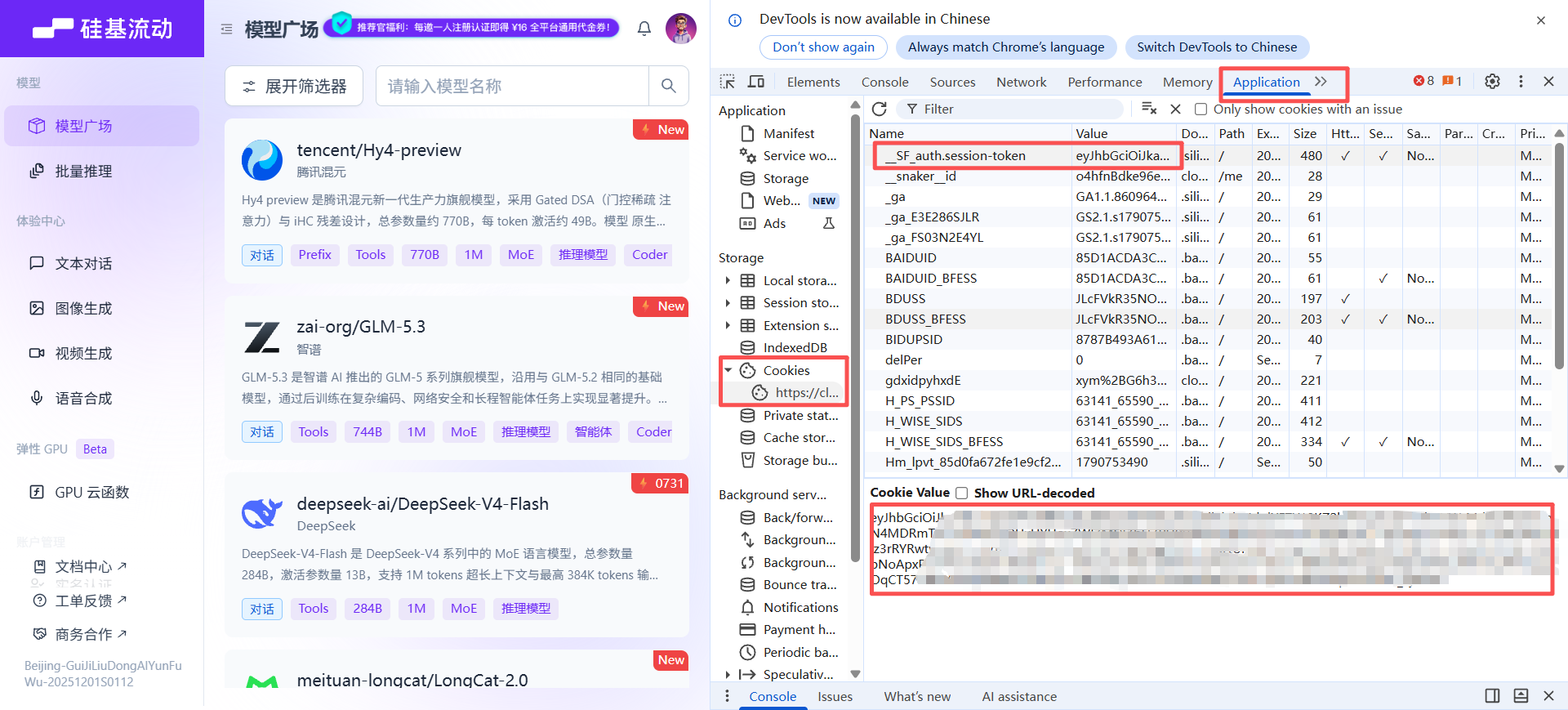
火山方舟 / 小米 MiMo:切到 Network(网络)标签,刷新页面后点任意一条请求,在 Headers(标头)里找到请求头
Cookie:,整串复制粘贴到插件即可。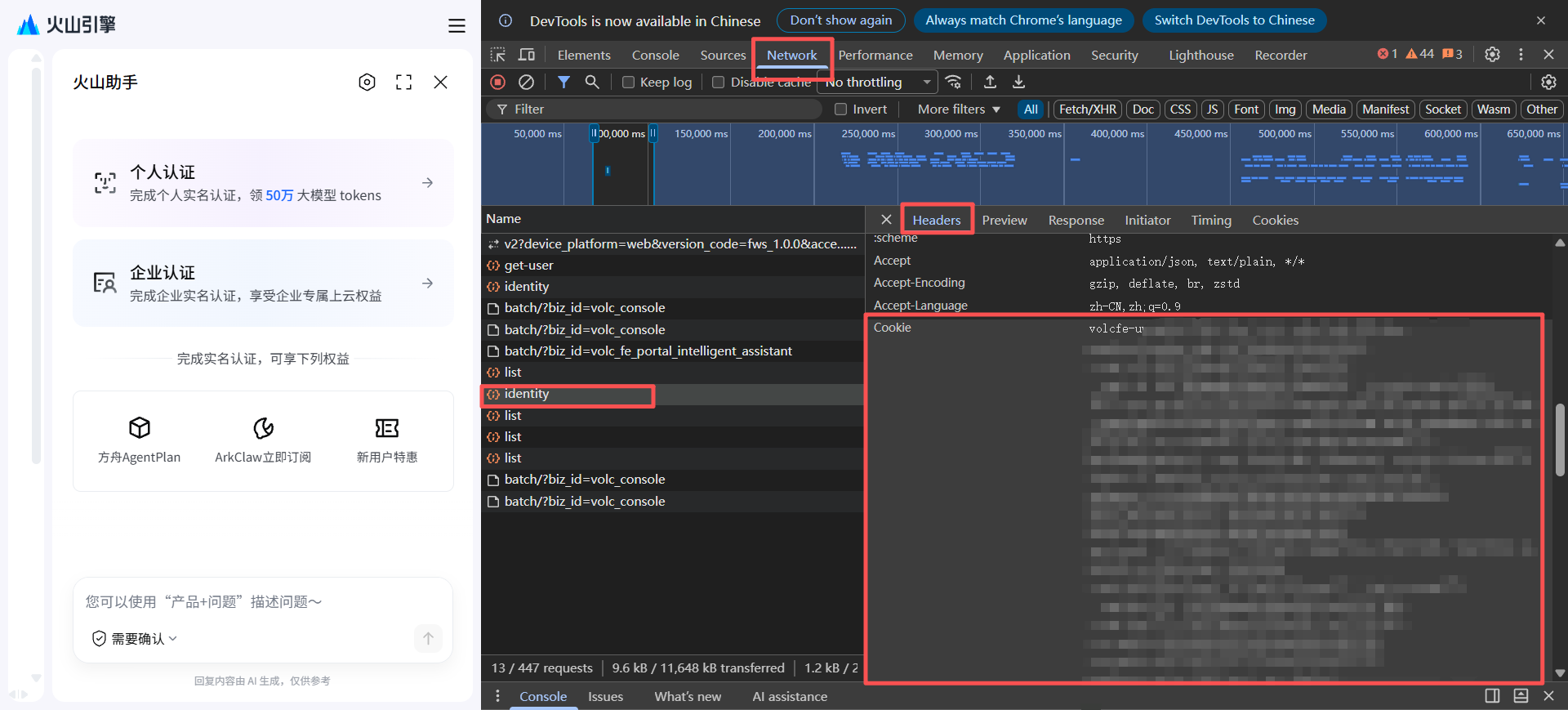
- 手机端:Android 可用支持扩展的浏览器(如 Firefox + Cookie-Editor)直接取值;iOS 的浏览器读不到该值,建议先在电脑上添加账号,再通过「凭证导出」在手机输入口令解锁使用。
注意:会话 Cookie 等同于你的登录状态,权限大于 API Key,请勿外传;失效后插件会明确提示,重新复制粘贴一次即可(火山方舟的 Cookie 按社区经验约 7 天需重贴)。硅基流动账号需已完成实名。
2. 安装与开始
- 在 Obsidian 设置 → 第三方插件中搜索 AI CodingPlan Check 安装并启用。
- 添加账号:设置 → AI CodingPlan Check → 「添加账号」,选套餐来源、起个别名、粘贴凭证,点「测试并保存」,插件会先验证连通并自动拉取套餐信息。
- 查看额度:点左侧栏 ribbon 的仪表图标,或用命令面板执行「打开额度面板」;卡片按服务分组,每张卡可单独刷新,工具行支持全部刷新、排序与展开收起。
需要 Obsidian 1.11.4 或更高版本;桌面端与移动端均可使用。
3. 凭证与数据安全
- 各家凭证明文只保存在 Obsidian 的系统安全存储中;插件数据文件只存账号别名与凭证指针,不存明文。
- 可选「凭证导出」:开启后,各账号凭证会加密成副本随插件数据保存,其他设备打开同一库时,在面板首次查看输入口令即可还原;凭证本体仍受系统安全保护,不会直接复制。口令本身不保存、不进日志,遗忘后重新导出即可。
- 联网行为:仅在查询额度时(打开面板、手动刷新或添加账号验证连通)直连各家服务的官方接口;无遥测、无广告、无支付、不访问你的笔记与外部文件。涉及域名:
opencode.ai、api.commandcode.ai、open.volcengineapi.com(Cookie 形态另用console.volcengine.com)、智谱open.bigmodel.cn/api.z.ai、Kimiapi.kimi.com/api.kimi.ai、MiniMaxwww.minimax.cn/api.minimaxi.com/www.minimax.io/api.minimax.io、DeepSeekapi.deepseek.com、硅基流动api.siliconflow.cn/api.siliconflow.com(Cookie 形态另用account.siliconflow.cn/cloud.siliconflow.cn)、Moonshotapi.moonshot.cn/api.moonshot.ai、StepFunapi.stepfun.com、PPIOapi.ppio.com/api.ppinfra.com、小米 MiMo(Cookie)platform.xiaomimimo.com。
4. 已知限制
- 火山方舟的额度查询默认需要在控制台自建 AK/SK(官方控制面硬性要求,API Key 替代路径不存在),建议使用最小权限的 IAM 子用户;不便自建时可用「火山方舟(Cookie)」形态直接用控制台登录态查询。方舟 5 小时窗口官方不提供固定重置时刻,因此不显示该档倒计时。
- Command Code 的「本期」按账单周期计算。
- 智谱 GLM、Kimi For Coding、MiniMax 的凭证口径各不相同:GLM 用 Coding Plan 的 API Key,Kimi 用 Kimi Code 控制台创建的 API Key(
sk-kimi-…,不是开放平台的 Key),MiniMax 用 Token Plan 的 Subscription Key(sk-cp-…,与按量付费的 Key 不通用);三家都会在国内站与国际站之间自动探测,按 Key 的实际归属站点取值。Moonshot 平台用的也是开放平台 Key(sk-…),与 Kimi For Coding 的 Key 不通用。 - 智谱 GLM、Kimi For Coding、MiniMax、Moonshot 平台、StepFun、PPIO、小米 MiMo(Cookie)尚未经真实账号验证:接口口径取自各家官方文档、官方插件 / CLI 使用的额度接口与公开实测响应。如遇查询失败,把界面上的提示原文贴到 Issues 即可定位。
- 额度为手动刷新,无自动轮询。
- 「导出口令」遗忘后无法还原已生成的加密副本(口令不保存),重新设置口令并导出即可。
5. 许可与支持
- MIT 开源。
- 查询失败或异常提示:把界面上的提示原文贴到 GitHub Issues 即可定位。
- 使用交流与产品动态:小红书搜索 焦应行 🔍